WPDM PDF Stamper
2 min read
Updated Jan 26, 2026
WPDM PDF Stamper extension allows you to apply text or image-based watermarks to PDF downloads. Text-based watermarks can be styled through user-defined font, font sizes and colors. Additionally, text-based watermarks allow several template tags to further personalize the watermark.
Installing WPDM PDF Stamper Plugin
- Download WPDM PDF Stamper plugin. Unzip plugin zip file and then upload the plugin folder and files via FTP Client like FileZilla to your wp-content/plugins folder OR upload the plugin zip file via the “Add New” plugin menu in WordPress.
- Activate the “WPDM PDF Stamper” plugin you just installed.
WPDM PDF Stamper Settings
- Goto Downloads –> Settings of your WordPress admin panel. Click PDF Stampers tabs.
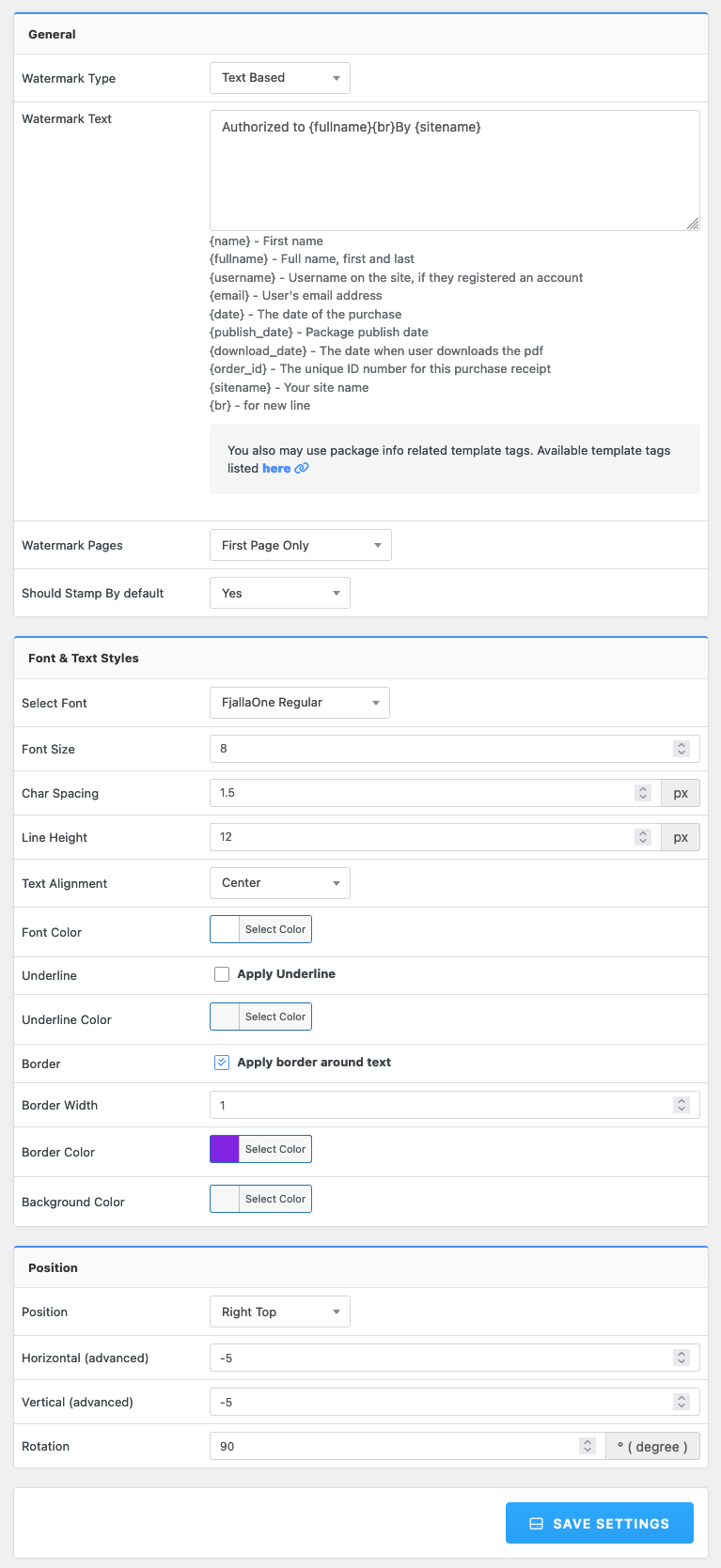
Below is the description for each setting sections: - Watermark Type: Select watermark type here. You can select either Text based watermark or Image based watermark. According to you selection, settings for each selection will appear.
- Settings related to text based watermark:
- Watermark Text: Here you can specify text for text based watermark. Text based watermarks allow several template tags to further personalize the watermark including:
{name} – The buyer’s first name {fullname} – The buyer’s full name, first and last {username} – The buyer’s user name on the site, if they registered an account {email} – The buyer’s email address {date} – The date of the purchase {order_id} – The unique ID number for this purchase receipt {sitename} – Your site name {br} – for new line - Watermark Pages: Here you can select which page/pages you want to add stamp.
- Select Font: Here you can select font for watermark text.
- Font Size: Here you can specify font size for watermark text.
- Font Offset / Line Height: Here you can specify font offset / line height for watermark text.
- Font Style: Here you can select font style for watermark text.
- Font Color: Here you can select font color for watermark text.
- Watermark Text: Here you can specify text for text based watermark. Text based watermarks allow several template tags to further personalize the watermark including:
- Settings related to image based watermark:
- Watermark Image: Here you can select image for watermark image. Click browse button to select a image from WordPress media manager.
- Position: Here you can specify position for watermark image or text.
Individual Package Settings: