
Subscribers
1 min read
Updated Mar 1, 2026
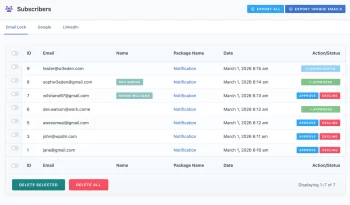
As you know, you can apply Email Lock feature to collect users name and email before they download. Go to WordPress Admin Menu > Downloads > Subscribers to the collected emails. You can export the emails from this list and import them into your mailing list anywhere. Additionally, If you’d like to automatically import these emails into your mailing list, you can easily do so using the WPDM Email Add-ons.
Export CSV
Click Export All button to export all email addresses in CSV file format. Notice that, email addresses can have duplicate values.
Export Unique Emails
Click Export Unique Emails to export all unique email address in CSV file format.