
How do I turn off auto-renew for my WPDM Pro subscription?
1 min read
Updated Jan 26, 2026
To turn off auto-renew for your WPDM Pro subscription, you’ll need to submit a cancellation request through your user dashboard. Here’s the process:
Steps to Cancel Auto-Renew
- Send an Order Note from User Dashboard: Click on your order and submit a cancellation request through the order notes section
- Request Cancellation: Clearly state that you want to cancel auto-renewal for your WPDM Pro subscription
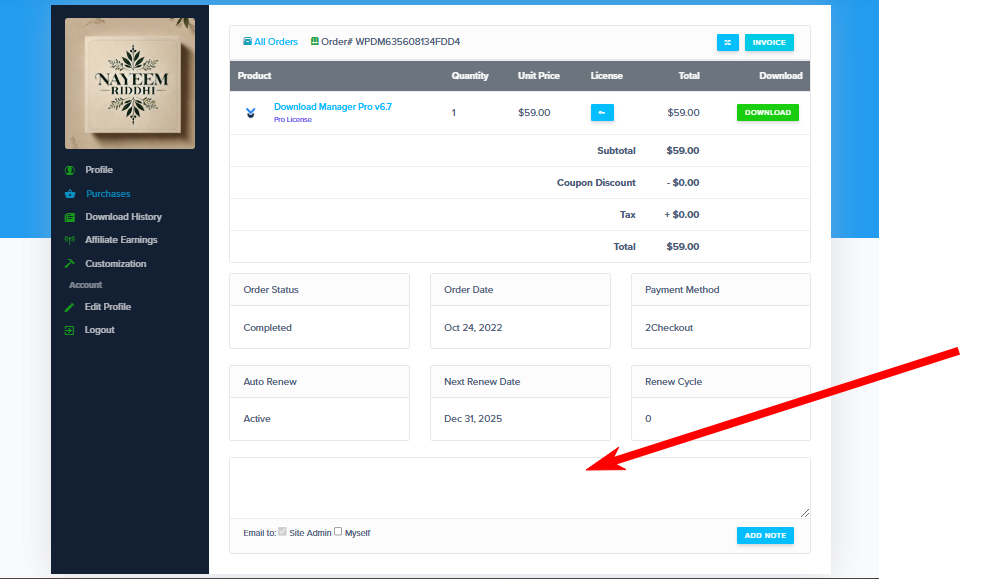
Submit your cancellation request through the order notes section
What Happens After Cancellation
Once your auto-renew cancellation is processed:
- Your current license remains active until the expiration date
- You’ll continue to receive support and updates until expiry
- No automatic charges will occur after cancellation
- You can manually renew later if needed
Important Notes
- Manual Processing: Cancellation requests are processed manually by the support team
- License Protection: Your existing license and downloads remain completely unaffected
- Feedback Welcome: Consider providing feedback on what features could be improved
✅ Good to Know: Canceling auto-renew doesn’t immediately terminate your service – you keep all benefits until your current subscription expires.
💡 Pro Tip: Make sure to submit your cancellation request with enough time before your renewal date to ensure processing.