
Lock Options
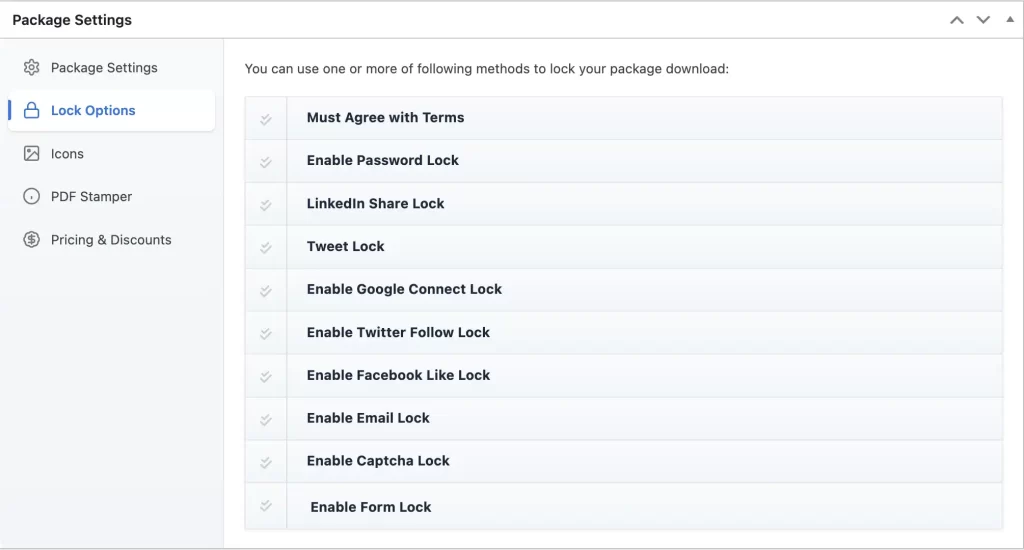
Here you can apply different lock option to protect and promote your items. You can use one or more lock options for your package. From the locks list ✔✔ check the lock option(s) you want to activate and provide any other required info shown on the expanded area.
Must Agree with Terms:
✔ Enable this option if you want users to accept your terms and conditions before downloading the package. When activated, a terms agreement checkbox will appear on the download page. Users must agree to the specified terms before they can access the download link.
You can define your custom terms content in the provided editor field. This is useful for copyright notices, license agreements, refund policies, or any legal disclaimers. The download button will remain disabled until the user accepts the terms.
Password Lock:
✔ Check this option if you want to lock your package using the password(s). The user will be asked for the password before downloading this package. Type your password in Password field. If you want to use multiple password, separate them using [ ], eg. [pass1][pass2][pass3]. You can also use the Password Generator to create a password. The user will be able to download this package using any of those passwords. If you want to apply the usage limit for a password, you can specify in PW Usage Limit field. eg. if you set PW Usage Limit field to 1, then each password can be used for once. When a password reaches its usage limit, the password will expire and the user will not be able to download this package using this password.
LinkedIn Share Lock:
✔ Check this option, if you want your user to share this link on their LinkedIn profile before downloading this package. If you want to set any custom message for LinkedIn share you can write it in Custom LinkedIn share Message field. Leave URL to share field blank, if you want to set package details/single package page as share link. Otherwise, type your share link here.
Tweet Lock:
✔ Check this option, if you want visitors to tweet this package in their Twitter profile before downloading this package. If you want to set any custom message for Twitter share, you can write it in the Custom tweet message field.
Google Connect Lock:
✔ Check this option, if you want visitors to connect using visitor’s Google account before downloading this package. You also may ask the user to allow to access their contact list.
Facebook Like Lock:
✔ Check this option, if you want visitors to like this package on Facebook. You can add a custom URL there to like, or leave URL to Like field blank if you want to set package details/single package page.
Email Lock:
✔ Check this option if you want visitors to enter their email address before download. At the front-end, users will be asked to enter their email address, and when they enter email, the download link will be mailed to that address or can be downloaded instantly . You can also request the visitor’s name for a more personalized experience. We also have some add-ons to add collected emails directly to email marketing sites like MailChimp, Campaign Monitor.
Captcha Lock:
✔ Enable this option if you want to protect your package download with Google reCAPTCHA verification. When activated, users must complete the reCAPTCHA challenge before they can access the download link. This helps prevent bots, automated downloads, and spam activity.
To use this feature, you need to configure Google reCAPTCHA Site Key and Secret Key in the plugin settings. Once configured, the verification widget will appear on the download page. The download button will remain disabled until the user successfully completes the reCAPTCHA challenge.
Form Lock (Add-on Required):
✔ Enable this option if you want users to fill out a form before accessing the download link. When activated, a form (created separately) will be displayed on the download page. The user must complete and submit the form to unlock the download link.
Select your preferred form from the drop-down list. Form Lock is useful for collecting user information such as name, email address, company details, or feedback before allowing access. You can also enable the option to send the download link via email after successful form submission.
Additional information about the Form Lock add-on is available here.