
Forum Replies Created

Got the issue, we are checking this now 🙂
the FTP connection is not working.
Error: Operation timed out
Error: Could not connect to server
- As you see, a search field is already there with responsive table
- Yes, that is possible, you can control that from link template, that feature is extensive but easy to use, please check the docs here
You can create new link template the way you need or close an existing template and edit that, then use it with shortcode.
If you are not using the latest version, please download the latest version from purchase download area and update your copy, that should resolve the download issue, otherwise, please give me your license and temporary wp-admin login info in a private reply to check your issue.
Actually, download manager has various way to achieve this and you can change the looks the way you want using simple tags.
You need to create a custom page template for that from Admin Menu Downloads Templates
You also need to enable simple file download globally ( from Admin Menu Downloads Settings ) or from package settings on Add/Edit Package window.
Docs:
However, please check those and let me know if anything is not still clear, I shall explain that for you 🙂
I see you are using single file download link, in that case, you activate stat you need to check the following option from wpdm settings:
https://www.evernote.com/l/AV1c6h-yl6xAqIojmsZBXP7IEJMXAsWrtssB/image.png
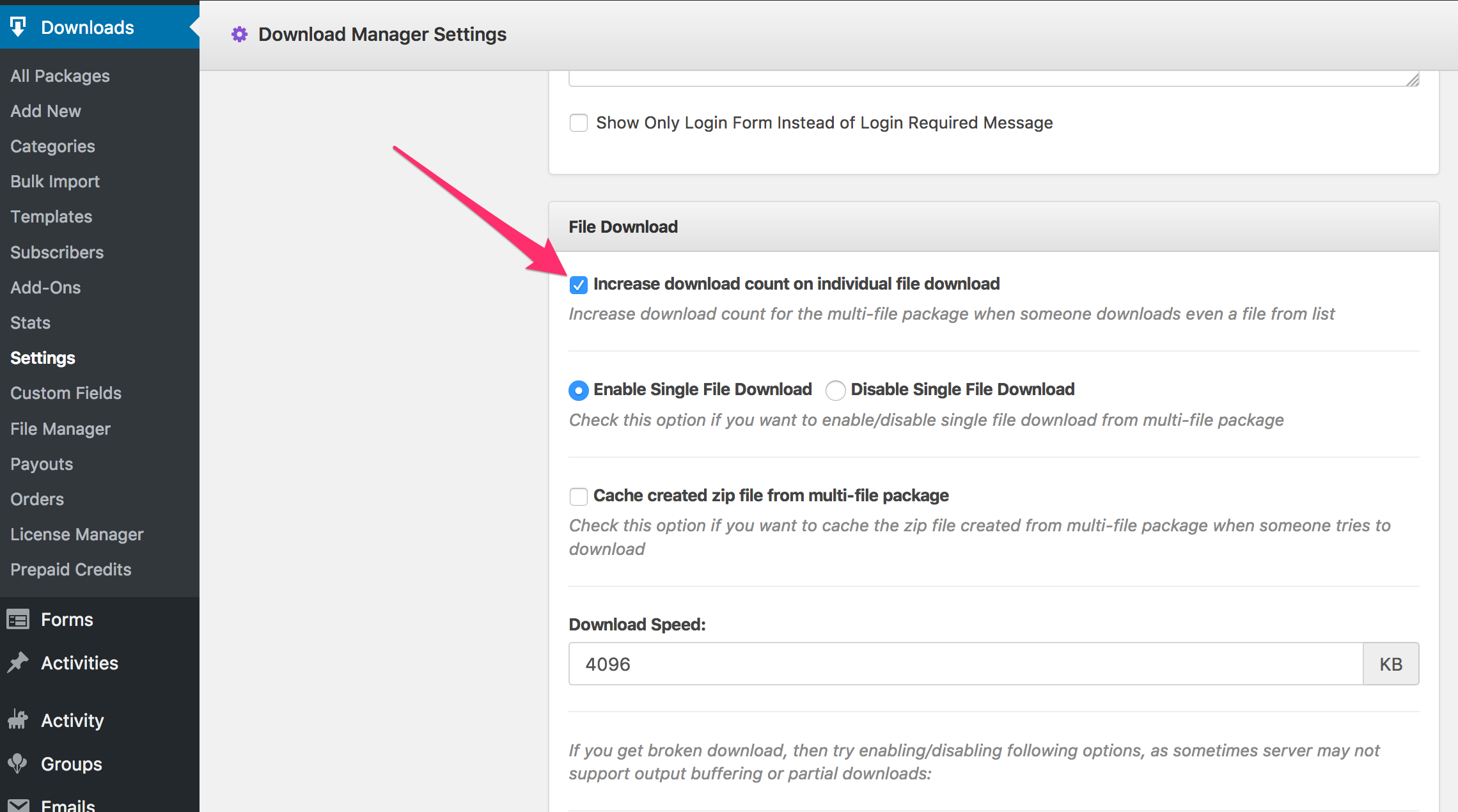
Please give me temporary wp-admin login info and ftp access in a private reply, I shall check that for you.
Button template already shows title on the button:
https://demo.wpdownloadmanager.com/wpdmpro/button-templates-add-on-free/
You can show a title linked to download as a button in following way:
<a href="[download_url]" class="btn btn-success btn-lg">[title]</a>
When a file is locked ( where you applied lock option like password, facebook, email or any other ) you need to use the same value for link label as the title.
Download the latest version and update your copy, that will resolve the issue.
In that case, you need to create a separate category for that, or use a text widget and put all package shortcodes there or pull all selected file in a same tag and use tag shortcode.
Doc:
https://www.wpdownloadmanager.com/doc/short-codes/wpdm_tag-query-all-downloads-from-specified-tags/
Sorry for the trouble, it is working fine now.
Google drive should work fine if you followed the all instructions here https://www.wpdownloadmanager.com/download/google-drive-explorer/, please recheck the instructions if you missed anywhere.
Please give me temporary wp-admin login info in a private reply to check.
Yes, I meant, everything at front-end ( http://acer.rose-noire.fr/compte/ ) is working fine now, as I disabled flat url ( new shortcode [wpdm_frontend flaturl=0] ).
Everything about setting up user profile page is explained here:
https://www.wpdownloadmanager.com/doc/short-codes/wpdm_user_profile-public-profile-short-code/
The author picture will come from gravatar. In next update of the theme, we shall remove author picture with shop logo from the public profile page.
To allow users to download your items you need to select Allow Access = “All Visitors”, allow access option is explained here:
https://www.wpdownloadmanager.com/doc/add-new-package/package-settings/
There is no separate page to signup as an author and a regular user. Every user will have both access, but you can control author dashboard access from front-end UI setting ( Docs: https://www.wpdownloadmanager.com/doc/settings/front-end-ui-settings/ ).
So, probably you can select “Author, Editor, Administrator” only, while signup form will signup users as a subscriber and you can promote any user to Author Role, who want to get access to author dashboard.
No way to preview or control templates for front-end users.
Subscribers function is explained here:
A cloud storage is for attaching files from that cloud storage with your package. For example, using dropbox add-on, you can attach files from dropbox with your package.
If you want to see Advanced Sales Report, you may install the add-on, please check the add-on page to detailed view of the report.
Actually, every feature is explained in the docs, and we are updating docs regularly when we are adding a new feature or updating any existing feature.
Your order is now linked with your account, you can download it from https://www.wpdownloadmanager.com/user-dashboard/purchases/
No coding required there. Now, I created all those pages and configured front-end settings for you.
#1. Authors can manage their product from here: http://clics.online/store/author-dashboard/
#2. They can configure their public profile page ( store display page ) from here http://clics.online/store/author-dashboard/?adb_page=edit-profile
#3. User’s profile page: http://clics.online/store/profile/?user=admin
Yes, you will get email from customize@wpdownloadmanager.com
Yes, in that case just purchase only custom upgrades ( 3 hours ) for now, customization team will start with it with priority. Thanks.
It should work fine everywhere, please try clearing cache. If you still see the issue, please give me temporary wp-admin login info in a private reply to check your issue.
If you are using multi-site structure, you don’t need additional add-ons, you simply need to activate wpdm in each subsite separately, Admin of any subsite will be able to manage his category and downloads the way they want, as items of one subsite doesn’t interfere with items of another subsite.
But,
#1. if you want to allow the admin to edit categories from front-end, what will require some customization ( Around 3 hours ). = $225 – https://www.wpdownloadmanager.com/download/custom-upgrade-service/
#2. You will need developer license of WordPress Download Manager = ( Upgrade price is $175, upgrade link https://www.2checkout.com/checkout/purchase?sid=1560048&quantity=1&product_id=6 )
So, total cost is only $400, you even don’t have to go to bank, a punch from your credit card corner will be enough 😀