Since the last friday update the jstable option for the all downloads shortcode doesn’t work anymore. This worked with version 6.5.5 but no longer in version 6.5.6. Can you fix that?
Yes, thank you! I have installed WPDM Extended Shortcodes and am using [wpdm_tree] to show a list of available downloads on my page for the visitors.
Ideally, I would want the visitors to see only a few of the categories in folders, but the most important feature is to make them appear in a logical order (for the visitor.)
Thanks!
Unfortunately I’m here again
It seemed to work but it didn’t
I then tried to change the recovery download buffering…
No result. The file is corrupted again.
I tried to reload it again and after many downloads the result was always CORRUPTED
I tried to upload the file to my host space, in file management so as to recall it with “select from server”
Nothing has changed. Always corrupt
I tried to see if the problem was coming from my host so I downloaded directly from my file manager
The file was perfect.
Evidently, after several attempts, it seems that the problem occurs when using the plugin
Maybe there is some setting set incorrectly? Please help me because I’m having a lot of problems with my work
Thank you
Hello Sitcom Software,
Hope you are well. Thanks for writing to us. You can use in this shortcode parameter async=1, thus I hope it will resolve your issue. For more details please check the shortcode doc., https://www.wpdownloadmanager.com/doc/short-codes/wpdm_category-query-all-downloads-from-one-or-more-categories/. please kindly check and let me know.
Thank you and regards
I do not see the “My Downloads” section in my user dashboard. How do I enable the “My Downloads” section for user dashboards?
Additionally, I would also like to know what the flaturl parameter in the User Dashboard short-code does and how I can use that parameter.
Hello,
I hope you are doing well and thanks for reaching out.
Unfortunately, the search with tags option is not available right now. You can query downloads from specific tags, for more information, kindly pay a visit here
Regards
It is any of the packages on this page: https://www.dales-eaves.co.uk/eaves-detailing/
Within WordPress, this applies to all downloads EXCEPT the following categories: certifications, literature.
Phil
I’m seeing strange behavior on my site since the latest update was installed. Some downloads are failing with “404 Errors”, but not all. Seems there may be an issue with the flat download URLs that are being generated that causes some file downloads to fail. If I disable the “Flat Download Link” option the issue is resolved. However, I would like this option enabled. Please advise, there is urgency with this issue.
Hi everyone,
I’m currently using the WP Download Manager plugin for managing downloads on my WordPress site. Whenever I upload some files through the admin panel, a random value is automatically prefixed to the filename. I would like to disable this behavior so that the file names remain as they are when uploaded.
I have looked through the plugin settings but couldn’t find an option to turn this off. Could someone guide me on how to prevent these random prefixes from being added to the file names?
For #1, For download showcase, you have use shortcode in your page or post, you can check this shortcode too, https://www.wpdownloadmanager.com/doc/short-codes/wpdm_all_packages-list-all-downloads-in-tabular-format-in-a-page/
For #2, For this requirement, you may need a custom code solution, you can knock here for that, https://www.wpdownloadmanager.com/download/custom-upgrade-service/
For #3, For this requirement, you may need also custom upgrade solution, you can knock here for that, https://www.wpdownloadmanager.com/download/custom-upgrade-service/
Please kindly check and let me know.
Thank you and regards
For #1 I have created a page named downloads and add all downloads short code on that page
and I have a question about this
can I make a page where my all download will be listed without manually adding the short code in the same design as I am sharing URL with you
https://cascadiadev-lightspeed-tek.pantheonsite.io/products-2/80739-2/
For #2 Yes It looks same,
you can check this in below link
https://cascadiadev-lightspeed-tek.pantheonsite.io/products-2/80739-2/
What I want is when I click on download button and downloading stated this popup should be closed automatically, for now I need to close this manually
for #3
Can we show some progress bar over the page when it is downloading
like when I upload a file there is a progress bar that shows the downloading percentage
We are experiencing a strange error with multiple files that were uploaded yesterday.
In total, 6 files were uploaded: 3 Software versions in German (package names starting with 2025, 2024, 2023) and 3 in English (also 2025, 2024, 2023). Each of these packages has an individual permalink that is correctly defined in the package settings. However, when one clicks on that link, the URLs for 2023 and 2024 are forwarded to version 2025 of the respective language.
When using the embed shortcode, the download button works correctly and the correct file begins downloading. However, when one clicks on the file name link next to it, the same error happens.
All of the older downloads are not affected by this error.
Download Manager Pro Version 6.5.5
Wordpress Version 6.5.5.
Dear Support Team,
I hope this message finds you well. I am currently using the “Download Manager Free” plugin on my WordPress site and have a few customization requirements that I need assistance with. Could you please guide me on how to achieve the following functionalities?
1. Login Screen Display:
I would like the login screen to appear before the downloads list is displayed to users. Currently, the login screen only appears after a download is selected. How can I modify the plugin settings or code to ensure the login screen is shown prior to displaying the downloads list?
2. Handling “Must Accept Terms” Pop-up:
When the “Must Accept Terms” pop-up appears and the user accepts the terms, the download button creates another pop-up. However, the “Must Accept Terms” window does not close automatically when the download starts and has to be closed manually. Is there a way to automatically close the “Must Accept Terms” window once the download begins?
3. Download Completion Indication:
There is currently no indication that the download has completed in the background. Is it possible to provide some form of notification or visual indicator to users once the download is finished?
Your guidance on these points would be greatly appreciated. Thank you in advance for your support and assistance.
All downloads on our site based on short-codes have stopped working with recent Download Manager updates and are producing a 404-error message.
This is affecting all of our datasheets, user manuals downloads on our website: https://hsierra.com/support/library/
This had been working fine until the most recent Download Manager updates.
Hi, I activated from lock for and package and set the Gravity Form.
When I click the download button on the front end the spinner shows up and never goes to the form for the download.
If I disable the form lock the download work as normal. When I re-add the form lock and select the form and save. Then dgo tot he front end to attempt a download, It then goes back to just loading the spinner.
I have tried all kind of trouble shooting but nothing is working.
Example here: https://noraxon.sitebuilderhub.com/our-products/medilogic-insoles/
Click on Downloads next to the big arrow close to the bottom of the page, then attempt to download the PDF.
Please help.
Thanks
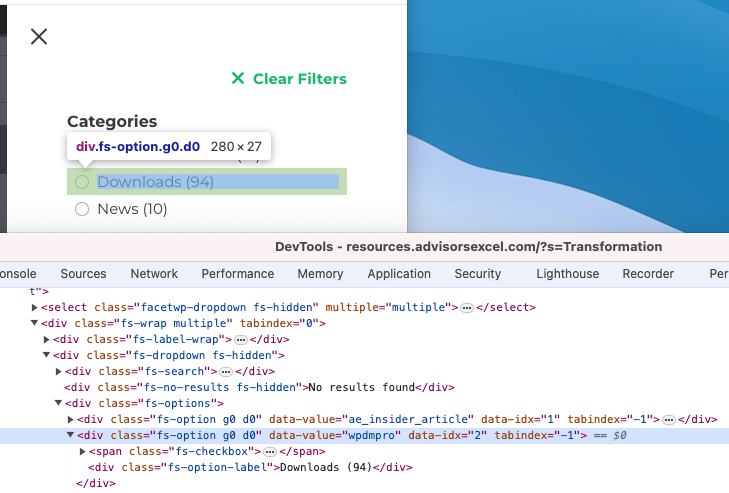
So, it is changing everywhere on the admin side, but on the frontend where I am trying to call that post type in my filters, it still auto-displays that post type name as “Downloads” instead of “Resources.” You can see in this screenshot: https://dbr2.flywheelsites.com/wp-content/uploads/2024/07/downloads-filter.png
I did the same method to turn the “Posts” post type to “News” and that worked, as you can see.
Hello Tahasin,
It is still not working correctly, please note not all thumbnails are wrong, and sometimes clearing the cache will fix some thumbnails, but then others are not correctly working again.
The first test I did the thumbnail was already incorrect. I tried on /wpdmpackages/ramada-hotels-suites-marina-del-sol-downloads/Images/Bedroom 2.jpg
I feel it has to do with that the images have same filenames, and that your plugin creates a cached version of the image in your own wpdm folder and once it has done it, it does not re-generate if a user goes from 1 download package to another and then the thumbnail image is incorrect. Any way we can disable to wpdm caching of the images?
EDIT: Did some more testing and does look like the issue is coming from the URL used for cached images: https://projects.idiliqdevelopments.com/wp-content/uploads/wpdm-cache/Bedroom%202-150×150.jpg
When clearing the cache from Privacy, and opening image “Bedroom 2.jpg” from “Package 1” it works fine, if I then go to “Package 2” to open “Bedroom 2.jpg” it is showing a thumbnail of “Package 1” and not “Package 2”.
I’m trying to update the “Downloads” custom post type so when I filter by post type using FacetWP, users will see “Resources” as the option instead of “Downloads.” I used the following code which has updated the name everywhere on the site, but am still seeing “Downloads” in my post type filter. Is there a way to change that?
function nc_ascend_change_download_labels()
{
    $p_object = get_post_type_object( 'wpdmpro' );

    if ( ! $p_object )
        return FALSE;

    // see get_post_type_labels()
    $p_object->labels->name               = 'Resources';
    $p_object->labels->singular_name      = 'Resource';
    $p_object->labels->add_new            = 'Add Resource';
    $p_object->labels->add_new_item       = 'Add New Resource';
    $p_object->labels->all_items          = 'All Resources';
    $p_object->labels->edit_item          = 'Edit Resource';
    $p_object->labels->name_admin_bar     = 'Resources';
    $p_object->labels->menu_name          = 'Resources';
    $p_object->labels->new_item           = 'New Resource';
    $p_object->labels->not_found          = 'No Resources Found';
    $p_object->labels->not_found_in_trash = 'No Resources Found in Trash';
    $p_object->labels->search_items       = 'Search Resources';
    $p_object->labels->view_item          = 'View Resource';

    return TRUE;
}

add_action( 'wp_loaded', 'nc_ascend_change_download_labels', 20 );
Hi there
What is the CSS to enlarge the font size for download titles etc in tabular format?
Much appreciated 🙂
With call to action 4 link template and category slugs with this shortcode, https://www.wpdownloadmanager.com/doc/short-codes/wpdm_category-query-all-downloads-from-one-or-more-categories/, the appearance you can get like this, https://wpdmpro.w3eden.com/category-shortcode/. Please kindly check and let me know.
Thank you and regards
So lets say I would like to use the link template “call to action 4” so that my downloads page listing looks like the “Call To Action 4” example on https://try.wpdownloadmanager.com/ready-to-use-templates/
and I would like to show downloads from category slugs “category-1” and “category-2” and show them in a grid totalling no more than 12 at a timer with pagination.
What would that shortcode look like?
Geoff
Hi,
Is it possible to set a manual sorting in a table with a list of downloads? At the moment I have set the sorting based on the title, but I would like to manage the sorting manually. How can I do this?
Thank you
The fault was mine.
I had forgotten that we had installed the “Post Type Order” plugin. This then apparently also takes over the sorting of the downloads.
Now the sorting works as it should. Sorry.
Thank you so much for your support, I really appreciate it.
So if the short code you mention above is the only one available for listing downloads, even with a pro version how would I show your “Call to action 4” example on https://try.wpdownloadmanager.com/ready-to-use-templates/ ?
I need to know how I can show different download listings before I decide to upgrade to pro.
Geoff