Hi @Munission,
Not sure if you are talking about tag sorting for [wpdm_all_packages] shortcode. It is not supported till now.
It supports title and date sorting. Also you can use it category-based.
For tag sorting you can use another short code which query all downloads from specified tags. doc here.
There is another shortcode for tree view.
You can see the [wpdm_tree] shortcode doc here,
you can sort it like
[wpdm_tree cat_orderby= "name" cat_order="asc"]
You can also set orderby( title, date, modified ) and order( asc, desc) parameter for packages inside a category folder.
Thanks
Hello,
1. You can see visitor’s ip and username as “guest” who is not logged in like this
2. Glad that you are checking. You can also use this shortcode to view download count on based on categories.
Thanks
Hello,
I hope you are doing great today.
1. You are not able to collect user info/email/ip before downloading. But if anyone downloads then you can check the download history and able to export username/ip/email/time etc.
2. You can use this shortcode to track and count download in free version.
Thanks
Tanvir
Hi,
In the Download Manager free without asking the user to login, can I
1. Collect user info name / email id / IP before allowing file download (I see there is a paid addon but that’s fancy and too expensive for me)
2. Track and count the number of downloads
Thanks,
Hello,
Please use this shortcode instead of the mentioned to get package details.
[wpdm_all_packages categories="DACC Forms" items_per_page="20" jstable=1 order_by="field_name" order="ASC/DESC" cols="page_link,package_size,download_count|download_link" colheads="Title|Download"]
You can get more parameters here.
I have changed the title into page_link, clicking which will fetch the package details too.
Let me know if it solves your issue.
Thanks
Are you looking for such like this add-on, https://www.wpdownloadmanager.com/download/wordpress-newsletters-autoresponder-plugin/,
WordPress Newsletters and AutoResponder Plugin will help you to notify all subscribers about new posts, downloads, and updates. It will also capture subscribers with appealing signup widgets, Import & Export Subscribers
thanks
This reply has been marked as private.
This reply has been marked as private.
Hi!
I’m using the WPDM Download Manager, Download Limits, Premium Packages and Pro Membership plug-ins to manage my downloads, digital products, membership plans and members.
Last week, I installed the Mollie plug-in, so my members could pay their membership plan with Bancontact, Visa, etc.
But how do I install this? I can only see ‘Test pay’ or ‘Paypal’ in Membership > Payment Systems.
Thanks in advance!
Just purchased your all access pass, the first thing I downloaded was the Membership plugin, but it says FILE NOT FOUND.
Also, where can I find the chat support.
Just purchased your all access pass, the first thing I downloaded was the Membership plugin, but it says FILE NOT FOUND.
Also, where can I find the chat support.
I have found the issue, I hope our developer should look into this. In the meanwhile, you may continue with this shortcode, https://www.wpdownloadmanager.com/doc/short-codes/wpdm_all_packages-list-all-downloads-in-tabular-format-in-a-page/
thanks
Hello,
if I use the shortcode [wpdm_all_packages login=1 items_per_page="20" jstable=1 ] everything works perfectly.
But, if I use the shortcode [wpdm_all_packages login=1 items_per_page="20" jstable=1 cols="title" colheads="Title"] then I get an error in the console, and the table can’t be sorted or filtered.
Here is the error traceback:
Uncaught TypeError: Cannot read property 'aDataSort' of undefined
    at V (jquery.dataTables.min.js:65)
    at wa (jquery.dataTables.min.js:70)
    at e (jquery.dataTables.min.js:90)
    at HTMLTableElement.<anonymous> (jquery.dataTables.min.js:92)
    at Function.each (jquery.min.js?ver=3.5.1:2)
    at s.fn.init.each (jquery.min.js?ver=3.5.1:2)
    at s.fn.init.m [as dataTable] (jquery.dataTables.min.js:82)
    at HTMLDocument.<anonymous> ((index):368)
    at e (jquery.min.js?ver=3.5.1:2)
    at t (jquery.min.js?ver=3.5.1:2)
I also tried it in a fresh WP install to be sure it wasn’t another plugin doing it. It’s the same. First shortcode is perfect, second one breaks JS.
How can I help fix this ?
Thanks
Hello I just have the following problem and maybe you can help me:
I have created a category “Vocational school”. Because of the better overview there are more categories within this category – for example: “Electrical Engineering”.
With the following code I call the parent category:
[wpdm_category id="vocational school" title="Custom Title Here or 1" desc="Custom Description or 1" toolbar="0" paging="1" orderby="id" order="asc" items_per_page="5" cols=1 colspad=2 colsphone=1]
Now I have the problem that the downloads from electrical engineering are also displayed in this area. Is it possible to prevent this? I would like to have ONLY the downloads from “vocational school”.
Thanks, Dietmar
Hi,
You shall find the tracking user downloads option from the Downloads > Stats > Download History section, please check and I hope it may help you
thanks
Hello,
Problem 1:
When I only add 1 file form server it works fine, but when I add multiple files at once, your plugin skips some of the files. There are allways some files missing but I am 100% sure i clicked on them. They are listed in the selected files but after I klick on the “attach selected files” Button, only a few of the files are attached.
What could be the problem?
Problem 2:
When i want to download multiple files I uploaded, and I klick on the Download all Button, that should ZIP all files and download these, I get a “504 Gateway Timeout Message”. It does not happen when there are only 5 files but when there are more files I always get this Message.
Is there a maximum numer of files or a max. size that could be ziped and downloaded at once? Or do I have to make a change in the settings? The cache option in the settings is not changing the problem.
Please help me find a solution. Thank you!
If you are claiming All Downloads Table of Gutenberg block issues, there are working fine from my side, can you please elaborate more on your issue, if possible, please, give your temporary wp-admin login details in a private reply for checking the issue.
Thanks
Hi,
For Invalid File Type updating ( 3.1.17 or 5.3.7 ), you may face the following 2 issues:
- Upload is not working
- Showing “Invalid File Type” error when trying to download
Here is the reason and solution:
From WPDM Free 3.1.20 and WPDM Pro 5.3.7, we have changed the file type validation process during file upload and download. Now, you have to white file types to allow them to upload or download. You will find the option at Admin Menu ► Downloads ► Settings ► Basic Settings Tab ► Upload Settings section.
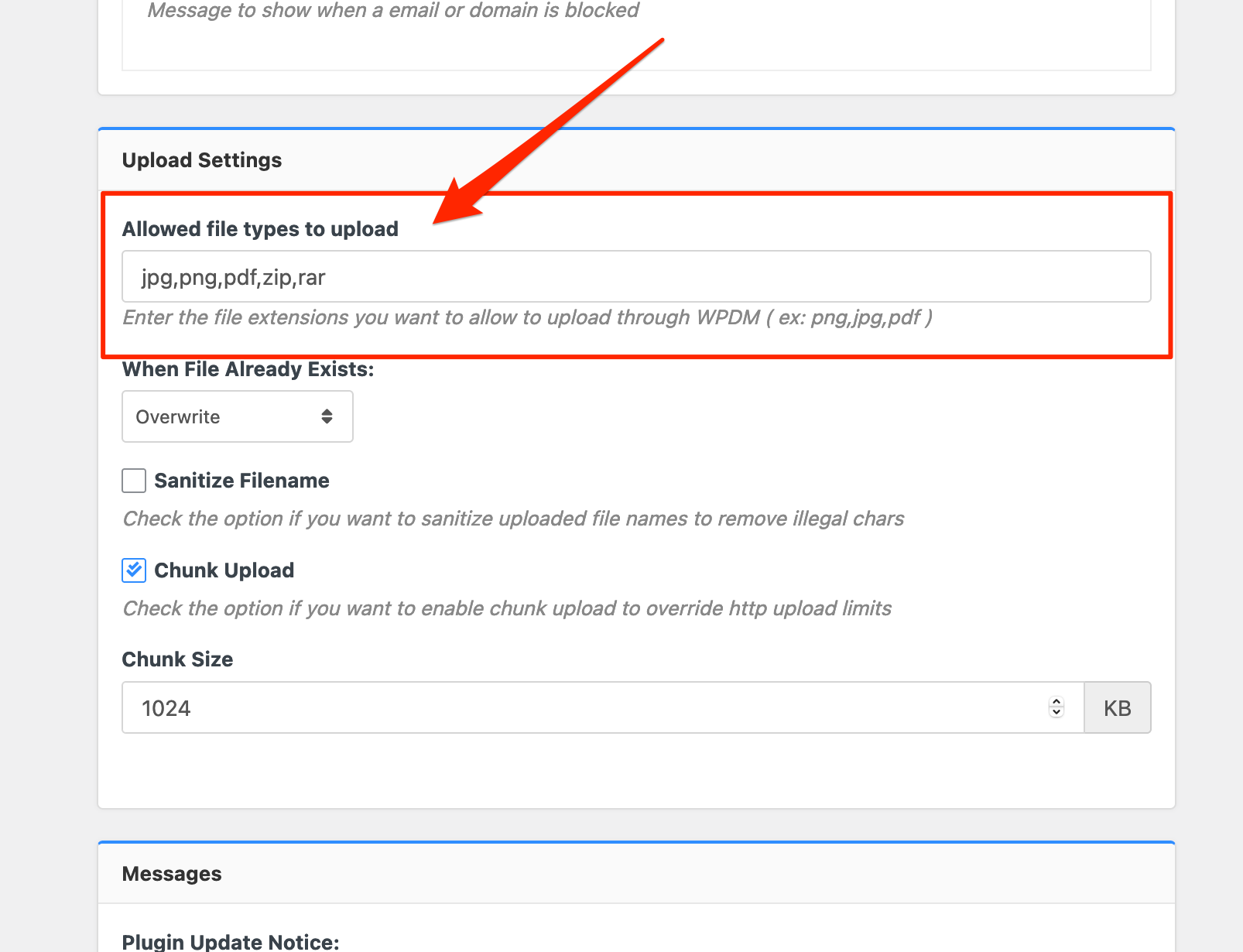
Please add file types ( texts, multiple texts separated by a comma ) as shown on the marked image. And then save settings. The shall resolve the issue.
or, Just Keep it Empty for WordPress default use as I image attached

thus it may resolve the issue
thanks
You can query all downloads/packages from one or more categories by using this shortcode.
[wpdm_category id="Category Slug or Slugs" operator="IN" title="Custom Title Here or 1" desc="Custom Description or 1" toolbar="1" paging="1" orderby="field name" order="asc or desc" items_per_page="10" template="template name or ID" cols=4 colspad=2 colsphone=1]
for more details please check here
How can I display all downloads of a package in a list on a content page? I just want to display all files in a package as a list.
This reply has been marked as private.
Hi @guardian88,
Hope you are well.
JStable only works with the below shortcode.
[wpdm_all_packages login=1 thumb=1 items_per_page="20" categories="slug1,slug2,..." jstable=1 order_by="field_name" order="ASC/DESC" cols="title,file_count,download_count|categories|update_date|download_link" colheads="Title|Categories|Update Date|Download::155px"]
More details can be found here.
However, you can use the below shortcode instead.
[wpdm_search_result init=1 template="link-template-default" cols=1]
More details can be found here.
Thanks.
Hi there,
Can you please advise me on how can I display a total downloads of a specific category on a page?
A sum of all downloads of that category!
Many thanks
Hi,
For Invalid File Type updating ( 3.1.17 or 5.3.7 ), you may face the following 2 issues:
- Upload is not working
- Showing “Invalid File Type” error when trying to download
Here is the reason and solution:
From WPDM Free 3.1.20 and WPDM Pro 5.3.7, we have changed the file type validation process during file upload and download. Now, you have to white file types to allow them to upload or download. You will find the option at Admin Menu ► Downloads ► Settings ► Basic Settings Tab ► Upload Settings section.
Please add file types ( texts, multiple texts separated by a comma ) as shown on the marked image. And then save settings. The shall resolve the issue.
or, Just Keep it Empty for WordPress default use as I image attached
thus it may resolve the issue
thanks



