Search Results for 'all downloads'

Viewing 25 results - 1,676 through 1,700 (of 5,452 total)
  • Author
    Search Results
  • #153918

    Nayeem Riddhi
    Moderator
    #153914

    Nayeem Riddhi
    Moderator

    Please simply click the Save Settings again for the license key option from Downloads > Settings > License, which will regenerate the access token. Finally, go to the plugins page and the update will work fine this time

    and for add-on for now,

    1 ) Download the latest version from here https://www.wpdownloadmanager.com/user-dashboard/?udb_page=purchases
    2 ) Install the latest version

    thanks, I hope you have understood

    #153908

    P N
    Participant

    On the plugin description, it says “Video file download protection, allow visitors to play but block download.” On our site, we have removed the download button and information from the video player template so that it only shows the video. However, when someone right clicks on the video (an uploaded mp4 file), they can still save the video. How can I block visitors from downloading videos, while still allowing visitors to play them?

    Previously, “controlsList=’nodownload'” was added to the line of html in class.package.php where the video player is initialized. However, this does not prevent download of the video when someone right clicks on it.


    David Partridge
    Participant

    I upgraded to the Download Manager Pro and now I get an error “Invalid dir path” when I try to run my downloads. Do I need to set something in settings? It worked fine with the basic version of the plugin. Can some advise me what to do?

    #152881

    Mahmoud Abdelbaset
    Participant
    This reply has been marked as private.

    Shahjada
    Keymaster

    Hi,
    Sorry for the delays.
    Please check the doc here https://www.wpdownloadmanager.com/doc/short-codes/wpdm_all_packages-list-all-downloads-in-tabular-format-in-a-page/, there is a way to add the author name and other author-related info with the table.

    When adding a shortcode order="ASC/DESC" indicated the sort order, you either add order='ASC' or order='DESC', field_name should be replaced by the field name you want to sort, for example, if you want to sort by title, order_by="field_name" should be order_by="title".

    To add a category filter, use parameter categories='CATEGORY_SLUG', here replace CATEGORY_SLUG with an exiting category plugin from your category name.

    However, everything is explained on the doc URL mentioned above. However, please let me know if anything is not clear in the doc.

    Thanks.

    #152810

    In reply to: File list order


    Sidratul Sohrat
    Spectator

    You need to use a shortcode to display your file alphabetically. You can use any of those following shortcode.

    1.https://www.wpdownloadmanager.com/doc/short-codes/wpdm_category-query-all-downloads-from-one-or-more-categories/

    2. https://www.wpdownloadmanager.com/doc/short-codes/wpdm_all_packages-list-all-downloads-in-tabular-format-in-a-page/

    Thanks


    Nayeem Riddhi
    Moderator

    Hi,

    For Invalid File Type updating ( 3.1.17 or 5.3.7 ), you may face the following 2 issues:

    • Upload is not working
    • Showing “Invalid File Type” error when trying to download

    Here is the reason and solution:

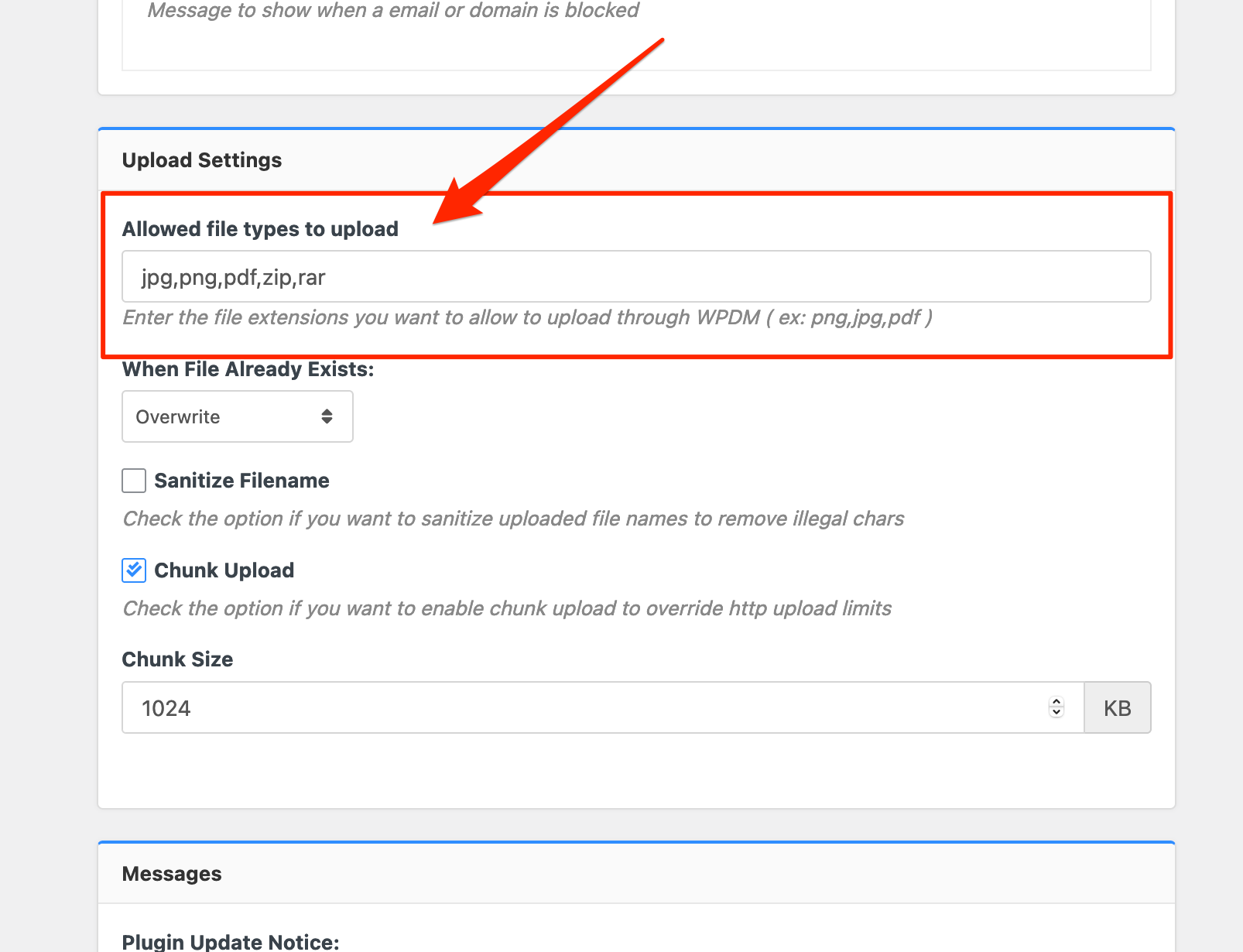
    From WPDM Free 3.1.20 and WPDM Pro 5.3.7, we have changed the file type validation process during file upload and download. Now, you have to white file types to allow them to upload or download. You will find the option at Admin Menu ► Downloads ► Settings ► Basic Settings Tab ► Upload Settings section.
    Settings%20%E2%80%B9%20Download%20Manager%20%E2%80%B9%20WordPress%20Download%20Manager%20Pro%20%E2%80%94%20WordPress

    Please add file types ( texts, multiple texts separated by a comma ) as shown on the marked image. And then save settings. The shall resolve the issue.

    or, Just Keep it Empty for WordPress default use as I image attached

    Image 2021-04-23 at 9.53.21 PM

    thus it may resolve the issue

    thanks

    #152713

    Fly
    Participant

    Hello, if I open in the admin panel on left side Download I get the message:
    “Fatal error: Allowed memory size of 805306368 bytes exhausted (tried to allocate 60912584 bytes) in ….wp-db.php on line 2056”

    Other selections like settings under Downloads are working.

    I have also tried to disable some plugins but it don’t help.

    What can I do?

    Thank you.
    Regards,
    Martin

    #152686

    Veva Van Vooren
    Participant

    Hi!

    I’m trying to install the registration payment for new users (to different pricing plans).

    I have some questions:
    – Can I have a separate register page for the different membership plans? Because there is only one option if you go to Downloads > Settings > Front-end access > Register page
    – How do I install the payment? Installing the register form works well, but I don’t see any payment options or billing info/forms. Do I have to use any add-on or … ? I did read the Docs on this site and tried all the options, but I can’t seem to find it.

    For example: this is the sales funnel I want to create
    Our ‘register for free’ page > register form (no payment required) > login page
    Our ‘pricing page’ > ‘Basic plan’ page (with more details about the plan) > register form > billing details > payment > login page

    How do I create this? Can you help me? 🙂

    EDIT: I’m going to use the Mollie add-on.

    #152668

    Nayeem Riddhi
    Moderator

    Please simply click the Save Settings again for the license key option from Downloads > Settings > License, which will regenerate the access token. Finally, go to the plugins page and the update will work fine this time

    and for add-on for now,

    1 ) Download the latest version from here https://www.wpdownloadmanager.com/user-dashboard/?udb_page=purchases
    2 ) Install the latest version

    thanks, I hope you have understood

    #152597

    Nayeem Riddhi
    Moderator
    #152594

    marco mirabito
    Participant

    Hello, I am opening this request regarding your PRO extension. I would like to know how I can make the download archive page limited only to registered users based on the selected access levels (http://marcomirabito.it/businessonweb/all-downloads/) Currently it is also downloadable to everyone.

    Also I would like to understand how to make the downloads assigned to that user appear in the user’s dashboard. Only the latest downloads appear.

    Sorry for my english and best regards

    Marco

    —


    ERA Brand ID
    Participant

    Two Related Questions

    QUESTION 1:
    – My downloads are grouped under 3 main categories, all the categories appear together.
    – Can I display each main category separately, in its own URL?
    – Here is a screenshot of what I need:
    image1

    QUESTION 2:
    – Can I have a URL that shows the content of a specific folder?
    – Here is a screenshot of what I need:
    image2

    • This topic was modified 5 years, 5 months ago by ERA Brand ID.

    Nayeem Riddhi
    Moderator

    Hi,

    For Invalid File Type updating ( 3.1.17 or 5.3.7 ), you may face the following 2 issues:

    • Upload is not working
    • Showing “Invalid File Type” error when trying to download

    Here is the reason and solution:

    From WPDM Free 3.1.20 and WPDM Pro 5.3.7, we have changed the file type validation process during file upload and download. Now, you have to white file types to allow them to upload or download. You will find the option at Admin Menu ► Downloads ► Settings ► Basic Settings Tab ► Upload Settings section.
    Settings%20%E2%80%B9%20Download%20Manager%20%E2%80%B9%20WordPress%20Download%20Manager%20Pro%20%E2%80%94%20WordPress

    Please add file types ( texts, multiple texts separated by a comma ) as shown on the marked image. And then save settings. The shall resolve the issue.

    or, Just Keep it Empty for WordPress default use as I image attached

    Image 2021-04-23 at 9.53.21 PM

    thus it may resolve the issue

    thanks


    Krys Petersen
    Participant
    This reply has been marked as private.

    Nayeem Riddhi
    Moderator

    Hi,

    For Invalid File Type updating ( 3.1.17 or 5.3.7 ), you may face the following 2 issues:

    • Upload is not working
    • Showing “Invalid File Type” error when trying to download

    Here is the reason and solution:

    From WPDM Free 3.1.20 and WPDM Pro 5.3.7, we have changed the file type validation process during file upload and download. Now, you have to white file types to allow them to upload or download. You will find the option at Admin Menu ► Downloads ► Settings ► Basic Settings Tab ► Upload Settings section.
    Settings%20%E2%80%B9%20Download%20Manager%20%E2%80%B9%20WordPress%20Download%20Manager%20Pro%20%E2%80%94%20WordPress

    Please add file types ( texts, multiple texts separated by a comma ) as shown on the marked image. And then save settings. The shall resolve the issue.

    or, Just Keep it Empty for WordPress default use as I image attached

    Image 2021-04-23 at 9.53.21 PM

    thus it may resolve the issue

    thanks


    Kristi Slette
    Participant

    Every time I’m trying to upload a pdf (and they are under the max file size of 256 MB), I get this error and nothing is uploading:

    Upload Error:
    File type is blocked for security reason!

    Most all our files in WP Downloads are pdfs, so I know it has worked in past, but is not working right now.

    Thanks

    • This topic was modified 5 years, 5 months ago by Kristi Slette. Reason: clarification

    Nayeem Riddhi
    Moderator

    Hello,

    Have you checked this add-on, https://www.wpdownloadmanager.com/download/advanced-access-control/, this add-on will allow you user-specific access to your files and document downloads, please check and let me know

    thanks


    Ikram Dirujii
    Participant

    Dear Wpdm team can we limit the number of downloads for the same user for a specific period?
    i mean if I want that user can download 10 files in a day, after that he did not allow to download the file until the next day? so is this possible with wpdm pro or not sir?


    Nayeem Riddhi
    Moderator

    Can you please elaborate more on your #1 problem, are you trying to have two different types of files in one package?

    and for #2, you may use categories parameter for this shortcode, https://www.wpdownloadmanager.com/doc/short-codes/wpdm_all_packages-list-all-downloads-in-tabular-format-in-a-page/

    thanks

    #152363

    Nayeem Riddhi
    Moderator

    Please simply click the Save Settings again for the license key option from Downloads > Settings > License, which will regenerate the access token. Finally, go to the plugins page and the update will work fine this time

    and for add-on for now,

    1 ) Download the latest version from here https://www.wpdownloadmanager.com/user-dashboard/?udb_page=purchases
    2 ) Install the latest version

    thanks, I hope you have understood

    #152353

    Chris Martin
    Participant

    My client asked the status of this and I just checked and it still doesn’t work. The log information can still be found above.

    Here’s what happens:
    1. I log in as admin
    2. click “add new” under downloads
    3. create a title
    4. add a test pdf file
    5. remove everyone from “Allow Access”
    6. add Anesthesiologist only
    7. click on publish

    Then when I log back in as a CRNA, I am able to see and download the file that should be for Anesthesiologist
    only. That should not happen. Please help!

    Thanks. Chris

    #152289

    Emma Harrison
    Participant

    Hello,
    We’ve been using WPDM for several years on our website, with no headaches.

    However, now on the front-end, when someone visits the download page it says “There has been a critical error on this website. Learn more about troubleshooting WordPress.” Below that text, it shows the header of the WPDM table, but no information.

    We’re using the [wpdm_all_packages] shortcode, and that’s it.

    I switched on PHP errors, and reloaded the page, and it shows the following….

    Fatal error: Uncaught Error: Class ‘liveforms’ not found in /DELETED_SERVER_ADDRESS/public_html/wp-content/plugins/download-after-submit/download-after-submit.php:77 Stack trace: #0 /DELETED_SERVER_ADDRESS/public_html/wp-includes/class-wp-hook.php(292): liveform_for_wpdmpro->download_lock(”, Array) #1 /DELETED_SERVER_ADDRESS/public_html/wp-includes/plugin.php(212): WP_Hook->apply_filters(”, Array) #2 /DELETED_SERVER_ADDRESS/public_html/wp-content/plugins/download-manager/libs/class.Package.php(1000): apply_filters(‘wpdm_download_l…’, ”, Array) #3 /DELETED_SERVER_ADDRESS/public_html/wp-content/plugins/download-manager/libs/class.Package.php(1150): WPDM\Package::activeLocks(1331, Array) #4 /DELETED_SERVER_ADDRESS/public_html/wp-content/plugins/download-manager/tpls/wpdm-all-downloads.php(294): WPDM\Package::downloadLink(1331, 0, Array) #5 /DELETED_SERVER_ADDRESS/public_html/wp-content/plugins/download-manager/libs/class.ShortCodes.php(563): include(‘/DELETED_SERVER_ADDRESS…’) #6 /DELETED_SERVER_ADDRESS/public_html/wp-includes/shortc in /DELETED_SERVER_ADDRESS/public_html/wp-content/plugins/download-after-submit/download-after-submit.php on line 77

    Any suggestions of how we can fix this error?

    #152176

    Philippe Bonneau
    Participant

    The edit are on line 59, 87 and 199

    const { __, _x, _n, sprintf } = wp.i18n;
    
    function wpdmapPagination(current, last) {
        var delta = 2,
            left = current - delta,
            right = current + delta + 1,
            range = [],
            rangeWithDots = [],
            l;
    
        for (let i = 1; i <= last; i++) {
            if (i === 1 || i === last || i >= left && i < right) {
                range.push(i);
            }
        }
    
        for (let i of range) {
            if (l) {
                if (i - l === 2) {
                    rangeWithDots.push(l + 1);
                } else if (i - l !== 1) {
                    rangeWithDots.push('...');
                }
            }
            rangeWithDots.push(i);
            l = i;
        }
        var html = "<ul class='pagination wpdm-pagination pagination-centered text-center'>";
        console.log(current);
        if(current > 1)
            html += "<li><a href='#' data-page='"+(current-1)+"' class='async_page page-numbers'><i style=\"display: inline-block;width: 8px;height: 8px;border-right: 1px solid;border-top: 1px solid;transform: rotate(-135deg);margin-left: -2px;margin-top: 2px;\"></i></a></li>"
        for(i = 0; i < rangeWithDots.length; i++){
            var cclass = parseInt(rangeWithDots[i]) === current ? 'current-page' : '';
            if(rangeWithDots[i] !== '...')
                html += "<li><a href='#' data-page='"+rangeWithDots[i]+"' class='async_page page-numbers "+cclass+"'>"+rangeWithDots[i]+"</a></li>";
            else
                html += "<li><a class='page-numbers dot'>"+rangeWithDots[i]+"</a></li>";
        }
        if(current < last)
            html += "<li><a href='#' data-page='"+(current+1)+"' class='async_page page-numbers'><i style=\"display: inline-block;width: 8px;height: 8px;border-right: 1px solid;border-top: 1px solid;transform: rotate(45deg);margin-left: -2px;margin-top: -2px;\"></i></a></li>"
        html += "</ul>";
        return "<div class='text-center'>"+html+"</div>";
    }
    
    jQuery(function ($) {
    
        function htmlEncode(value) {
            return $('<div/>').text(value).html();
        }
    
        var wpdmac_category = '', wpdmac_tags = '';
    
        function getDownloads(cp, container) {
    
            WPDM.blockUI('#wpdm-archive-page');
            var scode_params = typeof wpdmap_params !== 'undefined' ? wpdmap_params : '';
            jQuery('#wpdm-downloads').prepend('<div class="wpdm-loading">'+wpdm_asset.spinner+' '+__('Chargement', 'wpdm-archive-pae')+'...</div>');
            jQuery.post(location.href, {
                action: 'get_downloads',
                cp: cp,
                search: jQuery('#src').val(),
                category: wpdmac_category,
                tags: wpdmac_tags,
                orderby: jQuery('#order_by').val(),
                order: jQuery('#order').val(),
                sc_params: scode_params
            }, function (response) {
                if(typeof container === 'undefined') container = '#wpdm-downloads';
                jQuery(container).html(response.html+wpdmapPagination(cp, response.last));
    
                WPDM.unblockUI('#wpdm-archive-page');
            });
        }
    
        function setParentCat(cat_id) {
            jQuery.ajax({
                type: "post",
                dataType: "json",
                url: wpdm_url.ajax,
                data: {action: "wpdm_change_cat_parent", cat_id: cat_id},
                success: function (response) {
                    console.log(response);
                    if (response.type === "success") {
                        if (jQuery('#src').val() !== '')
                            jQuery('#inp').html(__('R&eacute;sultat de recherche pour', 'wpdm-archive-pae')+' <b>' + htmlEncode(jQuery('#src').val()) + '</b> '+__('in category', 'wpdm-archive-pae')+' <b>' + response.parent + '</b>');
                        else
                            jQuery('#inp').html(response.parent);
                    }
                }
            });
        }
    
        function selectedCats() {
            var _items = [];
            $('#wpdmcat-tree input[type=checkbox]').each(function (index, item) {
               if($(this).is(":checked")) _items.push($(this).val());
            });
            return _items;
        }
        function selectedTags() {
            var _items = [];
            $('#wpdm-tags input[type=checkbox]').each(function (index, item) {
                if($(this).is(":checked")) _items.push($(this).val());
            });
            return _items;
        }
    
        var $body = $('body');
    
        /*$body.on('click', '.pagination a', function (e) {
            e.preventDefault();
            $('#wpdm-downloads').prepend('<div class="wpdm-loading">'+wpdm_asset.spinner+' '+__('Loading', 'wpdm-archive-pae')+'...</div>').load(this.href);
        });*/
    
        $('.wpdm-cat-link').click(function (e) {
            e.preventDefault();
            $('.wpdm-cat-link').removeClass('active');
            $(this).addClass('active');
            var cat_id = $(this).attr('rel');
            wpdmac_category = cat_id;
            setParentCat(cat_id);
            getDownloads(1);
    
        });
    
        $('#wpdm-cats-compact').on('change', function (e) {
            var cat_id = $(this).val();
            if (cat_id == -1) cat_id = 0;
            $('#initc').val(cat_id);
            var sfparams = $('#srcp').serialize()
            wpdmac_category = cat_id;
            setParentCat(cat_id);
            getDownloads(1);
        });
    
        $('#wpdmcat-tree input[type=checkbox], #wpdm-tags input[type=checkbox]').on('change', function (e) {
            wpdmac_category = selectedCats();
            wpdmac_tags = selectedTags();
            $('#initc').val(wpdmac_category);
            var sfparams = $('#srcp').serialize()
            getDownloads(1);
        });
    
        $body.on('click', '.async_page', function (e){
            e.preventDefault();
            e.stopPropagation();
            getDownloads($(this).data('page'));
            return false;
        });
    
        $body.on('click', '.wpdm-cat-link2', function (e) {
    
            e.preventDefault();
            $('.wpdm-cat-link').removeClass('active');
            var new_rel = $(this).attr('test_rel');
            if (new_rel !== 'undefined') {
                $('a[rel=' + new_rel + ']').addClass('active');
            }
    
            var cat_id = jQuery(this).attr('rel');
            wpdmac_category = cat_id;
            setParentCat(cat_id);
            getDownloads(1);
    
        });
    
        $body.on('click', '.w3eden a.btn-clps[data-toggle="collapse"]', function () {
            $(this).children('.fa').toggleClass('fa-chevron-down');
            $(this).children('.fa').toggleClass('fa-chevron-up');
            $(this).toggleClass('active');
        });
    
        $body.on('click', '#reset-filter', function (e) {
            e.preventDefault();
            $('#wpdmcat-tree input[type=checkbox], #wpdm-tags input[type=checkbox]').removeAttr('checked');
            $('#src').val('');
            $('#srcp').resetForm();
            wpdmac_category = '';
            wpdmac_tags = '';
            getDownloads(1);
        });
    
        $('#order_by, #order').on('change', function () {
            getDownloads(1);
        });
    
        $('#srcpss').submit(function (e) {
            e.preventDefault();
            getDownloads(1);
        });
    
        $('#srcp').submit(function (e) {
            e.preventDefault();
            $('.wpdm-cat-link').removeClass('active');
            $('#inp').html(__('R&eacute;sultat de recherche pour', 'wpdm-archive-pae')+' <b>' + htmlEncode($('#src').val()) + '</b>');
    
            getDownloads(1);
    
        });
    
        $('#wpdm-archive-page-home').click(function (e) {
            e.preventDefault();
            $('.wpdm-cat-link').removeClass('active');
            $('#inp').html(__('All Downloads', 'wpdm-archive-pae'));
            wpdmac_category = '';
            $('#src').val('');
            getDownloads(1);
        });
    
        $body.on("keyup", "#cat_src", function() {
            var value = $(this).val().toLowerCase();
            $("#wpdmcat-tree li").filter(function() {
                $(this).toggle($(this).text().toLowerCase().indexOf(value) > -1)
            });
        });
        $body.on("keyup", "#tag_src", function() {
            var value = $(this).val().toLowerCase();
            $("#wpdm-tags .wpdm-tag").filter(function() {
                console.log($(this).text());
                $(this).toggle($(this).text().toLowerCase().indexOf(value) > -1)
            });
        });
    
        if($('#wpdm-downloads').length > 0)
            getDownloads(1);
    
    });
Viewing 25 results - 1,676 through 1,700 (of 5,452 total)