I’ve just started using this to see if it’s going to work out as a replacement for WP-Filebase. I have placed the shortcode for a download link on two pages for two different downloads. All settings are the same for both. However, one uses the call to action template and the other uses the default template.
I want my client to be able to just upload a document, copy the shortcode from the admin page and then paste that were they won’t it to appear.
Why isn’t the default link template being used for both?
Here is the code –
[wpdm_package id='18418']
[wpdm_package id='18387']
first one uses call to action, second one uses default. There is no option to set the link template on the download edit page in the non pro version.
This reply has been marked as private.
I am trying to achieve this with with the elementor addon which lists ALL DOWNLOADS TABLE as a feature as well but I can not get it to configure like your screen shot.
Elementor Addons
Can you provide me with instructions on how to implement ALL DOWNLOADS TABLE in elementor with a dropdown for categories.
Hi @operationsagilevelocity-com
Hope you are well. From now, You won’t need to install it separately anymore, WPDM has it integrated as Asset Manager. you shall find the option from Downloads> Asset Manager as I image attached,

let me know, if it helps you
thanks
Hello,
In pending posts, admin can view a package of another user if the user sets the allow access option to specific user roles.

However, you can set it from settings.
If you select the user for Allowed User Roles to Create Package From Front-end which is located under Dashboard>Downloads>Settings>Frontend Access then only the user will be able to create and manage their own packages, they will not see other packages.
Have a look at this.

However, selected roles for the option Front-end Administrator Roles will be able to create the package and manage all packages from the front-end.
Hope you understand.
Thanks.
Hello,
I hope you are all doing well and that you might be able to help me witch my problem.
Everything was working great for my client, I made some files protected by email and other by admin request, and since last week, even if someone asks for a file, it does not work, for a simple mail blocking, when you submit your mail, there is a moving circle that appears and keeps turning but the person never gets the e-mail with the file.
Second, if you ask for an admin validation, in the Action/Status collum, if I click approuve, same thing happens and two circle keeps turning with never sending the file.
I’m on WordPress 5.7.1 with Download manager 5.4.0
Thanks for your help.
Hi @hunterbevan,
Most of your downloads are coming from unknown IP and Guest users, you can protect your downloads by keeping the allow access role for certain packages, you may also can Block certain IPS, Emails from Downloads > Settings > Basic > Verification Settings. I hope those may help you
thanks
Hello, great plugin! I do have a problem tho, my downloads interface has no css styling. I am not getting what I’m seeing on your demo. what shall I do? here is a screenshot.

Thanks!
Hi,
For Invalid File Type updating ( 3.1.17 or 5.3.7 ),
Here is the reason and solution:
From WPDM Free 3.1.20 and WPDM Pro 5.3.7, we have changed the file type validation process during file upload and download. Now, you have to white file types to allow them to upload or download. You will find the option at Admin Menu ► Downloads ► Settings ► Basic Settings Tab ► Upload Settings section.
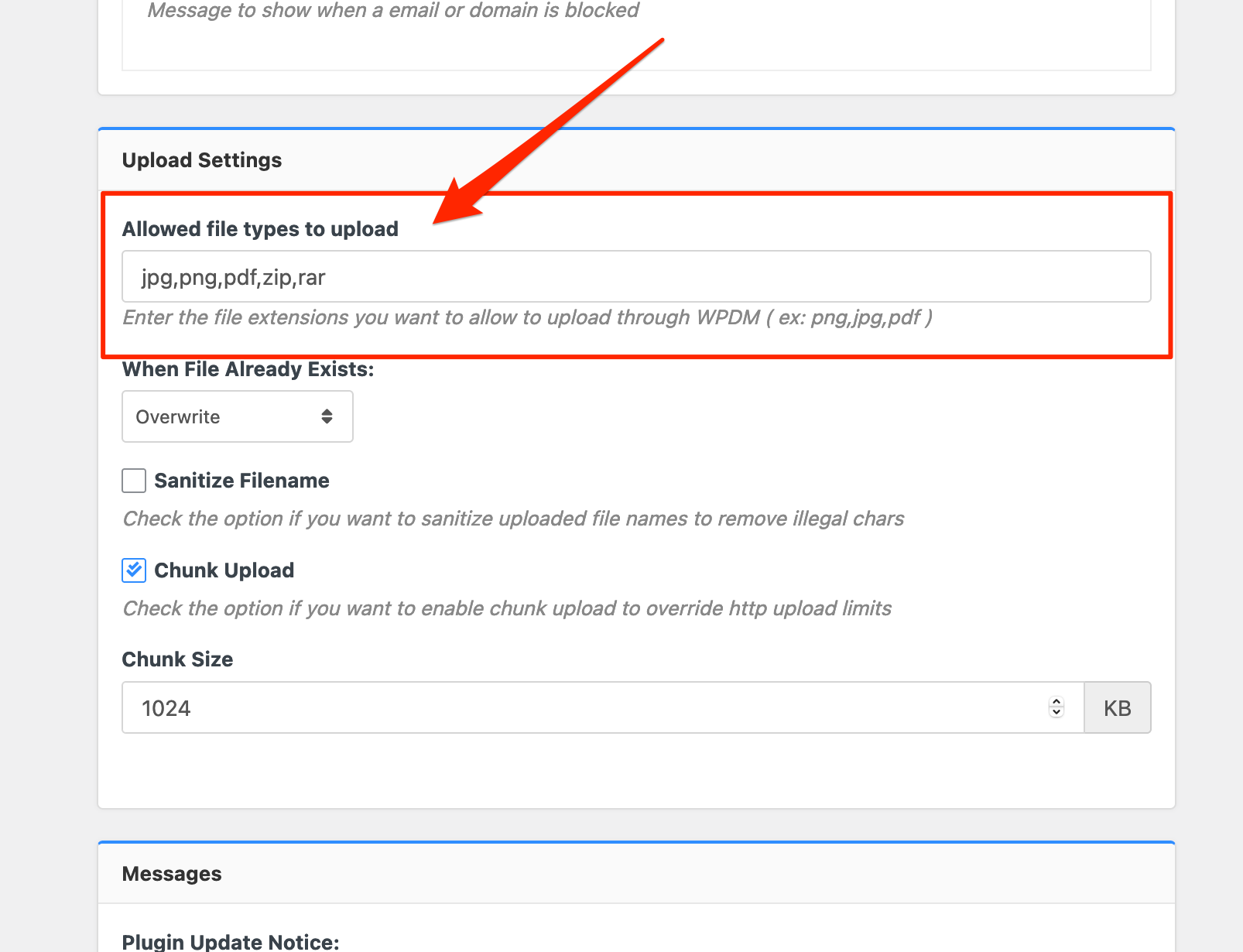
Please add file types ( texts, multiple texts separated by a comma ) as shown on the marked image. And then save settings. The shall resolve the issue.
or, Just Keep it Empty for WordPress default use as I image attached

thus it may resolve the issue
thanks
Hi @sophist,
Sorry for the inconvenience. Hide Everything option and Advanced Access Control add-on is working fine from my side. And for the shortcode, instead of [wpdm_category], can you please use this shortcode, https://www.wpdownloadmanager.com/doc/short-codes/wpdm_all_packages-list-all-downloads-in-tabular-format-in-a-page/, you can use login=1 parameter in your shortcode parameter. I hope it may help you. and please let me know, everthing is working fine from your side or not
thanks
The Downloads export does not work to generate a list of links so we can block IPs from bots… get the below message.
https://snipboard.io/FvAC0i.jpg
How can we get a list of all of the downloads links??
I have the same problem:
https://www.twsalaska.org/test/
I do not have the single-column-with-doc-preview template.
I use a custom template: template-view-download.
<div class=”link-template-default card mb-2″>
<div class=”card-body”>
<div class=”media”>
<div class=”mr-3 img-48″>[icon]</div>
<div class=”media-body”>
<h3 class=”package-title”>[title]</h3>
<div class=”text-muted text-small”><i class=”fas fa-copy”></i> [file_count] [txt=file(s)] <i class=”fas fa-hdd ml-3″></i> [file_size]</div>
</div>
<div class=”ml-3″>
[file_list]
</div>
</div>
</div>
</div>
So it seems the [file_list] shows the 2 buttons
View opens in the pdf viewer
Download opens the pdf file in the same tab, instead of downloads it.
Hello together,
i have a category named CategoryA. In this Category are Packages and every package is assigned to a single user. Only this User should can see his package and cant see packages from others in CategoryA.
Now i want to display CategoryA on a Page and every user can only see his Package from CategoryA.
I have set “When user is not allowed to download: Hide Everything”; The Package is in CategoryA, AllowAccess is set to nothing and Select Member is set to a single Username.
When i use a shortcode like “[wpdm_category id="CategoryA" operator="IN"] the Packages are not listed.
When i use the “[wpdm_my_downloads login=1 template=”link-template-default” cols=”1″] shortcode, all packages which are assigned to this user are visible.
What i need would be an shortcode like: “[wpdm_my_downloads category=”CategoryA”] but without Login Formular when logged out and without logout button.
Is it possible to create a own shortcode?
Hello @evince
Sorry for your inconvenience. I have seen that you are using this shortcode, https://www.wpdownloadmanager.com/doc/short-codes/wpdm_all_packages-list-all-downloads-in-tabular-format-in-a-page/, as per the documentation, the shortcode doesn’t have a parameter called template. for customizing [wpdm_all_packages] shortcode you may customize this file here download-manager/tpls/wpdm-all-downloads.php file. For making backup the file you may check this doc, https://www.wpdownloadmanager.com/doc/template-files/. otherwise, you may use this shortcode feature too,
https://demo.wpdownloadmanager.com/wpdmpro/gutenberg-table-builder/,it will give you a better appearance. for getting this you may use this Gutenberg block add-on, https://www.wpdownloadmanager.com/download/gutenberg-blocks/
thanks
Hello,
We can now delete downloads – thank you very much for looking at that.
The Form Lock still doesn’t work even after switching themes to the basic ‘Twenty Twenty-One’ and deactivating all other plugins (except Contact Form 7 which we use for forms).
The same error message still shows. The Form Lock worked perfectly, possibly before the WordPress 5.7.2 update.
Thanks,
Phil

If a page has a query string (other than “s”??) the generated links are not correct. They will be of the form
https://example.com/mypage?myqs=val/page/2/
where they should be
https://example.com/mypage/page/2/?myqs=val
Not sure why “s” is specially handled…
Please review wpdm-all-downloads.php lines 402 – 410
Hi I think you have logged into main domain.
Please login into https://www.smartzworld.com/downloads/wp-admin/ its a subdomain https://www.smartzworld.com/downloads/
In this site all the plugins are live.
Hello,
Sorry for the inconvenience. For deleting downloads for the attached files within the packages, you may delete them from the attached files, and then please update the package. it should work fine then. and for the WPDM form lock code appears issue instead of the Download button, I have checked that, there are many plugins installed on your side, can you please enable/disable other plugins for checking, you may also switch theme to another for checking the issue, please let me know then
thanks
Hi @hunterbevan,
Most of your downloads are coming from unknown IP and Guest users, you can protect your downloads by keeping allow access role for certain packages, you may also can Block certain IPS, Emails from Downloads > Settings > Basic > Verification Settings
And for delete stats data, you can check this option as I image attached from Downloads > Privacy,

Thanks
The stats count definitely includes bots – we’ve had the same challenge on our website.
If you have access to your WordPress database, the following SQL command will give you a count of the user agents and should help you spot bot downloads:
https://gist.github.com/jamesgreenblue/8fd92826c6fee790271141a7491541ec
Hope that helps! We’ve had good success using Cloudflare to limit bot downloading.
-
This reply was modified 5 years, 4 months ago by
 RWF.
RWF.
Hello,
I was confused to see that 5.4.1 was been offered as an upgrade directly in WordPress when it doesn’t appear in the changelog or the main downloads area on this website.
I clicked update and WordPress told me that the update was successful – but now I’ve lost the WPDM Default Values ( wpdm-default-values.zip ) menu item in the admin area Settings and I can’t re-install it using the Updates screen (it says ‘success’ but doesn’t come back).
What was in the 5.4.1. update and can you explain why it had the impact above?
Thanks!
Hi @bpw1133,
If you select the user for Allowed User Roles to Create Package From Front-end which is located under Dashboard>Downloads>Settings>Frontend Access then only the user will be able to create and manage their own packages, they will not see other packages.
Have a look at this.
However, selected roles for the option Front-end Administrator Roles will be able to create the package and manage all packages from the front-end
Hope you understand.
Thanks.
Can you please check now, I have adjusted the settings from, Downloads > Settings > Upload Settings > Allowed file types to upload for all types,
I have just removed file types from the settings. If you keep the option ( Allowed file types to upload ) empty, it will use WordPress defaults, however, if you are uploading some uncommon file types or the files, which are not allowed by WordPress by default, you need to mention all file extensions separated by commas for the option like this:

And, you may also use ext wildcard * instead of using specific extensions if you want to allow all file types to upload and download.
let me know if you have other queries.
thanks
-
This reply was modified 5 years, 4 months ago by
 Shahjada.



