Unfortunately I’m here again
It seemed to work but it didn’t
I then tried to change the recovery download buffering…
No result. The file is corrupted again.
I tried to reload it again and after many downloads the result was always CORRUPTED
I tried to upload the file to my host space, in file management so as to recall it with “select from server”
Nothing has changed. Always corrupt
I tried to see if the problem was coming from my host so I downloaded directly from my file manager
The file was perfect.
Evidently, after several attempts, it seems that the problem occurs when using the plugin
Maybe there is some setting set incorrectly? Please help me because I’m having a lot of problems with my work
Thank you
I hope you are doing well and thanks for reaching out.
Unfortunately, the search with tags option is not available right now. You can query downloads from specific tags, for more information, kindly pay a visit here
I’m seeing strange behavior on my site since the latest update was installed. Some downloads are failing with “404 Errors”, but not all. Seems there may be an issue with the flat download URLs that are being generated that causes some file downloads to fail. If I disable the “Flat Download Link” option the issue is resolved. However, I would like this option enabled. Please advise, there is urgency with this issue.
For #1 I have created a page named downloads and add all downloads short code on that page
and I have a question about this
can I make a page where my all download will be listed without manually adding the short code in the same design as I am sharing URL with you https://cascadiadev-lightspeed-tek.pantheonsite.io/products-2/80739-2/
What I want is when I click on download button and downloading stated this popup should be closed automatically, for now I need to close this manually
for #3
Can we show some progress bar over the page when it is downloading
like when I upload a file there is a progress bar that shows the downloading percentage
We are experiencing a strange error with multiple files that were uploaded yesterday.
In total, 6 files were uploaded: 3 Software versions in German (package names starting with 2025, 2024, 2023) and 3 in English (also 2025, 2024, 2023). Each of these packages has an individual permalink that is correctly defined in the package settings. However, when one clicks on that link, the URLs for 2023 and 2024 are forwarded to version 2025 of the respective language.
When using the embed shortcode, the download button works correctly and the correct file begins downloading. However, when one clicks on the file name link next to it, the same error happens.
All of the older downloads are not affected by this error.
Download Manager Pro Version 6.5.5
Wordpress Version 6.5.5.
All downloads on our site based on short-codes have stopped working with recent Download Manager updates and are producing a 404-error message.
This is affecting all of our datasheets, user manuals downloads on our website: https://hsierra.com/support/library/
This had been working fine until the most recent Download Manager updates.
Hi, I activated from lock for and package and set the Gravity Form.
When I click the download button on the front end the spinner shows up and never goes to the form for the download.
If I disable the form lock the download work as normal. When I re-add the form lock and select the form and save. Then dgo tot he front end to attempt a download, It then goes back to just loading the spinner.
I have tried all kind of trouble shooting but nothing is working.
Example here: https://noraxon.sitebuilderhub.com/our-products/medilogic-insoles/
Click on Downloads next to the big arrow close to the bottom of the page, then attempt to download the PDF.
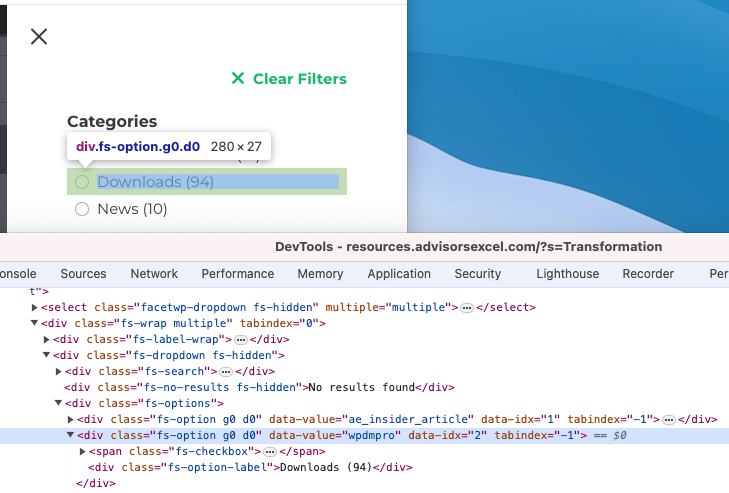
So, it is changing everywhere on the admin side, but on the frontend where I am trying to call that post type in my filters, it still auto-displays that post type name as “Downloads” instead of “Resources.” You can see in this screenshot: https://dbr2.flywheelsites.com/wp-content/uploads/2024/07/downloads-filter.png
I did the same method to turn the “Posts” post type to “News” and that worked, as you can see.
It is still not working correctly, please note not all thumbnails are wrong, and sometimes clearing the cache will fix some thumbnails, but then others are not correctly working again.
The first test I did the thumbnail was already incorrect. I tried on /wpdmpackages/ramada-hotels-suites-marina-del-sol-downloads/Images/Bedroom 2.jpg
I feel it has to do with that the images have same filenames, and that your plugin creates a cached version of the image in your own wpdm folder and once it has done it, it does not re-generate if a user goes from 1 download package to another and then the thumbnail image is incorrect. Any way we can disable to wpdm caching of the images?
EDIT: Did some more testing and does look like the issue is coming from the URL used for cached images: https://projects.idiliqdevelopments.com/wp-content/uploads/wpdm-cache/Bedroom%202-150×150.jpg
When clearing the cache from Privacy, and opening image “Bedroom 2.jpg” from “Package 1” it works fine, if I then go to “Package 2” to open “Bedroom 2.jpg” it is showing a thumbnail of “Package 1” and not “Package 2”.
I’m trying to update the “Downloads” custom post type so when I filter by post type using FacetWP, users will see “Resources” as the option instead of “Downloads.” I used the following code which has updated the name everywhere on the site, but am still seeing “Downloads” in my post type filter. Is there a way to change that?
and I would like to show downloads from category slugs “category-1” and “category-2” and show them in a grid totalling no more than 12 at a timer with pagination.
Thank you so much for your support, I really appreciate it.
So if the short code you mention above is the only one available for listing downloads, even with a pro version how would I show your “Call to action 4” example on https://try.wpdownloadmanager.com/ready-to-use-templates/ ?
I need to know how I can show different download listings before I decide to upgrade to pro.
[wpdm_all_packages] shows a list of all downloads in tabular format in a page, you can’t define any template in this shortcode parameter. However, you can check other shortcodes here too, https://www.wpdownloadmanager.com/doc/short-codes/. Please kindly check and let me know.
The template type is fine – I understand.
However how do I define what template I am going to use to list all my downloads?
For example I am currently using the following on my listing screen but it doesnt mention the listing layout template anywhere:
For updating the WPDM PRO plugin, Please simply click the Save Settings again for the license key option from Downloads > Settings > License, and then please update the plugin from the wp-admin > plugins panel.
For saving settings again for the license key option from Downloads -> Settings -> License, that will regenerate the access token. Thus the plugin will be updated,
For updating WPDM add-ons, please download your plugin from here, https://www.wpdownloadmanager.com/user-dashboard/?udb_page=purchases,
And update manually from the wp-admin dashboard Plugins > Add New option. I hope, thus it will resolve your issue. For the Download > Settings > Updates option will not work properly for some server settings. please check and let me know, if you have any queries.
However when I go to Admin Menu Downloads Settings Updates on our website I see a empty list of “Purchased add-ons” below “Check for updates” and “Logout” buttons. I have recently changed the wpdownloadmanager account password so I click “LOGOUT” but the page just reloads the same as it was; there’s no login page to enter the new password.
I performed a manual update by downloading the zip of 6.5.4 and updating via the “Upload plugin” interface, but this didn’t fix the problem.
Sure, but the search reveals ALL docs to ALL users – this is bad.
We are using this plugin because it allows us to assign downloads to users.
Search will bypass that… which is very very bad.
Author
Search Results
Viewing 25 results - 426 through 450 (of 4,517 total)