

WordPress Download Manager Special Pack
$199.00 — $599.00 Select License Pro For single installation $199.00 Business For…
Watermark PDF downloads in WordPress with each customer's name, email, and order ID. Add text or image stamps, encrypt files with 256-bit AES, and restrict printing and copying. An add-on for WordPress Download Manager.

WordPress PDF Stamper watermarks every PDF download from your site with the details of the person who downloaded it, so a copy that turns up on a file-sharing site leads straight back to the account it came from. Built for WordPress Download Manager, it applies a text or image stamp to each PDF at the moment it is downloaded and can lock the file with 256-bit AES encryption. Your original file on the server is never changed.
Selling eBooks, reports, or course material? Pair it with the Premium Package add-on to stamp each copy with the customer's name, email address, and order ID.
{fullname}, {email}, {order_id}, {download_date}, and {sitename}, plus any package template tagwpdm_pdf_stamper_tags filterLicensed to {fullname} ({email}){br}Downloaded on {download_date}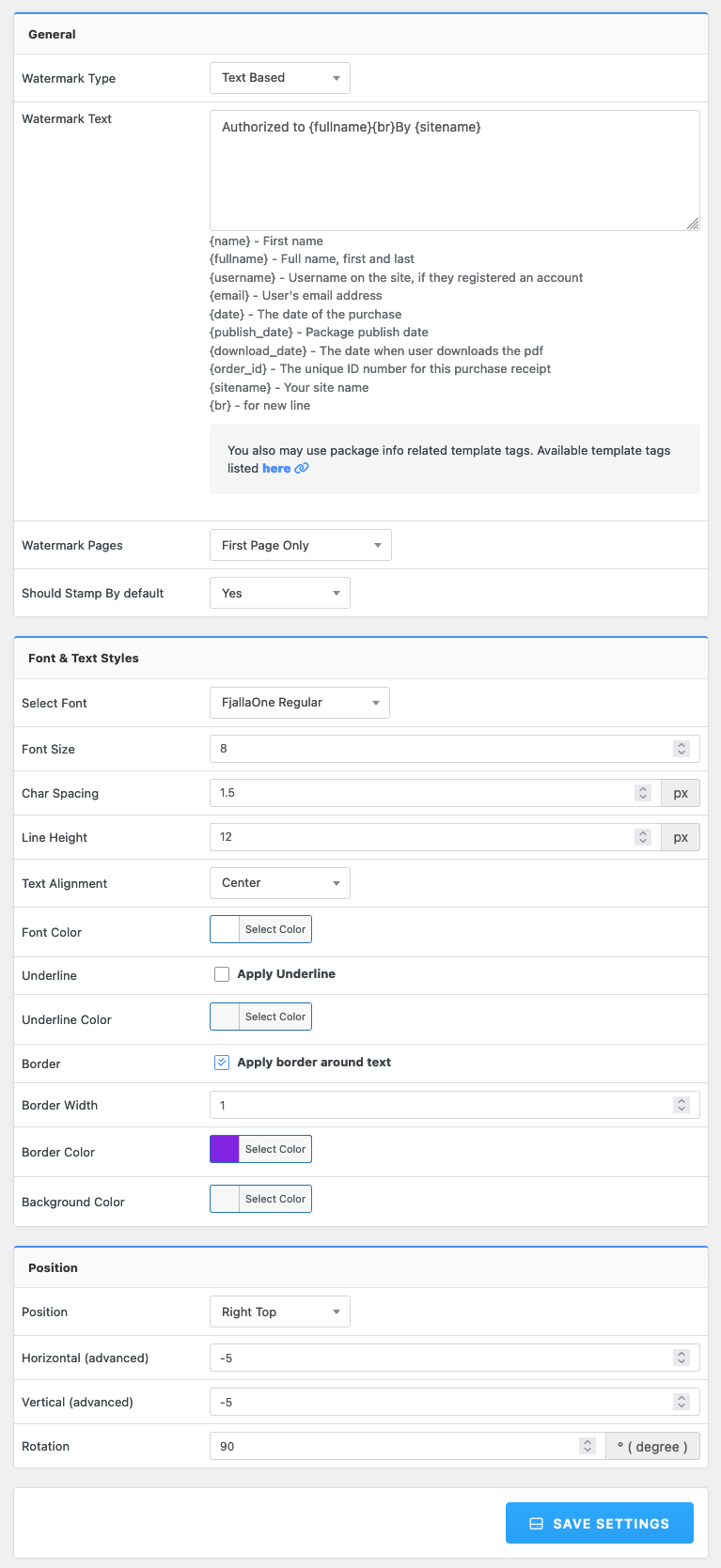
PDF Stamper works on PDF files stored on your own server when they are downloaded individually. See the PDF Stamper documentation for every setting and template tag.
$199.00 — $599.00 Select License Pro For single installation $199.00 Business For…

Download Version 4.0.1 Download 83663 File Size 310.17 KB File Count 1…

Login is required to access this page Login Version 1.6.0 Download 132…

You can create a download portal of third party software/application using WordPress…
52 Comments
Hi, I’m using version 6.3.6 of the download manager, and the only add-on having problems with PHP 8.3 is PDF Stamper. If I buy it, can I use the current version with my WPDM 6? Will it work with PHP 8.3?
Hello, pre-purchase question:
Can i custom design the stamp? my company has rounded stamps with company logo, and manual customer details inputted into it. Can i use this plugin to create custom stamps based on customer info such as name, email, …etc?
Cheers
If you use text stamp option, you can dynamically stamp customer details in text format, how for there is also an option to stamp a pre-designed image. However, to create the stamp image dynamically, there will require additional customization.
can I change/add more font to support more languages? in my language I got “?????” instead of text watermask
Please post in support forum https://www.wpdownloadmanager.com/support/forum/download-manager-pro/
hello i try to install wpdm pdf stamper using download manager plugin it say success but not plugin install plugin on my website can you please help
Please download the addon from here https://www.wpdownloadmanager.com/user-dashboard/?udb_page=purchases and the install it from Plugins > Add New page.
there is no wp pdft stamper on the given link
Hi,
Your order is linked to an account with email `contact@pas…..sat.com`, please go to https://www.wpdownloadmanager.com/user-dashboard/?udb_page=purchases and login using that account info.
i create one please check https://www.wpdownloadmanager.com/support/topic/cant-able-to-download-wp-pdf-stamper-plugin/
Please post in forum:
https://www.wpdownloadmanager.com/support/forum/download-manager-pro/
I can point you properly from there.
the only download file on the given linked is download manager pro v6.5 and i don’t see any pdf stamper plugin here
I have just taken out the full subscription of the extensions that you offer but I cannot find the file to activate this extension, what is its name? THANKS
wpdm-pdf-stamper.zipthe zip folder is empty?!?
Sorry for your inconvenience., it is fixed now, please download again.
Is it possible to add a new font for the PDF Stamper?
Hello, please insert compatibility with php 8.0
It is now.
Hi, is it compatible with php 8?
Hi! When I stamp the PDF the links do not work. Any way to solve it?
Please update to the latest version.
Hi,
is compatible the last version with php 7.3.21?
Thanks
Purchased the PDF Stamper and uploaded the zip file via the plugin add- then activated the plugin. Now, I cannot see the the plugin in my WordPress dashboard. I can find it under plugins but there are no additional setting links, etc associated with it.
Any ideas?
Have your installed the Download Manager? PDF Stamper is an add-on of Download Manager.
Ah, got it. Thanks!
Also, how do I get the watermark to show on my PDF document? Everything is installed and seems to be working properly from what I can see.
Have purchase this add-on and it generally works well, however I notice it does not work with packages that contain multiple files as a zip. Is this possible?
Regards
Brian
PDF stamper will work for only individual PDF attachment, not for zipped PDF files. When you have multiple pdf files with a package, and needs to be stamped, please use only [file_list] tag with thw page template, and skip [download_link] tag.
Hello,
does it requires Woocommerce or a buy process or does it simply apply watermark to .pdfs downloads created with Download Manager with users account details?
Thank you
None of the items at http://www.wpdownloadmanager.com have any dependency on Woocommerce. PDF Stamper is also developed specially for download manager files. Yes, It will apply a watermark to .pdfs downloads created with Download Manager and you can control the watermark text from settings page..
In the documentation it says it “is specially developed for WordPress Download Manager” — is this a plugin, or just the generic WordPress download management tool?
I’m wondering if this plugin would be compatible with the “PDF Viewer for WordPress” plugin
If it isn’t compatible – do you know of any PDF viewers/managers that *would* be compatible with this plugin?
Thanks
PDF Stamper is an add-on for WordPress Download Manager Pro. We have a PDF viewer add-on too https://www.wpdownloadmanager.com/download/wordpress-pdf-viewer/ which works with PDF Stamper.
Good day, i am thinking to update my PHP version to 7 and i run a plugin checker to see the compatibility of installed plugins.
So it detected this WPDM – PDF Stamper – Warnings: 1 Errors: 2
Is it safe to update does it will still work normal?
Please post the php7 errors in forum http://www.wpdownloadmanager.com/support/forum/download-manager-pro/ , we shall check and let you know.
Hello Sir,
I have a questions before buy this plugin.
Does it work to prevent distribution among users after purchase a ebook. Please reply ASAP.
Regards,
Arun
Hi
Just updated to the lates version expecting to get stamping for zip files as promised months ago. BUT, it still doesn’t do it!
Is it ever gonna happen?
Thanks
Hello,
in your demo (https://www.wpdownloadmanager.com/wordpress-download-manager-pro-demo/) I can’t find any option to enable pdf protections or encryption.
I downloaded the file from https://demo.wpdownloadmanager.com/addons/download/pdf-stamping/ and I was able to print and edit the file, so the file protection or encryption is not automatic.
Can I have more informations about this?
Thank you, best regards
It requires to enable encryption from package settings:
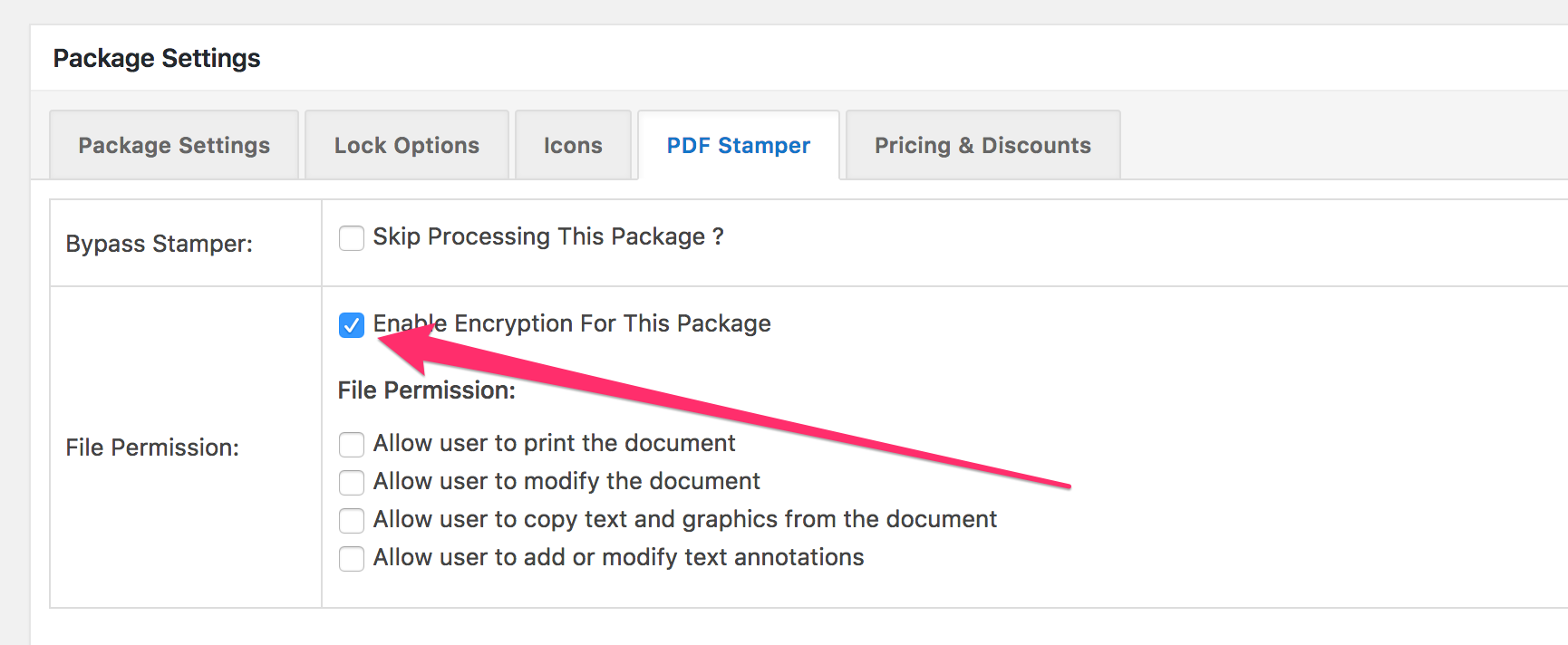
Ok, I see.
So is a per-package setting, not a global one.
Thank you!
Hi, have some questions before buy this add-on.
1st. Does it work with free version of download manager?
2nd. Where are the security settings to encrypt the PDF files?
3rd. Is the download-manager-files folder secure to store files?
4th. Is it possible to add opacity to text watermark in the plugin codes?
#1. Yes.
#2. All you need to do with setup explained above in the description.
#3. Yes, they are protected
#4. You can set “Watermark Transparency” level for image based stamp
I came across this plugin as a result of needing this functionality to add to my site built on Easy Digital Downloads. Is this still compatible with EDD?
Sorry, it will not work with your plugin, this plugin is for WordPress Download Manager and Premium Package ( https://www.wpdownloadmanager.com/download/premium-package-wordpress-digital-store-solution/ )
Also, is there a way to try all the features of this plug-in out first before purchase? Not all the features are available on your demo website. Also, your Dropbox and Amazon links don’t work on your demo website (admin area). Thanks.
You can check demo from here https://demo.wpdownloadmanager.com/addons/download/pdf-stamping/
Questions >
1) Can this plugin stamp if the file is delivered from Dropbox or Amazon?
2) Can I use a 3d party product to restrict access to the page on which the download link appears?
3) Are you using liquid templating for the PDF stamper?
1) Sorry, stamping will not work with remote files, as files need to be stored in the same server to customize it.
2) You won’t need to use 3rd part plugin, wpdm pro has roles based and other kinds of protections you need to apply
3) No
Could you provide a sample image of a stamped document please?
Demo: https://demo.wpdownloadmanager.com/addons/download/pdf-stamping/
Hi Shaon – Recommendation – Consider adding this to the next update of the PDF plugin. It would be very useful to anyone who needs to watermark the document with a time/datestamp in the event they are not “purchasing” the PDF, but just downloading it and want it to be marked with the download date.
$arr[‘{today}’] = ”;
$arr[‘{today}’] = $blogtime = current_time( ‘mysql’ );
—————————————————
{today} – The date of the PDF download- free
Thanks
Does the store owner get access to set up how their products would get stamped?
Only marketplace owners, the message is mostly generic.