
Forum Replies Created

Hello,
The dropdown filter is not possible to make with link template/page template.
It is based on shortcode.
You can check the shortcodes here available for wpdm:
https://www.wpdownloadmanager.com/doc/short-codes/
If you want to show with category filter options, you need the below addon. Please check that and demos:
Thanks
Hello,
With the template tag [popup_link] (this is not a short-code, but a template tag) you can use it with a link or page template if you want to open the package link in a bootstrap modal popup.
Create a custom link template without [download_link] template tag and use [popup_link] instead of [page_link]. You can clone an existing link template and edit on top of it.
However, [wpdm_tree] shortcode doesn’t support custom link template. All you can do with it is to open a new window using parameter newwin=1 For more details please check:
Thanks
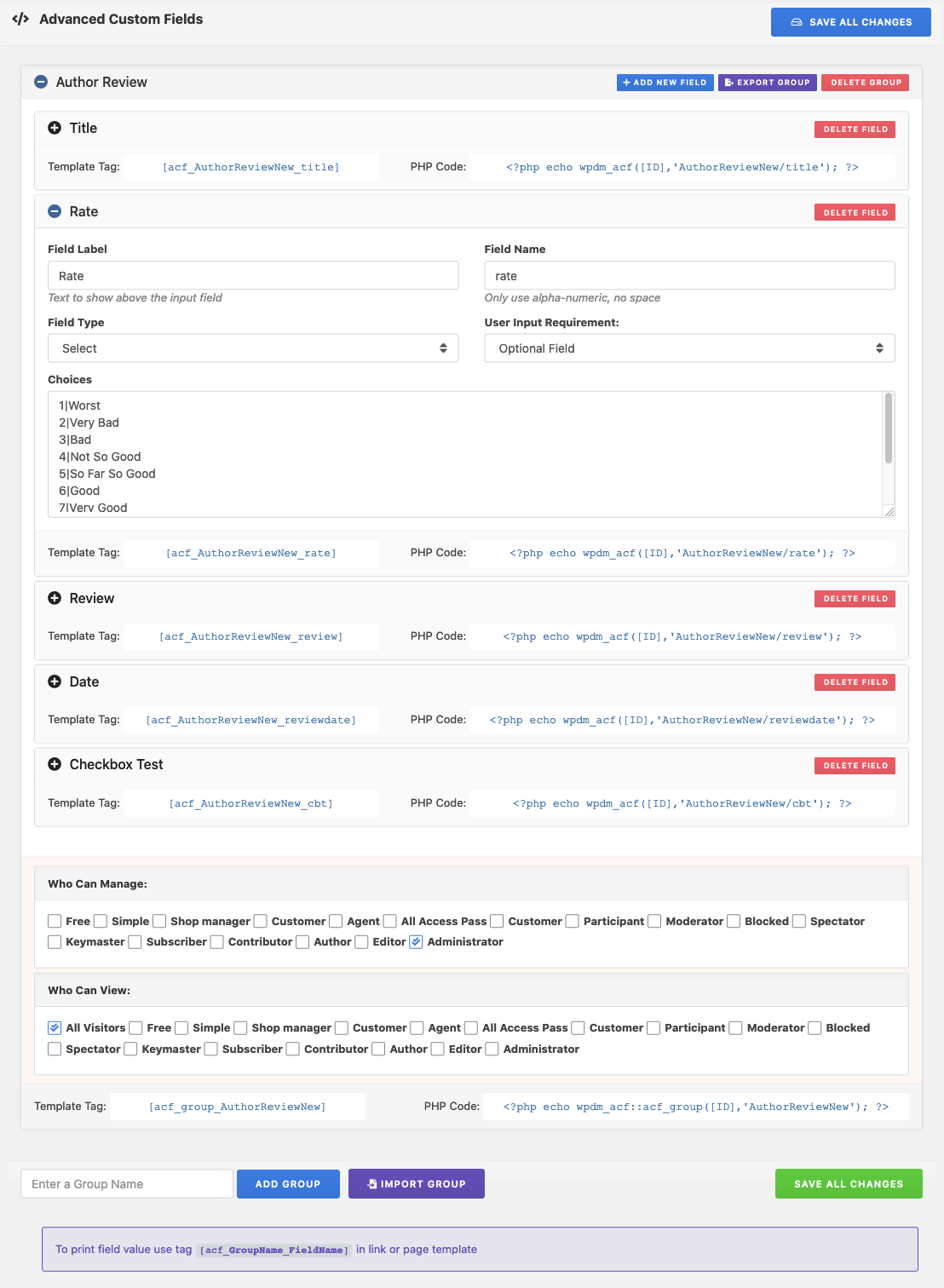
Please use the Field Name from the Quickforms if you are using.
Hello,
I think you haven’t added the correct data name there.
Please check Field Name from Downloads > custom fields menu or use the Field Name from the Quickforms if you are using.
Thanks
Glad to hear the issue has been resolved.
Thank You
Hello @eli-kattoura,
In the free
You just need to follow this:
1. Copy page-templates directory from /plugins/download-manager/src/package/views directory to your active theme directory.
2. Make a new directory as download-manager on your active theme directory.
3. Now remove all files from {active-theme}/download-manager/page-templates except the template files you need to update.
4. Update template file(s) in {active-theme}/download-manager/page-templates directory as per your need.
However, wpdm update will not cause any issue with this directory. But if you update the theme, the directory will be removed. In this case, I would suggest to use child theme.
Thanks
Hello,
I think there is a new bug with the custom field addon.
However, I have forwarded the issue to the developer team.
Soon you will be updated. Please keep patience.
Thanks
Hello ,
Sorry to hear about the issue.
Could you please share the related page/file/package URL with us?
If possible please also share the admin access of your website in a private reply.
It helps us to quickly figure out the issue and resolve it immediately.
Thank you
Hello ,
Sorry to hear about the issue.
Could you please share the related page/file/package URL with us?
However, it will be very cooperative if you record me reproducing your issue using a tool like this?
If possible please also share the admin access of your website in a private reply.
It helps us to quickly figure out the issue and resolve it immediately.
Thank you
Sorry for the inconvenience.
Could you please share the admin access of your website in a private reply?
It helps us to determine the issue properly also if there are any other issues.
Thanks
Hello,
Hope you are well.
Sorry for this inconvenience.
Could you please provide your website’s admin access in a private reply?
It will help us to identify the issue correctly.
You will get all replies in mail from here.
Our time zone is 14 hours faster from yours.
Please keep patience.
Thanks.
Hello @stopframemedia,
Sorry for this inconvenience.
I think you have just bought the wpdm and addons and at the first time you have to upload required plugins manually to your website. Addons menu is a very recent feature with the latest few versions. It may not allow the first installation.
However, I hope you can update wpdm and addons from Downloads > Settings > Updates
If you can’t update it directry from WordPress dashboard, Please update from here.
Let me know please if it works properly. Sometimes hosting permission doesn’t allow installation directly from website.
Thanks
Hello,
Hope you are well.
For prepaid credits you can check our this addon
for membership, you can check our this addon:
If you need to add custom fields, Please check this addon of us:
To use elementor with wpdm, you can check this free addon:
unfortunately, I was not able to see the image you provided. It just shows me a black and white 404 symbol. Please share the image using google drive or imgbb.com so I am unable to provide any suggestions after seeing the image.
Thanks
Yes icon with text with download button.
You can remove the download button too by custom css
Hello Chris,
Yes it is possible.
I have created an example for you where I disabled the jstable.
https://demo.wpdownloadmanager.com/wpdmpro/icon-test/
you can edit the page here too:
https://demo.wpdownloadmanager.com/wpdmpro/wp-admin/post.php?post=48260&action=edit
However, the remaining tableborders can be removed via custom css too.
So no worry.
Thanks
Hello Chris,
Hope you are well.
Yes, it is possible to make a download list with custom icons.
You can use this shortcode:
https://www.wpdownloadmanager.com/doc/short-codes/wpdm_all_packages-list-all-downloads-in-tabular-format-in-a-page/
There is a parameter to use in the shortcode:
thumb: Optional, if you don't use this parameter, the table will show package icon, if you use thumb=1, it will show the feature image thumbnail instead of the icon
I hope it will help you.
Thanks
Hello @breldan,
Have you checked the below shortcode for direct download link?
https://www.wpdownloadmanager.com/doc/short-codes/wpdm_direct_link-embed-direct-download-link-as-a-simple-text-link/
However, you can also make direct download link by editing link template with different template tags.
In example, if you use [download_url] as the download link in the button, then it will start downloading directly.
If the issue still persists, please share related links to check also provide me admin access in a private reply. So that I can do it for you.
Thanks
Hi,
Thanks for identifying the issue.
In this case I would suggest to keep that plugin disabled.
If you think you need that plugin activated, you can use our pdf viewer addon which will not cause any issue.
Thanks.
Hello,
I see the below notice:
Your site is running an outdated, insecure version of PHP (7.1.33), which could be putting your site at risk for being hacked.
WordPress is working towards discontinuing support for your PHP version.
Updating PHP only takes a few minutes and will make your website significantly faster and more secure.
So, Please update php of your hosting. If you unable to do it, please contact hosting support.
I hope updating php will fix the issues.
Thanks
Hello Eugen,
Sorry to hear about the issue.
Could you please share the related page/file/package URL with us?
However, it will be very cooperative if you record me reproducing your issue using a tool like this?
If possible please also share the admin access of your website in a private reply.
It helps us to quickly figure out the issue and resolve it immediately.
Thank you
Hi @Robertwikholm,
You can update files from the file list of any package from the attached file list.

You will just remove the old file from there then reupload the newer and keep the file name same. In this way you can add newer version number there.
If you want to show only directory url, then either you have to add files by using SELECT FILES FROM SERVER or SELECT FROM MEDIA LIBRARY.

Also you can use the below shortcode to make direct download links for any packages.
https://www.wpdownloadmanager.com/doc/short-codes/wpdm_direct_link-embed-direct-download-link-as-a-simple-text-link/
Hope you understand.
Thank you
Hello @Evancourtney,
I am sorry for the issue.
You are using latest version of WPDM free and the updated version of WPDM Directory.
However, I think the issue is in your shortcode as I have tested in local environment and it is working fine.
Please use the below shortcode by copy and pasting then update the pages again:
[wpdm_archive button_style="inverse" link_template="link-template-panel" order_by="post_title" order="asc" items_per_page=9 cat_view="compact" cols=3]
If still the problem persists, please also enable the admin access for me as I am unable to update pages and provide me the related pages where you are using the shortcodes. I will solve those.
Thanks