
Forum Replies Created

Seems like mail function in your server is not working properly, may you please contact server/hosting support.
Are you talking about creating a package from the frontend? In that case, you need to use shortcode wpdm_frontend. Doc: https://www.wpdownloadmanager.com/doc/short-codes/wpdm_frontend-front-end-uploader-ui/
Please update your copy, then license key will work fine.
Follow the steps:
- Deactivate and Delete old version
- Download the latest version from https://www.wpdownloadmanager.com/user-dashboard/purchases/
- Install and activate the latest version.
That will resolve your license issue.
Please update your copy, then license key will work fine.
Follow the steps:
- Deactivate and Delete old version
- Download the latest version from https://www.wpdownloadmanager.com/user-dashboard/purchases/
- Install and activate the latest version.
That will resolve your license issue.
No other better option for now, but, we shall think of something with the next update of the add-on.
Actually, you have access to this forum means the license is not expired :). However, Please give me your Order ID and temporary wp-admin login info in a private reply, I shall check.
Actually, in case of Dropbox, downloads are handled by Dropbox it self, wpdm simply redirect to download link, anything you need to adjust, it is in dropbox side.
You will need this add-on https://www.wpdownloadmanager.com/download/mailchimp-subscription/ for mailchimp connection. To add extra fields with email lock, you will need https://www.wpdownloadmanager.com/download/advanced-custom-fields/ and still, there will need some customization to send extra fields to mailchimp, now it only sends name and email to mailchimp.
Please give me temporary wp-admin login info in a private reply to check your issue.
@mantecado, and the URL is …
Sorry, no such option is available with free version. This is possible with pro version using the template builder, but only applicable for public downloads.
I’m not seeing anything like that, may you please give me a screenshot and temporary wp-admin login info in a private reply to check the issue.
Please check the instructions here https://www.wpdownloadmanager.com/how-to-use-dropbox-to-store-files-and-allow-users-to-download-then-from-your-website/ again
Please give me temporary wp-admin login info in a private reply to check your issue.
The request was blocked by your server rules:
https://www.evernote.com/l/AV0WKpNmG6ZI1ZXXzKswJKPfIEvnFBoOOAwB/image.png
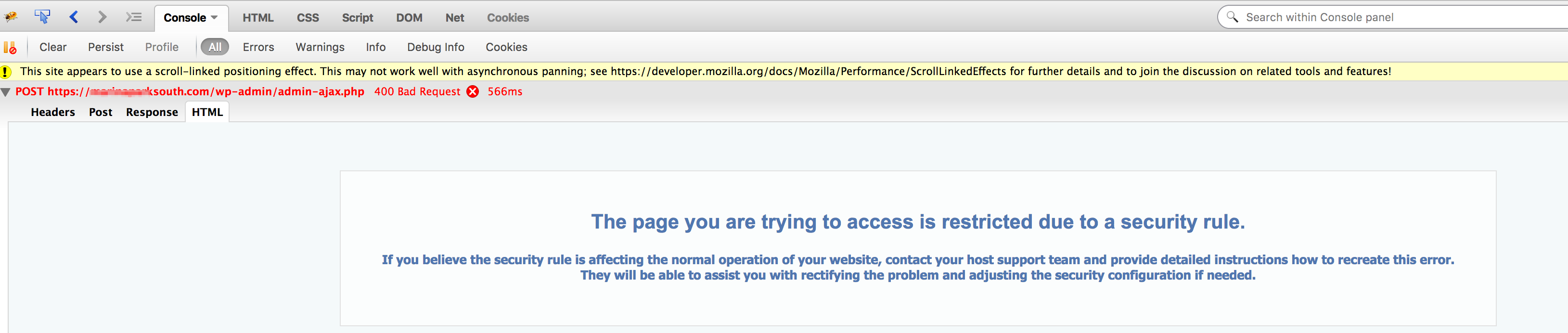
Please contact hosting support to fix this or if you want to solve it by yourself, please add the following rules to your site’s .htaccess file to get it to work:
<IfModule mod_security.c>
SecFilterRemove 001868
</IfModule>
Please give me temporary wp-admin login info in a private reply to check your issue. Also give me the URL where you’re seeing the issue.
@mantecado, please give me temporary wp-admin login info in a private reply.
Sorry, not clear, may you please explain little more.
Price is $99 only.
You are seeing that red x, because download manager is not configured properly, you should see a message there, but you need to put it in wpdm settings page. However, it seems like you didn’t set any access role for the file, you can set roles from add/edit file window:
https://www.evernote.com/l/AV1lr1Hn_fZCo4FZ7GwMg9QqAtZ4BfRKeNYB/image.png

Other free add-ons:
You need to put the shortcode in page or post content. Please use following add-on to generate shortcodes:
For tree view, download and install following add-on:
please use flaturl=0 with shortcode.
Doc:
https://www.wpdownloadmanager.com/doc/short-codes/wpdm_user_dashboard-user-dashboard-short-code/
