Sir, I am using the bulk import option https://www.wpdownloadmanager.com/doc/bulk-import/ thanks and importing files from my server. before the new update, everything was ok. but today when I import files from the server, so the package size option is not working for that imported files, in link template or in a page template. you can see in the below picture. also, I mentioned the old files which are ok, in the same table.
View post on imgur.com
Hi, thanks alot, the page, accordian, tabs are all working.
I’m sorry I forgot to mention one more conflict that happens within WPDM itself, which still exists on Bootstrap 4:
My download link template styling gets corrupted as well. Please see this screenshot: https://i.imgur.com/MgAeCbm.jpg
The left side is on Bootstrap 4. The title becomes oversized and becomes a clickable link. The outline box is also not as streamlined, it has wider padding
The right side is on Bootstrap 3 and is the correct look. Non-clickable title, smaller text fitting the theme, and the outline box is tighter.
This sounds like a great solution:
1) create a package with all my protected files, I’ll look up docs on this.
2) Only allow access to the package for logged in users. This would block download links for non-logged in users.
A different suggestion from your support would be to upload files only via WPDM, They also suggested making these changes https://www.wpdownloadmanager.com/doc/how-to-protect-download-manager-files-directory-in-nginx/
I don’t have access to nginx in /etc I only have access to htdocs and below since I’m on a managed wordpress.com hosting site that is already locked down a bit. Can you confirm that without the above changes in the link, WPDM for media upload or creating packages I can project my files without changes to nginx. Also which is the best way to do this?
Thanks,
Brian.
Hi,
yes, possible
by default, you are using link-template-default.php for the link template and page-template-default.php for the page template. After customizing/adjusting download button tag, you can copy the file in the theme directory naming a folder called download-manager, then paste it in tpls>page-templates for page template or tpls>link-templates for link template. and you can follow this doc for making backup files, https://www.wpdownloadmanager.com/doc/template-files/
also, you can use the pre-made link-templates or page-templates from here as i image attached,

from Downloads > Templates section
I hope those may help you
Thanks.
The shortcode generator worked in the free version, but after purchasing the pro that was replaced with an “embed” option button. Every time I click it, the pop up displays and immediately disappears. I’ve tried it on safari and Chrome. Not sure what to do! This is happening with every pop up option on the Downloads page (generate download link, email download, etc.)
We fixed the PDF-viewer problem. I saw that there were 100 of support threads about the bug in your latest update, so I just followed the solution given by other users. But we still have the problem from my initial thread.
I’ll add the code below here:
<br>
<p><h1>[title]</h1>
<br>
<br/>
[image_gallery_400x400x2]
[gallery_400x400]
</div>
</div>
<br/>
<h3>Download all files</h3>
[download_link_extended]
<br/>
<ul class=”list-group ml-0 mb-2 mt-3″>
<li class=”list-group-item d-flex justify-content-between align-items-center”>
[fav_button_ico_sm]
<li class=”list-group-item d-flex justify-content-between align-items-center [hide_empty:update_date]”>
[txt=Last Updated]
<span class=”badge”>[update_date]</span>
<br/>
</div>
-
This reply was modified 4 years, 11 months ago by
 Casper Bjerg.
Yes Sir thank you i was read another post with the same problem, so after that, I was fixed it. sir, I need your help regarding the Responsive table, I want on the responsive table when the user click, the Page URL should open, I do not want the direct download, I want [Page_url] instead of [download_link]. Sir I know there are other tables also, and i can modify them, but I need this one because it is filter system is very good, also design and responsive. so please help me regarding this.
View post on imgur.com
Hello,
Sorry for the late reply.
The admin login credentials you have provided did not worked properly. Please check this.
However, you have to use the below shortcode to generate the dashboard.
https://www.wpdownloadmanager.com/doc/short-codes/wpdm_user_dashboard-user-dashboard-short-code/.
From the dashboard you will find a package list like this.
We have released a new update of the WPDM Package Lists plugin which will fix the 404 image issue. Please update your plugin copy.
Also, about the button render issue please set the link template in the shortcode page like this.
Let us know if you need further assistance regarding this matter.
Regards
This reply has been marked as private.
Hello Andy,
Thank you for your questions.
If you don’t use the login form shortcode then the option will be inactive at the frontend.
Also, you can show all categories by using the WPDM Directory addon.
WPDM Directory Add-on
However, Can you please let us know from which server/cloud storage do you want to add a download link?
In order to deactivate the shortcodes simply just remove the form and accts shortcodes then it will be deactivated.
Thanks
Hi, I have not made a separate ticket, let me know if I should and I’ll make a new topic.
Basically if I don’t make the settings changes I mentioned, some Avada theme functions break on my site. I’ve listed a couple that I’ve noticed:
1 – The Avada accordion toggles which are heavily used throughout my site. Some toggles will not open, others will open but will be blank inside, the content will not show up
2 – All WPDM download link templates become irregular shaped. The title text becomes very large, the download button becomes larger, and it simply doesn’t look right. An example of sometimes when even the icon becomes very large: https://imgur.com/gB4Byjz
Basically if I leave settings as default, the above 2 issues happen, but the WPDM archive shortcode looks normal.
If I change the boostrap settings the above 2 issues are fixed, but the WPDM archive front end looks irregular.
You can compare the visually irregular version of an archive page (https://al-m.ca/speced-draft/) with a normally functioning archive page (https://demo.wpdownloadmanager.com/wpdmpro/advanced-search-left/)
I had seen other people post similar conflicts with Avada, and they were told by WPDM team to disable bootstrap JS and use Bootstrap 3, which is how I came across the temporary solution as well.
Hello,
Templates do not appear in Download Manager download link and page templates settings. The following text appears instead of the template. I get the same warning in all templates. I would be glad if you could help. Thank you.
İlkokuma Yazma 2.Grup (omutüy) sesleri ile ilgili etkinlikler seslerin veriliş ve işleniş sırasına göre düzenlenmiştir.
This reply has been marked as private.
This reply has been marked as private.
This reply has been marked as private.
I also have a closely related question, but to do with the wpdm_tree shortcode that comes from the WPDM Extended Shortcodes add-on.
This is the code I’m using to generate a file tree:
[wpdm_tree newwin=1 download_link=1 category="about-us"]
I was looking at the code to work out where to put the target=_blank code so that these links would open in a new tab as well, and while in the PHP file I found an undocumented shortcode parameter called newwin which appears to add the target=_blank to the generated link tree.. except it doesn’t work. I can see in the page source that target="_blank" is part of the <a tag, but when I click the link it opens in the same window anyway. Is there JavaScript somewhere that’s overriding this?
Thanks so much for your help here!
I have been using the free version for a while. I recently updated the free plugin to the latest version 3.1.21
I bought the Pro version, downloaded it, and installed it. However, when I clicked on a download link, the error “Invalid dir path” will show up.
I found this in the forum: https://www.wpdownloadmanager.com/support/topic/upgrading-from-free-to-pro-2/
However, the copy-to-pro add on is no longer available ( https://www.wpdownloadmanager.com/download/copy-to-pro/).
I don’t want to lose my old files. Please help me to migrate from the free version to the Pro.
Tommy
Hi Team,
From Membership page(https://www.smartzworld.com/downloads/membership/) if I click on checkout then the page is Blank – https://www.smartzworld.com/downloads/check-out/?wppm_task=checkout&plan_id=7749
In WordPress Dashboard for Membership plugin only paypal is available. I’ve added the addon instamojo payment gateway and configured it in wp premium membership but it is not showing instamojo and it is showing only the Paypal checkout option in Membership Pro profile page dashboard – https://www.smartzworld.com/downloads/dashboard/?udb_page=membership-plans.
It shows below error for paypal checkout: I think the currency should be INR for India.
{“name”:”UNPROCESSABLE_ENTITY”,”message”:”The requested action could not be performed, semantically incorrect, or failed business validation.”,”debug_id”:”887c9644b45a0″,”details”:[{“location”:”body”,”issue”:”CURRENCY_NOT_SUPPORTED_FOR_RECEIVER”,”description”:”This currency cannot be accepted for this recipient’s account.”}],”links”:[{“href”:”https://developer.paypal.com/docs/api/v1/billing/subscriptions#UNPROCESSABLE_ENTITY”,”rel”:”information_link”,”method”:”GET”}]}
Hello Aleksandr,
I hope you are well.
You will find all the shortcodes list in the below link.
https://www.wpdownloadmanager.com/doc/short-codes/
However, you can generate shortcode easily with out copy-pasting any of em.
If you are using the classic editor:
Advanced TinyMCE button
For Gutenberg users:
Gutenberg Blocks
And for elementor:
Elementor Addons
I have made this screencast only for you so that you can easily implement a shortcode properly.
Let us know if you need further assistance regarding this matter.
With Regards
Hi,
Download URL is working fine from my side, please check my attached image,

you can also flush the permalink structure again from your side
thanks
The problem is with the links to individual documents. On both the Profile and Download History menus, clicking on a document name results in a 404 error. On the My Download menu, the document pages load correctly. This is due to different URL structures, as shown in these screenshots:
Profile menu: https://drive.google.com/file/d/1SSQLBhvB3Tzqk4flteuvkGDEQPlTeAo4/view?usp=sharing
My Downloads menu: https://drive.google.com/file/d/1SXXTdSvqi1V3ONCEFgUQmEUUa9po-etZ/view?usp=sharing
I hope that is helpful.
This reply has been marked as private.
Hi,
For better performance and security, videos should be hosted on Amazon S3. You can stream them from there by using the below add-on.
WordPress Amazon S3 Storage Plugin
For watermark and any other type of video editing option, no add-on is available yet, it will require custom development. You can request custom development by following the below link.
Custom Upgrade Service
Thanks.
Hi Nayeem, I am working on this project with Arianna and am trying to make these changes. I understand what you’ve written, but as we’re using the WPDM Button Templates add-on I think the template file is located elsewhere – it’s probably coming from plugins/wpdm-button-templates/wpdm-button-templates.php
The trouble I have now is that the [download_link] text is in code like this:
if(!wpdm_is_locked($id) && wpdm_user_has_access($id)){
  return "<a href='".wpdm_download_url($package)."'>{$html}</a>";
} else
  return FetchTemplate("[download_link]", $package);
I’m not sure how to replace or modify this without breaking the code – I’m not a PHP developer so I’m just using educated guesses here.
Hi,
May you please explain sending link feature, we are implementing the link feature in this way, when someone sends a URL. it will automatically show URL preview ( like in facebook messenger or whatsapp ). Is that how you want or please let me know if you have a different idea. The update is coming soon ( in a week or so ).
#3. Checking it on your site. I shall let you know details after I’m done
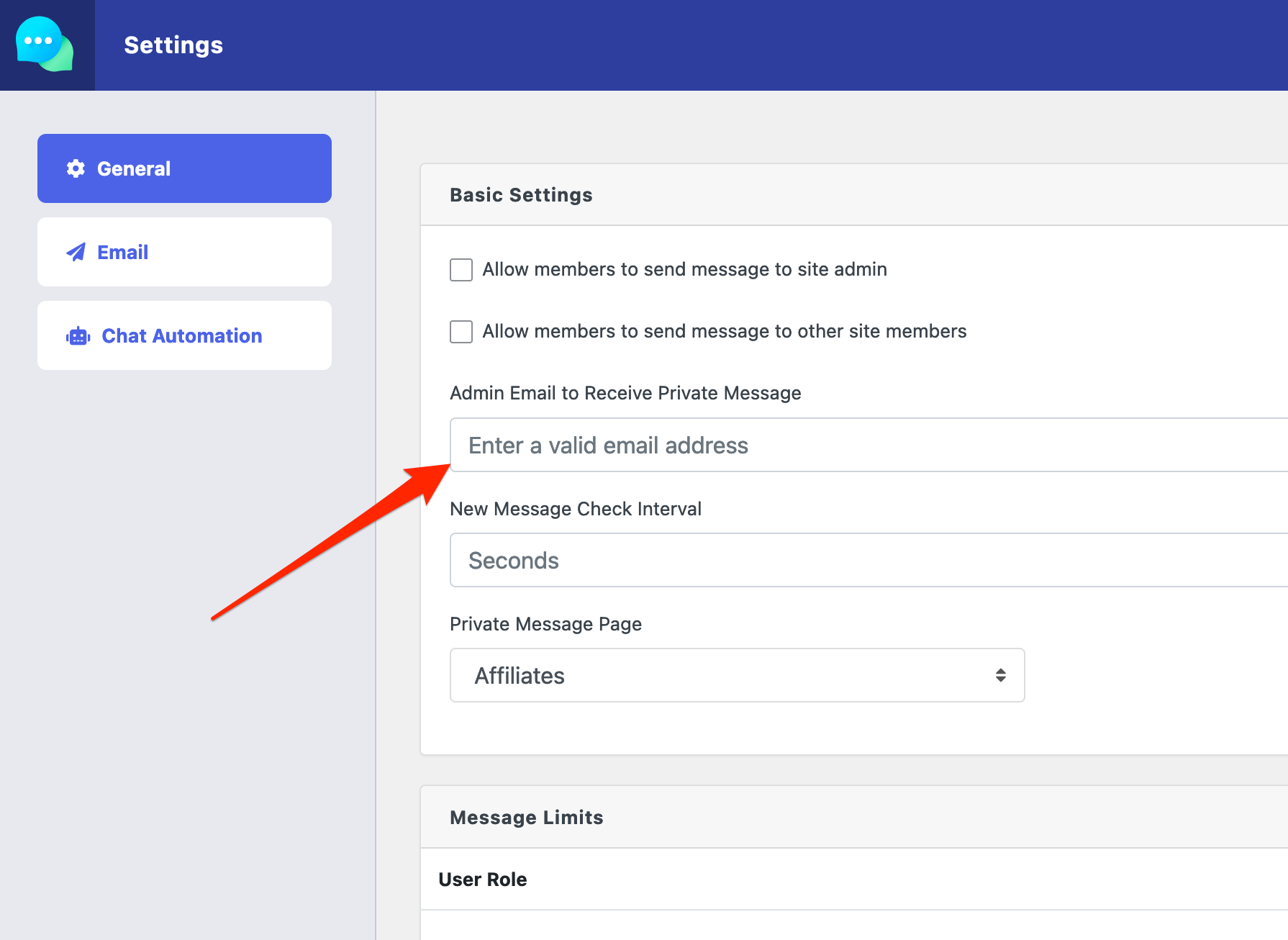
#4. You can setup the admin email to receive private message from PM settings:
However, we shall implement the multi-admin feature, but it may take some time.



