
Forum Replies Created

Hello,
I found that you are using a outdate php for your website. WordPress stopped supporting your PHP version in November, 2019.
In this case, I would suggest to update the php from your server to the version 7.3++
I hope it will solve the issue.
If the issue still persists, please let me know.
Thanks
Hello Terry,
Yes it is possible with wpdm.
For that please follow the below doc:
https://www.wpdownloadmanager.com/doc/short-codes/wpdm_user_profile-public-profile-short-code/
However, I found that you are using different plugin for showing wp member. Remember that, using multiple plugins for wp user will conflict with wpdm as all the plugins will use the same user template author.php created by wordpress. So in this case I would suggest to follow the doc and do what will be suitable for you.
also I have created a wpdm author page here to show an example.
Thanks
Hi,
You can add Custom CSS to control the icon size. Icon css class is .wpdm_icon.
<style>.w3eden .wpdm_icon{ width: 25px; }</style>
Thanks.
Hello @wolfspyryt,
1 & 2 ) You can upload and manage files from frontend using the frontend uploader ( https://www.wpdownloadmanager.com/doc/short-codes/wpdm_frontend-front-end-uploader-ui/ ) of Download Manager. But there is no option to control the category as you described. The category permission in Downloads > Settings > front end access is about the download access.
Our File Hosting and Sharing add-on which does this in a different way. In this case, each user has a main category under which they can create as many categories as they want. They can manage and see only their own categories. To make things easier we represent each category as a folder in this add-on. Please check the demo to get a clear understanding.
Thanks
Hello April,
There could be some other problems in your website.
I found that styling issues in our admin menu. I suspected it could be a theme issue.
However to check this , once I switched to twenty twenty two, it worked. but whenever I had switched back to the activated child theme, the site is showing critical error. It is weird. Without this theme switching, I didn’t do or change anything there.
Please check and contact with your website developer.
Thanks
Hello Gabriel,
Could you please share the related page url to check the issue properly?
If possible please also share temporary admin access of your website in a private reply.
Thanks
Hello David,
Have you created new project properly from google API console mentioned below?
If still the problem persists, please provide related urls to check the issue properly also you can share admin access in a private reply.
Thanks
Hello,
sorry for the delay.
Please check now and download the updated latest version.
It is fixed now.
Thanks
Hi,
Please try to logout/login again, it may help you. also, you may try these steps,
1 ) Deactivate and delete the old version. You won’t lose any data.
2 ) Download latest version from here https://www.wpdownloadmanager.com/user-dashboard/?udb_page=purchases
3 ) Install the latest version and activate the license key.
To enable the auto-update, login to your WPDM account from Downloads > Settings > Updates tab
Thanks.
Hello Terry,
Could you please share the related page url to check the issue properly?
If possible please also share temporary admin access of your website in a private reply.
Thanks
Hello,
Could you please share the related page url to check the issue properly?
If possible please also share temporary admin access of your website in a private reply.
Thanks
Hello,
I am sorry, I am unable to access. The link shows page not found.
please recheck the page and let me know.
Thanks
Hello,
Please check the Package Properties from here,
As per other Attributes, you shall find files object, here you can bind id with file name. Thus you will be able to attach/upload file thereby. I hope you have understood.
If you have kept just the file name you should keep the files in wp-content/uploads/download-manager-files dir too. And for local files, you will not be able to attach files from the local PC drive directly, or you may please attach a live server file URL there. It will also help you upload files properly.
The JSON response will look like the following example:
{
      "id": 6488,
      "title": "The Alchemist",
      "slug": "the-alchemist",
      "description": "The Alchemist follows the journey of an Andalusian shepherd boy named Santiago.",
      "excerpt": "The Alchemist is a novel by Brazilian author Paulo Coelho.",
      "author": 1,
      "status": "publish",
      "parent": 0,
      "tags": [
          "novel",
          "paulo-coelho"
      ],
      "categories": [
          16
      ],
      "thumbnail": "https://example.com/wp-content/uploads/2019/01/the-alchemist.jpg",
      "additional_previews": [
          "https://example.com/wp-content/uploads/2019/03/the-alchemist-cover.jpg",
          "https://example.com/wp-content/uploads/2019/03/the-alchemist-map.jpg"
      ],
      "version": "3.0.0",
      "link_label": "Download",
      "quota": 0,
      "download_limit_per_user": "100",
      "view_count": 80,
      "download_count": 14,
      "package_size": "811.84 KB",
      "access": [
          "guest",
          "subscriber",
          "administrator"
      ],
      "user_access": [
          "admin"
      ],
      "individual_file_download": "1",
      "cache_zip": "-1",
      "template": "link-template-calltoaction1",
      "page_template": "page-template-1col-flat",
      "files": {
          "1": "The Alchemist.pdf"
      },
      "fileinfo": {
          "1": {
              "title": "The Alchemist",
              "password": "",
              "license_price": {
                  "statdard": "",
                  "extended": "",
                  "unlimited": ""
              },
              "price": ""
          }
      },
      "package_dir": "",
      "publish_date": "2019-04-01 12:00 am",
      "expire_date": "2019-08-31 12:00 am",
      "terms_lock": "1",
      "terms_title": "Agree to terms",
      "terms_conditions": "You can't redistribute without prior authorization.",
      "terms_check_label": "Checkbox Label",
      "password_lock": "1",
      "password": "[123][456]",
      "password_usage_limit": "2",
      "linkedin_lock": "1",
      "linkedin_message": "LinkedIn Share Lock message",
      "linkedin_url": "https://www.wpdownloadmanager.com/",
      "tweet_lock": "1",
      "tweet_message": "Custom tweet message",
      "twitterfollow_lock": "1",
      "twitter_handle": "Shahriar",
      "facebooklike_lock": "1",
      "facebook_like": "",
      "email_lock": "1",
      "email_lock_title": "Subscribe To Download",
      "email_lock_msg": "",
      "email_lock_idl": "0",
      "icon": "https://example.com/wp-content/plugins/download-manager/assets/file-type-icons/arrow.png",

      "base_price": "12.00",
      "sales_price": "10.00",
      "sales_price_expire": "2019-08-31 12:00 am",
      "pay_as_you_want": "0",
      "license": {
          "statdard": {
              "active": "1"
          },
          "extended": {
              "price": "22",
              "active": "1"
          },
          "unlimited": {
              "price": "32",
              "active": "1"
          }
      },
      "discount": {
          "subscriber": "10",
          "contributor": "20",
          "author": "30",
          "editor": "40",
          "administrator": "50"
      },
      "enable_license": "1",
      "enable_license_key": "1",
      "free_downloads": [
              "/Applications/XAMPP/wpdm/wp-content/uploads/2019/04/The-Alchemist-free-sample.pdf"
          ],
      "meta_input":{
        "meta_key" : "Hello"
      }
  }
here file attach should be like this,
"files": {
          "1": "The Alchemist.pdf"
      }
And for this default format, the file should be residing in wp-content/uploads/download-manager-files, thus the package should create with fa file. Please let me know if you have other queries
Thanks
As you are using sub domain for dev reason, you don’t need new license there. Your main domain is registered in wpdm.
You can delete the dev site when main site is completed.
Thanks
Hello,
I have checked the issue.
Actually the chat plugin is conflicting with your activated theme. If I change the theme, it is working properly. Also deactivating the plugin is causing a php error because of your theme.
I would suggest to change the theme and check the issue. Also found that you are using an outdated version of wpdm. I would suggest to update your wp version too. I hope following these will solve the issue.
Thanks
Hello,
Could you please make sure that tags are working properly?
…/wp-json/wpdm/v1/… if v1 doesn’t work use v2 instead of v1.
If the problems still persists please provide me related categories, tags and website urls to test it from my side. If possible please also share admin access in a private reply.
Thanks
Hello,
Thanks for your reply.
I think it is a js conflict between any other plugins with wpdm.
I would suggest to temporary deactivate/reactivate other plugins and check which plugin is actually conflicting with wpdm.
You can also disable wpdm js files from Downloads > Settings > User interface to check if it fixes the issue.
However, if the issues still persist even after following my suggestions, please share temporary admin access of your website in a private reply. it will help me to solve it quickly.
Thanks
Hello,
Hope you are well.
Let me know please are you using the below addon and have you followed the doc here properly?
Thanks
Hello,
Could you please share relevant urls from your website and let me know how it is currently and how you want it to be?
It would help me to understand it properly and resolve it quickly.
Thanks
Hello,
Sorry to hear about the issue.
Please share related url of your website to check the issue further and solve it quickly.
Thanks
Hello,
Have you checked the doc here properly?
If the issue still persists, also please share the related url of your website to check the issue properly. if possible please also share admin access in a private reply.
Thanks
Hello,
If you activate this , you will get a option in Downloads > Settings > Default Values like this:
https://cdn.wpdownloadmanager.com/wp-content/uploads/2014/04/WordPress-Download-Manager-Default-Value-Options.png
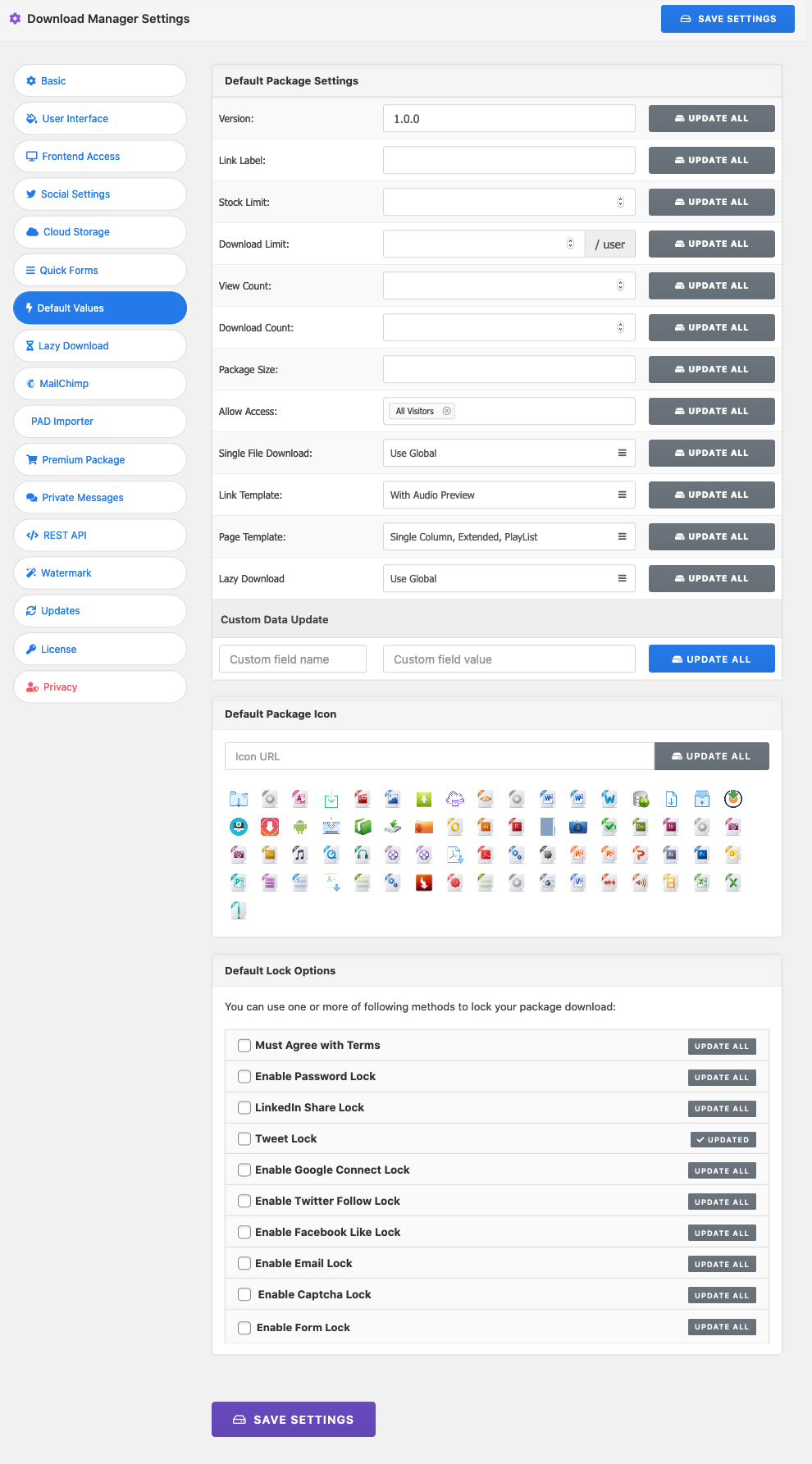
Thanks