
Forum Replies Created

For regular updating default values for all packages and settings, you may check this add-on, https://www.wpdownloadmanager.com/download/wpdm-default-values/, please let me know if it helps you
thanks
please check this add-on, https://www.wpdownloadmanager.com/download/advanced-access-control for controlling user-specific access,
category access for roles and packages follow these steps as I describe below,
before giving access to a certain category for a particular role you have to set from the edit category option,
then you have to make empty for Allow Access option or giving a particular role on it like as I image attached or as usual for select member option too,

because Package Access = Package Access + All Category Access = All Visitors + Subscribers = All Visitors
and Package Access = Package Access empty + Category Access(Subscribers) = Subscribers
or Package Access = Package Access(subscriber) + Category Access(Subscribers) = Subscribers
Thanks
Please, give your temporary wp-admin login details in a private reply for checking the issue
Thanks
Which plugins/add-ons you are using, please let me know, if possible, please share related URL and if possible, please, give your temporary wp-admin login details in a private reply for checking the issue
Thanks
I think you are talking about the Nginx web server, if you are using an apache server, you don’t need to have to adjust the server settings, you can easily manage packages from wp-admin panel or if you are using Nginx in your Cpanel you can follow this instruction too, please let me know if you have other queries
thanks
Hi,
After this update ( 3.1.17 or 5.3.7 ), you may face the following 2 issues:
- Upload is not working
- Showing “Invalid File Type” error when trying to download
Here is the reason and solution:
<hr/>
From WPDM Free 3.1.20 and WPDM Pro 5.3.7, we have changed the file type validation process during file upload and download. Now, you have to white file types to allow them to upload or download. You will find the option at Admin Menu ► Downloads ► Settings ► Basic Settings Tab ► Upload Settings section.
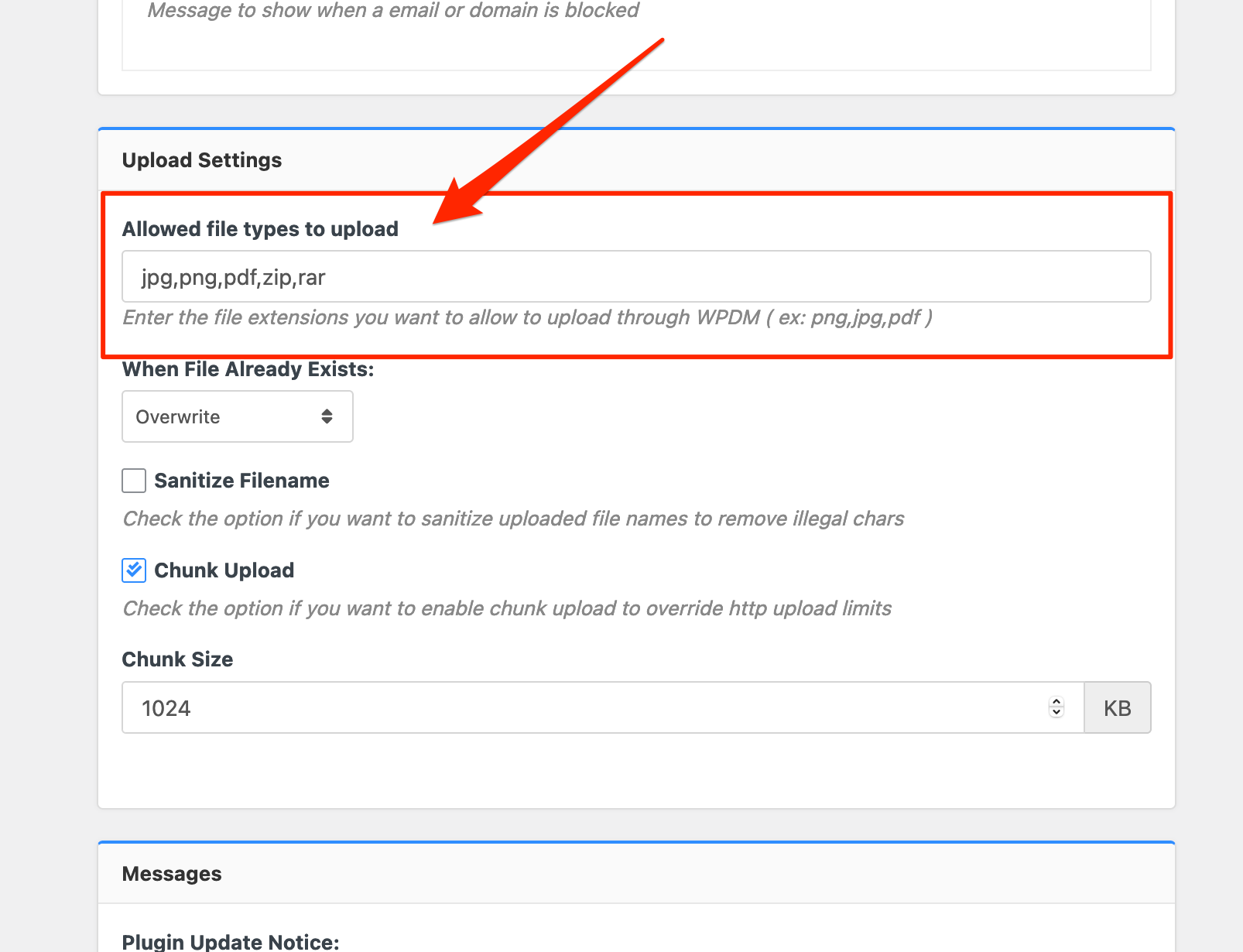
Please add file types ( texts, multiple texts separated by a comma ) as shown on the marked image. And then save settings. The shall resolve the issue.
or, Just Keep it Empty for WordPress default use as I image attached

thus it may resolve the issue
thanks
I think you are trying to filter last year data, you can filter data this month from 2021, please check
thanks
Hi,
After this update ( 3.1.17 or 5.3.7 ), you may face the following 2 issues:
- Upload is not working
- Showing “Invalid File Type” error when trying to download
Here is the reason and solution:
<hr/>
From WPDM Free 3.1.20 and WPDM Pro 5.3.7, we have changed the file type validation process during file upload and download. Now, you have to white file types to allow them to upload or download. You will find the option at Admin Menu ► Downloads ► Settings ► Basic Settings Tab ► Upload Settings section.
Please add file types ( texts, multiple texts separated by a comma ) as shown on the marked image. And then save settings. The shall resolve the issue.
or, Just Keep it Empty for WordPress default use as I image attached
thus it may resolve the issue
thanks
Please, give your temporary wp-admin login details in a private reply for checking the issue.
Thanks
please share your related file/package URL, if possible, please, give your temporary wp-admin login details in a private reply for checking the issue.
Thanks
Have you checked these options as I image attached,

from the download settings, please let me know
thanks
Okay, we shall adjust it for the features…
thanks
Yes, the feature is on beta-test/you can say developing, for now for the add-ons, you may simply follow these procedures,
1 ) Download the latest version from here https://www.wpdownloadmanager.com/user-dashboard/?udb_page=purchases
2 ) Install the latest version
thanks again
Yes, You can do that, but before that, you may check this doc too, https://www.wpdownloadmanager.com/how-to-increase-the-maximum-file-upload-size-in-wordpress-download-manager/, if you face any trouble/problem
and for any bulk-import, you may check this doc too, https://www.wpdownloadmanager.com/doc/bulk-import/
thanks
Hi,
If you are not comfortable working with helping add-ons like tiny-mce add-on, you can create manually the packages, for making enable registration you may follow these docs,
https://www.wpdownloadmanager.com/how-to-create-a-wordpress-user-registration-form/
please let me know how can I more help you or if you have other queies
thanks
It is working here as I video attached here,
please check, I hope it will work from your side too,
thanks
please adjust these options from Downloads > Settings as I image attached,

I hope it may help you for adjusting the speed/download
thanks
Hi,
yes, possible
by default, you are using link-template-default.php for the link template and page-template-default.php for the page template. After customizing/adjusting download button tag, you can copy the file in the theme directory naming a folder called download-manager, then paste it in tpls>page-templates for page template or tpls>link-templates for link template. and you can follow this doc for making backup files, https://www.wpdownloadmanager.com/doc/template-files/
also, you can use the pre-made link-templates or page-templates from here as i image attached,

from Downloads > Templates section
I hope those may help you
Thanks.
Hi,
You are able to filter between months for top packages as I image attached for those filter options,

please check, I hope it will work fine from your side
thanks
Please simply click the Save Settings again for the license key option from Downloads > Settings > License, which will regenerate the access token. Finally, go to the plugins page and the update will work fine this time
and for add-on for now,
1 ) Download the latest version from here https://www.wpdownloadmanager.com/user-dashboard/?udb_page=purchases
2 ) Install the latest version
thanks, I hope you have understood
Please check now, I hope it is looking very nice and clean, https://al-m.ca/speced-draft/, the categories also showing fine, please let know, if there any other conflicts with other pages
thanks
I think it is conflicting somewhere within your themes or plugins, can you please enable/disable other plugins for checking, you may also switch theme to another for checking, please let me know then
thanks
You may use this one-drive add-on, https://www.wpdownloadmanager.com/download/wpdm-onedrive/ or you can use the Insert URL as well for your purposes. It should work fine then
thanks
I have found the issue, soon you shall be updated about this
thanks
Hi,
For your information, Hide Everything” (When a user is not allowed to download) feature is available based on role user when a certain role is not allowed access the file/package and Download was expired message is shown based on user can’t able to download, can download between the available date, for hiding certain packages for expired date, there need some special customization code
thanks