
Forum Replies Created

Glad to hear that. However, if you need further help with anything else, then please don’t hesitate to open a new topic. If you get some free moments, can you please give us a 5* here https://wordpress.org/support/plugin/download-manager/reviews/?rate=5#new-post, It will inspire us a lot. Thanks in advance 🙂
Thank you again and regards
Hello Sitcom Software,
Hope you are well. And sorry for the inconvenience. Can please make Allowed file types to upload to * as I image attached from Downloads > Settings

Please kindly check and let me know.
Thank you and kind regards
Upload speed may depend on your internet speed and regarding upload file settings you can check the doc here, https://www.wpdownloadmanager.com/how-to-increase-the-maximum-file-upload-size-in-wordpress-download-manager/ and also upload settings as I image attached here from Downloads > Settings,

Please kindly check and let me know.
Thank you and kind regards
Hello Geonauta,
Hope you are well. For your issue, Please explore this doc details and copy again the license key from your account, https://www.wpdownloadmanager.com/doc/settings/license/. Please kindly check and let me know.
Thank you and kind regards
If you attached file URL, it will do so what you are facing now. Please attach the file directly instead of the file URL, thus I hope it will work for you. Please kindly check.
Thank you and kind regards
How did you attach the file? Have you attached the URL or attached direct file? Please kindly check and let me know.
Thank you and kind regards
For getting package ID, you can simply use this <?php echo $ID; ?>, please kindly check and let me know, if it works for you.
Thank you and kind regards
Hello Jonathan Dwinell,
Hope you are well. And sorry for the inconvenience. Please share the related URLs. if possible, please, give your temporary wp-admin login details in a private reply to check the issue.
Thank you and regards
Please kindly let me know, if you have any queries more.
Thank you and kind regards
I have back with information from our team that, update is coming soon for the issue. Please kindly check and let me know, if you have any more issue.
Thank you and kind regards
Please kindly share the related URL for checking the issue elaborately. if possible, please, give your temporary wp-admin login details in a private reply to check the issue.
Please kindly check and let me know.
Thank you and kind regards
You can use this jQuery code for replacing the tag icon,
$(document).ready(function() {
    $('.w3eden .fa.fa-tag').removeClass('fa-tag').addClass('fa-star');
});
Please kindly check and let me know if it works for you.
Thank you and kind regards
Can you please kindly check your related link template which you are using for the package in this page, https://cgshortcuts.com/partition-modifier ? Please kindly check and let me know.
Thank you and kind regards
Hello Ron Fredericks,
Hope you are well. I have already forwarded your concern to our team authority. Thanks for your appreciation.
Thank you and kind regards
Please kindly let me know, if you have any queries more.
Thank you and regards
Hello Dave Bergin,
Hope you are well. Please kindly share the related URLs. if possible, please, give your temporary wp-admin login details in a private reply to check the issue.
Thank you and regards
Yes, PDF Viewer plugin has been updated recently. And for hook issue, I have information from our team that, It will be adjusted in the next Download Manager update. Please kindly check.
Thank you and kind regards
As I have information from our team that, Along with filter hook, We will fix the issue in the upcoming update. Please kindly wait for that and let me know if you have any queries more.
Thank you and kind regards
Does the error effecting in the frontend of your website? I hope it will not affect any features of WPDM. Please kindly check and let me know.
Thank you and kind regards
Hello Laura,
Hope you are well. Thanks for writing to us.
For updating the WPDM PRO plugin, Please simply click the Save Settings again for the license key option from Downloads > Settings > License, and then please update the plugin from the wp-admin > plugins panel.
For saving settings again for the license key option from Downloads -> Settings -> License, that will regenerate the access token. Thus the plugin will be updated,
For updating WPDM add-ons, please download your plugin from here, https://www.wpdownloadmanager.com/user-dashboard/?udb_page=purchases,
And update manually from the wp-admin dashboard Plugins > Add New option. I hope, thus it will resolve your issue. For the Download > Settings > Updates option will may not work properly for some server settings. please check and let me know, if you have any queries.
Thank you and regards
I have back with information from our team that, We will fix the issue in the upcoming update. Please kindly check and let me know if you have any queries.
Thank you and kind regards
Hello Razvan Rosca,
Hope you are well. Thanks for writing to us. The demo is here, https://try.wpdownloadmanager.com/category-blocks/. You are able to achieve this feature using this add-on, https://www.wpdownloadmanager.com/download/wpdm-directory-add-on/. Please kindly check.
Thank you and kind regards
Can you please check again without sharing the link if it happens again? Please kindly check.
Thank you and kind regards
I have forwarded your concern to our related team member. Please kindly check and let me know if you have any queries.
Thank you and kind regards
Please kindly check now. I have re-attached the image,
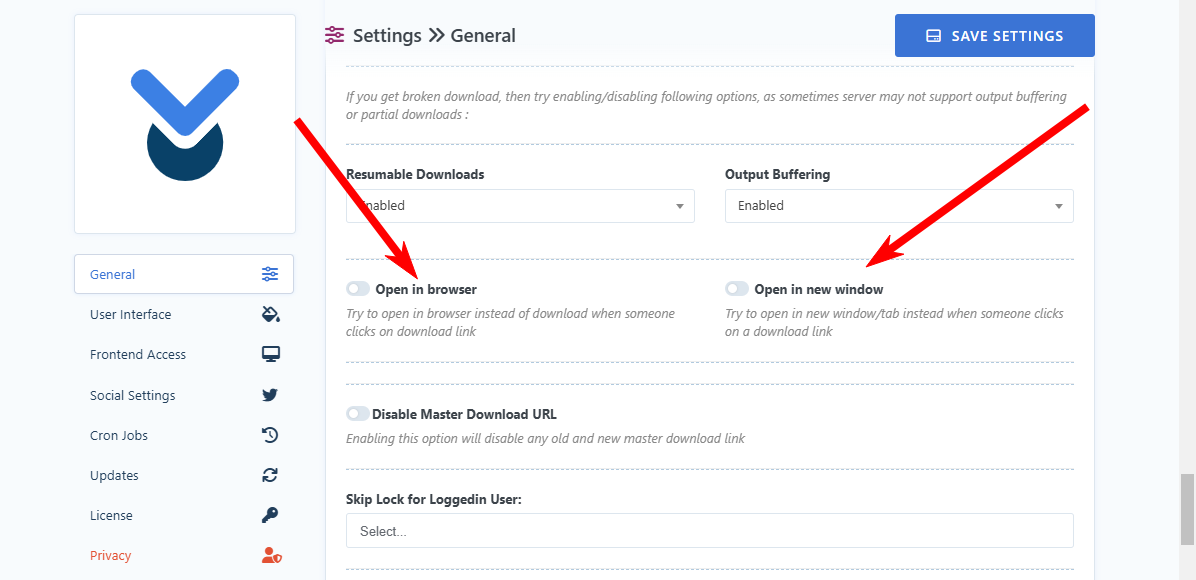
Please kindly check.
Thank you and kind regards