
-
AuthorSearch Results
-
Apr 6, 2022 at 9:01 am #170948
In reply to: Creating CSV Files and Uploading Files
Andrew BeniamsParticipantMorning
For your ref:
I have and followed the CSV ‘sample’ (and read the associated documentation) that’s where we started!!
The problem seems to be with the synchronisation of the actual download image files and the CSV once uploaded to Download Manager?!We are nearly there PLEASE can we get this resolved. See below for the CVS example
title description link_label password quota show_quota show_counter access template category icon preview files file_titles file_passwords file_prices package_dir individual_file_download cache_zip download_count page_template uid create_date update_date password_lock terms_lock linkedin_lock tweet_lock gplusone_lock facebooklike_lock email_lock custom_form_field email_lock_idl base_price sales_price tags acf_MoreInfo_source acf_MoreInfo_excerpt
Premium template Description 1 Download 0 0 0 guest link-template-default.php 123124 http://localhost/icons/box_download.png http://localhost/app-icon.png abc.txt,another-file.doc,other-file.pdf ABC File,Another File,Other File 123,asc1,34de2 12.35,11.5,22.00 1 1 31 page-template-default.php 1 20160122 20160122 1 0 0 0 0 0 0 name=1 1 25.99 9.99 Download Manager,Custom Tag,Tag Import custom field source custom field excerpt
Web developer iconset Description 2 Download 0 0 0 administrator,editor link-template-default.php 123124 http://localhost/app-icon.png /server/dir/path 1 1 15 page-template-default.php 1 20160122 20160122 0 0 0 0 0 0 0 name=1 1 19.99 9.99 Download Manager,Custom Tag,New Tag custom field excerpt
tech 68 new final Level 2 Download 0 0 0 administrator,subscriber link-template-default.php Senior Coaching,Level 2,Game Related,goal keeping,Technical Skills level2 tech68newfinal.png level 2 tech 68 new final 0 1 0 page-template-default.php 0 0 0 0 0 0 0 0 name=1 1 Junior,5 to 8,Fun Practices custom field excerpt
control techniques 2019 Level 2 Download 0 0 0 administrator,subscriber link-template-default.php Senior Coaching,Level 2,Game Related,goal keeping,Technical Skills level2controltechniques2019.png level 2 control tech niques 2019 page-template-default.php Junior,5 to 8,Fun Practices
defending principles 6v6 Level 2 Download 0 0 0 administrator,subscriber link-template-default.php Senior Coaching,Level 2,Game Related,goal keeping,Technical Skills level2defendingprinciples6v6.png level 2 defending principles 6v6 page-template-default.php Junior,5 to 8,Fun Practices
Multi-Pack principles Level 2 Download 0 0 0 administrator,subscriber link-template-default.php Senior Coaching,Level 2,Game Related,goal keeping,Technical Skills level2 tech68newfinal.png,level2controltechniques2019.png,level2defendingprinciples6v6.png level 2 tech 68 new final,level 2 control tech niques 2019,level 2 defending principles 6v6 page-template-default.php Junior,5 to 8,Fun PracticesApr 6, 2022 at 8:57 am #170947In reply to: Upload csv when files contains spaces
Andrew BeniamsParticipantYes I have and followed that ‘sample’ (and read the associated documentation) that’s where we started!!
The problem seems to be with the synchronisation of the actual download image files and the CSV once uploaded to Download Manager?!We are nearly there PLEASE can we get this resolved. See below for the CVS example
title description link_label password quota show_quota show_counter access template category icon preview files file_titles file_passwords file_prices package_dir individual_file_download cache_zip download_count page_template uid create_date update_date password_lock terms_lock linkedin_lock tweet_lock gplusone_lock facebooklike_lock email_lock custom_form_field email_lock_idl base_price sales_price tags acf_MoreInfo_source acf_MoreInfo_excerpt
Premium template Description 1 Download 0 0 0 guest link-template-default.php 123124 http://localhost/icons/box_download.png http://localhost/app-icon.png abc.txt,another-file.doc,other-file.pdf ABC File,Another File,Other File 123,asc1,34de2 12.35,11.5,22.00 1 1 31 page-template-default.php 1 20160122 20160122 1 0 0 0 0 0 0 name=1 1 25.99 9.99 Download Manager,Custom Tag,Tag Import custom field source custom field excerpt
Web developer iconset Description 2 Download 0 0 0 administrator,editor link-template-default.php 123124 http://localhost/app-icon.png /server/dir/path 1 1 15 page-template-default.php 1 20160122 20160122 0 0 0 0 0 0 0 name=1 1 19.99 9.99 Download Manager,Custom Tag,New Tag custom field excerpt
tech 68 new final Level 2 Download 0 0 0 administrator,subscriber link-template-default.php Senior Coaching,Level 2,Game Related,goal keeping,Technical Skills level2 tech68newfinal.png level 2 tech 68 new final 0 1 0 page-template-default.php 0 0 0 0 0 0 0 0 name=1 1 Junior,5 to 8,Fun Practices custom field excerpt
control techniques 2019 Level 2 Download 0 0 0 administrator,subscriber link-template-default.php Senior Coaching,Level 2,Game Related,goal keeping,Technical Skills level2controltechniques2019.png level 2 control tech niques 2019 page-template-default.php Junior,5 to 8,Fun Practices
defending principles 6v6 Level 2 Download 0 0 0 administrator,subscriber link-template-default.php Senior Coaching,Level 2,Game Related,goal keeping,Technical Skills level2defendingprinciples6v6.png level 2 defending principles 6v6 page-template-default.php Junior,5 to 8,Fun Practices
Multi-Pack principles Level 2 Download 0 0 0 administrator,subscriber link-template-default.php Senior Coaching,Level 2,Game Related,goal keeping,Technical Skills level2 tech68newfinal.png,level2controltechniques2019.png,level2defendingprinciples6v6.png level 2 tech 68 new final,level 2 control tech niques 2019,level 2 defending principles 6v6 page-template-default.php Junior,5 to 8,Fun PracticesApr 6, 2022 at 5:34 am #170942
Nayeem RiddhiModeratorHello Gail,
Hope you are well. Can you please share the non-stamped normal PDF file? The link you have shared is stamped downloading a PDF file. please let me know.
Thank you and regards
Apr 5, 2022 at 6:04 pm #170936In reply to: Missing Select Members Input Field
Ryan AnemaParticipantThis reply has been marked as private.Apr 5, 2022 at 4:21 pm #170931In reply to: Creating CSV Files and Uploading Files
Andrew BeniamsParticipantHello again
I have managed to add the CVS (T_nfp_package_u16_youth_coach_test_3_22.csv) and also uploaded via FTP the image files (Ti.U16 syllabus.png,Ti.U16youthacademycover.png,TU16 Youth Academy 1a.png,TU16 Youth Academy 1b.png) to the subfolder ‘download-manager-files’ / ‘Test 24_3_22’.
Please refer to the example packages:
https://nfpsoccer.co.uk/download/ttu16-youth-academy-1a-png/
https://nfpsoccer.co.uk/download/tti-u16-syllabus-png/The problem seems to be linking the download files to the packages. If I go to ‘Import / Export’ the ‘Test 24_3_22’ folder and upload – whilst the individual files are ‘linked’ the ‘Title’ is the file rather than the ‘file_name’?!
Where there are a ‘group’ (more that 1 file) they message “Sorry! File not found!”Is ther something I need to do differently after uploading the files by FTP?!
Hope you can help?!
Thanks
Andrew B
Apr 5, 2022 at 10:52 am #170921
Nayeem RiddhiModeratorHello Jorge,
Hope you are well. For categories hierarchy, giving access to a certain category for a particular role you have to set from the edit category option, then you have to make empty for the
Allow Accessoption or have to give a particular role on it like as I image attached or as usual for the select member option too,
because
Package Access = Package Access + All Category Access = All Visitors + Author = All Visitors

and Package Access = Package Access empty + Category Access(Author) = Author

or Package Access = Package Access(Author) + Category Access(Author) = Author
More details can be found in the below link,
Hope you have understood. And The feature is actually for packages, selected roles will be applied to assigned packages, and the information I have given above. Thanks for your understanding and appreciation.
Thank you and regards
Apr 4, 2022 at 8:36 pm #170905
Wayne DugdaleParticipantThis reply has been marked as private.Apr 4, 2022 at 5:32 pm #170898In reply to: User added file listed as pending
Paul DParticipantHi Tanvir,
I am using this shortcode in the sidebar. I want to hide the Apply filter thing.<br />[wpdm_category id="Documents" order="desc" template="sidebar_text_links" cols=1]
 Apr 4, 2022 at 4:10 pm #170887
In reply to: WPDM Package Create Question
Nayeem RiddhiModeratorHello Sumit,
We have also an add-on called Download Manager REST API that will help you create packages,
Can you please check this too, if it fulfills your requirements? and how you are trying to attach a link, in the frontend or backend section, please elaborate on this.
Thank you and regards
Apr 2, 2022 at 5:09 pm #170813In reply to: User added file listed as pending
TanvirSpectatorHello Paul,
In our testing environment the below setting is working perfectly and it is creating a package instantly.

However, I would suggest you to check other options too in this settings page if those are properly set also update wpdm and all related addons of wpdm you are using to the latest version. Current version of wpdm is
6.1.4. Make sure you are using that. If you can’t update the plugin and addons from your website, just update from here.If the issue still persists and you are worried about sharing the credentials of your live website, could you please create a staging site with identical settings and share the credentials for that. This way we can debug things in the exact same environment as your live site.
Here is a video to help you create a staging site – Link to the Video.Looking forward to resolving your issue asap.
Apr 2, 2022 at 6:47 am #170797In reply to: Force File Download
TanvirSpectatorHello,
Hope you are well.
Could you please share related website link to check the issue properly.
However, If you are using remote url then download or open in browser will not depends on wpdm pro, If you want to force download, you need to upload it with wpdm pro or use server file browser to attach file.
ThanksApr 1, 2022 at 2:59 pm #170672In reply to: Problem with categories
Nayeem RiddhiModeratorHello Gergi,
I have checked that, your packages download links are coming from the google drive directory. I think this speed depends on Google Drive storage. please let me know.
Thank you and regards
Apr 1, 2022 at 2:05 pm #170668In reply to: Creating CSV Files and Uploading Files
HumayonSpectatorHello Andrew,
Thank you for writing back to us.
Regarding your questions please check the answer below.
1. Go here https://nfpsoccer.co.uk/download/6-conditioned-game-various/ and click on the first download link.
It’s working fine after disabling this theme option here: https://prnt.sc/fovTcXwKJrHu.2. The CSV file link you have shared is not working. Please check this: https://prnt.sc/oIFo5NQGyk-c.
3. There is a column named
filesin the CSV file. You need to upload your related file in thewp-content/uploads/download-manager-filesfirst by using FTP software or even via cPanel before importing files and then simply put the file name in the CSV file under thefilescolumn. Here’s the reference screenshot: https://prnt.sc/R21-9ZzurTqU4. If your files are in google drive then please put your related google drive file URL in the CSV file under the files column before importing. However, if your files are on the server then follow the
step 3procedure.Regarding the FTP upload procedure, you can follow this helpful documentation: https://www.wpkube.com/bulk-upload-files-wordpress-via-ftp-methods/.
I hope that helps and let me know if you have any queries regarding this.
Thanks.
Apr 1, 2022 at 11:43 am #170665Topic: WPDM Package Create Question
in forum Download Manager Free
Sumit dattParticipantHello sir,
I’m creating wpdm package by using WPDM()->package::create via PHP. There are few values which I’m not able to enter, Can you please help me ?
1. How can I add a Link for download via ‘files’ ► array() ?
2. What value should I enter to make the file accessible to all in ‘access’ ► ” ?
3. Why ‘post_name’ not working as I want to set a custom URL.Please help as I’ve tried a lot but nothing worked.
Mar 31, 2022 at 9:12 pm #170659In reply to: Problem with categories
Pierre GergiParticipantHello,
It still slow.This is the code´:
[wpdm_all_packages login=0 thumb=1 items_per_page="8" categories="ترانيم,روحانيات,سرياني,سرياني/تعليمي,سير الأعلام,سير القديسين,طقس وصلوات,عام,قبطي,قبطي تعليمي,كتاب مقدس,كنسي,لاهوت دفاعي,لاهوت عقيدي,للأطفال,,وعظ," jstable=1 order_by="field_name" order="ASC/DESC" cols="title,file_count,download_count|categories|update_date|download_link" colheads="Title|Categories|Update Date|Download::155px"]This is the link .. please test it
https://www.qenshrin.com/ebooksq
Thank youT
Mar 31, 2022 at 6:18 pm #170654
Wendy ChoongParticipantThis reply has been marked as private.Mar 31, 2022 at 6:11 pm #170653In reply to: User Redirect Hooks
Akotherm GmbHMemberHey Nayeem,
thank you for that link, but I need to set different destinations for different user-roles.
For example:if( !$admin_role_found && $intern_role_found ) { $redirect_to = home_url("/intern/"); } else if ( !$admin_role_found ) { $redirect_to = home_url("/downloadcenter/"); }Thanks
Mar 31, 2022 at 12:58 pm #170637
Nayeem RiddhiModeratorHello FRANCK,
For categories hierarchy, giving access to a certain category for a particular role you have to set from the edit category option, then you have to make empty for Allow Access option or have to give a particular role on it like as I image attached or as usual for select member option too,
because
Package Access = Package Access + All Category Access = All Visitors + Author = All Visitors

and Package Access = Package Access empty + Category Access(Author) = Author

or Package Access = Package Access(Author) + Category Access(Author) = Author
More details can be found in the below link,
Hope you have understood now. please let me know
Thank you and regards
Mar 31, 2022 at 9:51 am #170627In reply to: Creating CSV Files and Uploading Files
Andrew BeniamsParticipantThis reply has been marked as private.Mar 31, 2022 at 5:52 am #170613In reply to: My import gets stuck at 1%
HumayonSpectatorHi @tfoulkes68,
I hope you are well and doing great.
Glad to hear that you found it, and also, we have mentioned it in detail in our related documentation.
Please check the below link for future reference.
Have a good day!
Mar 30, 2022 at 1:10 pm #170571In reply to: change Template
HumayonSpectatorHi @idiedrich,
Greetings and Welcome to the support forum.
To customize the related link template please copy your file from
src/package/views/link-templates/link-template-panel.phpto the…attire/download-manager/link-templatesdirectory.You will find more details regarding this on our documentation page: https://www.wpdownloadmanager.com/doc/template-files/.
Let me know if you still have any queries regarding this.
Regards
Mar 30, 2022 at 10:32 am #170565In reply to: Subdomain License
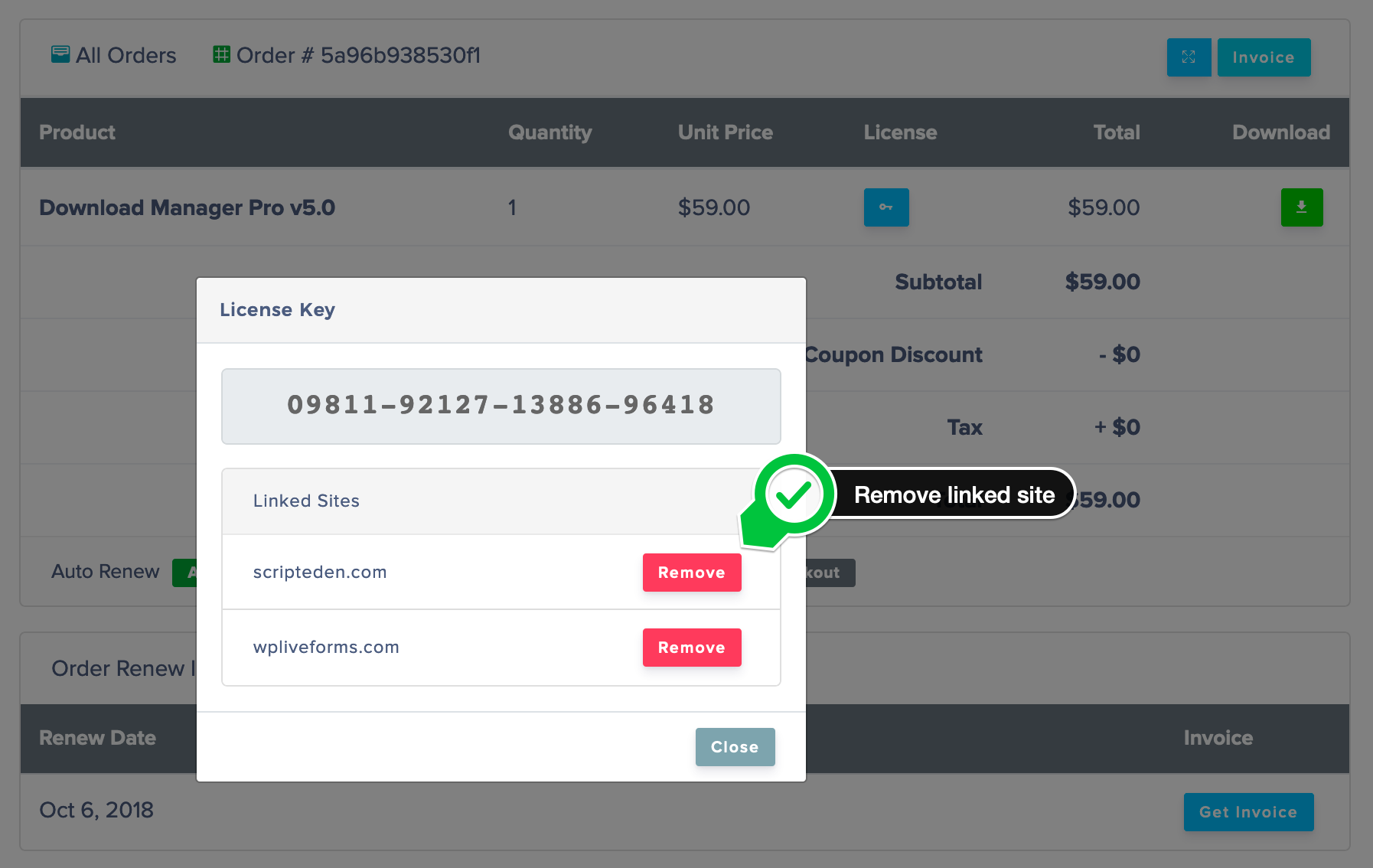
ShahjadaKeymasterHello @akotherm_hompage, sorry for the confusion, you can’t use single site license key in more than once installation, if you want to use the key in dev site, you need to unlink it from main site first, what we explained here https://www.wpdownloadmanager.com/doc/settings/license/ in 3rd screenshot.
Sometimes, you may need to move your license to a different domain, like development to production, in such cases, you can remove the linked domain to use the key with a new domain.
 Mar 30, 2022 at 5:02 am #170544
In reply to: Repeated Download Button Bugs?
ShahjadaKeymasterPassword lock works fine with single file download, however, if you want to remove package download button, you need to remove
[download_link]tag from page template.
More about page template:
https://www.wpdownloadmanager.com/doc/templates/page-templates/
https://www.wpdownloadmanager.com/doc/templates/creating-a-new-template/Mar 29, 2022 at 4:05 pm #170508Topic: change Template
in forum Download Manager Free
Ingo DiedrichParticipantI want to change the linktemplate panel in the free plugin.
I copied the file …src/package/views/link-templates/link-template-panel.php to the …attire/download-manager/ directory.
I changed this file. But the changes are not visible.
What am I doing wrong?Mar 29, 2022 at 2:29 pm #170500In reply to: How to add package version to title?
Nayeem RiddhiModeratorHello cosmin,
Hope you are well. For using the template tags, you may need to edit the templates from
Downloads > Templates > link/page Template. please check and let me knowThank you and regards
-
AuthorSearch Results
Search Results for 'download link'
-
Search Results
-
Topic: WPDM Package Create Question
Hello sir,
I’m creating wpdm package by using WPDM()->package::create via PHP. There are few values which I’m not able to enter, Can you please help me ?
1. How can I add a Link for download via ‘files’ ► array() ?
2. What value should I enter to make the file accessible to all in ‘access’ ► ” ?
3. Why ‘post_name’ not working as I want to set a custom URL.Please help as I’ve tried a lot but nothing worked.
Topic: change Template


