Search Results for 'all downloads'

Viewing 25 results - 2,051 through 2,075 (of 5,451 total)
  • Author
    Search Results

  • Felix De Caluwe
    Participant

    All given downloads don’t work since I downloaded the given WordPress Download Manager (the old download plugin couldn’t be updated anymore). If I click on the download-button, there’s just a download of a “download-not-available.txt” – all previous linked documents aren’t linked anymore. And I neither know where to find them in the backend, nor do I know how to re-attach them to the respective link. (https://hans-josef-fell.de/dokumente/)


    Nicholas Nagle
    Participant

    When clicking on the link under package name for files downloaded on the pages DOWNLOAD HISTORY & LAST 5 DOWNLOADS it just goes to a blank screen.

    Should it be allowing them to download again?

    #138857

    Shahjada
    Keymaster

    Yes, you can do that by modifying the shortcode parameter. You can specify the colums you want to show in shortcode parameter, please check the doc:
    https://www.wpdownloadmanager.com/doc/short-codes/wpdm_all_packages-list-all-downloads-in-tabular-format-in-a-page/

    #138787

    Sidratul Sohrat
    Spectator

    Hi,
    Please follow the steps to upgrade:
    1.Download the latest version from https://www.wpdownloadmanager.com/user-dashboard/?udb_page=purchases
    2.Install and activate the latest version
    3.Done!

    Also check if there correct license key in your Downloads > Settings > License option. and save settings again. Then try again to update.

    Hope it will not break your site. If it breaks please let us know.

    From the next update, you will be able to use the automatic upgrade as usual.

    #138721

    Mason Portell
    Participant
    This reply has been marked as private.

    Mason Portell
    Participant

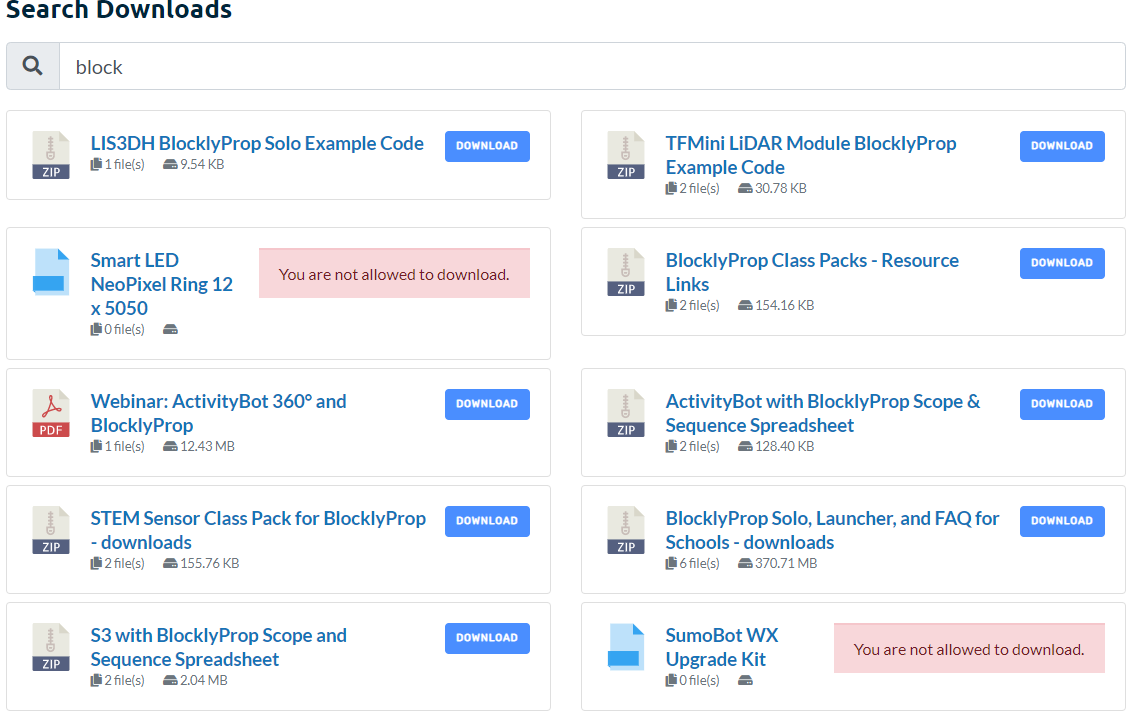
    I am using this plugin on a development site, and my woocommerce products are showing up as downloads? I dont know why.

    I am using this Shortcode: [wpdm_search_result init=1 template="link-template-default" cols=2]

    Here is a picture: https://i.gyazo.com/229178c8ed7394dda146b57923f2ad0b.png

    The “You are not allowed to download” warnings are all WooCommerce products. I do not know why they are being pulled in. The SLUGs of the WooCommerce have /products/ in the URL and the downloads have /package/ in the URL.

    I can share more details in a private response.

    #138705

    Sidratul Sohrat
    Spectator

    Hi
    You can check Downloads>Subscribers to know which users actually downnloaded the file. Downloaded will show on the right side of the users name and email address.

    #138696

    bostjan laba
    Participant

    new update of directory add on has missing “languages” folder. I’ve created it under plugins/wpdm-archive-page/ and copied my own translations and now it works again…

    Also:
    – now it properly does not show all-downloads until you select a category BUT breadcrubs still show “Home All downloads” (make no sense).
    – my translation works on HOME ALL DOWNLOADS on initial page opening. BUT when I select a category and go back (click “HOME”), the translation does not work anymore for breadcrumbs.

    • This reply was modified 5 years, 12 months ago by bostjan laba.
    #138630

    Joshua Laing
    Participant

    I thought it was something on my end I tried different themes even ones from them and reinstalled my server and files and its still just showing a rectangle or an arrow for the download count and it says Download and not like Total DownloadS with an S on the end.

    #138584

    bostjan laba
    Participant

    Btw, is there a way, thru css perhaps, to change category listing button width and height?

    This would be very useful when there’s not many categories, but there is many downloads and especially with longer file titles.

    This is our case: https://tehnicni.info/zakonodaja-eu/ (page is in Slovenia language but not important).

    Bostjan

    #138549

    In reply to: ISSUE WITH AMAZON s3


    Jarrett Berl
    Participant

    Awesome thank you for quick response. That worked.

    Couple questions:

    1. https://share.getcloudapp.com/QwukAb78 Is it possible to re-direct users to the downloads page from this screen, or make it more prominent so there is no confusion?

    2. When we assign a user access to a download, is it possible to use their email or only the username works to add them?

    3. Where is the best place to learn what all these options mean? https://share.getcloudapp.com/6quPrxAl


    smoco
    Participant

    Hi,
    the free version worked like a charm. After upgrading from free to pro version all my downloads are broken and i get this error:
    <br /><b>Notice</b>: A non well formed numeric value encountered in <b>/var/www/clients/client15/web13/web/labw/wp-content/plugins/download-manager/admin/tpls/metaboxes/file-info.php</b> on line <b>18</b><br /><br /><b>Notice</b>: Uninitialized string offset: 1600115352 in <b>/var/www/clients/client15/web13/web/labw/wp-content/plugins/download-manager/admin/tpls/metaboxes/file-info.php</b> on line <b>18</b><br /><br /><b>Warning</b>: Illegal string offset 'title' in <b>/var/www/clients/client15/web13/web/labw/wp-content/plugins/download-manager/admin/tpls/metaboxes/file-info.php</b> on line <b>18</b><br /><br /><b>Notice</b>: Uninitialized string offset: 0 in <b>/var/www/clients/client15/web13/web/labw/wp-content/plugins/download-manager/admin/tpls/metaboxes/file-info.php</b> on line <b>18</b><br />
    Screenshot
    Any help?

    The only reason i switched from free to pro is that i had to make a small change in the default link template. Can i copy the default link template to my child theme and do the changes? if so i would go back to free and ditch the pro version.

    Matt

    • This topic was modified 5 years, 12 months ago by smoco.

    bostjan laba
    Participant

    Hi,

    using directory add-on I have added a shortcode on my webpage which has a “category” attribute set (which is ONE of my parent categories). However, the initial state of the webpage shows all downloads overall (it should show all downloads UNDER DEFINED PARENT CATEGORY).

    I would like to:
    1. show only “all downloads which belong under defined parent category and it’s subcats”
    2. if I want to, I’d like to show no downloads under “home” until user select a subcategory
    3. Remove the “breadcrumbs” line “Home Parent cat Subcat” and just add a parent category on top of subcategory list (could be named “Home” actually)

    How do I achieve all this?

    Thanks

    Bostjan

    #138475

    David Baker
    Participant

    I’ve installed download pro – and it works….

    However, there are more than 50 downloads on a customers site ( paye.net/paye-projects ) and when you first select a download – you get the invalid download link…

    Then you clear your cache and you get the correct link.

    However, the end-user isn’t going to do this – they will simple go somewhere else.

    Can you help?

    thanks

    David

    #138429

    Shahjada
    Keymaster

    Hello @markshipley77,
    Please check the doc for all downloads table here:
    https://www.wpdownloadmanager.com/doc/short-codes/wpdm_all_packages-list-all-downloads-in-tabular-format-in-a-page/
    You can specify columns here, for column data use title instead of page_link to remove the link from there title.

    Yes, you can remove icon with thumb, that also mentioned in the doc above.


    odessu
    Participant

    Hi,

    I updated today to the newest version of WPDM and my (custom) template shows all downloads wrong. I want them to be in a row and not one under the other, like it was before updating the plugin. Dear Support, can you send me a solution for that.

    Example: https://pressebereich.yupik.de/download/silicium/


    Brett Baker
    Member

    The popup box appears behind the save dialogue on all downloads even those with a set start and end dates specified. it says: Download was expired on October 14, 2020 11:27 AM but the download actualy comences?

    I have updated it to the latest Plugin Version 5.2.4 and does the same thing. I tried adding dates to some of the items in case not having any dates was the issue but it displays the same if I add valid dates or leave them blank?

    no idea what the issue is or how to find the problem?

    #138360

    In reply to: ISSUE WITH AMAZON s3


    Jarrett Berl
    Participant
    This reply has been marked as private.

    We have a problem with the WPDM-archive, category filtering, cat_view”extended”.
    We want to see only some categories Not all file downloads. Instead it happens that as soon as the page is opened it shows all the existing download files.


    cbenson583
    Member

    believe I have figured out a workable solution with the lates release of Download Manager. I am able to use a direct link to a download manager category page and have the listing show the search and link template of my choice. However, the title of the category and breadcrumbs are missing. I have turned off all other plugins except download manager, the archive page, default values and tiny mce add-on and switched to the 2019 theme to verify that there are no conflicts with your plugin.

    Can you please tell me how to get my page to show the title and the breadcrumb as shown in your demo here – https://demo.wpdownloadmanager.com/wpdmpro/downloads/free-downloads/?

    https://hr.staging18.gsu.edu/downloads/benefits-health-wellness/ – The title should be Benefits Health & Wellness


    Mark Perry
    Participant

    We are getting an error on all our downloads. When we click on the Download button we get ‘Headers already sent in /home/site/wwwroot/index.php on line 4’ The downloads were working fine earlier this month. We updated the plugin to the latest Version 5.2.4.

    It is for all our downloads. Here is an example

    https://www.springridgeonline.com/wpdm-package/october-2020/

    #138079

    Ertan Ljajic
    Participant

    Hello again,

    I did some research and I think that I finale have an idea of how to set up the system using your plugins. I have 2 questions for you:
    1) Can I have packages sell both as single products and via subscriptions? So for if the user has a subscription with 3 monthly downloads and spends those 3 monthly downloads can that user buy a new package separately? And can subscribers with the monthly free downloads download packages with the prices at all?

    2) On the WP Pro Membership page (https://www.wpdownloadmanager.com/download/wp-pro-membership/) there is a list of supported payment gateways:

    PayPal – Integrated
    Authorize.net – Integrated
    2Checkout – Add-on
    Stripe – Add-on
    Alipay – Add-on
    Paystack – Add-on

    There is no Coinbase payment gateway in a list, although you send me a link to it. So does this addon supports Coinbase or not?

    #138077

    DAVID MEEKE
    Member

    I have installed the free version and linked my downloads to a google drive. I would welcome help to achieve the following.

    I want to display my downloads in a grid whilst displaying the respective image for the pdf file with an image hover mouse over effect.

    I would also like to have categories and tags for the downloads with the ability to select display of downloads by category and tag filter.

    Happy to purchase software to achieve this and all advice welcome.

    David

    #138049

    Hi,

    I have just renewed my licenses for both Download Manager Pro v5.2 and WordPress PDF Stamper Plugin, but cannot get the stamper to install. It is still marked as ‘Buy now’ in the Add ons section, and when I go to ‘Updates’ it shows Install as an option for one and expired for the other (see screenshot 1).

    When I click ‘Install’ it turns green and says ‘Success’, and when I click ‘Save settings’ it constantly spins. When I go back to Updates, it’s back to ‘Install’.

    Can I get some advice ASAP – I’m getting users who have paid for downloads that I can’t release until they can be stamped.

    Does it have something to do with being on a multisite setup? I’ve tried it Network Activated and not Network Activated – same result.

    Thanks!

    Patrick


    Ali
    Member

    Hello
    We are trying to create a page template throw Downloads -> Templates -> Page Template, but the editor allowing only HTML text.
    Can you please enable the default editor of the website like Gutenberg, Avada, or Elementor to make it much easier to build those templates?

Viewing 25 results - 2,051 through 2,075 (of 5,451 total)