
Forum Replies Created

Hello @Dshank,
Hope you are well.
You can export downloads from the Downloads > Import/Export menu
https://prnt.sc/bv-mmrvwEwD3
Or you can follow this
After exporting the csv file with downloads packages, you just remove other columns of the csv file to keep only the titles column.
Thanks
Hello Clan,
Hope you are well.
Could you please share the related page/file/package URL with us with details?
It helps us to quickly figure out the issue and resolve it immediately.
Thank you
Hello,
I am sorry I am not able to update or delete wpdm extended shortcode from the wp dahsboard as it is always showing error.
Please delete that from cpanel or ftp then reinstall it. Also dont forget to update wpdm to the latest version 6.1.6 as you are using old version that is 6.0.0 Also please update other adddons of wpdm to the latest version.
If the problem still persists, please let me know after deleting the problematic wpdm extended shortcode. I will check the issue.
Thanks
Delete button is actually working fine, user need to active the option from private message settings:
https://prnt.sc/Hyb9HH9I5B3F
Hello Cedric,
Sorry to hear about the issue.
Could you please delete wpdm extended shortcodes and reinstall it? Also please update wpdm and all other addons of wpdm. I hope it will solve the issue.
If possible please also share the admin access of your website in a private reply.
It helps us to quickly figure out the issue and resolve it immediately.
Thank you
Hello,
Sorry for this inconvenience.
Originally Backslash is used as an escape character. I think It is not showing for sanitized code of WPDM.
Please use the html entity ∖ or ∖ to output the backslash. I tested and found that it will solve the issue.
Thank You
Hello @Insain,
Sorry to hear about the issue.
Could you please share the related page/file/package URL with us with the detailed issue?
If possible please also share the admin access of your website in a private reply.
It helps us to quickly figure out the issue and resolve it immediately.
Thank you
Hello @esseanet,
Thank you for your query.
Auto-install sometimes fails due to auth error or server file permission issue.
However, you always can download any plugin and add-on from https://www.wpdownloadmanager.com/user-dashboard/?udb_page=purchases and install it.
Feel free to us know for further assistance.
Hello Ines,
Hope you are well.
You can check out our below addon for this purpose.
Please let me know if it meets your requirements.
Thanks
Hello Verne,
I am sorry currently it is not possible with amazon s3 addon.
However, you can mention and request the feature below:
It could be added in the next update.
Thanks
Hello,
I am sorry currently shared folder is not set with the latest version of wpdm.
It could be a latest bug.
However, I have forwarded the issue to the developer team, soon it will be fixed and new updated version will be released.
Thanks
Hello,
Metadata is not applied to a bucket. It’s applied to an object. S3 doesn’t have a feature that would automatically apply metadata to a newly created object.
Third party products like Cloudberry Explorer and Bucket Explorer allow setting default metadata for a bucket, but they apply this metadata to all the objects in the background.
Thanks
ok after checking the issue I will let you know soon
Hello,
Sorry to hear about the issue.
Sometimes it may happen for image, video, or audio files when you hit the download button, it opens in the browser instead of downloading. You can change the behavior and force download amazon s3 files. You need the follow the steps marked on the image below:
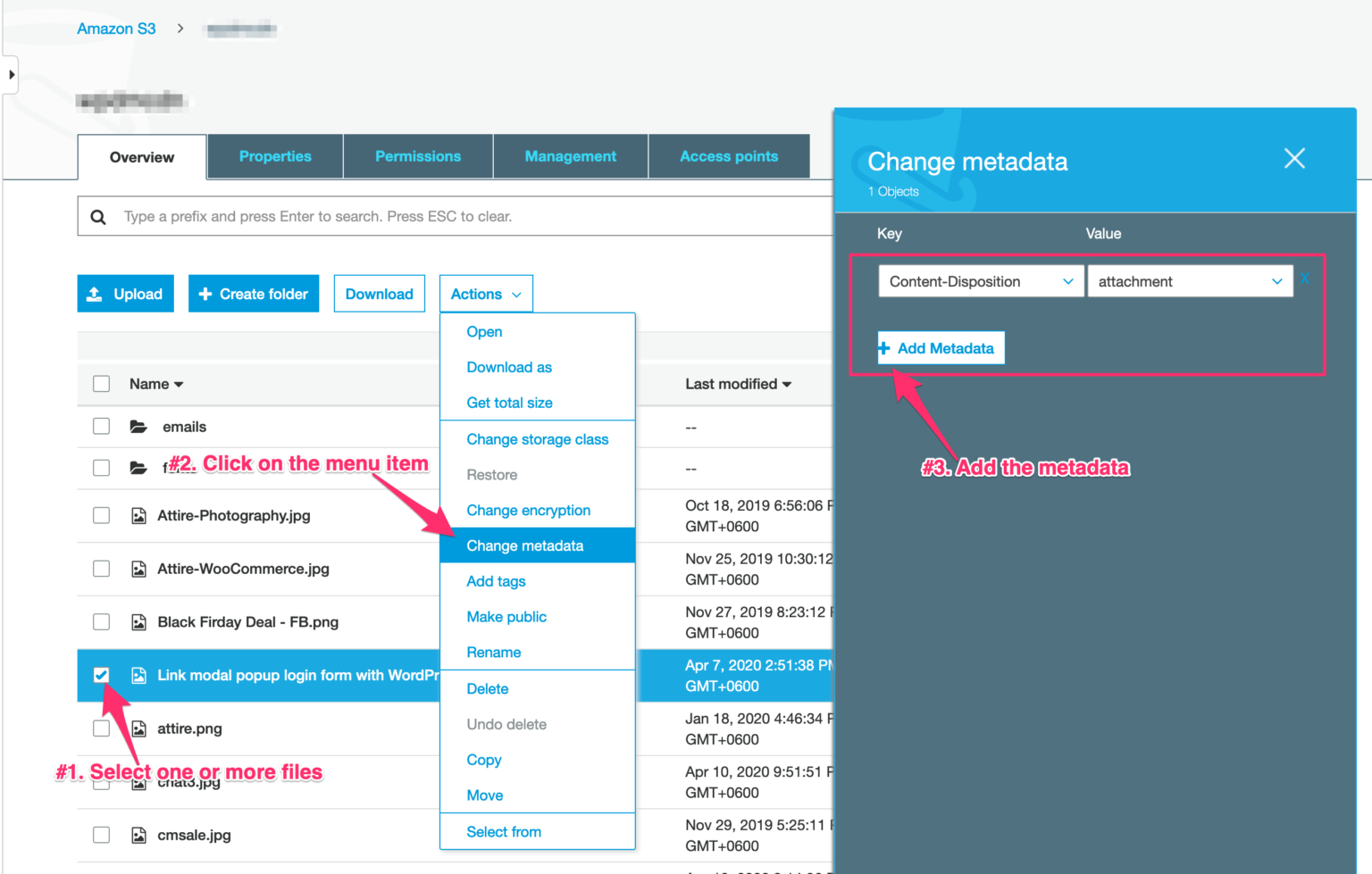
Thanks
Hello,
Sorry to hear about the issue.
Sometimes it may happen for image, video, or audio files when you hit the download button, it opens in the browser instead of downloading. You can change the behavior and force download amazon s3 files. You need the follow the steps marked on the image below:
Thanks
Hello Neil,
Sorry to hear about the issue.
Could you please share the related page/file/package URL with us with the detailed issue?
If possible please also share the admin access of your website in a private reply.
It helps us to quickly figure out the issue and resolve it immediately.
Thank you
Hello,
I am sorry I am not seeing any file to download, when I click the download, it shows xml with notice that NoSuchBucket.
Please create a test package to show me the issue and any general package by uploading files directly in wpdm to show if that works fine.
Thanks
Hello Neil,
Please make sure that you are using the latest version of wpdm that is 6.1.6
Also there can be a conflict with other third-party plugins, can you please disable/enable other plugins except wpdm one by one to check if any particular plugin is causing the conflict? you may also switch theme to another for checking,
please let me know then If still the problem persists, please provide temporary admin access in a private reply.
With Regards
Hello Neil,
Sorry to hear about the issue.
Could you please share the related page/file/package URL with us?
If possible please also share the admin access of your website in a private reply.
It helps us to quickly figure out the issue and resolve it immediately.
Thank you
Hello ,
Sorry to hear about the issue.
Could you please share the related page/file/package URL with us?
If possible please also share the admin access of your website in a private reply.
It helps us to quickly figure out the issue and resolve it immediately.
Thank you
Hello Susan,
Sorry for this inconvenience.
Make sure that WPDM and all add-ons you are using of WPDM are in the latest version. If you can’t update it directry from WordPress dashboard, Please update from here.
current version of wpdm and Advanced Custom Fields extension is 6.1.6 and 2.2.8 respectively.
You can also delete the plugins and reinstall it to check if the issue still persists.
If, still the problem exists then please share your admin login credentials with us in a private reply so that we can debug and give you a better solution about it?
Best Regards
Hello @Futureyoon,
Glad to see you again.
In that case, package password will be applicable and single files password will be overridden. So if you download a package after providing a password, all files will be downloaded of that package in a zip file.
Thanks