
Forum Replies Created

Sorry in vacation, checking just now, this package https://pedrasriscas.pt/download/alisia-aneis/ is not updating for both allow access role as well as the page template and the link-template, can you please create a similar package new for testing
thanks
Please share your related package URL if possible, please give your temporary wp-admin login details in a private reply for checking the issue.
Thanks
Hi,
For Invalid File Type updating ( 3.1.17 or 5.3.7 ), you may face the following 2 issues:
- Upload is not working
- Showing “Invalid File Type” error when trying to download
Here is the reason and solution:
From WPDM Free 3.1.20 and WPDM Pro 5.3.7, we have changed the file type validation process during file upload and download. Now, you have to white file types to allow them to upload or download. You will find the option at Admin Menu ► Downloads ► Settings ► Basic Settings Tab ► Upload Settings section.
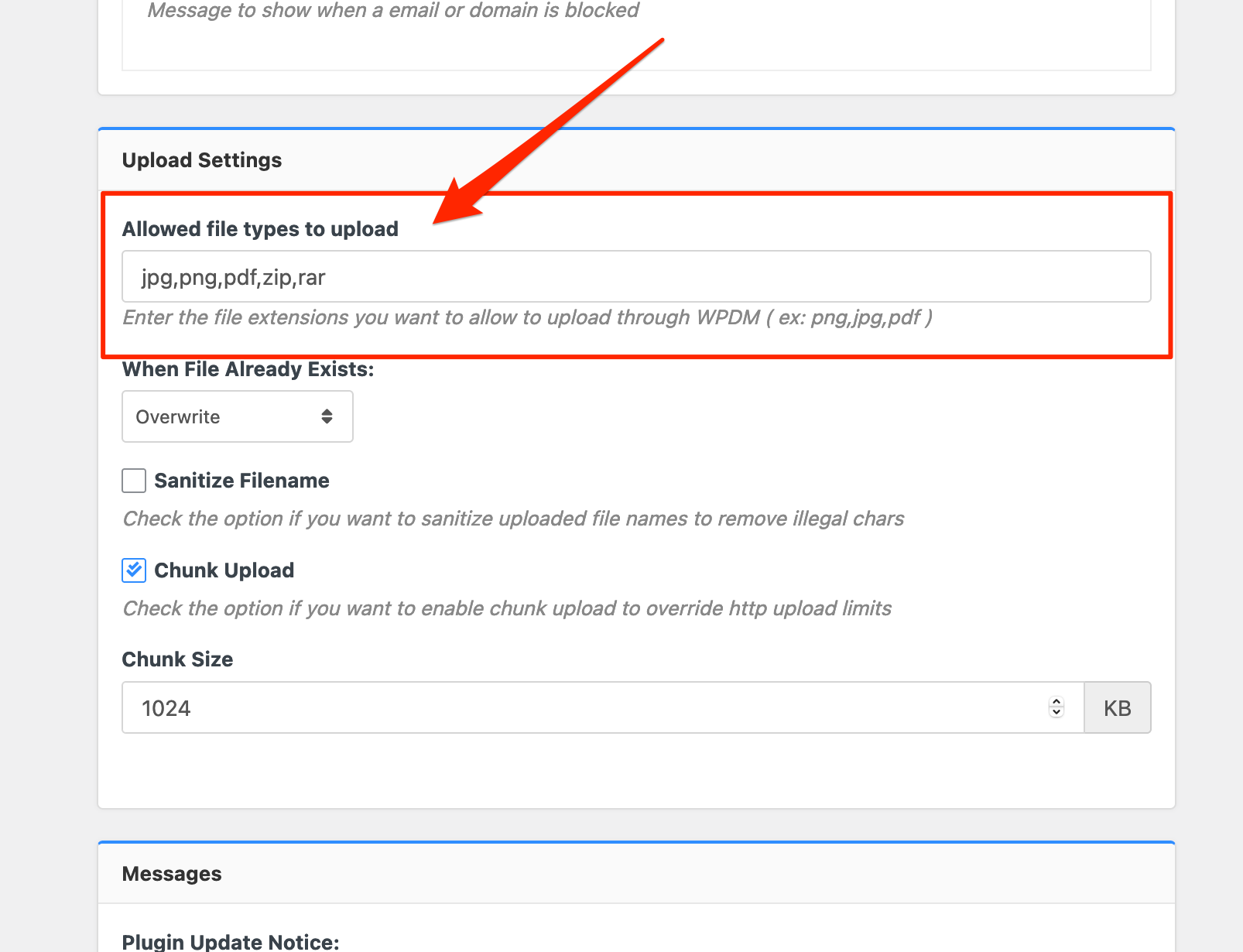
Please add file types ( texts, multiple texts separated by a comma ) as shown on the marked image. And then save settings. The shall resolve the issue.
or, Just Keep it Empty for WordPress default use as I image attached

thus it may resolve the issue
thanks
I have checked that there are many errors coming in your browser console log, and it is related to the server response, please check my attached image,

I think from the server response it is blocking the WPDM services, please contact with server administrator for this, I hope you should get the help
thanks
Okay, we shall look over on this
thanks
If they are in download-manager-> tpls/tpls3 folder, you may make a back up for the file following this doc, https://www.wpdownloadmanager.com/doc/template-files/
thanks
Sorry little bit of confusion, if some minor changes placed, it doesn’t take in the changelog page, i hope you have understood for that
thanks
Can you please check this admin column plugin, https://wordpress.org/plugins/codepress-admin-columns/, I think it may help you
thanks
Please, give your temporary wp-admin login details in a private reply for checking the issue.
Thanks
I think it is required some customization, please knock here with your requirements here, https://www.wpdownloadmanager.com/user-dashboard/?udb_page=upgrade
thanks
Please, give your temporary wp-admin login details in a private reply for checking the issue.
Thanks
Please, give your temporary wp-admin login details in a private reply for checking the issue.
Thanks
For #2 and #3 issue, can you please share the related URL and if possible, please, give your temporary wp-admin login details in a private reply for checking the issue.
Thanks
please check your PRO support ticket and please let me know if your MailChimp issue solved yet or not
thanks
-
This reply was modified 4 years, 11 months ago by
Nayeem Riddhi.
Are you using this add-on, https://www.wpdownloadmanager.com/download/download-limit/, please let me know
thanks
Hi,
I have checked that Gutenberg block is working fine from your side, can you please elaborate more on your issue, please
thanks
I can’t able to access your wp-admin plugin page, please deactivate and delete WPDM and please install a fresh copy from here again, https://www.wpdownloadmanager.com/user-dashboard/?udb_page=purchases
thanks
Sorry for the inconvenience, please, give your temporary wp-admin login details in a private reply for checking the issue.
Thanks
Hi,
For Invalid File Type updating ( 3.1.17 or 5.3.7 ), you may face the following 2 issues:
- Upload is not working
- Showing “Invalid File Type” error when trying to download
Here is the reason and solution:
From WPDM Free 3.1.20 and WPDM Pro 5.3.7, we have changed the file type validation process during file upload and download. Now, you have to white file types to allow them to upload or download. You will find the option at Admin Menu ► Downloads ► Settings ► Basic Settings Tab ► Upload Settings section.
Please add file types ( texts, multiple texts separated by a comma ) as shown on the marked image. And then save settings. The shall resolve the issue.
or, Just Keep it Empty for WordPress default use as I image attached
thus it may resolve the issue
thanks
Can you please share your Elementor template related URL please, if possible, please, give your temporary wp-admin login details in a private reply for checking the issue
Thanks
You can use your shortcode as a code snippet in your registration email template PHP file as I have shared here for your quick forms
<?php echo do_shortcode( '[wpdm_quick_form id='WPDMTEST' email='']' ); ?> for showing forms
and for getting values, you can use variables in email templates like this [#REQUEST_field_group/field_name#].
To explain more:
If a field name is contact[email], the variable should be [#REQUEST_contact/email#],
please let me know if it helps you
thanks
-
This reply was modified 4 years, 8 months ago by
Are you following this doc, https://www.wpdownloadmanager.com/doc/bulk-import/ or sample.csv file for making your CSV file, please let me know
thanks
please adjust this code putting in your active-theme/functions.php file, I hope it will help you
thanks
Can you please check this doc please, https://www.wpdownloadmanager.com/2-ways-of-adding-breadcrumbs-on-wordpress-site for your required breadcrumb feature? please let me know then
thanks
If you are talking about the Downloads > stats > download history section and want to add custom column fields there, I think it is required some customization, please knock here with your requirements, https://www.wpdownloadmanager.com/user-dashboard/?udb_page=upgrade
thanks