
Forum Replies Created

please mail support@wpdownloadmanager.com with your Order Id details. I hope you should get the help
Thanks
I have checked that, it is working fine from my side,

please check
thanks
It is working on your side too, https://wp-test.durham.gov.uk/dscp/download/wpdm-test/
thanks
You are welcome
thanks
please check my attached video, https://share.getcloudapp.com/8LubvOz9
it is working fine from my side
thanks
Yes, please just remove or make empty Package Settings > Package Size for the related packages and try to make an update again. it will re-calculate the total size again
thanks
You may keep empty the package size from package settings and try to make update again
thanks
For your license key, you may check this doc, https://www.wpdownloadmanager.com/doc/settings/license/
thanks
Can you pleaser just Keep it Empty for WordPress default use as I image attached

thus it may resolve the issue
thanks
I think you are trying to upload the file from the media library, For getting package size, you may upload the file manually, media library files don’t render package size generally
thanks
Glad to hear this, your problem has been resolved
thanks
The updated version is available now, please check
thanks
Hi,
For Invalid File Type updating ( 3.1.17 or 5.3.7 ), you may face the following 2 issues:
- Upload is not working
- Showing “Invalid File Type” error when trying to download
Here is the reason and solution:
From WPDM Free 3.1.20 and WPDM Pro 5.3.7, we have changed the file type validation process during file upload and download. Now, you have to white file types to allow them to upload or download. You will find the option at Admin Menu ► Downloads ► Settings ► Basic Settings Tab ► Upload Settings section.
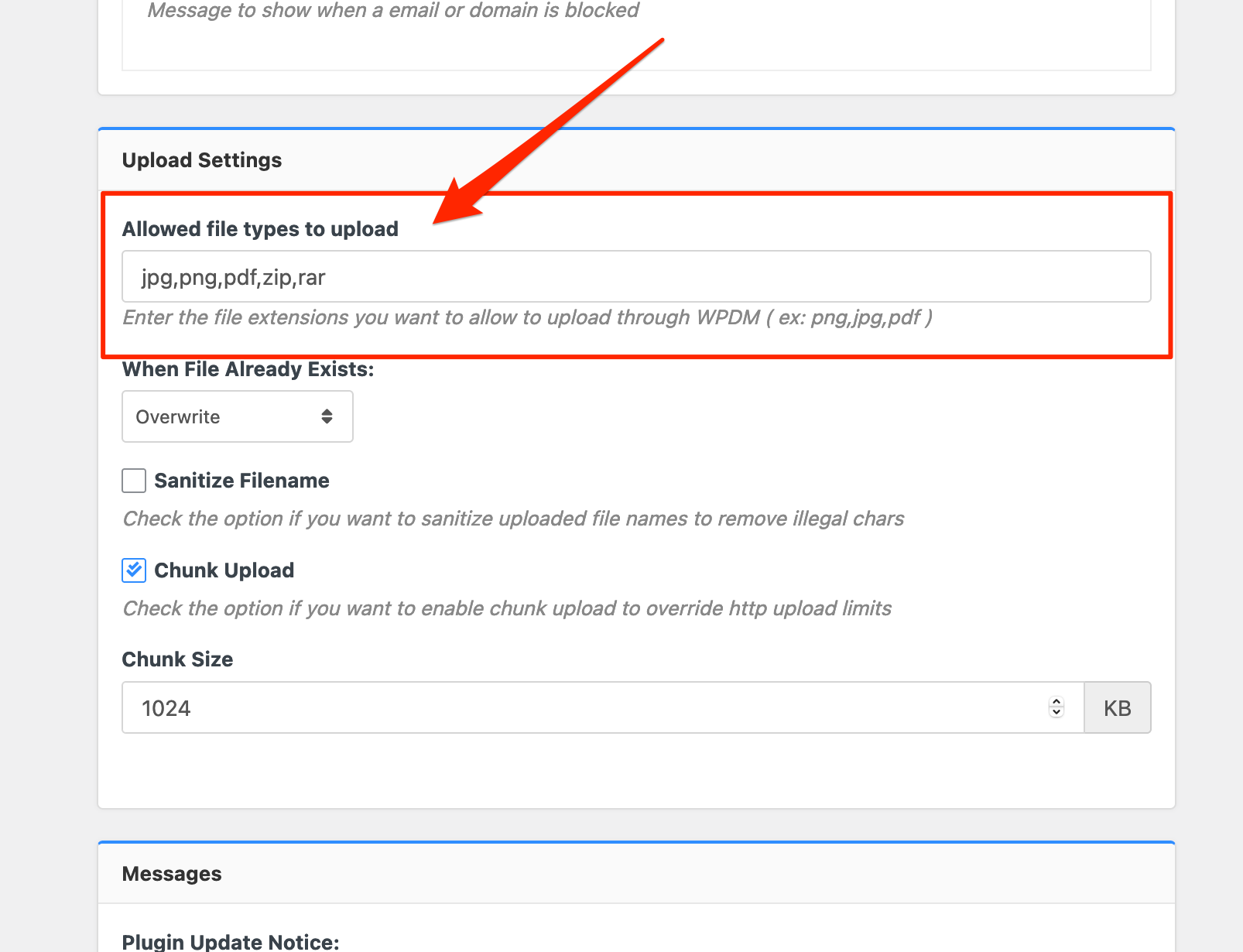
Please add file types ( texts, multiple texts separated by a comma ) as shown on the marked image. And then save settings. The shall resolve the issue.
or, Just Keep it Empty for WordPress default use as I image attached
thus it may resolve the issue
thanks
I have informed from our developer, it will be from the next update
thanks
I want to let you inform that, by default wpforms will only show the latest five forms
thanks
They should in the forms dropdown menu, please check your published forms in drafts or not
thanks
No, I didn’t have manually added the size, the package size is properly showing from my side
thanks
I think you may use the shortcode directly now, no hasslement for the next upgrdation
thanks
Are you using this shortcode, https://www.wpdownloadmanager.com/doc/short-codes/wpdm_category-query-all-downloads-from-one-or-more-categories/ here, you may also use https://www.wpdownloadmanager.com/doc/short-codes/wpdm_all_packages-list-all-downloads-in-tabular-format-in-a-page/ and this shortcode https://www.wpdownloadmanager.com/doc/short-codes/wpdm_packages-wp_query-in-a-shortcode-for-download-manager-packages/ here for your categories-packages too
thanks
Can you please elaborate more on your attached image, https://ibb.co/Q9jq5Gx
thanks
Glad to hear this your problem has been resolved
thanks
Please simply click the Save Settings again for the license key option from Downloads > Settings > License, which will regenerate the access token. Finally, go to the plugins page and the update will work fine this time
and for add-on for now,
1 ) Download the latest version from here https://www.wpdownloadmanager.com/user-dashboard/?udb_page=purchases
2 ) Install the latest version
thanks, I hope you have understood
Hi,
We do not have any addon yet from Aweber. You can check available email addons here
https://www.wpdownloadmanager.com/downloads/email-add-ons/
But we provide a custom upgrade service. Let us know if you are interested in building a custom solution.
Thanks.
You can make the registration field from Downloads > Settings > Quick Forms and show it checking the option, Show in User Registration Form thereby
thanks
please check now, it is working fine now, I have adjusted from Upload Settings > Allowed file types to upload with zip
thanks