
Forum Replies Created

Hi @gmop-unite-com,
Hope you are well. I think there will no problem using in combination with WPDM and metabox.io. And for the URL slug, the same page as Public Profile in Frontend access settings, can you please little elaborate on this? I think it is required some customization. Hearing back from you
thanks
Hello @paslodemarketing,
Sorry for your inconvenience. With the latest update of WPDM is working fine from our side. if you have any query you can ask us, we shall try to assist you.
Thanks for your appreciation
Hi,
Sorry for the inconvenience. Can you please check the option as I image attached from Downloads > Settings > Basic as I image attached,

if it works for you, please let me know, otherwise, if possible, please, give your temporary wp-admin login details in a private reply for checking the issue.
Thanks
Hi @rossiello
Hope you are well. I have just checked here, https://www.centroantiviolenzabari.it/sanfra/frontend-uploader/, it is working fine for uploading and publishing for the packages from the frontend, please check and let me know
thanks
Hi @operationsagilevelocity-com
Hope you are well. From now, You won’t need to install it separately anymore, WPDM has it integrated as Asset Manager. you shall find the option from Downloads> Asset Manager as I image attached,

let me know, if it helps you
thanks
Hi @levthn
The update is coming very soon and for translation issue with Polylang plugin, have you followed Export String Translation from translation of strings menu and next procedure thereby for translating all strings. I think it will work fine then from your side
thanks for your appreciation
Hello @paslodemarketing,
Sorry for your inconvenience. With the latest update of WPDM is working fine from our side. We have also checked the PHP version and WP version too. Can you please, give your temporary wp-admin login details in a private reply for checking the issue
Thanks
Hello @thehaiccna
The issue you are claiming is working fine from my side. I think there maybe some conflict with your Mythemeshop theme scripts. It is better to contact your Mythemeshop support regarding this issue. I hope you should get the help
thanks again
Hi @rossiello
Hope you are well. can you please check this add-on, https://www.wpdownloadmanager.com/download/file-hosting-sharing-add-on/, you are allowed with this for your website users to host files from the front-end, get share packages to certain role easily. please check the add-on and its demos
thanks
Hi @hunterbevan,
Most of your downloads are coming from unknown IP and Guest users, you can protect your downloads by keeping the allow access role for certain packages, you may also can Block certain IPS, Emails from Downloads > Settings > Basic > Verification Settings. I hope those may help you
thanks
Hello @thehaiccna
Sorry for the inconvenience. Can you please provide the screenshot of the console log while searching the product, if possible, please, give your temporary wp-admin login details in a private reply for checking the issue
Thanks
Hello @nicotra
Hope you are well. Have you installed this add-on (Premium Packages – Sell Digital Products Securely), https://wordpress.org/plugins/wpdm-premium-packages on your side? , please let me know
thanks
Hello @tweber
Sorry for your inconvenience. Can you please share your related package URL, if possible, please, give your temporary wp-admin login details in a private reply for checking the issue
Thanks
Hello @sgtuttle,
Hope you are well. Can you please share your related package/page URL? if possible, Please, give your temporary wp-admin login details in a private reply for checking the issue.
Thanks
Hello @cpatt2015
Hope you are well. Have you purchased this pack, https://www.wpdownloadmanager.com/download/full-access-pack/? please let us know, we shall try to help you. you may also include your order ID details here in a private reply
thanks
-
This reply was modified 4 years, 9 months ago by
Nayeem Riddhi.
Hi
Glad to hear that, your problem has been resolved. you may also check this shortcode too, https://www.wpdownloadmanager.com/doc/short-codes/wpdm_packages-wp_query-in-a-shortcode-for-download-manager-packages/ for the template template=" template ID " parameter.
thanks again
Hi,
For Invalid File Type updating ( 3.1.17 or 5.3.7 ),
Here is the reason and solution:
From WPDM Free 3.1.20 and WPDM Pro 5.3.7, we have changed the file type validation process during file upload and download. Now, you have to white file types to allow them to upload or download. You will find the option at Admin Menu ► Downloads ► Settings ► Basic Settings Tab ► Upload Settings section.
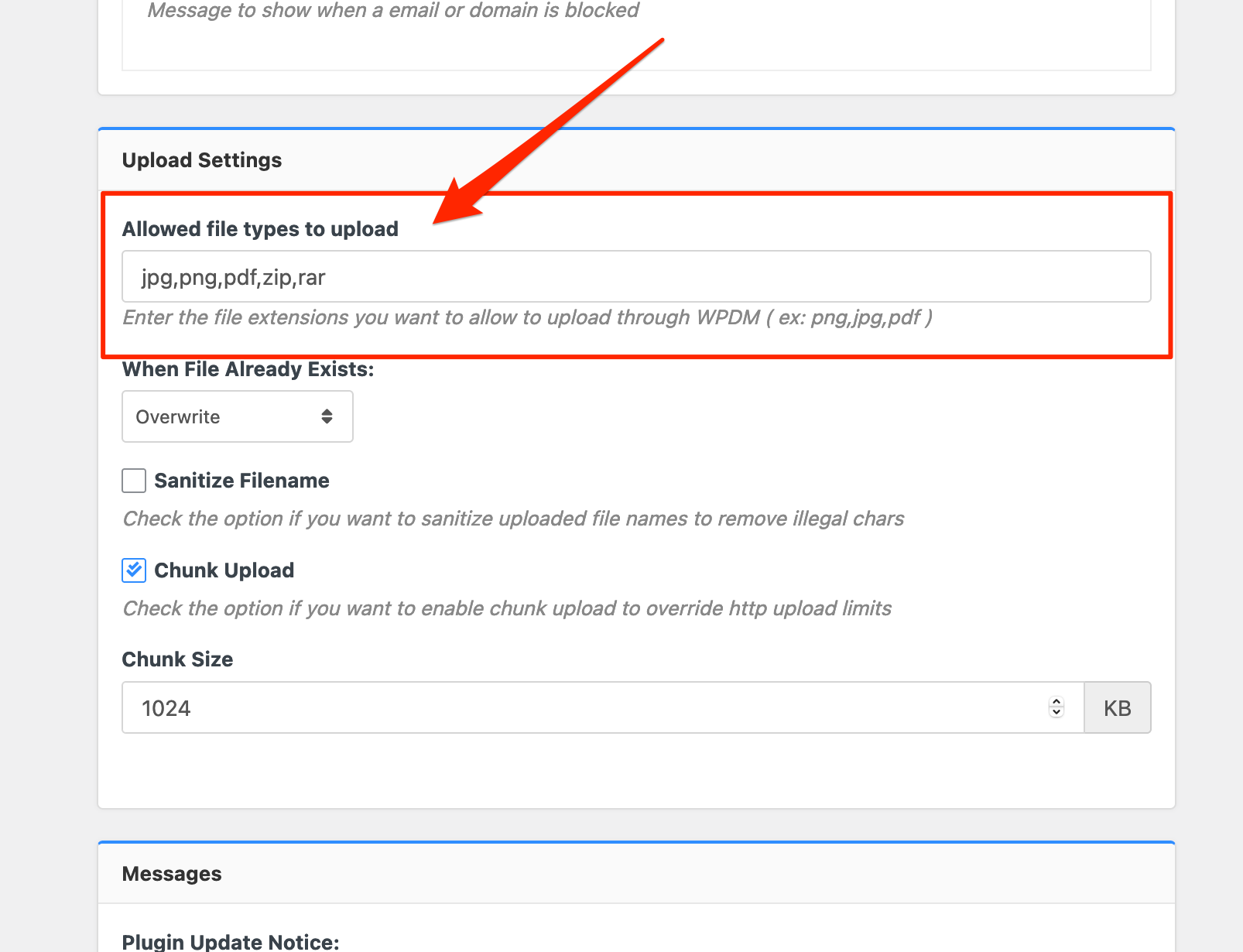
Please add file types ( texts, multiple texts separated by a comma ) as shown on the marked image. And then save settings. The shall resolve the issue.
or, Just Keep it Empty for WordPress default use as I image attached

thus it may resolve the issue
thanks
Hi @sophist,
Sorry for the inconvenience. Hide Everything option and Advanced Access Control add-on is working fine from my side. And for the shortcode, instead of [wpdm_category], can you please use this shortcode, https://www.wpdownloadmanager.com/doc/short-codes/wpdm_all_packages-list-all-downloads-in-tabular-format-in-a-page/, you can use login=1 parameter in your shortcode parameter. I hope it may help you. and please let me know, everthing is working fine from your side or not
thanks
Okay, Glad to hear that, your problem has been resolved
thanks
Hi @sophist
Hope you are well. If you are trying to show packages on a single page but every user should only see his package. Have you checked this option from Downloads > Settings > Basic> Access Settings as I image attached,

I hope this option may help you. please let me know if there any more queries you have
thanks
Hello @legiotek
Are you facing the problem with Error 404 with Invalid download Link still now with your packages, please elaborate on your issue. and if possible, please share your related package URL and give your temporary wp-admin login details in a private reply for checking the issue.
Thanks
Hi @sophist
Category access for roles and packages follow these steps as I describe below,
before giving access to a certain category for a particular role you have to set from the edit category option,
then you have to make empty for Allow Access option or giving a particular role on it like as I image attached or as usual for select member option too,

because Package Access = Package Access + All Category Access = All Visitors + Subscribers = All Visitors
and Package Access = Package Access empty + Category Access(Subscribers) = Subscribers
or Package Access = Package Access(subscriber) + Category Access(Subscribers) = Subscribers
Thanks
Hello @klemens,
Can you please share the related URL? if it is a column issue after activation download manager, can you please check adjusting Download > Settings > User Interface style/scripts settings. please check and let me know
thanks