
Forum Replies Created

Really sorry for the inconvenience. I have forwarded your request as it is a urgent requirement. Thanks for your appreciation.
Thank you and kind regards
Hello BudBreak Creative,
Hope you are well. The shortcode is working properly as expected in our testing site. Please share the related URLs. if possible, please, give your temporary wp-admin login details in a private reply to check the issue.
Thank you and regards
You can check our Attire theme demos here, https://demo.wpattire.com/demo-showcase/?type=page. Please kindly check and let me know.
Thank you and kind regards
I have found the login credentials. For the reference can you please kindly share the related URLs. Please kindly check and let me know.
Thank you and kind regards
I think one second delay is not a much significant issue. Please kindly check.
Thank you and kind regards
Hello Eric Johnson,
Hope you are well. Thanks for writing to us.
For updating the WPDM PRO plugin, Please simply click the Save Settings again for the license key option from Downloads > Settings > License, and then please update the plugin from the wp-admin > plugins panel.
For saving settings again for the license key option from Downloads -> Settings -> License, that will regenerate the access token. Thus the plugin will be updated,
For updating WPDM add-ons, please download your plugin from here, https://www.wpdownloadmanager.com/user-dashboard/?udb_page=purchases,
And update manually from the wp-admin dashboard Plugins > Add New option. I hope, thus it will resolve your issue. For the Download > Settings > Updates option will may not work properly for some server settings. please check and let me know, if you have any queries.
Thank you and regards
Please remove download_count template tag from your used packages link/page template what you are using. Please kindly check and let me know.
Thank you and kind regards
I think 1 second is not much different for loading. Please kindly check and let me know.
Thank you and kind regards
You can also check this setting from Downloads > Settings > Privacy as I image attached,
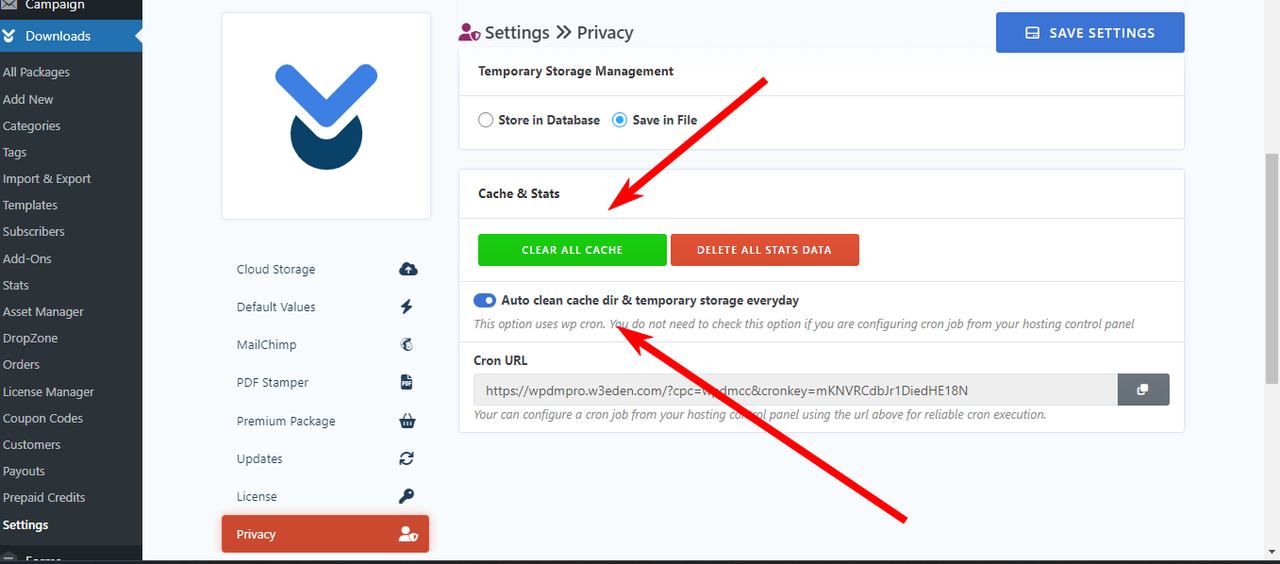
It may help you to improve the loading speed. Please kindly check and let me know.
Thank you and kind regards
The shared video is not appearing here. However, 1 sec. variation can’t be counted effecting the site too much. It can be negotiable. You can also use a cache plugin for making your site fast loading. Please kindly check and let me know.
Thank you and kind regards
Can you please kindly make a screen video of your issue by using it, https://www.loom.com/? Please kindly check and let me know.
Thank you and kind regards
Sorry for the inconvenience. if possible, can you please, give your temporary wp-admin login details in a private reply to check the issue?
Thank you and regards
I have back information from our team developer that, your customization request will be done within this week. Thanks for your appreciation.
Thank you and kind regards
I have forwarded your concern to our team authority. Thanks for your appreciation.
Thank you and kind regards
Hello Davinder Sangha,
Hope you are well. Thanks for writing to us. Can you please confirm if you are using all latest version of the plugin? Please kindly check and let me know.
Thank you and kind regards
To increase the upload size limit please follow the below helpful documentation.
How to Increase the Maximum File Upload Size in WordPress Download Manager
Kind Regards
I have back information from our team developer that, Currently, Authorize.net is not available for pro membership. If you want to add Authorize.net to their pro membership add-on, Please kindly knock here, https://www.wpdownloadmanager.com/download/custom-upgrade-service/ to our customization team. Please kindly check and let me know.
Thank you and kind regards
For #1, Please edit the email subject that will help not to go spam folder. You can edit body description too from Downloads > Templates > Email Templates section.
For #2, you may need this option as I image attached from Downloads > Templates > Email Templates section.
,
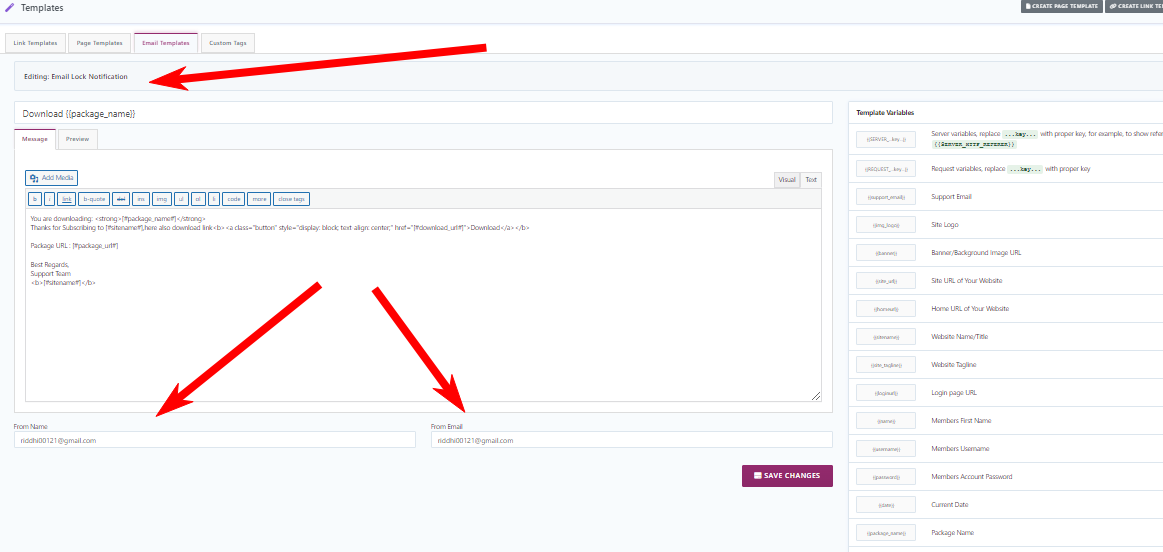
For #3, It may require a customization, you may please knock here, https://www.wpdownloadmanager.com/download/custom-upgrade-service/ with your requirements.
For #4, Please share the related URLs. if possible, please, give your temporary wp-admin login details in a private reply to check the issue.
Thank you and regards
Hello risu doan,
Please kindly open a separate ticket if you have any issues.
Thank you and kind regards
You can provide admin credentials for checking the issue. Please kindly check.
Thank you and kind regards
If any issues appear from the user end, we check for it and try to give a proper solution. If we fail and unable to give fixes/solutions, we process the refund. I hope you have understood. Please kindly check and let me know.
Thank you and kind regards
Glad to hear that. However, if you need further help with anything else, then please don’t hesitate to open a new topic. If you get some free moments, can you please give us a 5* here https://wordpress.org/support/plugin/download-manager/reviews/?rate=5#new-post, It will inspire us a lot. Thanks in advance 🙂
Thank you again and regards
Hello Bruno Keel,
Hope you are well. And sorry for the inconvenience. Please share the related URLs. if possible, please, give your temporary wp-admin login details in a private reply to check the issue.
Thank you and regards
Hello Tracy Reinhard,
Hope you are well. Thanks for writing to us. I think you are trying to use Authorize.net add-on and WPDM PRO and with Membership plugin of WPDM. I am checking the requirements, you will be informed accordingly. Please kindly check.
Thank you and kind regards
I have back information from our developer that, It’s still a work in progress and should be completed within the next month. Please kindly check.
Thank you and kind regards