
Forum Replies Created

Yes. Though they are included with the theme but designed using integrated template editor with wpdm pro.
Hi,
Got the issue, users are not receiving your chat message due to http and https. Please change site url and home url tp https from wp general settings.
Are you available now? starting a new chat session.
I’ve released a new update now with some new adjustments and improvements.
When you reply from the dashboard, of course, the connected user will get it and will be able to see the reply in they live chat window at the front-end. If they are not online, they will receive an email with a re-join/resume link to chat. When they click on the link, it will go to your site and reopen the chat window and the user will be able to reply you back.
Also, we are hugely improving the chat plugin, let us know if you have any new idea and any feature you want there.
Hi,
Got the issue, update is coming soon.
Hi,
This is coming from wpdm acf:

This one is:

Changed some options:

Use code:
<?php echo wpdm_acf(get_the_ID(),'filetype/file_types'); ?>
Yes, a new update released, please update your copy.
Sorry, not clear, may you please explain little more.
I’ve updated the plugin adjusting the CSS issue and it is showing fine now.
@macmillandesign,
#1.
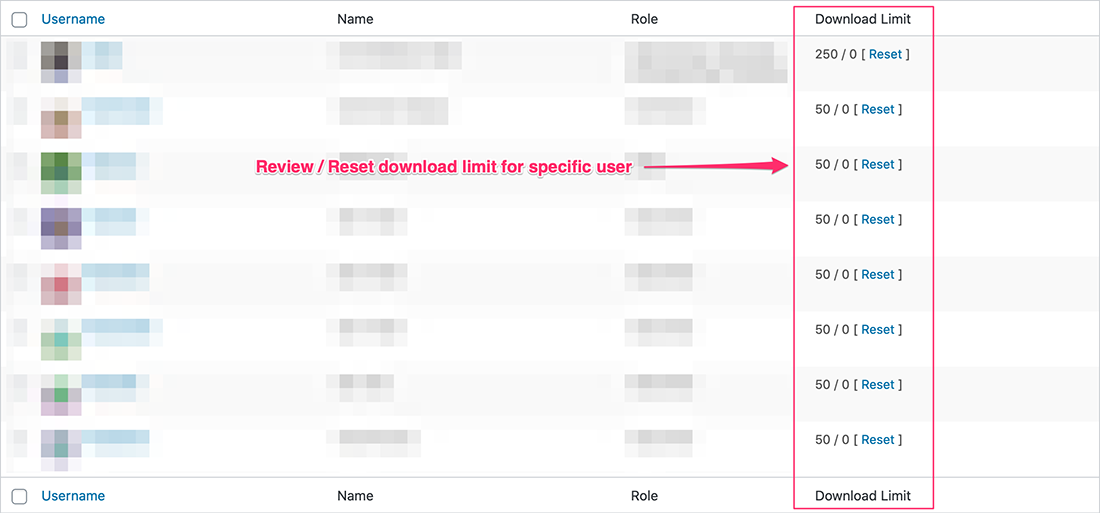
when you are using download limit add-on, you will be able to reset the limit from WordPress users page on the admin side.
#2.
The option is only available with advanced access control add-on when you assign a download to specific users only. But, to send an update notification to all users who previously downloaded the item, please use the following code:
function wpdm_send_update_notification($ID, $post, $update){
    global $wpdb;
    if (get_post_type() != 'wpdmpro' || wp_is_post_revision( $ID ) || $post->post_status !== 'publish') return;

    $users = $wpdb->get_results("select uid from {$wpdb->prefix}ahm_download_stats where pid = '{$ID}' and uid != 0");
    $emails = [];
    foreach ($users as $user){
        if((int)$user->uid > 0)
        $emails[] = get_user_by('ID', $user->uid)->user_email;
    }
    $link = get_permalink($ID);
    $title = get_the_title($ID);
    $params = [
        'to'        ► "noreply@yourdomain.com",
        'from'      ► "admin@yourdomainn.com",
        'bcc'       ► implode(",", $emails),
        'subject'   ► "Updated: ".$title,
        'message'   ► "Hello,<br/>There is an update available for the following item:<br/><a href='{$link}'>{$title}</a>"
    ];
    \WPDM\Email::send("default", $params);
}
add_action('save_post', 'wpdm_send_update_notification', 10, 3);Please give me temporary wp-admin login info in a private reply to check your issue, the add-ons should work for all regions.
#1 Here is the changelog: https://www.wpdownloadmanager.com/download/wordpress-amazon-s3-storage-plugin/
#2. You can only download the latest version from https://www.wpdownloadmanager.com/user-dashboard/?udb_page=purchases
#3. Please follow https://www.wpdownloadmanager.com/how-to-generate-amazon-iam-access-key-and-secret-key/
#4. Please delete the old version, download the latest version from our site and install ( we are checking the issue )
#5. Deactivate premium packages plugin from wp plugins page.
Features image is showing there now, however, we have patched it on our side too for the next update 🙂
We have fixed the issue and updated plugin on your site, working fine now. Thanks for your patience.
Yes, default value’s bulk update doesn’t work for “Ask For Visitors Name” field, however, we are adjusting it and a new update will be released within the next few hours. Thanks.
If you want you can change these restrictions using the following filters:
add_filter('wpdm_review_package_access_required', function (){ return false; } );
add_filter('wpdm_review_purchase_required', function (){ return false; } );
add_filter('wpdm_review_download_required', function (){ return false; } );When you are using user review plugin, here is the exact code you need to use:
add_filter("wpseo_schema_webpage", function($ldjson){
	if(!is_singular("wpdmpro")) return $ldjson;
        global $wpdm_user_reviews;
        $reviews = get_posts("post_type=wpdmreview&meta_key=pid&meta_value=".get_the_ID()."&post_parent=0");
        $ratingCount = count($reviews);
	$ldjson['@type'] = 'SoftwareApplication';
	$ldjson['@id'] = get_permalink(get_the_ID()).'#SoftwareApplication';
	$ldjson['applicationCategory'] = "http://schema.org/OtherApplication";
	$ldjson['fileFormat'] = "application/zip";
	$ldjson['downloadUrl'] = get_permalink(get_the_ID());
	$ldjson['softwareVersion'] = get_post_meta(get_the_ID(), '__wpdm_version', true);
	$ldjson['operatingSystem'] = 'Any';
	$ldjson['aggregateRating'] = array(
		"@type" ► "AggregateRating",
		"worstRating" ► 0,
        "bestRating" ► 5,
        "ratingValue" ► $wpdm_user_reviews->wpdm_get_average_reviews(get_the_ID()),
        "ratingCount" ► $ratingCount,
        "reviewCount" ► $ratingCount
    );
	$ldjson['interactionStatistic'] = array(
		"@type" ► "InteractionCounter",
        "interactionType" ► "http://schema.org/DownloadAction",
        "userInteractionCount" ► (int)get_post_meta(get_the_ID(), '__wpdm_download_count', true)
    );

	return $ldjson;
}, 999);What I meant, you need the change the following values with original values:
"ratingValue" ► "*.*",
 "ratingCount" ► 0000,
 "reviewCount" ► 0000