
Forum Replies Created

Please give me temporary wp-admin login info in a private reply to check your issue.
That was in 2014, and now it is wpdm-functions.php 🙂
Please use following CSS:
.w3eden .modal-dialog {
    margin-top: 280px;
}
I still don’t have the login info, even in the email. Please give me temporary wp-admin login info in a private reply to check your issue.
However, it seems like you used an invalid value for role discount, which should be actually numeric.
Please give me temporary wp-admin login info in a private reply to check your issue.
However, I just added a quick update adjusting compatibility issue, deactivate and delete premium package add-on, download and install again.
Please upgrade php version to 5.4 or upper to resolve the issue.
Any trouble means, you missed a step here:
Error: invalid_client
no registered origin
Seems like, you didn’t follow the step #6 properly.
Please give me temporary wp-admin login info in a private reply to check your issue.
wpdm_user_dashboard shortcode will give you the user dashboard page like this:
https://demo.wpdownloadmanager.com/wpdmpro/user-dashboard/
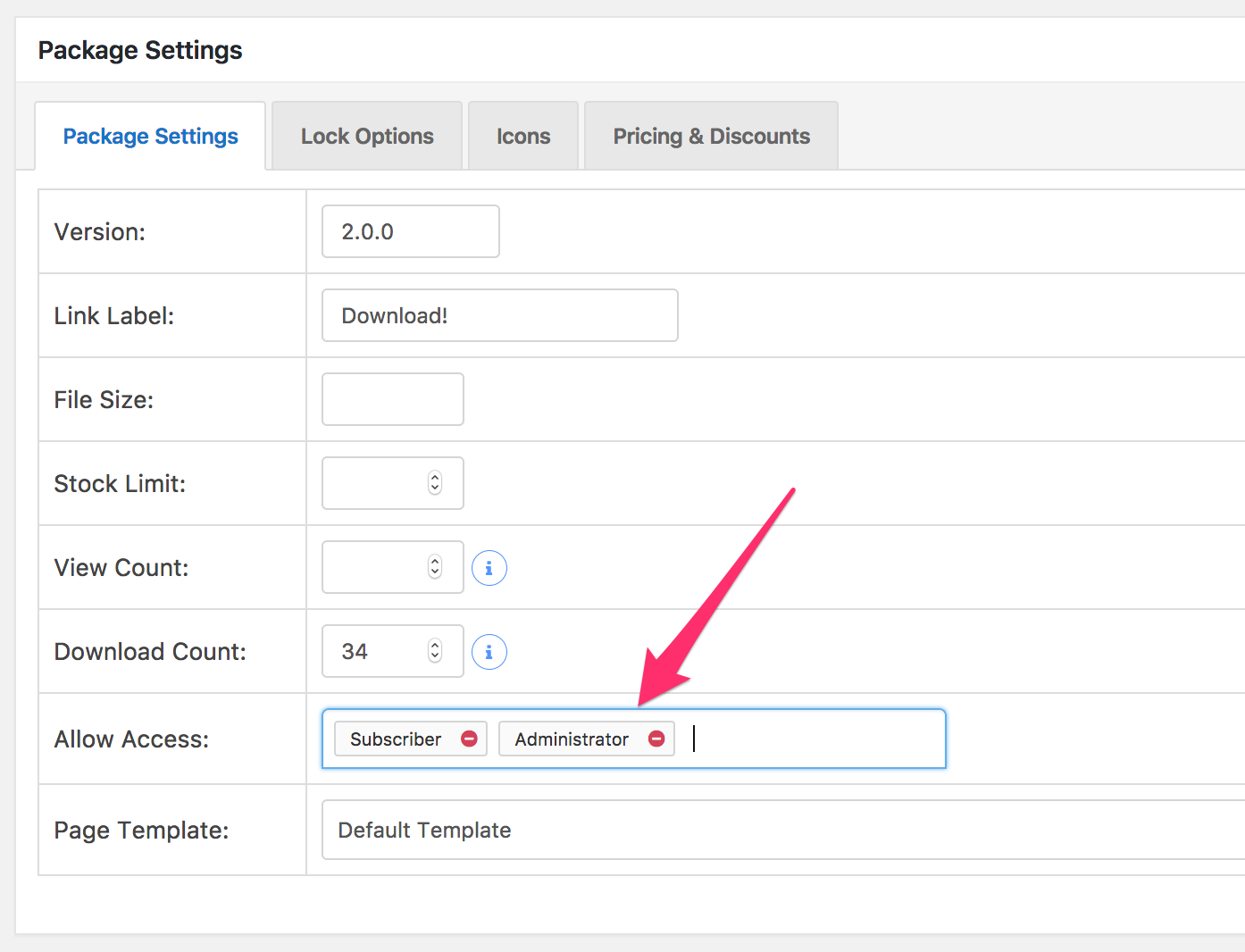
But if you want to control access to a download, you need to do that from “Allow Access” while adding/editing a package:
https://www.evernote.com/l/AV0edZBRelpEZZLmXDrtg3YsrWEP5BBveKcB/image.png
You can get the attached files. Put class.Apply.php in /download-manager/libs/ dir and class.Search.php in /download-manager/widgets/ dir.
Ok, we shall check and add the widget with the next update, it was there, probably we missed to re-add it when we were rebuilding codebase.
No problem with that. I change IN to AND, now it will display only items that appear in BOTH the categories.
Please give me temporary wp-admin login info in a private reply to check your issue.
After I check everything, it seems like some files were not update properly, also I couldn’t do that for dir access permission, please delete currently installed plugin totally, then download the latest version from https://www.wpdownloadmanager.com/user-dashboard/purchases/ and install. That should resolve the issue.
It is working fine, showing the result when searching by file name or title:
https://www.evernote.com/l/AV37bOxWUmpF4bgGzU9GZ8lqabM0V9DYlqsB/image.png

add captcha='false' with the shortcode, also it seems like your shortcode is wrapped with a <em> tag, you need to remove that tag to give a better look.
You need to remove “All visitors” select from package and category access option and then select other user roles you want to allow access. The option is explained here:
https://www.wpdownloadmanager.com/doc/add-new-package/package-settings/
Please check “Allow Access” section.
We shall adjust it with the next update of archive page add-on.
Actually, there is nothing much to understand, you uploaded the files in a location, now you or your hosting company changed server file and uploaded file were not moved properly, so why it is failing to download. Nothing to change in the plugin. However, though, it is not in our support scope, I still will check your server for once, please give me FTP info in a private reply. If I don’t see those files in your server, you have to ask your hosting company to restore them or you have to reupload all those files.
Please give me your URL to check, it is possible with small CSS change.