This reply has been marked as private.
This reply has been marked as private.
I’m trying to embed videos into a package using embed links from Vimeo. We have a lot of long videos and don’t want to bog down our site, by uploading them as MP4 files and attaching them to a package.
I had circumvented this issue by using Pods for Beaver Builder to extend WPDM and add an additional field to place embed codes in. This works fine EXCEPT it since it isn’t directly attached to the package settings, it displays my embed for all users regardless of the access level assigned to the package.
I have to figure out a solution to be able to use video embed codes that listen to the access level permissions.
I found this code in a previous thread, but do not know how to adapt it to my Pods additional field, but this is essentially what I need to accomplish, but with an embed code, not the built in video player that requires me to upload MP4 files into the site.
add_filter("wpdm_video_player_html", function ($player, $packageID, $file, $width){
    if(!WPDM()->package->userCanDownload($packageID)) $player = \WPDM\__\Messages::permission_denied($packageID);
    return $player;
}, 10, 4);
I am super close. Just a couple more questions.
I have the new shortcode there: https://ateceos.wpengine.com/downloads-test/
[wpdm_archive_filter items_per_page=”12″ template=”link-template-default” cols=1 colspad=1 colsphone=1]
That was from your website.
1. How can I change the titling in the search sidebar? I want “Categories” to say “Languages” and “Tags” to say “Product Line”.
2. I need the title of each product to either go to the download or do nothing at all. I tried page_link=0 to no avail within the shortcode.
3. The line spacing in “Tags” is cramped under the search bar.
I made a little video so I can hopefully be clear and concise for you: https://share.getcloudapp.com/YEuWqe94
-
This reply was modified 4 years, 2 months ago by
 Russ.
Russ.
Hello,
The only way you can use custom button using this addon. I have already told you that in chat. You can use that button shortcode in anywhere including page, post, page template and link template.
To modify the available buttons of button template you have to add custom css for the buttons. You may also need to edit the core files of button template addon to totally modify the available button.
Thanks
This reply has been marked as private.
Hello @Russcantu,
Using the parameter page_link=0 and download_count=0 in shortcode will disable the link.
More details and parameter can be found below:
https://www.wpdownloadmanager.com/doc/short-codes/wpdm_all_packages-list-all-downloads-in-tabular-format-in-a-page/
For more customization you have to follow this doc to edit link template and you have to use a shortcode that supports link template like this.
Hope you understand.
Regarads.
Hello,
Got the issue.
Actually, link template previews are taken from download packages that are accessible to all visitors.
You can’t show a template preview since download packages aren’t public on your site.
Hope you understand.
Thanks
I have a staging site set up: https://ateceos.wpengine.com/downloads-test/
Here is a walk-through: https://share.getcloudapp.com/E0uyDbKr
I am using the plugin (pro).
– How can both the title and the CTA link directly to the download?
– How can we remove the download count (in the tabular list and download page)?
The built-in widgets seem OK, but do not have pagination within.
Hi there, this is not the case. Please try heading to the link of the Download itself, and see that the Preview is not working, despite the Download button working.
Hello @French150,
Please create a separate topic for a new issue. Also please provide more details there to check the issue and fix. If link template/page template is created correctly, it should be previewed. Currently link template and page templates previews working fine from our side. You can check here.
Thanks
Hello Jennyfer Moreno Shek,
For video player content will be available for all general download packages, But for premium/product packages, the preview will not come, you have to use the below template tag
[video_player_1200] in your page/link templates from Downloads > Templates > Link/Page Template, if you are unable to make adjustments, please refer/points on your requirements, and please, give your temporary wp-admin login details in a private reply for checking the issue.
Thank you and regards
Hello,
You can show description using template tags. Also You can remove link from title by modifying link template too.
If you add the template tag in page template or link template, the related output will be showed.
More details here.
Thanks
Hello Jennyfer Moreno Shek,
For #1, For video player content will be available for all general download packages, for video player, you can use this template tag,
[video_player_1200] in your page/link templates.
For #2, For membership and download limit, you can check this both add-ons,
WordPress Pro Membership
Download Limit
For your second portion #1, Can you please elaborate on the library option please?
For your purchased issue, can you please give your order details note here, please
please let me know
Thank you and regards
Hi. When you want delete a file in the pop up to confirm this there is the text “YES, DELETE” (SI, CANCELLA).
In the add package form there are “Select Members” (Seleziona Utenti), “enter name or email” (inserisci nome o mail), “notify” (notifica), “Send email notification to selected members” (Invia notifica mail agli utenti selezionati”, “link template” (collegamento modello or link modello), “select link template” (seleziona collegamento modello or seleziona link modello), “select page template” (seleziona pagina modello) and “enable form lock” (abilita blocco modulo).
In user dashboard there are “Downloads are shared with you” (Download condivisi con te), “welcome” (benvenuto), “Display …downloads per page” (Visualizza download per pagina), “title” (titolo), “file size” (dimensione file), “search” (cerca), “Showing x to x of x downloads” (Mostra da x a x di x download),”my downloads” (I miei download), “Previous” (Precedente), “Next” (Successivo), “Logout” (Esci), “Sorry! No files shared for you.” (Spiacenti, nessun file per te).
I wrote you above already the translations for every text.
If I find more I’ll tell you.
Thanks
Best regards
Currently, I have pdf,PDF,ppt,PPT,pptx,PPTX,doc,DOC,docx,DOCX,png,PNG,jpg,JPG,xlsx,XLSX,xls,XLS,xlsm,XLSM,zip,ZIP in my Download Manager Settings as allowed files.
However, ALL powerpoint files are showing as COMPLETELY blank in the download manager page (shows all details but the file preview is blank) OR saying “File not found – The URL of the original file is not valid or the document is not publicly accessible.
Verify the URL is correct, then contact the document owner.”
I have relinked these files multiple times to working files in the server, renamed them, etc and it isn’t helping.
HELP!
This is showing up on the bottom of every single admin page in WordPress.
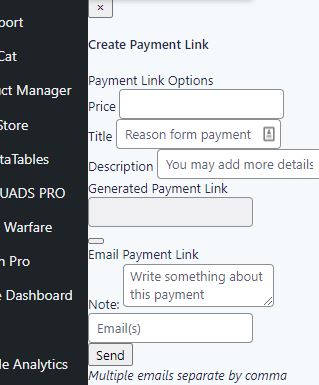
It’s hard to see what it is exactly since on most pages it’s almost completely covered up. This is the start of the source code I found associated with it
<div class=”w3eden”>
<div class=”modal fade” tabindex=”-1″ role=”dialog” id=”modal-pay-link”>
<div class=”modal-dialog” role=”document” style=”width: 400px”>
<form method=”post” id=”sendplink”>
<input type=”hidden” id=”plinknonce” name=”plinknonce” value=”ea68028b6f” /><input type=”hidden” name=”_wp_http_referer” value=”/wp-admin/admin.php?page=gf_edit_forms&view=settings&subview=settings&id=4″ /> <input type=”hidden” name=”action” value=”wpdmpp_email_payment_link” />
<div class=”modal-content”>
I don’t know what caused it to show up. I just want to know how to stop it. Thanks.
Hi,
You can’t use html there directly, but you can create 2 fields instead of one.
For example:
Split <a href="https://www.dxf-downloads.de/infos/premium-user"><img src="https://www.dxf-downloads.de/premium.png" alt="Premium User Infos" /></a> into url field 
Then in link page template create the html link:
<a href="[acf_PremiumUser_URL]"><img src="[acf_PremiumUser_IMG]" alt="Premium User Infos" /></a>
Hello!
it seems that the plugin load google font from google and don’t use the local stored font.
I found this in the sourcecode of my site:
<meta name=”generator” content=”WordPress Download Manager 6.2.2″ />
<link href=”https://fonts.googleapis.com/css2?family=Raleway” rel=”stylesheet”>
How can I change that nothing is loaded from external google servers?
Thank you.
Regards.
I’m using the lock option to require a password before downloading the file, the issue is that sometimes it gets stucked before asking for the password, and it remains with the loading iframe…
If you refresh several times it works, but it doesn’t feel right…
Issue reported on chrome and safari.
link
Any ideas what could solve this?
This reply has been marked as private.
I am a WordPress Download Manager PRO user and I am noticing some issues With Premium Packages – Sell Digital Products Securely Plugin, since its activation created this message in my dashboard área of WordPress:
Create Payment Link
Payment Link Options
Price
Title
Reason form payment
Description
You may add more details about this payemnt
Generated Payment Link
Email Payment Link
Note:
Write something about this payment
It take me to uninstall WPRSS Agregator because fatal error and compatibility issue. In that scenario, the dashboard became frozen.
Hello Marianda de Villiers,
I have checked your page. And found that, every package contains a separate download link, Can you please check it again and elaborate on the issue? please check and let me know
Thank you and regards
Thank you Nayeem!
My last hurdle is this:
– Can I link the package title to download the package (open in a new tab) instead of opening the package page?
– If so, can you tell me which template to edit and what I need to change it to?
I understand that the edited template needs to be in a parallel directory in my theme folder, I just don’t know what file/template to edit or what to change it to.
Thank you so much for your help!
This reply has been marked as private.



