Search Results for 'download link'

Viewing 25 results - 4,126 through 4,150 (of 11,368 total)
  • Author
    Search Results
  • #136484

    nesf
    Participant

    I was able to solve the Error:

    “Fatal error: Uncaught ArgumentCountError: Too few arguments to function WPDMPP\WPDMPremiumPackage::hide_single_file_download_link(), 3 passed in /var/www/vhosts/foroeconomiacircular.com/httpdocs/wp-includes/class-wp-hook.php on line 287 and exactly 4 expected in”

    updating wpdm-premium-packages 3.9.1 to 4.6.5

    Regards

    #136480

    nesf
    Participant
    This reply has been marked as private.
    #136448

    In reply to: WPDM Plugin Edits


    Nayeem Riddhi
    Moderator

    Hi,

    For that, you can Unmask Download Link from the basic settings as I image attached from Downloads > Settings > Basic

    Image 2020-09-16 at 10.36.01 AM

    Thanks.

    #136444

    Ankush
    Member

    HI WPDM,

    I’m looking to edit the plugin to achieve the below.

    1. I would like to remove the “nofollow” attribute from links that directly generate downloads
    (see img2: https://imgur.com/a/O8c5xef)

    2. I would like to remove the hidden masked link – which has been flagged as negative for SEO
    (see img1: https://imgur.com/a/O8c5xef)

    Please let me know which files in the plugin contain the above settings – I’d like to remove the above.

    Thanks!

    • This topic was modified 6 years, 1 month ago by Ankush.
    #136443

    In reply to: Form lock not working


    Ana Fierek
    Participant
    This reply has been marked as private.

    Dave Schmidt
    Participant

    I’ve inherited an old web server that has Download Manager installed, but how can I identify if it’s the free version or Pro? Does the Free version only work during a trial period?

    Ultimately, I need to find the license key (if it exists) as migrating to a new server breaks the downloads. After clicking the download link, the file names says “download-not-available.txt.”


    Reeb Venners
    Participant

    Hello,
    I’ve been getting an error repeatedly in plugin page in WordPress every time I tried to upgrade DMP in the usual manner. Here is the error message:

    Update failed: The package could not be installed. PCLZIP_ERR_BAD_FORMAT (-10) : Unable to find End of Central Dir Record signature

    So I went on the forum and found the following instructions:

    1 ) Deactivate and delete the old version. You won’t lose any data.
    2 ) Download latest version from here https://www.wpdownloadmanager.com/user-dashboard/?udb_page=purchases
    3 ) Use a good file manager or FTP or asset manager option for uploading the plugin zip
    4 ) Extract it in your plugins folder and activate from the plugins dashboard menu panel

    The first time, I followed them and they worked great. However, our download page kind of broke. The display format changed dramatically, with the listings forced into three columns. After a lot of looking around, I added a cols=”1″ to the shortcode and that fixed the problem.

    However, about a week later, there was another update your plugin (5.2.2 I think). I attempted through the WP plugin page to update to the new version…and same error:

    Update failed: The package could not be installed. PCLZIP_ERR_BAD_FORMAT (-10) : Unable to find End of Central Dir Record signature

    I followed the instructions above and again, they worked fine.
    However, now our download page is broken again, but this time it is worse. There are no downloads listed. Instead, all the categories are just laid out in one continuous list and the rest of the page is completely blank. Also it breaks the entire navigation menu at the top of the site (it doesn’t show up at all). Here is the shortcode that I am using:

    [wpdm-archive cat_view=”default” button_style=”default” showcount=0 link_template=”5c830ecaed300″ items_per_page=”30″ order_by=”date” order=”desc” login=1]

    Please let me know what I am doing wrong and maybe how to fix this seemingly ongoing issue.
    Thanks!
    Reeb

    ### wp-core ###

    version: 5.5.1
    site_language: en_US
    user_language: en_US
    timezone: America/Los_Angeles
    permalink: /%postname%/
    https_status: true
    multisite: false
    user_registration: 0
    blog_public: 1
    default_comment_status: closed
    environment_type: production
    user_count: 243
    dotorg_communication: true

    ### wp-parent-theme ###

    name: Betheme (betheme)
    version: 21.8.5.1
    author: Muffin group
    author_website: https://muffingroup.com/
    theme_path: /home/zencla/public_html/wp-content/themes/betheme
    auto_update: Disabled

    ### wp-plugins-active (33) ###

    Category Order and Taxonomy Terms Order: version: 1.5.7.3, author: Nsp-Code, Auto-updates enabled
    Classic Editor: version: 1.6, author: WordPress Contributors, Auto-updates enabled
    Contact Form 7: version: 5.2.2, author: Takayuki Miyoshi, Auto-updates enabled
    Contact Form CFDB7: version: 1.2.4.11, author: Arshid, Auto-updates enabled
    Download Manager: version: 5.2.2, author: W3 Eden, Inc., Auto-updates disabled
    Embed Any Document: version: 2.6.1, author: Awsm Innovations, Auto-updates enabled
    FileBird Lite: version: 4.0.6, author: Ninja Team, Auto-updates enabled
    Google XML Sitemaps: version: 4.1.1, author: Auctollo, Auto-updates enabled
    LearnPress: version: 3.2.7.7, author: ThimPress, Auto-updates enabled
    PrivateContent: version: 7.24, author: Luca Montanari, Auto-updates disabled
    Public Post Preview: version: 2.9.1, author: Dominik Schilling, Auto-updates enabled
    reSmush.it Image Optimizer: version: 0.3.10, author: reSmush.it, Auto-updates enabled
    Simple Sitemap: version: 3.5, author: David Gwyer, Auto-updates enabled
    Slider Revolution: version: 6.2.6, author: ThemePunch, Auto-updates disabled
    Smash Balloon Custom Facebook Feed: version: 2.16.1, author: Smash Balloon, Auto-updates enabled
    UpdraftPlus – Backup/Restore: version: 1.16.29, author: UpdraftPlus.Com, DavidAnderson, Auto-updates disabled
    W3 Total Cache: version: 0.14.4, author: BoldGrid, Auto-updates enabled
    WooCommerce: version: 4.5.2, author: Automattic, Auto-updates enabled
    WooCommerce Name Your Price: version: 3.1.5, author: Kathy Darling, Auto-updates enabled
    WooCommerce One Page Checkout: version: 1.7.8, author: Automattic, Auto-updates enabled
    Woocommerce one page checkout and layouts: version: 2.4, author: BluePlugins, Auto-updates enabled
    WooCommerce PayPal Checkout Gateway: version: 2.0.3, author: WooCommerce, Auto-updates disabled
    WooCommerce Stripe Gateway: version: 4.5.2, author: WooCommerce, Auto-updates enabled
    WooCommerce USPS Shipping: version: 4.4.47, author: WooCommerce, Auto-updates enabled
    Wordfence Security: version: 7.4.11, author: Wordfence, Auto-updates enabled
    WPBakery Page Builder: version: 6.2.0, author: Michael M – WPBakery.com (latest version: 6.4.0), Auto-updates enabled
    WPDM – Archive Page: version: 3.1.1, author: WordPress Download Manager, Auto-updates disabled
    WPForms: version: 1.6.2.3, author: WPForms, Auto-updates disabled
    WPForms PayPal Standard: version: 1.3.4, author: WPForms, Auto-updates disabled
    WPForms Stripe: version: 2.4.2, author: WPForms, Auto-updates disabled
    WPForms Zapier: version: 1.2.0, author: WPForms, Auto-updates disabled
    WP Mail SMTP Pro: version: 2.3.1, author: WPForms, Auto-updates disabled
    Yoast Duplicate Post: version: 3.2.5, author: Enrico Battocchi & Team Yoast, Auto-updates enabled

    #136382

    Poshnjari
    Participant

    I have big problem with link for download, link for download isn’t live link how to fix this problem please? example https://fullfreesoftware.net/soft/download-easybcd-for-free/

    #136346

    Reeb Venners
    Participant

    I was getting the same error. This is the second time I’ve had to do this process. The last time I did it, it broke our download page and I had to modify the shortcode to get it to work correctly.

    I just did the process again (I uploaded via FTP and it seemed to go fine) and it “worked” but once again our download page is completely broken. This time it is broken in a different way. There are no downloads listed and none of the categories seems to work. Also the page looks quite different. Can you provide some advice?

    Here is the shortcode that I am using:

    [wpdm-archive cat_view=”default” button_style=”default” showcount=0 link_template=”5c830ecaed300″ items_per_page=”30″ order_by=”date” order=”desc” login=1]

    Download Manager is 5.2.2.
    WPDM Archive page is 3.1.1

    Thanks for any help!

    #136301

    ramsey
    Participant

    Please help. I have no form lock or any add ons. Simply customer buys, downloads. Now we get this error — Invalid download link —

    #136300

    In reply to: Can’t update plugin


    ramsey
    Participant

    Hi I am having this same issue. — Invalid download link —


    Nayeem Riddhi
    Moderator

    The download link is working and your site sometimes showing this error as I image attached,

    Image 2020-09-12 at 11.28.52 AM

    I think you are trying to enable multiple locks at the same time, but that is not possible, use single lock for any single package.

    Thanks.

    #136236

    Joffrey
    Participant

    After plugin update, issue reappear.

    — HERE IS A FUNCTIONAL AND TEMPORARILY FIX FOR USERS —
    I have to put the “.php” extension in the shortcode template tag to it works as follow :
    [wpdm_category ... template="link-template-default-ext.php" ...]
    — END OF FIX —

    I think there is something not optimised in this part of code :
    wp-content/plugins/download-manager/libs/class.Package.php from line 1060

    $ltpldir = get_stylesheet_directory().'/download-manager/'.$type.'-templates/';
    $pthemeltpldir = get_template_directory().'/download-manager/'.$type.'-templates/';
    
    if(!file_exists($ltpldir) || !file_exists($ltpldir.$template))
        $ltpldir = WPDM_BASE_DIR.'tpls/'.$type.'-templates/';
    
    if (file_exists($ltpldir . $template)) $template = file_get_contents($ltpldir . $template);
    else if (file_exists($pthemeltpldir . '/' . $template)) $template = file_get_contents($pthemeltpldir . '/' . $template);
    else if (file_exists($ltpldir . $template . '.php')) $template = file_get_contents($ltpldir . $template . '.php');
    else if (file_exists($pthemeltpldir . $template . '.php')) $template = file_get_contents($pthemeltpldir . $template . '.php');
    else if (file_exists($ltpldir. $type . "-template-" . $template . '.php')) $template = file_get_contents($ltpldir. $type . "-template-" . $template . '.php');
    else $template = file_get_contents(wpdm_tpl_path($default[$type], $ltpldir));

    If a dev can have a look on this part to improve it.

    I suggest to replace above code by something like this :

    $directories = [
        get_stylesheet_directory().'/download-manager/'.$type.'-templates/',
        get_template_directory().'/download-manager/'.$type.'-templates/',
        WPDM_BASE_DIR.'tpls/'.$type.'-templates/'
    ];
    
    $getTemplateContent = function() use ($directories, $template, $type, $default) {
        foreach ($directories as $dir) {
            if (file_exists($dir . $template)) {
                return file_get_contents($dir . $template);
            } 
            if (file_exists($dir . '/' . $template)) {
                return file_get_contents($dir . '/' . $template);
            } 
            if (file_exists($dir . $template . '.php')) {
                return file_get_contents($dir . $template . '.php');
            } 
            if (file_exists($dir . $type . "-template-" . $template . '.php')) {
                return file_get_contents($dir . $type . "-template-" . $template . '.php');
            }
        }
    
        return file_get_contents(wpdm_tpl_path($default[$type], $dir));
    };
    
    $template = $getTemplateContent();

    Best regards.

    • This reply was modified 6 years, 1 month ago by Joffrey.

    Vi-Hau
    Participant

    Hi

    When i open the download page and click on the link i get a 404

    example: https://captainandnel.com/download/test/

    #136207

    Trista Perot
    Participant

    Thank you. I can see the issue is fixed now.

    We are having an issue with web hooks – Zapier is not seeing any of them. IF we choose the New wpdm_before_email_download_link Hook, the client never even receives the email to download the file. It sits as a loading screen. Could you assist with this?

    Here is an example of the page with the issue: https://www.globaldatavault.com/blog/cybersecurity-guide-cloud-data-management/

    Let me know if you need access to Zapier.


    Penny Whiteley
    Participant

    HELP anyone!

    I’m posting this again for the third time.

    30-40% of the time when I add multiple files into a package from Select from Server, Download Manager assigns duplicate IDs. When this happens, the file is not attached to the package and you have to tediously go through the whole menu again to find your file.

    I do not understand why these unique values are not assigned server-side but rather based on jQuery.getTime() method in milliseconds.

    I’ve tried exploring through all the php files, changing values, trying to ‘slow’ down the loop to prevent duplicate IDs, but no success.

    This is a really frustrating bug.

    Here’s a link to the video I made showing the problem


    A Hefter
    Participant

    Is it possible to have a redirect to a specific page if someone clicks on our download link and they are not logged in or registered? Adding, the WordPress page is set to Private.

    • This topic was modified 6 years, 1 month ago by A Hefter.
    #136079

    Andy W
    Participant

    Hello. We have the problem that we have PDFs – which you can also fill in online. So these were specially made that you can fill in fields by yourself. If use the PDF Stamper, what we absolutely need to put a watermark on these PDFs (Text – Licensed by Username – left Top), if you want to download them – do not work all of these “interactiv” PDF fields anymore? How can I do this so that it still works?

    These are PDF files, which have interactive fields or links in them, which must be clickable. Or just a hook can be set or just can be filled out. It works perfectly, but as soon as I activate the PDF Stamper, the desired text is right on top of the document – user – but then all interactive fields in the PDF no longer go. . . .

    At the moment it is so that you can only generally determine for all PDFs whether this STAMP is made on ALL PAGES only on PAGE 1 or on EVEN or ODD PAGES. Perhaps it would also be possible to specify where this STAMP is made by entering a line and entering it for each “download”. So for example a PDF with 10 pages and then you enter 1,2,6,7. After that, the STAMP is made for this download, i.e. in this PDF only on pages 1,2,6,7 – not for the others. Then these “interactive fields” would also be active and could be filled. Everything is not OPTIMAL and therefore I wonder whether a programmer could not help us with a special solution?

    #136023

    vervocity
    Participant
    This reply has been marked as private.
    #136012

    Joffrey
    Participant

    Hello,

    unfortunatly, as I mentioned, I’m working in local environment, so I can’t provide login to the website now.

    I’ve overwritten one page template and its working… but page template is only overwritten if I put the file in /download-manager/ directory and not in /download-manager/page-templates/.

    There is only link templates that don’t work. I tried to for link-templates but its not working…

    Resume :
    wp-content/themes/mychildtheme/download-manager/link-templates/link-template-default-ext.php NOT WORKING
    wp-content/themes/mychildtheme/download-manager/link-template-default-ext.php NOT WORKING

    wp-content/themes/mychildtheme/download-manager/shortcodes/category.php WORKING
    wp-content/themes/mychildtheme/download-manager/page-templates/page-template-default.php NOT WORKING
    wp-content/themes/mychildtheme/download-manager/page-template-default.php WORKING

    Shortcodes I’m using to display links :
    [wpdm_category id="mycategory" toolbar="0" paging="1" order="desc" item_per_page="10" template="link-template-default-ext" cols=4 colspad=2 colsphone=1]
    [wpdm_package id='16001' template="link-template-default-ext"]

    I tried to reinstall plugin without success. Same issue…


    Jaewon Kim
    Participant

    Hi,

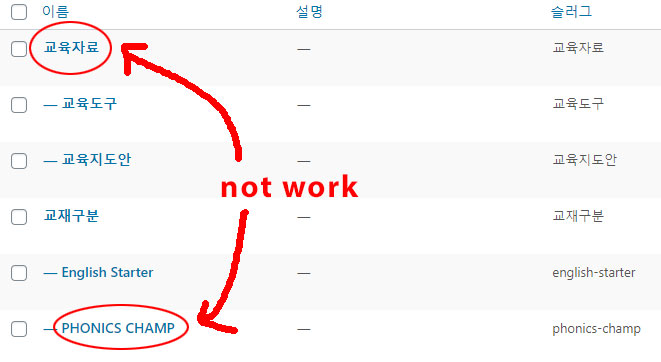
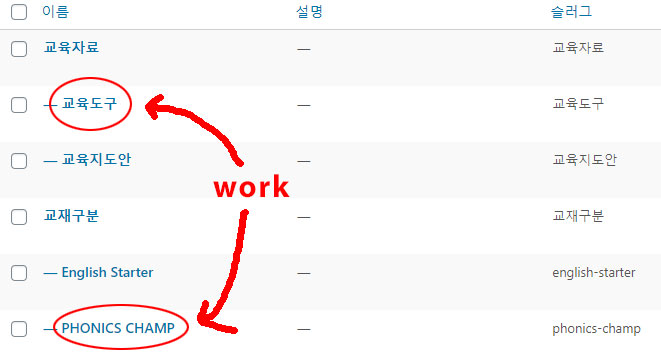
    [wpdm_category id="평가자료형태,start-camp" operator="AND" toolbar="0" order_by="date" order="desc" items_per_page="90" template="Seoil-PR-Template" cols=3 colspad=2 colsphone=1]
    This shortcode works fine in 5.0.95.
    However, it does not work from later versions.
    I thought this problem was due to Korean language, but I found out that this problem was not due to Korean language.

    After version 5.0.95…
    I noticed that the’AND’ operator doesn’t work for the parent category and the child category.
    The’AND’ operator only works on child category and child category.
    Can you solve this problem?

    I have installed version 5.0.95 of WPDM on WordPress to find out this issue.

    https://data.seoiln.com/Cap13.png
    not work
    work

    https://www.wpdownloadmanager.com/doc/short-codes/wpdm_packages-wp_query-in-a-shortcode-for-download-manager-packages/
    There is no example of how to fulfill the conditions in the link you said.
    Please explain in more detail.


    Rendani Nevhulaudzi
    Participant

    Hi, I have successfully installed the WPDM Pro to my new website. But the new updated WPDM Pro does not support the Form lock add on.
    Please help, We need the form lock for our downloads.

    Temporary Logins to the website:
    Link:
    Username:
    Password:

    #135897

    In reply to: restrict access page


    treativa
    Participant
    This reply has been marked as private.

    Duncan McAllister
    Participant

    Here’s the link to my page:

    The distiction seems to be in the FileSystem.php class as below. The Content-disposition parameter determines whether it displays or downloads the file (inline or attachment):

    if (get_option(‘__wpdm_open_in_browser’, 0) || wpdm_query_var(‘open’) == 1)
    header(“Content-disposition: inline;filename=\”{$filename}\””);
    else
    header(“Content-disposition: attachment;filename=\”{$filename}\””);

    In any case, I’ve managed to get it to work after gaining some familiarity with the plugin. Apparently, if I link to a PDF in the WP Media Library, it displays the file. But if I attach the PDF using the Download Manager sidebar, it opens the Windows File Save dialog box, which is exactly what I want.

    Is there any way to suppress the filename link from opening that metadata page that displays the download, filesize, filecount, etc?
    That link is actually where I would prefer to have it open in brower. I’ve searched around, but I’m not sure which class calls. The link sends this: /?wpdmpro=manuals.

    Any help would be greatly appreciated.

    #135822

    Paul Hsieh
    Participant

    Thank you very much for posting this answer, which is what I am looking for. I have one additional question. After the recommended change is made to the link template, does Download Manager still record the number of times the file has been downloaded (in History)?

    Thanks.

Viewing 25 results - 4,126 through 4,150 (of 11,368 total)