Search Results for 'all downloads'

Viewing 25 results - 1,726 through 1,750 (of 5,452 total)
  • Author
    Search Results
  • Hi
    I don’t understand what you mean
    “It is working fine here, with items_per_page more than 12, the packages was causing the issue which allows access option was empty from package settings, https://theblueshield.org/wpdm-test/”

    There are 18 packages?

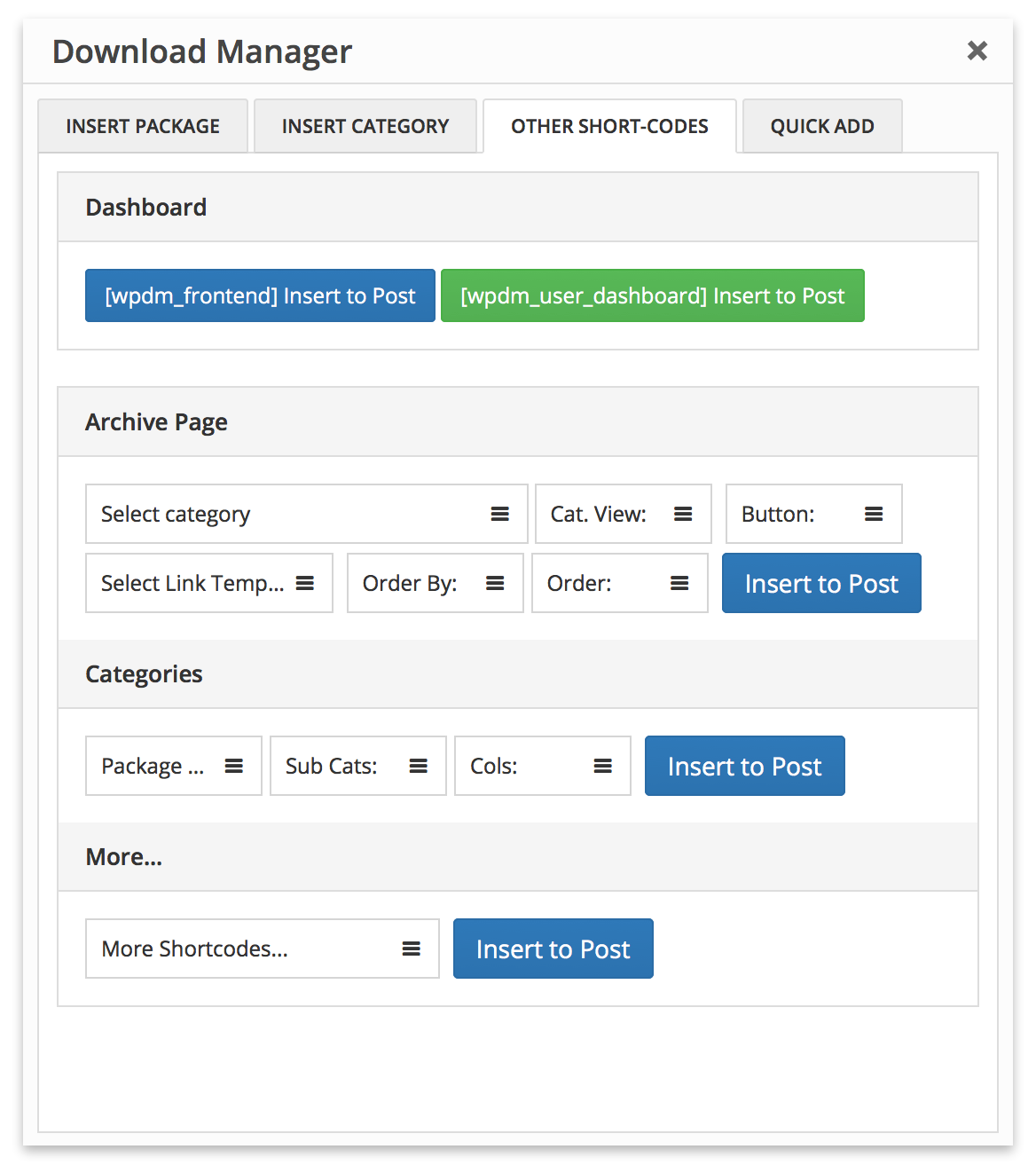
    I don’t understand how the shortcode generator
    For this image, https://www.wpdownloadmanager.com/wp-content/uploads/2012/11/wpdm-archive-page-addon-shortcode-generator.png,

    depends on this add-on, https://www.wpdownloadmanager.com/download/advanced-tinymce-button/,

    HOW do they interact? How do I fix it?
    What even is Tinymce? do I need it? Can I remove it? Will that fix it? If I remove it, what setting will make all 18 downloads display?

    Secondly, why do I always need to be logged in to access the downloads?
    User registration does not work, so I do not want people to need to log in to access them?
    Though I would also like user registration to work?

    Thanks, Emma

    #151408

    Nayeem Riddhi
    Moderator

    Please simply click the Save Settings again for the license key option from Downloads > Settings > License, which will regenerate the access token. Finally, go to the plugins page and the update will work fine this time

    and for add-on for now,

    1 ) Download the latest version from here https://www.wpdownloadmanager.com/user-dashboard/?udb_page=purchases
    2 ) Install the latest version

    thanks, I hope you have understood

    #151388

    xavier lebrun
    Participant

    in the menu

    downloads / settings / updates

    it give the list of

    installed plugins
    non installed plugins
    plugins that can be updated

    if i select a plugin update,the result is that the corresponding plugin is deleted which is not really what should be done


    Andy
    Participant

    Hello,

    we want to use your Pro plugin for downloads only. No user should be able to upload some files, login, or use/see a dashboard All downloads should be free and there should be a main page like yours where people can see categories, etc.

    Also, can we add a download link from a remote server so we don’t have to upload files to our server?

    I saw in your free version login form shortcodes, accts shortcodes too. Can this be deactivated in the Pro version?

    Thank you

    • This topic was modified 5 years, 5 months ago by Andy.
    #151241

    Shahjada
    Keymaster

    After this update ( 3.1.17 or 5.3.7 ), you may face the following 2 issues:

    • Upload is not working
    • Showing “Invalid File Type” error when trying to download

    Here is the reason and solution:


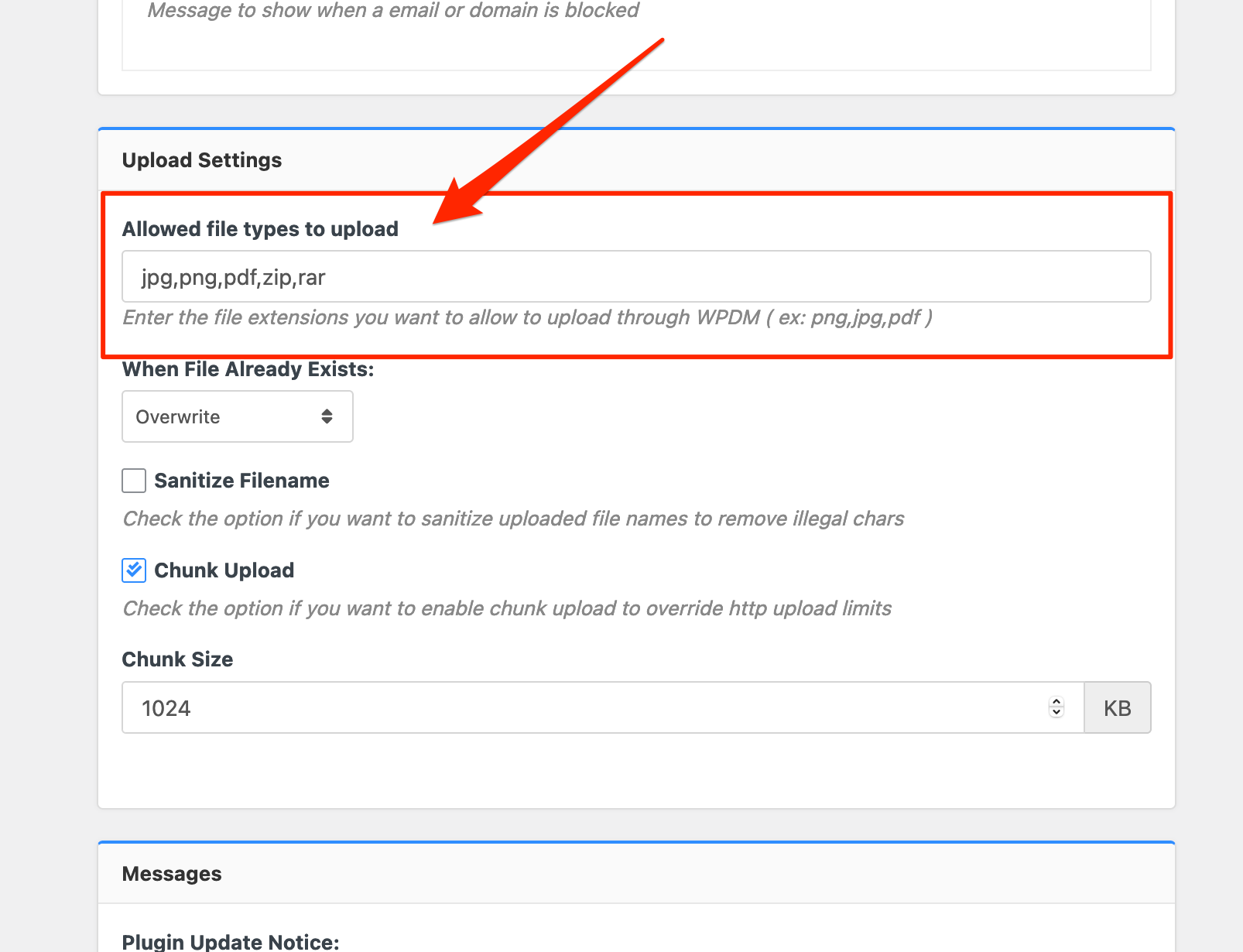
    From WPDM Free 3.1.20 and WPDM Pro 5.3.7, we have changed the file type validation process during file upload and download. Now, you have to white file types to allow them to upload or download. You will find the option at Admin Menu ► Downloads ► Settings ► Basic Settings Tab ► Upload Settings section.
    Settings%20%E2%80%B9%20Download%20Manager%20%E2%80%B9%20WordPress%20Download%20Manager%20Pro%20%E2%80%94%20WordPress

    Please add file types ( texts, multiple texts separated by a comma ) as shown on the marked image. And then save settings. The shall resolve the issue.


    If you have further questions, please create a separate post. Thanks for staying with us and using WordPress Download Manager.


    Nayeem Riddhi
    Moderator

    Hi,

    After this update ( 3.1.17 or 5.3.7 ), you may face the following 2 issues:

    • Upload is not working
    • Showing “Invalid File Type” error when trying to download

    Here is the reason and solution:
    <hr/>
    From WPDM Free 3.1.20 and WPDM Pro 5.3.7, we have changed the file type validation process during file upload and download. Now, you have to white file types to allow them to upload or download. You will find the option at Admin Menu ► Downloads ► Settings ► Basic Settings Tab ► Upload Settings section.
    Settings%20%E2%80%B9%20Download%20Manager%20%E2%80%B9%20WordPress%20Download%20Manager%20Pro%20%E2%80%94%20WordPress

    Please add file types ( texts, multiple texts separated by a comma ) as shown on the marked image. And then save settings. The shall resolve the issue.

    or, Just Keep it Empty for WordPress default use as I image attached

    Image 2021-04-23 at 9.53.21 PM

    thus it may resolve the issue

    thanks

    #151220

    Karley Hall
    Participant

    I can’t access my downloads to be able to adjust them. Is there a way to access them without getting that error?

    This page isn’t workingkarleyhall.com is currently unable to handle this request.
    HTTP ERROR 500

    #151218

    Nayeem Riddhi
    Moderator

    Hi,

    After this update ( 3.1.17 or 5.3.7 ), you may face the following 2 issues:

    • Upload is not working
    • Showing “Invalid File Type” error when trying to download

    Here is the reason and solution:
    <hr/>
    From WPDM Free 3.1.20 and WPDM Pro 5.3.7, we have changed the file type validation process during file upload and download. Now, you have to white file types to allow them to upload or download. You will find the option at Admin Menu ► Downloads ► Settings ► Basic Settings Tab ► Upload Settings section.
    Settings%20%E2%80%B9%20Download%20Manager%20%E2%80%B9%20WordPress%20Download%20Manager%20Pro%20%E2%80%94%20WordPress

    Please add file types ( texts, multiple texts separated by a comma ) as shown on the marked image. And then save settings. The shall resolve the issue.

    or, Just Keep it Empty for WordPress default use as I image attached

    Image 2021-04-23 at 9.53.21 PM

    thus it may resolve the issue

    thanks


    Nayeem Riddhi
    Moderator

    For active license, you may check your user account, https://www.wpdownloadmanager.com/user-dashboard/?udb_page=purchases and for setup license key you may check this doc, https://www.wpdownloadmanager.com/doc/installing-wordpress-download-manager-pro/ and For updating you may simply click the Save Settings again for the license key option from Downloads > Settings > License, which will regenerate the access token. Finally, go to the plugins page and the update will work fine this time and for your 3rd problem can you please elaborate more on your issue, please

    thanks


    Nayeem Riddhi
    Moderator

    For active license, you may check your user account, https://www.wpdownloadmanager.com/user-dashboard/?udb_page=purchases and for setup license key you may check this doc, https://www.wpdownloadmanager.com/doc/installing-wordpress-download-manager-pro/ and For updating you may simply click the Save Settings again for the license key option from Downloads > Settings > License, which will regenerate the access token. Finally, go to the plugins page and the update will work fine this time

    thanks

    #151203

    Nayeem Riddhi
    Moderator

    Hi,

    After this update ( 3.1.17 or 5.3.7 ), you may face the following 2 issues:

    • Upload is not working
    • Showing “Invalid File Type” error when trying to download

    Here is the reason and solution:
    <hr/>
    From WPDM Free 3.1.20 and WPDM Pro 5.3.7, we have changed the file type validation process during file upload and download. Now, you have to white file types to allow them to upload or download. You will find the option at Admin Menu ► Downloads ► Settings ► Basic Settings Tab ► Upload Settings section.
    Settings%20%E2%80%B9%20Download%20Manager%20%E2%80%B9%20WordPress%20Download%20Manager%20Pro%20%E2%80%94%20WordPress

    Please add file types ( texts, multiple texts separated by a comma ) as shown on the marked image. And then save settings. The shall resolve the issue.

    or, Just Keep it Empty for WordPress default use as I image attached

    Image 2021-04-23 at 9.53.21 PM

    thus it may resolve the issue

    thanks

    #151200

    Luther Davies
    Participant

    Hi there,

    As of today we’re getting an Invalid File Type (xxx.xxx)! error message on all downloads (both whole package and individual files).

    The site is login only, please let me know if you need admin access.

    Many thanks,
    Luther


    Juan Gordo
    Participant

    Hi

    When we bought this plugin to create our website, one of the things that attracted us to it was that it had both memberships and one off purchase facilities. Exactly what we needed. Our members would be able to browse and download while non members and guests would just be able to browse and make one of purchases of anything they needed, or choose to become members.

    Sadly having both functionalities available forces the members to get files via the cart while browsing the site or try to find the hidden “my downloads” page on the dashboard and figure out what file they were looking for in a big long uncategorised list, which is far from ideal.

    What I would suggest is that when a member browses the site the purchase button gets replaced with a straight download button and they don’t need to go via the cart.

    Is that possible? Sound simple enough. The site already knows whether the user is a member or not

    #151141

    Michael Angermeir
    Participant

    Hello DM-team!

    I have the following problem and most likely i can not see the forest because of the trees.
    On my homepage (WordPress and Thrive Theme) I intend to offer downloads without registration (DM Pro). I tried to integrate the corresponding template (Call to action 4) both via the Gutenberg block and via the shortcodes: The desired success was not achieved.

    When using the Gutenberg block, I have the mask as a result, but no content, although a total number of objects is displayed to me.

    If I use shortcodes, things get even more adventurous because the possible downloads are displayed, but not all. Also, only one page is displayed. The categories for a selection appear as a list above the remaining filter options.

    As a first possible solution, I used different shortcodes and tried to adapt, delete or add to my requirements.
    I have also already deactivated the plugin and reactivated it.

    Now my question, what did I either do wrong or what could be the problem?

    Thanks for your help and support!

    Best greetings
    Michael

    #151125

    Nayeem Riddhi
    Moderator

    I have checked that PDF viewer is working fine from my side, https://steinwaylyngdorf.com/downloads/model-b-installation-manual/ can you please share the gallery code related packages

    thanks


    Jason Petefish
    Participant

    Hi – unable to locate the WPDM default setting that allows users to download a file from Chrome. On the original WPDM free installation, our library items (pdfs) all download for users which is what I want for all site-wide downloads. When I create a new WPDM item, upon testing the file opens in Chrome instead of downloading. I cannot find a setting or why this is occurring. In WPDM settings > file download, the “open in browser” is not checked. Using Beaver builder and WPDM short codes properly. If I duplicate an existing download item and rename it and swop out a different asset, it also opens in browser whereas the original item I duplicated from downloads the asset (PDF). Looks to me somehow the default download is messed up (unless a recent WPDM update eliminated downloads and opens assets in the browser instead). All library items on this page operate properly except the new ones under “Trimteck Valve Training Modules” accordion https://trimteck.com/tools/technical-library/

    Thanks for a quick reply.

    #151102

    I had the line blank as suggested and it still gave me the error. When I manually entered the file extensions all my downloads started to work again.


    Nayeem Riddhi
    Moderator

    For updating you may simply click the Save Settings again for the license key option from Downloads > Settings > License, which will regenerate the access token. Finally, go to the plugins page and the update will work fine this time

    thanks

    #151003

    MESO
    Participant

    One of the last updates (5.3.6 or 5.3.7) disabled all downloads. When trying to download a file there is only the message: “Invalid File Type (IBoxTC-Datenblatt-201703-web.pdf)!”. We also cannot create new files since apparently PDF is a blocked filetype even though the allowed file types are “*”

    #150994

    Casper Bjerg
    Participant
    This reply has been marked as private.

    Vela Agency
    Member

    Can the “File Browser Root” setting be used to grab downloads from an alternate domain?

    Use Case:
    Client has 2 websites
    Client would like to add downloadable files to both (currently active in one site)
    Client would like to manage all downloads from one interface

    Is this possible with Set File Browser Root?


    Nayeem Riddhi
    Moderator

    For updating you may simply click the Save Settings again for the license key option from Downloads > Settings > License, which will regenerate the access token. Finally, go to the plugins page and the update will work fine this time, I hope it will work then from your side too

    thanks

    #150918

    Nayeem Riddhi
    Moderator

    Please try now, it is working fine now, and for updating you may simply click the Save Settings again for the license key option from Downloads > Settings > License, which will regenerate the access token. Finally, go to the plugins page and the update will work fine this time

    thanks

    #150886

    Marvin Lopez
    Participant

    Hi, i have a problem with downloads, at first i think only happen to my user but now i see others users has the same issue.
    When i upload a file, i can not donwloads my same file but i can download the other files from others users, and the same happen when they uploads a file, they can not downloads their own files.

    see screenshot: https://infonetla.org/wp-content/uploads/2021/04/Captura-de-Pantalla-2021-04-21-a-las-15.13.37.png


    ERA Brand ID
    Participant

    My downloads are organized by category and each category has sub categories, each of the sub categories has a series of downloadable assets.

    It seems that CATEGORY BLOCKS only allows one-level deep.

    For example, I need this approach: DOWNLOADS> MARKETING DOWNLOADS> BROCHURE DOWNLOADS> COLOR BROCHURES> Then 10 brochures.

    It seems Category Blocks only goes down one level, so: DOWNLOADS> CONSUMER DOWNLOADS: Then all the files, no further categorization.

    Am I doing something wrong?

Viewing 25 results - 1,726 through 1,750 (of 5,452 total)