-
AuthorSearch Results
-
May 11, 2021 at 1:44 pm #152408
Nayeem RiddhiModeratorHello,
Have you checked this add-on, https://www.wpdownloadmanager.com/download/advanced-access-control/, this add-on will allow you user-specific access to your files and document downloads, please check and let me know
thanks
May 10, 2021 at 11:48 pm #152373Topic: can we add limatation for a user on downloads?
in forum Download Manager Pro
Ikram DirujiiParticipantDear Wpdm team can we limit the number of downloads for the same user for a specific period?
i mean if I want that user can download 10 files in a day, after that he did not allow to download the file until the next day? so is this possible with wpdm pro or not sir?May 10, 2021 at 9:27 pm #152366
Nayeem RiddhiModeratorCan you please elaborate more on your #1 problem, are you trying to have two different types of files in one package?
and for #2, you may use categories parameter for this shortcode, https://www.wpdownloadmanager.com/doc/short-codes/wpdm_all_packages-list-all-downloads-in-tabular-format-in-a-page/
thanks
May 10, 2021 at 9:13 pm #152363In reply to: Unable to update Download Manager
Nayeem RiddhiModeratorPlease simply click the Save Settings again for the license key option from
Downloads > Settings > License, which will regenerate the access token. Finally, go to the plugins page and the update will work fine this timeand for add-on for now,
1 ) Download the latest version from here https://www.wpdownloadmanager.com/user-dashboard/?udb_page=purchases
2 ) Install the latest versionthanks, I hope you have understood
May 10, 2021 at 7:27 pm #152353In reply to: Trouble with Allow Access by Document
Chris MartinParticipantMy client asked the status of this and I just checked and it still doesn’t work. The log information can still be found above.
Here’s what happens:
1. I log in as admin
2. click “add new” under downloads
3. create a title
4. add a test pdf file
5. remove everyone from “Allow Access”
6. add Anesthesiologist only
7. click on publishThen when I log back in as a CRNA, I am able to see and download the file that should be for Anesthesiologist
only. That should not happen. Please help!Thanks. Chris
May 10, 2021 at 4:54 am #152289Topic: Critical Error
in forum Download Manager Pro
Emma HarrisonParticipantHello,
We’ve been using WPDM for several years on our website, with no headaches.However, now on the front-end, when someone visits the download page it says “There has been a critical error on this website. Learn more about troubleshooting WordPress.” Below that text, it shows the header of the WPDM table, but no information.
We’re using the [wpdm_all_packages] shortcode, and that’s it.
I switched on PHP errors, and reloaded the page, and it shows the following….
Fatal error: Uncaught Error: Class ‘liveforms’ not found in /DELETED_SERVER_ADDRESS/public_html/wp-content/plugins/download-after-submit/download-after-submit.php:77 Stack trace: #0 /DELETED_SERVER_ADDRESS/public_html/wp-includes/class-wp-hook.php(292): liveform_for_wpdmpro->download_lock(”, Array) #1 /DELETED_SERVER_ADDRESS/public_html/wp-includes/plugin.php(212): WP_Hook->apply_filters(”, Array) #2 /DELETED_SERVER_ADDRESS/public_html/wp-content/plugins/download-manager/libs/class.Package.php(1000): apply_filters(‘wpdm_download_l…’, ”, Array) #3 /DELETED_SERVER_ADDRESS/public_html/wp-content/plugins/download-manager/libs/class.Package.php(1150): WPDM\Package::activeLocks(1331, Array) #4 /DELETED_SERVER_ADDRESS/public_html/wp-content/plugins/download-manager/tpls/wpdm-all-downloads.php(294): WPDM\Package::downloadLink(1331, 0, Array) #5 /DELETED_SERVER_ADDRESS/public_html/wp-content/plugins/download-manager/libs/class.ShortCodes.php(563): include(‘/DELETED_SERVER_ADDRESS…’) #6 /DELETED_SERVER_ADDRESS/public_html/wp-includes/shortc in /DELETED_SERVER_ADDRESS/public_html/wp-content/plugins/download-after-submit/download-after-submit.php on line 77
Any suggestions of how we can fix this error?
May 7, 2021 at 5:22 pm #152176In reply to: WPDM archive page translation «Loading…»
Philippe BonneauParticipantThe edit are on line 59, 87 and 199
const { __, _x, _n, sprintf } = wp.i18n; function wpdmapPagination(current, last) { var delta = 2, left = current - delta, right = current + delta + 1, range = [], rangeWithDots = [], l; for (let i = 1; i <= last; i++) { if (i === 1 || i === last || i >= left && i < right) { range.push(i); } } for (let i of range) { if (l) { if (i - l === 2) { rangeWithDots.push(l + 1); } else if (i - l !== 1) { rangeWithDots.push('...'); } } rangeWithDots.push(i); l = i; } var html = "<ul class='pagination wpdm-pagination pagination-centered text-center'>"; console.log(current); if(current > 1) html += "<li><a href='#' data-page='"+(current-1)+"' class='async_page page-numbers'><i style=\"display: inline-block;width: 8px;height: 8px;border-right: 1px solid;border-top: 1px solid;transform: rotate(-135deg);margin-left: -2px;margin-top: 2px;\"></i></a></li>" for(i = 0; i < rangeWithDots.length; i++){ var cclass = parseInt(rangeWithDots[i]) === current ? 'current-page' : ''; if(rangeWithDots[i] !== '...') html += "<li><a href='#' data-page='"+rangeWithDots[i]+"' class='async_page page-numbers "+cclass+"'>"+rangeWithDots[i]+"</a></li>"; else html += "<li><a class='page-numbers dot'>"+rangeWithDots[i]+"</a></li>"; } if(current < last) html += "<li><a href='#' data-page='"+(current+1)+"' class='async_page page-numbers'><i style=\"display: inline-block;width: 8px;height: 8px;border-right: 1px solid;border-top: 1px solid;transform: rotate(45deg);margin-left: -2px;margin-top: -2px;\"></i></a></li>" html += "</ul>"; return "<div class='text-center'>"+html+"</div>"; } jQuery(function ($) { function htmlEncode(value) { return $('<div/>').text(value).html(); } var wpdmac_category = '', wpdmac_tags = ''; function getDownloads(cp, container) { WPDM.blockUI('#wpdm-archive-page'); var scode_params = typeof wpdmap_params !== 'undefined' ? wpdmap_params : ''; jQuery('#wpdm-downloads').prepend('<div class="wpdm-loading">'+wpdm_asset.spinner+' '+__('Chargement', 'wpdm-archive-pae')+'...</div>'); jQuery.post(location.href, { action: 'get_downloads', cp: cp, search: jQuery('#src').val(), category: wpdmac_category, tags: wpdmac_tags, orderby: jQuery('#order_by').val(), order: jQuery('#order').val(), sc_params: scode_params }, function (response) { if(typeof container === 'undefined') container = '#wpdm-downloads'; jQuery(container).html(response.html+wpdmapPagination(cp, response.last)); WPDM.unblockUI('#wpdm-archive-page'); }); } function setParentCat(cat_id) { jQuery.ajax({ type: "post", dataType: "json", url: wpdm_url.ajax, data: {action: "wpdm_change_cat_parent", cat_id: cat_id}, success: function (response) { console.log(response); if (response.type === "success") { if (jQuery('#src').val() !== '') jQuery('#inp').html(__('Résultat de recherche pour', 'wpdm-archive-pae')+' <b>' + htmlEncode(jQuery('#src').val()) + '</b> '+__('in category', 'wpdm-archive-pae')+' <b>' + response.parent + '</b>'); else jQuery('#inp').html(response.parent); } } }); } function selectedCats() { var _items = []; $('#wpdmcat-tree input[type=checkbox]').each(function (index, item) { if($(this).is(":checked")) _items.push($(this).val()); }); return _items; } function selectedTags() { var _items = []; $('#wpdm-tags input[type=checkbox]').each(function (index, item) { if($(this).is(":checked")) _items.push($(this).val()); }); return _items; } var $body = $('body'); /*$body.on('click', '.pagination a', function (e) { e.preventDefault(); $('#wpdm-downloads').prepend('<div class="wpdm-loading">'+wpdm_asset.spinner+' '+__('Loading', 'wpdm-archive-pae')+'...</div>').load(this.href); });*/ $('.wpdm-cat-link').click(function (e) { e.preventDefault(); $('.wpdm-cat-link').removeClass('active'); $(this).addClass('active'); var cat_id = $(this).attr('rel'); wpdmac_category = cat_id; setParentCat(cat_id); getDownloads(1); }); $('#wpdm-cats-compact').on('change', function (e) { var cat_id = $(this).val(); if (cat_id == -1) cat_id = 0; $('#initc').val(cat_id); var sfparams = $('#srcp').serialize() wpdmac_category = cat_id; setParentCat(cat_id); getDownloads(1); }); $('#wpdmcat-tree input[type=checkbox], #wpdm-tags input[type=checkbox]').on('change', function (e) { wpdmac_category = selectedCats(); wpdmac_tags = selectedTags(); $('#initc').val(wpdmac_category); var sfparams = $('#srcp').serialize() getDownloads(1); }); $body.on('click', '.async_page', function (e){ e.preventDefault(); e.stopPropagation(); getDownloads($(this).data('page')); return false; }); $body.on('click', '.wpdm-cat-link2', function (e) { e.preventDefault(); $('.wpdm-cat-link').removeClass('active'); var new_rel = $(this).attr('test_rel'); if (new_rel !== 'undefined') { $('a[rel=' + new_rel + ']').addClass('active'); } var cat_id = jQuery(this).attr('rel'); wpdmac_category = cat_id; setParentCat(cat_id); getDownloads(1); }); $body.on('click', '.w3eden a.btn-clps[data-toggle="collapse"]', function () { $(this).children('.fa').toggleClass('fa-chevron-down'); $(this).children('.fa').toggleClass('fa-chevron-up'); $(this).toggleClass('active'); }); $body.on('click', '#reset-filter', function (e) { e.preventDefault(); $('#wpdmcat-tree input[type=checkbox], #wpdm-tags input[type=checkbox]').removeAttr('checked'); $('#src').val(''); $('#srcp').resetForm(); wpdmac_category = ''; wpdmac_tags = ''; getDownloads(1); }); $('#order_by, #order').on('change', function () { getDownloads(1); }); $('#srcpss').submit(function (e) { e.preventDefault(); getDownloads(1); }); $('#srcp').submit(function (e) { e.preventDefault(); $('.wpdm-cat-link').removeClass('active'); $('#inp').html(__('Résultat de recherche pour', 'wpdm-archive-pae')+' <b>' + htmlEncode($('#src').val()) + '</b>'); getDownloads(1); }); $('#wpdm-archive-page-home').click(function (e) { e.preventDefault(); $('.wpdm-cat-link').removeClass('active'); $('#inp').html(__('All Downloads', 'wpdm-archive-pae')); wpdmac_category = ''; $('#src').val(''); getDownloads(1); }); $body.on("keyup", "#cat_src", function() { var value = $(this).val().toLowerCase(); $("#wpdmcat-tree li").filter(function() { $(this).toggle($(this).text().toLowerCase().indexOf(value) > -1) }); }); $body.on("keyup", "#tag_src", function() { var value = $(this).val().toLowerCase(); $("#wpdm-tags .wpdm-tag").filter(function() { console.log($(this).text()); $(this).toggle($(this).text().toLowerCase().indexOf(value) > -1) }); }); if($('#wpdm-downloads').length > 0) getDownloads(1); });May 7, 2021 at 4:34 pm #152163In reply to: Category limits for Back end Document Managers
Nayeem RiddhiModeratorAre you talking about wp-admin
downloads > all packages? please let me knowthanks
May 7, 2021 at 4:04 pm #152158Topic: Category limits for Back end Document Managers
in forum Download Manager Pro
Kyle BorgParticipantI have tried to use the [wpmd_frontend] code, but I find limits in the function and it doesn’t work with my theme.
I want my document managers to use the backend, but when I assign Document categories to a Role, those users are still seeing every package in the backend Downloads Section.
How do I limit the backend Downloads manager All Packages to show only packages for the role authorized to see those categories?
May 7, 2021 at 1:13 pm #152128In reply to: Unable to update Pro version.
Nayeem RiddhiModeratorPlease simply click the Save Settings again for the license key option from
Downloads > Settings > License, which will regenerate the access token. Finally, go to the plugins page and the update will work fine this timeand for add-on for now,
1 ) Download the latest version from here https://www.wpdownloadmanager.com/user-dashboard/?udb_page=purchases
2 ) Install the latest versionthanks, I hope you have understood
May 7, 2021 at 8:48 am #152088In reply to: Upload and download is not working
Christoph KaiserParticipantAfter updating to Version 3.1.26 today NONE of my downloads is working any longer!
With the old version at least all the files that had been uploaded previously could be downloaded. – With the new Version 3.1.26 NONE of my apk-files can be downloaded!
May 6, 2021 at 1:51 pm #152034
Nayeem RiddhiModeratorplease use this Pastebin code,
I hope it will work now for
downloads/tpls3/wpdm-all-downloads.phpfilethanks
May 6, 2021 at 12:00 pm #152017
Ikram DirujiiParticipantthis is my current wp all downloads PHP file sir please paste in this.
May 6, 2021 at 10:06 am #152006
Nayeem RiddhiModeratorHi,
if you are using
bootstarp 4fromdownloads > settings > user interfaceplease add the below line
downloads/tpls/wpdm-all-downloads.phpfile in line number295$data['download_link'] = "<a target='_blank' class='btn btn-primary' href='".get_permalink($data['ID'])."'>"."Download"."</a>";commenting out this line
// $data['download_link'] = \WPDM\Package::downloadLink($data['ID'], 0, array('template_type' ► 'link'));I hope it should open a new tab for the related packages
thanks
May 5, 2021 at 11:32 am #151894In reply to: Memory Problem
Markus SchulteParticipantThis reply has been marked as private.May 5, 2021 at 8:58 am #151871In reply to: Getting Error when trying to update
Nayeem RiddhiModeratorPlease simply click the Save Settings again for the license key option from
Downloads > Settings > License, which will regenerate the access token. Finally, go to the plugins page and the update will work fine this timeand for add-on for now,
1 ) Download the latest version from here https://www.wpdownloadmanager.com/user-dashboard/?udb_page=purchases
2 ) Install the latest versionthanks, I hope you have understood
May 5, 2021 at 8:25 am #151861In reply to: Can’t download since I installed WPML
Nayeem RiddhiModeratorHi,
For Invalid File Type updating ( 3.1.17 or 5.3.7 ), you may face the following 2 issues:
- Upload is not working
- Showing “Invalid File Type” error when trying to download
Here is the reason and solution:
<hr/>
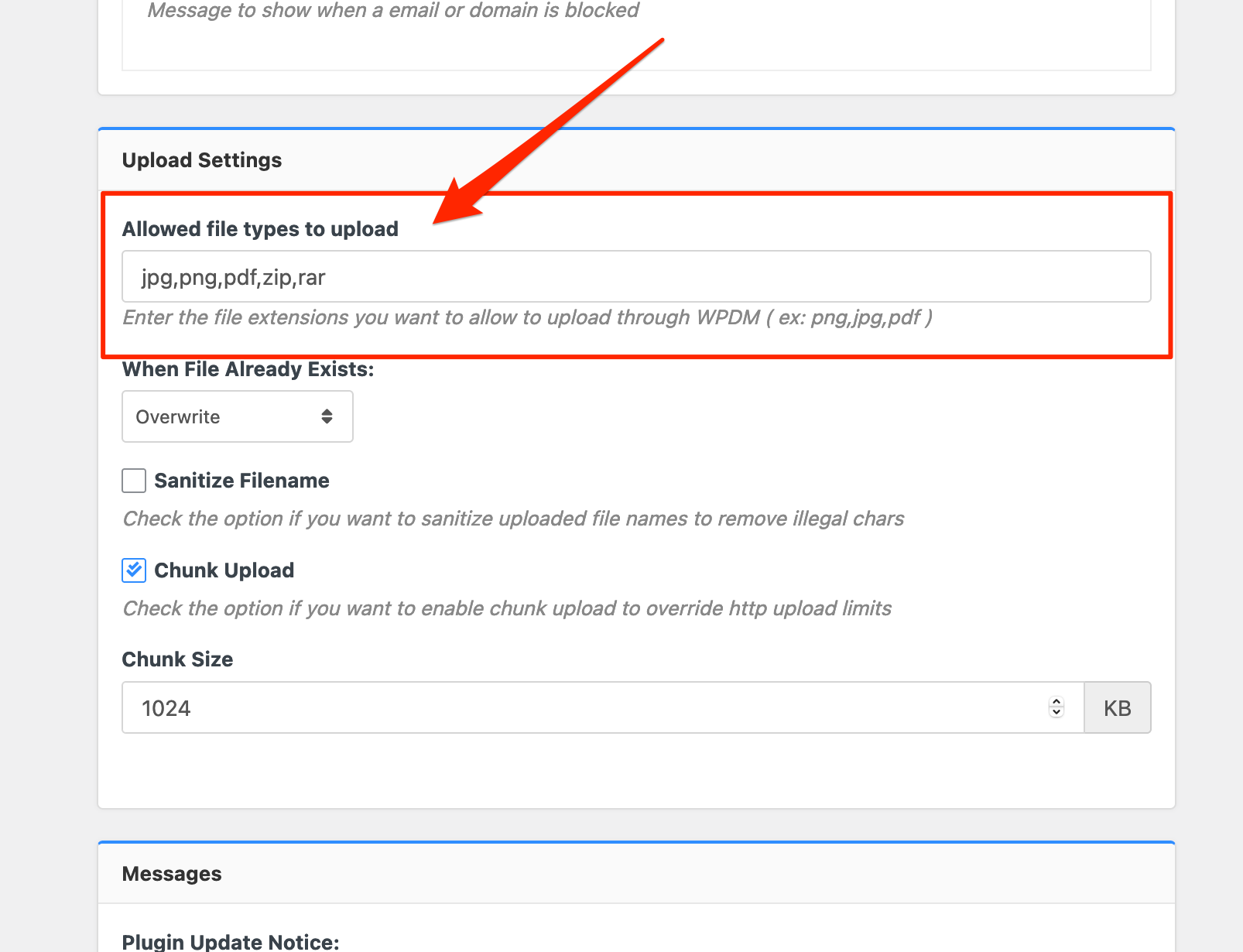
From WPDM Free 3.1.20 and WPDM Pro 5.3.7, we have changed the file type validation process during file upload and download. Now, you have to white file types to allow them to upload or download. You will find the option at Admin Menu ► Downloads ► Settings ► Basic Settings Tab ► Upload Settings section.

Please add file types ( texts, multiple texts separated by a comma ) as shown on the marked image. And then save settings. The shall resolve the issue.
or, Just Keep it Empty for WordPress default use as I image attached
thus it may resolve the issue
thanks
May 4, 2021 at 8:06 am #151757In reply to: Latest version?
Nayeem RiddhiModeratorYou can also try updating the PRO plugin this way, please simply click the Save Settings again for the license key option from
Downloads > Settings > License, which will regenerate the access token. Finally, go to the plugins page and the update will work fine this timeand for add-on for now,
1 ) Download the latest version from here https://www.wpdownloadmanager.com/user-dashboard/?udb_page=purchases
2 ) Install the latest versionthanks, I hope you have understood
May 3, 2021 at 9:11 am #151684
odessuParticipantThis reply has been marked as private.May 3, 2021 at 9:01 am #151681
Nayeem RiddhiModeratorHi,
For Invalid File Type updating ( 3.1.17 or 5.3.7 ), you may face the following 2 issues:
- Upload is not working
- Showing “Invalid File Type” error when trying to download
Here is the reason and solution:
<hr/>
From WPDM Free 3.1.20 and WPDM Pro 5.3.7, we have changed the file type validation process during file upload and download. Now, you have to white file types to allow them to upload or download. You will find the option at Admin Menu ► Downloads ► Settings ► Basic Settings Tab ► Upload Settings section.

Please add file types ( texts, multiple texts separated by a comma ) as shown on the marked image. And then save settings. The shall resolve the issue.
or, Just Keep it Empty for WordPress default use as I image attached
thus it may resolve the issue
thanks
May 2, 2021 at 5:16 pm #151660
Nayeem RiddhiModeratorHi,
If you are trying package link over download text for this shortcode
wpdm_all_packages, I have made a custom file that will render you download text for package link, please copy this Pastebin URL code,then try to paste
download-manager > tpls/tpls3 > wpdm-all-downloads.phpfile, if you are using bootstrap4 then tpls, bootstrap3 then tpls3, for making backup the file, please follow this doc, https://www.wpdownloadmanager.com/doc/template-files/please let me know, if it works from your side
thanks
May 1, 2021 at 3:44 pm #151619In reply to: Error downloading files after update 5.3.7
Nayeem RiddhiModeratorHi,
After this update ( 3.1.17 or 5.3.7 ), you may face the following 2 issues:
- Upload is not working
- Showing “Invalid File Type” error when trying to download
Here is the reason and solution:
<hr/>
From WPDM Free 3.1.20 and WPDM Pro 5.3.7, we have changed the file type validation process during file upload and download. Now, you have to white file types to allow them to upload or download. You will find the option at Admin Menu ► Downloads ► Settings ► Basic Settings Tab ► Upload Settings section.

Please add file types ( texts, multiple texts separated by a comma ) as shown on the marked image. And then save settings. The shall resolve the issue.
or, Just Keep it Empty for WordPress default use as I image attached
thus it may resolve the issue
thanks
May 1, 2021 at 12:17 pm #151609In reply to: Invalid File Type (Pdv_202103_it_Color.pdf)!
Nayeem RiddhiModeratorHi,
After this update ( 3.1.17 or 5.3.7 ), you may face the following 2 issues:
- Upload is not working
- Showing “Invalid File Type” error when trying to download
Here is the reason and solution:
<hr/>
From WPDM Free 3.1.20 and WPDM Pro 5.3.7, we have changed the file type validation process during file upload and download. Now, you have to white file types to allow them to upload or download. You will find the option at Admin Menu ► Downloads ► Settings ► Basic Settings Tab ► Upload Settings section.

Please add file types ( texts, multiple texts separated by a comma ) as shown on the marked image. And then save settings. The shall resolve the issue.
or, Just Keep it Empty for WordPress default use as I image attached
thus it may resolve the issue
thanks
Apr 30, 2021 at 9:47 am #151556In reply to: Email Template / Preview and Result not the same
Steve LaborieParticipantAnother issue we have. The first time somebody fills out a form to download, we receive all the info in the download notification. If I continues his session and downloads more, we only receive the IP address, the other info is not added, only on the first download. Is there a setting for that?
Apr 30, 2021 at 9:21 am #151554In reply to: Avada theme conflicts
Nayeem RiddhiModeratorI have seen that which template you are using in the shortcode there you have used
link-template-default,by default, you are using
link-template-default.phpfor the link template. After customizing/adjusting download button tag, you can copy the file in the theme directory naming a folder called download-manager, then paste it intpls>page-templatesfor page template ortpls>link-templatesfor link template. and you can follow this doc for making backup files, https://www.wpdownloadmanager.com/doc/template-files/also, you can use the pre-made link-templates or page-templates from here as i image attached,
from
Downloads > Templatessectionand for title size, you may use adjusted font size for the package title
I hope those may help you
Thanks again
-
AuthorSearch Results
Search Results for 'all downloads'
-
Search Results
-
Dear Wpdm team can we limit the number of downloads for the same user for a specific period?
i mean if I want that user can download 10 files in a day, after that he did not allow to download the file until the next day? so is this possible with wpdm pro or not sir?Topic: Critical Error
Hello,
We’ve been using WPDM for several years on our website, with no headaches.However, now on the front-end, when someone visits the download page it says “There has been a critical error on this website. Learn more about troubleshooting WordPress.” Below that text, it shows the header of the WPDM table, but no information.
We’re using the [wpdm_all_packages] shortcode, and that’s it.
I switched on PHP errors, and reloaded the page, and it shows the following….
Fatal error: Uncaught Error: Class ‘liveforms’ not found in /DELETED_SERVER_ADDRESS/public_html/wp-content/plugins/download-after-submit/download-after-submit.php:77 Stack trace: #0 /DELETED_SERVER_ADDRESS/public_html/wp-includes/class-wp-hook.php(292): liveform_for_wpdmpro->download_lock(”, Array) #1 /DELETED_SERVER_ADDRESS/public_html/wp-includes/plugin.php(212): WP_Hook->apply_filters(”, Array) #2 /DELETED_SERVER_ADDRESS/public_html/wp-content/plugins/download-manager/libs/class.Package.php(1000): apply_filters(‘wpdm_download_l…’, ”, Array) #3 /DELETED_SERVER_ADDRESS/public_html/wp-content/plugins/download-manager/libs/class.Package.php(1150): WPDM\Package::activeLocks(1331, Array) #4 /DELETED_SERVER_ADDRESS/public_html/wp-content/plugins/download-manager/tpls/wpdm-all-downloads.php(294): WPDM\Package::downloadLink(1331, 0, Array) #5 /DELETED_SERVER_ADDRESS/public_html/wp-content/plugins/download-manager/libs/class.ShortCodes.php(563): include(‘/DELETED_SERVER_ADDRESS…’) #6 /DELETED_SERVER_ADDRESS/public_html/wp-includes/shortc in /DELETED_SERVER_ADDRESS/public_html/wp-content/plugins/download-after-submit/download-after-submit.php on line 77
Any suggestions of how we can fix this error?
I have tried to use the [wpmd_frontend] code, but I find limits in the function and it doesn’t work with my theme.
I want my document managers to use the backend, but when I assign Document categories to a Role, those users are still seeing every package in the backend Downloads Section.
How do I limit the backend Downloads manager All Packages to show only packages for the role authorized to see those categories?