-
Search Results
-
I am attaching files to the categories in my taxonomy. The files are in Dropbox. I right click the file then copy the Dropbox link. Then I paste it in the box marked URL.
The problem is that the after a user clicks on the file and clicks “download” the file appears but also includes a link to my Dropbox “Back to Dropbox.” Is there a different plugin I can use that excludes the “Back to Dropbox” link and at the same time allows more than one image to be attached so that when the user clicks download all the images attached to a particular category may be viewed.When customers attempt downloading from IE 11 browser they click the download link and nothing happens. I will post a link privately.
Everything works in Firefox and Chrome. This needs a fast resolution.
DISCARD THIS MESSAGE I ALREADY FOUND OUT HOW TO FIX IT IN SETTINGS.
Hello thereWe have changed our site’s login URL in WordPress and now all protected downloads show the old login page when an unregistered user attempts to download a protected file.How do I make the plugin update the download link to show the new login URL in WordPress?
Thanks in advance.I am using the Email lock option. When the site visitor gets the email with the download link, it appears as the package permalink, with the wpdmdl and _wpdmkey tacked on. Okay, that’s fine.
However, if the visitor copies that link, and then uses wget on the command line, the file saved is NOT the Link Label, or the permalink, but instead ‘index.html?wpdmdl=xxx&_wpdmkey=xxx….’
How can this be fixed? My site visitors are cli users, and do want to use wget and the like.
Ideally, I would like the saved filename to be the Link Label, as defined in the Package Settings.
Thanks,
ScottHi- very new to this! Once I have added downloads, is there a quick way to add the download to the page or do I have to copy and paste the link every time? Is there also a way of adding the downloads as a grid display to a page?
Fatal error: Call to undefined method WPDM\Package::validateMasterKey() in (removed) /plugins/wpdm-premium-packages/wpdm-premium-packages.php on line 448
the first time i installed it worked (mind you wp cache is turned off) but after trying to get it how i wanted (adding differ downloads, making one that had all the downloads in one download, etc.. ) download stop working.. i erased all downloads deleted plugin and reinstalled but when i recreate (using attach directory or single files attached) when i click download it doesn’t work.
if its in the call to action download (that should zip all the files in the folder?) it gives error:
Fatal error: Call to undefined method WPDM\Package::validateMasterKey() in /home/content/90/8723690/html/HarambeeRecords/wp-content/plugins/wpdm-premium-packages/wpdm-premium-packages.php on line 448if I click the link to go to the download manager page with the file verseion, all files and unique download buttons for all files (say mp3, cover art etc) it just acts like it reloads and shows nothing (using html5/ajax) so all the info on the page goes away and it goes to blank page with the menu and background.
i also noticed the links to the files are as such
/home/content/90/8723690/html/HarambeeRecords//GODJHaKa/337HottestVol1/337’s_Hottest_Vol._1_CoverArt.png
the “2 ” // is how it does it.
Topic: BAD links after upgrade
Hi Shaon,
After upgrading WPDM I now have bad links on all external sites that linked directly to files. Here are examples:On this page: https://wels.net/about-wels/official-reports/rttd2018 (a non WPDM enabled external site) links to downloadable file on our Resource Center (a WPDM enabled site ) https://synodadmin.welsrc.net/.
So links on the wels.net page look like this:
https://synodadmin.welsrc.net/download-synodadmin/report-to-the-twelve-districts-2018/?wpdmdl=3443&ind=u5a_nwomPE419wkGweyJBHVwi6Rq6z8Yf2OiXFE_sqW3vJhUZ6EP92MUZo9SPWf_After the upgrade the &ind= “value” is no longer pointing to the correct file.
It should now be pointing to the CECW file on this page:FILE URL NOW after upgrade is:
https://synodadmin.welsrc.net/download-synodadmin/report-to-the-twelve-districts-2018/?wpdmdl=3443&ind=1524857850754So
&ind=u5a_nwomPE419wkGweyJBHVwi6Rq6z8Yf2OiXFE_sqW3vJhUZ6EP92MUZo9SPWf_
Became
&ind=1524857850754I would need to go through all of our external sites to fix the links. UNLESS you have a different method that recognizes the old &ind value and redirects to the new &ind value.
Help me out here please! Thanks
I use to have WPDM FREE version, so i use to add file – go to all file – copy short code – add it into my page – the download is displayed in a nice way and when users click it – the download start directly .
Moved to pro version, doing the same steps as before but when my users click the link their are being redireted to another page in order to start the download.
Need to stop that and make it easy like the free version, the download should start directly.
Thanks in advance for your help.
For a PDF package in which I have no Link Template and the Page Template is Single Column with Doc Preview, when the Download link is clicked, is there a way to have the rendered preview appear in a new window?
Topic: Remove right column
Hey,
I’m beginning to use the wp download manager and it’s work fine.
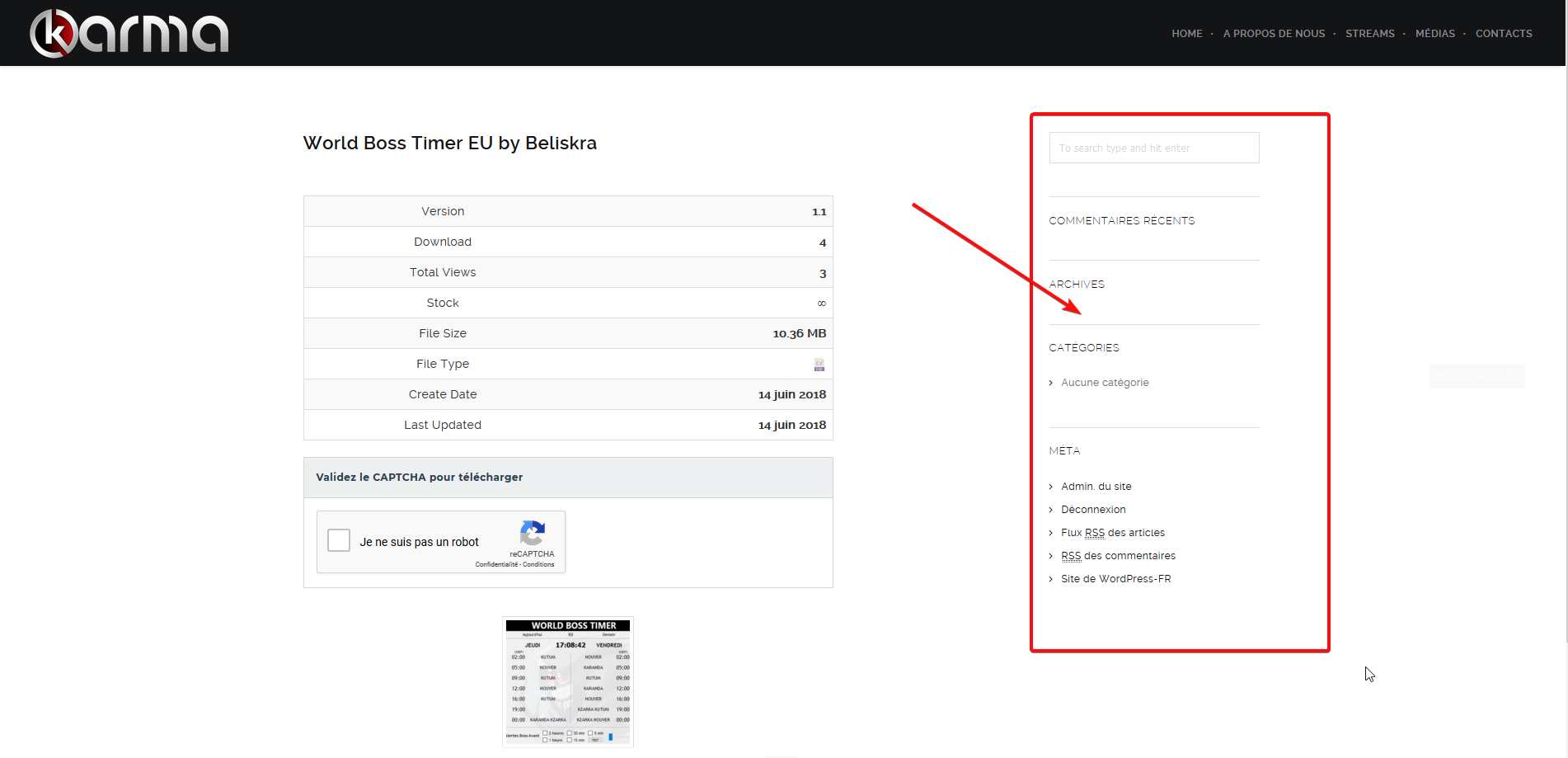
But i don’t know how to remove the right column with the search box, meta, flux rss etc…I link you a screenshot of my site for to see what I’m talking about.
https://nsa39.casimages.com/img/2018/06/14/180614091122601511.pngThx
I use to have WPDM FREE version, so i use to add file – go to all file – copy short code – add it into my page – the download is displayed in a nice way and when users click it – the download start directly .
Moved to pro version, doing the same steps as before but when my users click the link their are being redireted to another page in order to start the download.
Need to stop that and make it easy like the free version, the download should start directly.
Thanks in advance for your help.