-
Search Results
-
Topic: About Email Download Link
When I create an EMail Lock for a package, and the user receives the Download link and clicks on it, it opens a page before the direct link.
How can I remove this page, and let the user directly download the package from his email?Topic: Invalid Download Link
This is the 2nd time I am getting this error. When users try to download using the password lock or using the email lock, they are getting invalid download link error in red box. This is really frustrating because you fixed it for me last time so I have no idea how to do it myself this time.
I’m trying to style the package link display based on whether a user has access to that package. I have set Download Manager to Only Block Download Link when user is not allowed to download, and the projects appear with no download link, as expected. Can an HTML class be set in a link template by checking whether a user has access to a specific package?
Hi! In pro it is easy to set a customized default download link template. Is it likewise possible to set a customized default download page template? I am trying to make a swedish download page, and have already uploaded a lot of packages. I would much appreciate a way of using a customized download page template by default on all packages, instead of going through each package again and manually choosing the customized template.
Hello,
I using the download manager pro and the to [file_list] template, and I need to open a new tab when click to download button of file list. Can you help me please?Hello,
the e-mail with the download link is generally not sent. I have been looking for many hours for an error. But I cannot find an error!? Or maybe this is related to the fact that I currently have 2 different accounts with you (see my e-mail about this).
SMTP is installed.
Can you please help me?
I will give you access to the website as a private message.
Thanks a lot –
Marc
Topic: Download links keep expiring
Hello,
We have been using your fantastic plugin for sharing files with our students, but the download links keep expiring. We have disabled “resumable downloads” (after reading previous forum posts), but the problem persists. The files are password protected (i.e., anyone with the password can download the files). Could you please tell us how to make it so that the download links never expire?
Thank you for your support!
Topic: Document Link Format
In v3 the download link format was http://website.com/?wpdmdl=nnnn
In v5 the format is now http://website.com/wpdm-package/document-name?wpdmdl=nnnn&refresh=masterkey
However, the v3 format still works. My client wants to use the v3 format in their templates. Is this possible?
If the package-id could be made a template tag I think I could generate the links myself in the template, but I couldn’t find this option in your documentation.
Whenever I email a link to download a package, the end user gets the following 2 errors:
Warning: include([my website directory]/wp-content/plugins/download-manager/tpls//download-page-clean.php): failed to open stream: No such file or directory in /home/mytabtim/public_html/ameritechds.com/wp-content/plugins/download-manager/libs/class.Apply.php on line 1170

Warning: include(): Failed opening '[my website directory]/wp-content/plugins/download-manager/tpls//download-page-clean.php' for inclusion (include_path='.:/usr/local/php71/pear') in /home/mytabtim/public_html/ameritechds.com/wp-content/plugins/download-manager/libs/class.Apply.php on line 1170
Note: “[my website directory]” replaced the real directory path for security purposes.
The first thing that jumps out at me is the double slash in the directory path. Not sure if this is intentional.
I am using the “Email Download Link” button from the All Packages page of the admin to send a link. The end user is receiving the message, but the page they land on displays the error above.
The error is also displayed if I use the “Download Page” link in the “Generate Download Link” overlay from the same page.
I can view the package page directly at https://ameritechds.com/download/epm-reporting-2020/.
I’m opening the page in the latest version of Chrome on Mac OS Mojave.
Thanks for any help you can provide. I’m trying to launch this feature for my client this week.
Hello,
The shortcode below does not show me the download elements:
[wpdm-archive cat_view=”compact” button_style=”secondary” link_template=”link-template-panel” order_by=”post_title” order=”asc” items_per_page=”10″ cols=”3″]
Browser console tool don’t show error
REgards
Topic: expression error
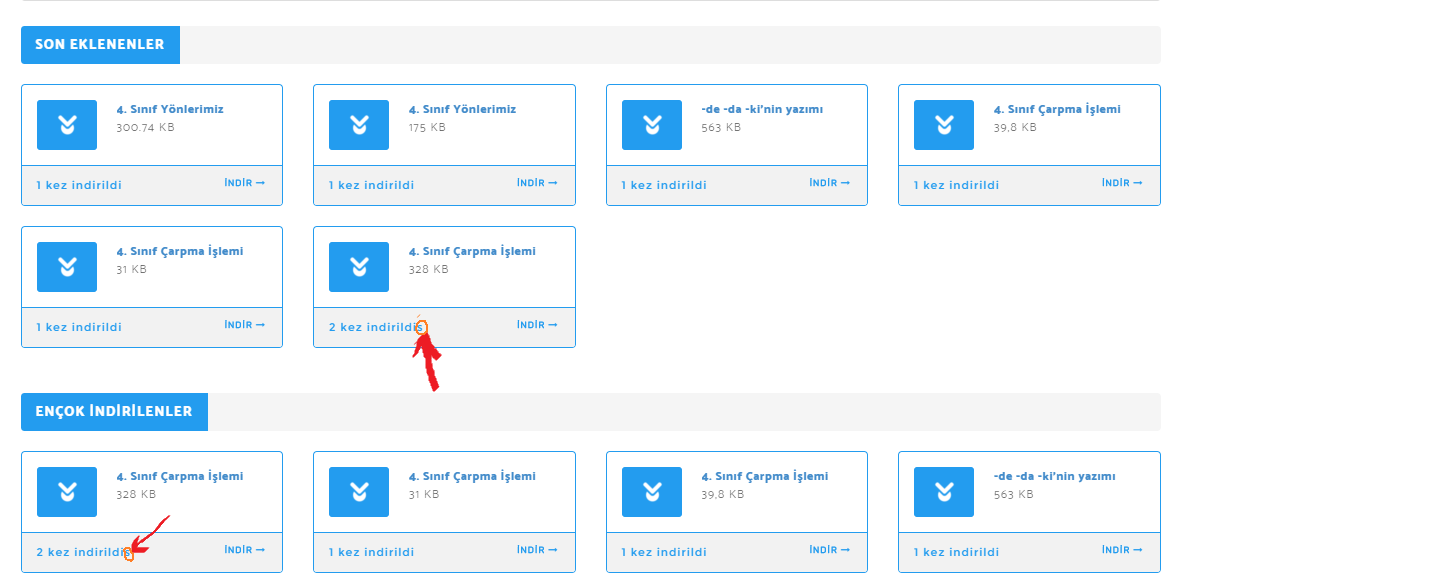
The expression on the main page has the letter “s” indicating how many times the file was downloaded. How do I resolve this error? Can you help me?
link showing the error:: https://i.hizliresim.com/LvLYEb.png
Topic: Custom Link Templates Broken
Since the recent updates, our Custom Link templates have broken. We are using Default Values as well. We have the template setup so that clicking on the Button and the Title of the download should automatically download the file without showing the Download Page. This has now stopped working.
This is the template code:
<div class=”well c2a3″>
<div class=”media”>
<div class=”mr-3″ align=”left”>
[icon]
</div>
<div class=”media-body”>
<h3 class=”media-heading” style=”padding-top: 0px;border:0px;margin: 0 0 5px 0;font-size:12pt;”>
[title]
<span style=”font-size:8pt;font-weight:300″ class=”text-muted ml-4″>
<i class=”fa fa-hdd mr-1″></i> [file_size]
<i class=”ml-3 fa fa-arrow-alt-circle-down mr-1″></i> [download_count] downloads
</span>
</h3>
[excerpt_80]
</div>
<div class=”ml-3″ align=”right”>
[download_link]
</div>
</div></div>
<style>
.well.c2a3 .btn {
padding: 11px 30px;
font-size: 11pt;
}.well.c2a3 .media-body {
font-size: 11pt;
}.well.c2a3 .wpdm_icon {
height: 42px;
width: auto;
}</style>Website (one of many where it is now not working!) https://trinitybuckshaw.lancs.sch.uk/news-events/newsletters/