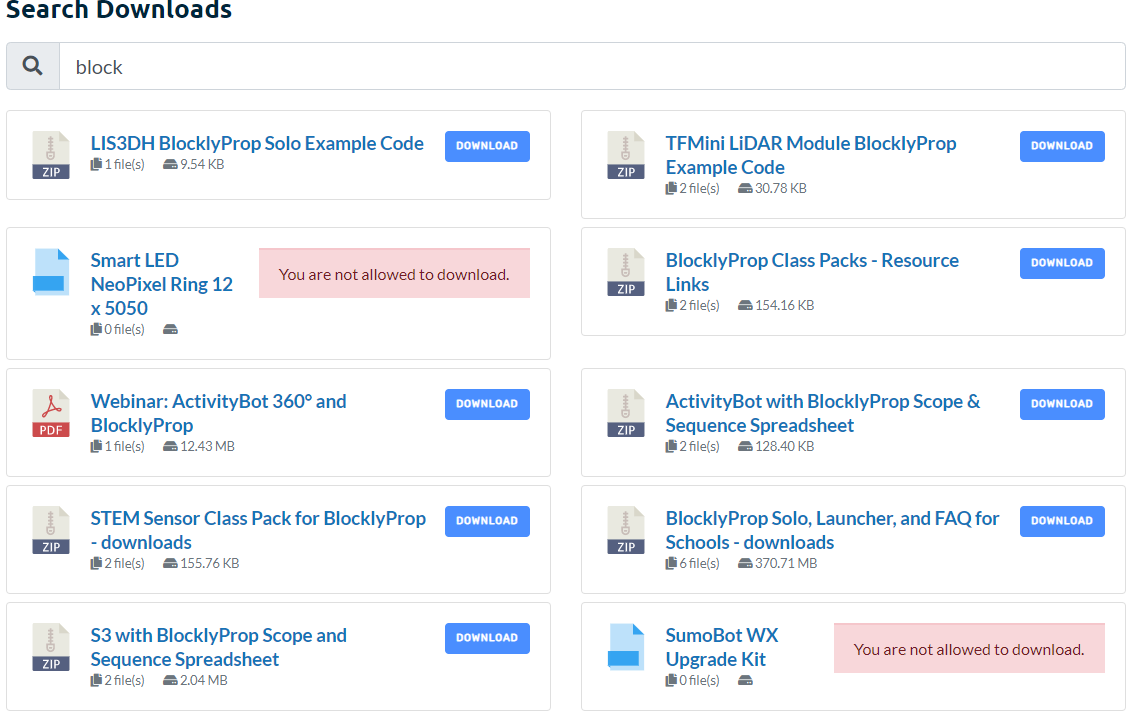
After a year of flawless use, today I tried to download files from google and nothing happens. In the download app I can open google drive, I select the file, but file does not link in the package. Help… downloads are an important part of my my website.
worspress v 5.5.1, wpdm v 5.1.20, wpdm google explorer v 1.5.0
I’ve added the following js code to fix the dropdown conflict:
<script>
jQuery(function($){
  $('.btn-clps').on('click', function(){ $($(this).attr('href')).slideToggle(); });
});
</script>
Use the following css to hide the blue box shadow:
.w3eden .btn-primary:not(:disabled):not(.disabled):active:focus, .w3eden .btn-primary:not(:disabled):not(.disabled).active:focus, .w3eden .show > .btn-primary.dropdown-toggle:focus {
    box-shadow: none !important;
}
If you want to remove the title link, any other info in the template, that can be done by editing the link template ( https://www.wpdownloadmanager.com/doc/templates/ ), however, I’ve adjusted it for you.
I’ve upgraded to the Pro version, everything works fine however the link template style has changed.
Rather than individually change shortcodes or category templates, I’d like to change the default global template that is in use, to Default Template (link-template-default) that doesn’t include the download count.
I’m unable to find the option of changing the default link template style in use.
This reply has been marked as private.
Hi, this page should only show the price list to certain user groups. I’ve set the price list to only allow access to the relevant group and also content permissions. It’s set in settings to ‘When user is not allowed to download:’ to block everything but it still shows the row with the download details, the shortcode is:
[wpdm-all-packages title="Price List" items_per_page="20" categories="pricelist" jstable=1 order_by="title" order="ASC/DESC" cols="title|categories|update_date|download_link" colheads="Title|Categories|Update Date|Download::155px"]
Many thanks
Hi. I still believe you do not understand what I wish to accomplish.
Library
Have a look at the image above. As you can see there are many files I can choose to download from. I wish to remove the green bracketed “Download” link from this page; not the URL page for an individual download package file.
Does this help you understand what i wish to achieve?
Hi. Since the last update the plugin has stopped working (my current version is 3.1.10). Clicking on “download” adds a # in the URL but does not download anything.
I use this shortcode: [wpdm_package id='12949']
On the backend, it does work. So, the downloads are well linked.
You can see an example here: https://st-systemtronic.com/portfolio/mill/ (button is _descargar 3D).
I have 305 downloads prepared with your plugin … please don’t tell me I have to redo them.
Greetings.
Hi,
You can remove the download button just by removing [download_link] tag from the link/page template.
Templates Overview
Hi,
Since a couple of weeks the download link on my download-page doesn’t work anymore. It links to ‘#’. If I click the title of a donload and in the next screen on the tab ‘Added files’, only then it works. Can you help me? My customers are complaining.
Thanks,
Bart
pardon me i dont get it
#1 .. which part i should to edit ?
#1.a. for open new window
#1.b. for limit the list only 5 or 7… because i have plan to put updated file/pdf at same link. so my visitor can choose which one they one to download ( i mean not manually delete from Download—>all post—> my post —-> download field… but by script )
#2 ..
if i have 1 file pdf. with external file hosting like mediafire
but some how mediafire delete my pdf file.
how to create reported broken link / link missing from visitor.
-
This reply was modified 5 years, 12 months ago by
 Anyeb Tim.
I am using this plugin on a development site, and my woocommerce products are showing up as downloads? I dont know why.
I am using this Shortcode: [wpdm_search_result init=1 template="link-template-default" cols=2]
Here is a picture: https://i.gyazo.com/229178c8ed7394dda146b57923f2ad0b.png
The “You are not allowed to download” warnings are all WooCommerce products. I do not know why they are being pulled in. The SLUGs of the WooCommerce have /products/ in the URL and the downloads have /package/ in the URL.
I can share more details in a private response.
I see, you are using email lock, with email lock, there are 2 confirmation emails, one is for the new subscriber and another one comes when the user clicks on the download link.
Hi
We need stats who really downloaded the files.
We don’t work with registered users but with form lock / email lock, because we need additional fields.
But I can’t find a possibility to see, which user really downloaded the files (or clicked at the download link).
How to get this information?
Tanks in advance and kind regards
Evi
I have put the archive shortcode in the Page template, here you can review the code.
<div class=”row”>
<div class=”col-md-7″>
<div class=”card mb-3 p-3″>
[thumb_600x0]
</div>
</div>
<div class=”col-md-5″>
<h4 class=”mt-0″>Pattern Details</h4>
[description]
<div class=”wpdm-download-link btn btn-primary” style=” width:100%” >
[download_link]
</div>
</div>
</div>
</br>
[wpdm_archive_compact template=”5e8c544b1125c” order_by=”post_title” order=”DSC” items_per_page=”48″ cols=6]
Hi,
The short code is changed now.
[wpdm_archive button_style="primary" link_template="app_card" order_by="post_title" order="ASC" items_per_page=12 cols=3 colspad=2 colsphone=1]
Thats the new short code.
And also you can update Download Manager and WPDM Archive.If It breaks the design we are here for your help.
Thanks
What Causes 403 Forbidden Error in WordPress?
The most common cause for the 403 Forbidden error in WordPress is due to poorly configured security plugins. Many WordPress security plugins can block an IP address (or a whole range of IP addresses) if they believe them to be malicious
First thing you need to do is to temporarily deactivate all WordPress plugins. This includes any security plugins that you may have installed on your site. If this resolves your problem, then this means one of the plugins on your website was causing this error. You can figure out which plugin was causing the error by activating all your plugins one at a time until you are able to reproduce the 403 forbidden error.
Often the 403 error is caused by a corrupt .htaccess file in your WordPress site. Repairing this file is quite easy.First you need to connect to your website using a FTP client or file manager in cPanel. Next, locate the .htaccess file in the root folder of your WordPress site. See this guide if you can’t find .htaccess file in Your WordPress folder. You need to download the .htaccess file to your computer so that you have a fresh backup of it. After that, you need to delete the file from your server.
Try accessing your website. If 403 forbidden error is resolved, then this means that your .htaccess file was corrupt. You can generate a fresh .htaccess file by logging into your WordPress admin area and going to Settings » Permalinks page.
please check those and let me know,
thanks
Still no fix for this it seems to be a pretty big issue and its making me second guess getting an alternative download manager plugin. None of my download links show the total number of downloads most of the time its just an arrow or its blank next to downloads…. Please fix this asap!
Hi,
the free version worked like a charm. After upgrading from free to pro version all my downloads are broken and i get this error:
<br /><b>Notice</b>: A non well formed numeric value encountered in <b>/var/www/clients/client15/web13/web/labw/wp-content/plugins/download-manager/admin/tpls/metaboxes/file-info.php</b> on line <b>18</b><br /><br /><b>Notice</b>: Uninitialized string offset: 1600115352 in <b>/var/www/clients/client15/web13/web/labw/wp-content/plugins/download-manager/admin/tpls/metaboxes/file-info.php</b> on line <b>18</b><br /><br /><b>Warning</b>: Illegal string offset 'title' in <b>/var/www/clients/client15/web13/web/labw/wp-content/plugins/download-manager/admin/tpls/metaboxes/file-info.php</b> on line <b>18</b><br /><br /><b>Notice</b>: Uninitialized string offset: 0 in <b>/var/www/clients/client15/web13/web/labw/wp-content/plugins/download-manager/admin/tpls/metaboxes/file-info.php</b> on line <b>18</b><br />
Screenshot
Any help?
The only reason i switched from free to pro is that i had to make a small change in the default link template. Can i copy the default link template to my child theme and do the changes? if so i would go back to free and ditch the pro version.
Matt
-
This topic was modified 6 years ago by
 smoco.
To view the pdf with the doc_preview it is necessary to reload the page 3 or 4 times.
___________________
<div>
[doc_preview]
<div class=’card-footer’><span class=”pull-right”><i class=”fas fa-hdd text-white-50″></i> [file_size] [download_link]</span>
</div>
</div>
________________
To view the pdf with the doc it is necessary to reload the page 3 or 4 times.
We have 300 download pdf files that should be viewable immediately.
Please I need your precious support
I’ve installed download pro – and it works….
However, there are more than 50 downloads on a customers site ( paye.net/paye-projects ) and when you first select a download – you get the invalid download link…
Then you clear your cache and you get the correct link.
However, the end-user isn’t going to do this – they will simple go somewhere else.
Can you help?
thanks
David
Hello @markshipley77,
Please check the doc for all downloads table here:
https://www.wpdownloadmanager.com/doc/short-codes/wpdm_all_packages-list-all-downloads-in-tabular-format-in-a-page/
You can specify columns here, for column data use title instead of page_link to remove the link from there title.
Yes, you can remove icon with thumb, that also mentioned in the doc above.
which link-templates you are using in that shortcode, you can customize the link-template, you can follow this doc, https://www.wpdownloadmanager.com/building-a-wordpress-download-manager-link-template-from-scratch/ also you can edit the link template PHP file,
and for media image as an icon, you can use like as I image attached

thanks
Hi, we’re just building a new site and would like the Title to not be linkable (we just want the Download button to allow the customer to download the article). See https://jenx.fentidev.co.uk/distributor-portal/quote-forms
Also, we’ve a media download page (for the customer to be able to download marketing imgaery). Is there a way to replace the jpg icon with a thumbnail of the image? see https://jenx.fentidev.co.uk/distributor-portal/media-area/bee-media
Thanks!
Solved this myself by copying the code you use in wpdm-functions.php function wpdm_logout_url so my finalised code for my custom function is:
/*  ADD NONCE TO LOGOUT LINK  */

function change_menu($items){
  foreach($items as $item){
    if( $item->title == "Logout"){
         $item->url = $item->url . "=" . wp_create_nonce(NONCE_KEY);
    }
  }
  return $items;

}
add_filter('wp_nav_menu_objects', 'change_menu');
Where the change was from
$item->url = $item->url . "=" . wp_create_nonce( 'login' );
TO
$item->url = $item->url . "=" . wp_create_nonce(NONCE_KEY);
For anyone interested in having TWO wordpress menus – one for logged in ( named logged-in ) and one for logged out ( named logged-out ) that switch when you are logged in or not PLUS having a Logout Link that behaves just like the WPDM logout links AND the ability to display login text messages to people not logged in, the three adds to your child theme functions.php is as follows:
/*  LOGGED IN / LOGGED OUT MENU      */

function my_wp_nav_menu_args( $args = '' ) {

if( is_user_logged_in() ) {
    $args['menu'] = 'logged-in';
} else {
    $args['menu'] = 'logged-out';
}
    return $args;
}
add_filter( 'wp_nav_menu_args', 'my_wp_nav_menu_args' );
/*  ADD NONCE TO LOGOUT LINK  */

function change_menu($items){
  foreach($items as $item){
    if( $item->title == "Logout"){
         $item->url = $item->url . "=" . wp_create_nonce(NONCE_KEY);
    }
  }
  return $items;

}
add_filter('wp_nav_menu_objects', 'change_menu');
/*  LOGGED OUT MESSAGE TO REGISTER OR LOGIN    */

add_shortcode( 'visitor', 'visitor_check_shortcode' );

function visitor_check_shortcode( $atts, $content = null ) {
	 if ( ( !is_user_logged_in() && !is_null( $content ) ) || is_feed() )
		return $content;
	return '';
}
To use the visitor only text shortcode in a page or widget just do E.G.:
[visitor]
<div class=”card card-body bg-light”>
You must register or login
to download files from this site.</div>
[/visitor]
Thanks,
Ben
Sure. The logout links that are part of WPDM plugin work as expected – they log you out of WordPress and take you to the Login page. These links are on e.g. the Login page using [wpdm_login_form] when you are logged in as a susbscriber and the [wpdm_user_dashboard] on a dashboard page. I click the Logout link provided by your plugin and the user gets properly logged out, and presented with an empty login screen. Perfect.
I have tried to replicate that function via a link in my main menu that uses the function posted before but with my login link I get sent to the homepage and I remain logged in to WordPress and can access the downloads / dashboard as a subscriber.
The only difference I can see between the two Logout links (yours on the page via the plugin and mine in the menu are the none tokens).
Can you advise how your plugin achieves this so I can implement similar in my menu.
Thanks
Ben