-
Search Results
-
All given downloads don’t work since I downloaded the given WordPress Download Manager (the old download plugin couldn’t be updated anymore). If I click on the download-button, there’s just a download of a “download-not-available.txt” – all previous linked documents aren’t linked anymore. And I neither know where to find them in the backend, nor do I know how to re-attach them to the respective link. (https://hans-josef-fell.de/dokumente/)
After a year of flawless use, today I tried to download files from google and nothing happens. In the download app I can open google drive, I select the file, but file does not link in the package. Help… downloads are an important part of my my website.
worspress v 5.5.1, wpdm v 5.1.20, wpdm google explorer v 1.5.0Topic: Change default template
I’ve upgraded to the Pro version, everything works fine however the link template style has changed.
Rather than individually change shortcodes or category templates, I’d like to change the default global template that is in use, to Default Template (link-template-default) that doesn’t include the download count.
I’m unable to find the option of changing the default link template style in use.
Hi, this page should only show the price list to certain user groups. I’ve set the price list to only allow access to the relevant group and also content permissions. It’s set in settings to ‘When user is not allowed to download:’ to block everything but it still shows the row with the download details, the shortcode is:
[wpdm-all-packages title="Price List" items_per_page="20" categories="pricelist" jstable=1 order_by="title" order="ASC/DESC" cols="title|categories|update_date|download_link" colheads="Title|Categories|Update Date|Download::155px"]
Many thanks
Topic: Download Manager not works
Hi. Since the last update the plugin has stopped working (my current version is 3.1.10). Clicking on “download” adds a # in the URL but does not download anything.
I use this shortcode: [wpdm_package id='12949']
On the backend, it does work. So, the downloads are well linked.
You can see an example here: https://st-systemtronic.com/portfolio/mill/ (button is _descargar 3D).
I have 305 downloads prepared with your plugin … please don’t tell me I have to redo them.
Greetings.
Topic: Download link not working
Hi,
Since a couple of weeks the download link on my download-page doesn’t work anymore. It links to ‘#’. If I click the title of a donload and in the next screen on the tab ‘Added files’, only then it works. Can you help me? My customers are complaining.
Thanks,
BartI am using this plugin on a development site, and my woocommerce products are showing up as downloads? I dont know why.
I am using this Shortcode: [wpdm_search_result init=1 template="link-template-default" cols=2]
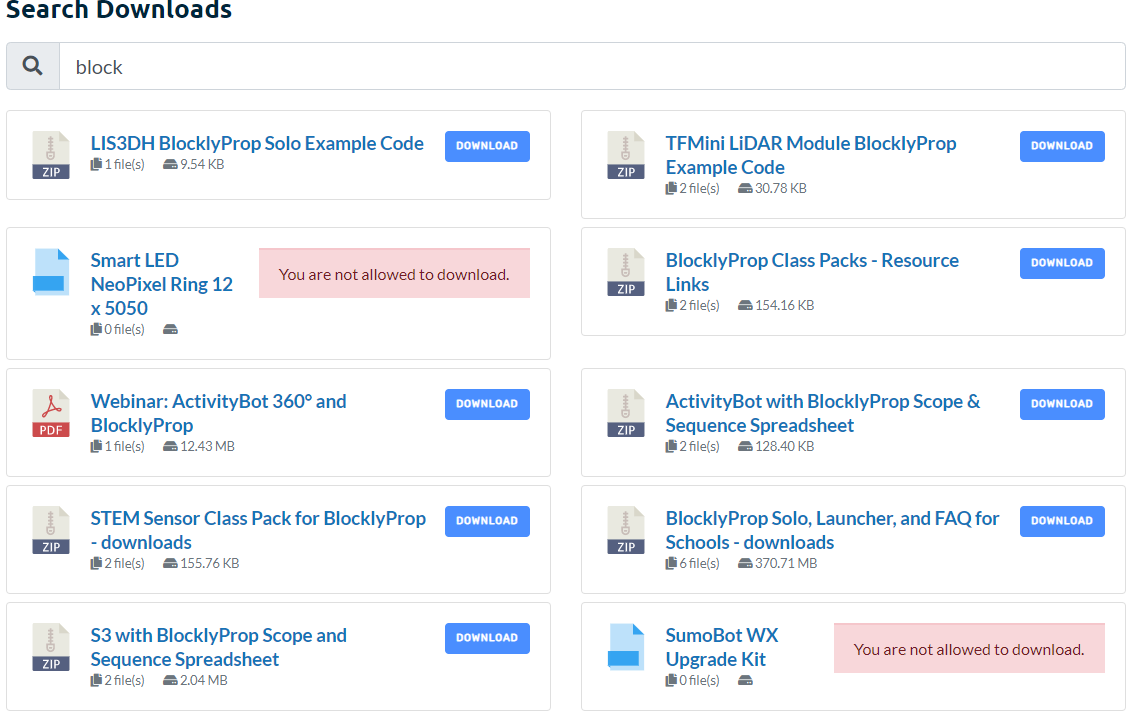
Here is a picture: https://i.gyazo.com/229178c8ed7394dda146b57923f2ad0b.png
The “You are not allowed to download” warnings are all WooCommerce products. I do not know why they are being pulled in. The SLUGs of the WooCommerce have /products/ in the URL and the downloads have /package/ in the URL.
I can share more details in a private response.
Topic: Stats used with form lock
Hi
We need stats who really downloaded the files.
We don’t work with registered users but with form lock / email lock, because we need additional fields.
But I can’t find a possibility to see, which user really downloaded the files (or clicked at the download link).
How to get this information?Tanks in advance and kind regards
EviHi,
the free version worked like a charm. After upgrading from free to pro version all my downloads are broken and i get this error:
<br /><b>Notice</b>: A non well formed numeric value encountered in <b>/var/www/clients/client15/web13/web/labw/wp-content/plugins/download-manager/admin/tpls/metaboxes/file-info.php</b> on line <b>18</b><br /><br /><b>Notice</b>: Uninitialized string offset: 1600115352 in <b>/var/www/clients/client15/web13/web/labw/wp-content/plugins/download-manager/admin/tpls/metaboxes/file-info.php</b> on line <b>18</b><br /><br /><b>Warning</b>: Illegal string offset 'title' in <b>/var/www/clients/client15/web13/web/labw/wp-content/plugins/download-manager/admin/tpls/metaboxes/file-info.php</b> on line <b>18</b><br /><br /><b>Notice</b>: Uninitialized string offset: 0 in <b>/var/www/clients/client15/web13/web/labw/wp-content/plugins/download-manager/admin/tpls/metaboxes/file-info.php</b> on line <b>18</b><br />
Screenshot
Any help?The only reason i switched from free to pro is that i had to make a small change in the default link template. Can i copy the default link template to my child theme and do the changes? if so i would go back to free and ditch the pro version.
Matt
Topic: Problema con [doc_preview]
To view the pdf with the doc_preview it is necessary to reload the page 3 or 4 times.
___________________
<div>
[doc_preview]
<div class=’card-footer’><span class=”pull-right”><i class=”fas fa-hdd text-white-50″></i> [file_size] [download_link]</span>
</div>
</div>
________________To view the pdf with the doc it is necessary to reload the page 3 or 4 times.
We have 300 download pdf files that should be viewable immediately.
Please I need your precious supportTopic: Invalid download link
I’ve installed download pro – and it works….
However, there are more than 50 downloads on a customers site ( paye.net/paye-projects ) and when you first select a download – you get the invalid download link…
Then you clear your cache and you get the correct link.
However, the end-user isn’t going to do this – they will simple go somewhere else.
Can you help?
thanks
David