Search Results for 'download link'

Manage your purchases, downloads, and account settings

Viewing 25 results - 3,701 through 3,725 (of 11,372 total)
  • Author
    Search Results
  • #146203

    Shafayet
    Moderator

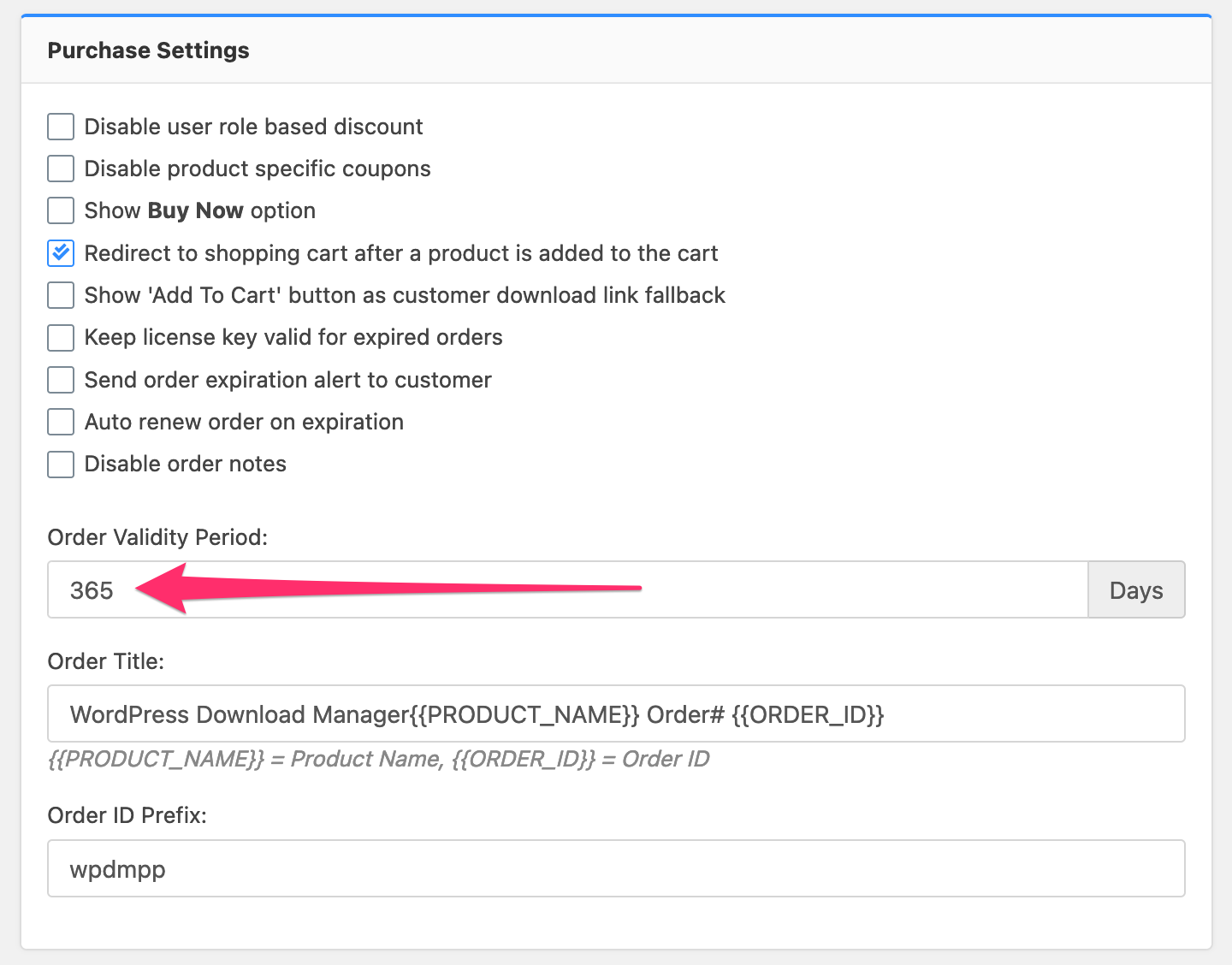
    You can change the expiration period from Admin Menu ► Downloads ► Settings ► Premium Packages ► Purchase Settings:
    Settings%20%E2%80%B9%20Download%20Manager%20%E2%80%B9%20WordPress%20Download%20Manager%20%E2%80%94%20WordPress

    The user will get the temporary link.

    #146195

    Habib Anwari
    Participant

    Hi,
    Can you please guide me where to set the order expiration date?

    If I attached a file from my service, so will the customer have the access to the original link? And or a temporary link will be made for the downloads?

    Kind regards
    Habib

    #146173

    Shafayet
    Moderator

    Download link after purchase is okay now, it was expiring immediately as the expiration period for the orders was 0, which can be controlled from wpdm premium package settings.

    Download link from google drive is a public link, please use amazon s3 for expirable temporary download link:

    WordPress Amazon S3 Storage Plugin

    #146157

    Habib Anwari
    Participant
    This reply has been marked as private.

    Fraser Hardy
    Participant

    I know this is probably a very basic question, but I just want to show all downloads available (for the specified user role) on the dashboard, but only AFTER they login. I’m currently using this on my dashboard page:

    [wpdm_user_dashboard]

    [wpdm_all_packages login=1 thumb=1 jstable=1 order_by="title" order="ASC" cols="title|categories|update_date|download_link" colheads="Title|Categories|Updated|Download::155px"]

    But the problem is that all downloads are showing under the login form. Granted the files are not downloadable…but I don’t even want them to show up.

    What am I missing?

    Thanks!!

    #146087

    IMUNA Foundation
    Participant

    When using a shortcode of the WP Download Manager (latest version, in I believe, near default configuration), it displays incorrectly on mobile devices, please see the image linked below. Is there any quick solution to this sort of issue? Is it theme related, or plugin related?

    View post on imgur.com

    #146047

    etc
    Member

    My site updated to version 3.1.13 of your plugin one week ago today.

    Today the client noticed that the [wpdm_tree] shortcode is not displaying anything. Since there was an update last week I’m thinking that might be the issue.

    The page in question is:

    Product Information

    The shortcode in use:
    [wpdm_tree category=product-information download_link=1 cat_order=asc orderby=title order=asc]

    A plain [wpdm_tree] shortcode with no attributes also exists on the page at present, for testing purposes, and it also does not generate any visual output.

    There are 54 categories/folders containing 122 files in all.

    I’ll be glad to help troubleshoot, or if I need to provide more details please let me know. Thank you!


    Greg Petersen
    Participant

    Hi,

    I want to secure previous files in my media folder. I added 1 file as a package in the download manager. It seems to have blocked anyone not logged in from accessing the file. I was hoping it would redirect someone to a login screen that tries to access the file directly. For example at the moment if you access https://mysite.something/wp-content/uploads/2021/02/doc.docx I end up getting this screen:
    https://share.getcloudapp.com/kpu7mYBj

    What is wrong? I tried setting a login screen in the frontend settings but nothing works.

    #145977

    Sunil Kumar
    Participant

    Yes. Copy the descriptions, categories, tags, featured images, and everything else to the download packages. Is there an automated way to do that so that we don’t have to manually copy/paste all the content from every post? Thanks.

    Another way to say it is that we would like to add a download link to every existing post – with a unique file in each post. Let me know what you think. Thanks.

    #145961

    Victoria Chu
    Participant

    Hi wanted to follow up to see if there are any solutions?

    The shortcodes are not working on the latest plugin version for “WPDM – Advanced Access Control”

    Someone helped us apply a patch that I had to restore to get it to display again; but latest plugin doesn’t have working shortocdes

    This shortcode doesn’t work:
    [wpdm_my_downloads login=1 template=”link-template-calltoaction3″ cols=”4″]

    #145915

    acason
    Participant
    This reply has been marked as private.
    #145885

    Cornelis Bockemühl
    Participant

    There used to be a way how I could restrict the download of a package to one single user: I do not find it any more! It used to be here on the Edit Package settings page, below or above the “Allow Access” entry.

    Is there now a new way how I can achieve the same? I absolutely need that feature!


    Thomas Bourgue
    Participant
    This reply has been marked as private.

    Thomas Bourgue
    Participant

    Thanks for your reply!
    It’s not the form itself I’m trying to customize, it’s the page from which the user can actually download the locked package when using the link in the email.

    #145801

    Evi Halbeisen
    Participant

    Hi

    We use download manager with form lock. In our tests, email notification is sent at the moment the form is sent.
    Actually, we have the problem, that we can’t see who really did the click to download the file package. The notification mail is sent before the user (maybe) does the click on download link. So what can we do to se who not just fills out the form but really downloads the files?

    Thanks and kind regards
    Evi

    #145790

    Web Team
    Participant

    Hi

    I was having a problem with the Download link button not displaying in IE 11, so I have fixed that by selecting the ‘Disable Front CSS’ option in settings. This has worked fine as I am now styling the Download link button in my theme’s CSS. So the Download buttons are displaying fine via the link template and on the Preview template page.

    However it has also knocked out all styling in the direct download panel (the little box that appears when you hit the Download button). The font styling is no longer there and the download button is now with a white background and white font.

    I have tried locating the CSS with inspector and putting it in my custom CSS like so:

    .w3eden .btn-primary {
    color: #FFFFFF !important;
    background-color: #f37920;}  

    but this isn’t working. Could you please advise on this?

    Thank you

    Alistair

    • This topic was modified 5 years, 8 months ago by Web Team.
    #145779

    acason
    Participant
    This reply has been marked as private.

    Thomas Bourgue
    Participant

    Hello!

    How can one customize the modal template acessed when clicking the download link created in an email/form lock email with the “[#download_url#]” tag?

    Also, is it possible to restrict the number of times a package accessed through an email lock is accessible?

    Best,

    Thomas


    Sunshine Everyday
    Participant

    As requested I shared the login separately and it has been a few days with no updates or reply. Let me know if these issues can be addressed/answered. I could not find answers for these in the documents or forums.

    1) I have the email lock and captcha enabled. “Open in browser” is NOT checked. However, after name, email and reCaptcha, it takes me to a page where it says:
    There has been a critical error on this website.

    Learn more about debugging in WordPress.

    If I refresh the page it loads the PDF in the browser. Let me know how I can make it simply download

    2) I have “email” in “Skip Lock for Loggedin User:”. But, even when I am logged in, it is prompting for Name and email

    3) In Firefox, it simply shows [wpdm_login_form] in place of the download button

    The page in question is this: https://americaninstituteoftamil.org/download/

    4) verifyemail is specified in the wp_reg_form, however, the user is directly logged in.

    5) Currently it shows four icons – Facebook, Twitter, LinkedIn and Google. I want to have only Facebook and Google and disable the other two? How do I disable these buttons? I could not see this information in the docs or the forums.

    #145766

    Marco van Leeuwen
    Participant
    This reply has been marked as private.
    #145753
    This reply has been marked as private.
    #145731

    Kandice Venter
    Participant

    Hi there,

    I am trying to achieve the below, but I am having trouble with the templates.

    I want my archive page (Link template) to have a search bar and list the download categories (as per the top section of the demo site).

    Then categories open to list of document downloads (page template) that will display similar to ‘featured downloads’.

    All my documents are free to all visitors to download and only need to have title, version and date meta.

    Is the plugin able to accommodate this?


    Anonymous
    Inactive

    Hi again.

    I have been testing more ever since I contacted you for the first time.

    Try it out with this new link: https://quickrows.com/free-download/qr_test-1/

    Problem summary: intermittent error when trying to download the file. If refreshing the window it is solved.


    Anonymous
    Inactive

    ok wait then I didn’t understand. I don’t want to always create a new product with each new version, it’s not good for seo, because it would always change the permalink, post id etc. What I want to understand is, what happens when a buyer has a subscription and it expires after 1 month? If the buyer does not renew, will he be able to continue downloading the previous downloads? I want to insert a subscription where the subscriber can download everything from the catalog with a limit of 3 downloads per day, but if he has an expired subscription, he must not have access to the downloads already made. This thing is very easy to do with woocommerce, why can’t it be done with your plugin? I bought the special pack just for a change, I wanted to do everything with your pro plugin and extensions, but from what I am understanding I will never be able to do what I need. It doesn’t make sense that a user can continue to download files even if he has an expired subscription.

    #145569

    In reply to: HOW TO ADD MORE INFO


    Nayeem Riddhi
    Moderator

    In this page, if you are using shortcode and there is a field or parameter called link-template, you may customize the link template and add info as your requirements. you shall find template tags here, https://www.wpdownloadmanager.com/doc/templates/template-tags/

    thanks

Viewing 25 results - 3,701 through 3,725 (of 11,372 total)