Hello Humayon. It was working perfect before v6.0 As a matter of fact I tried other download options even from the server and I am getting the same message no matter which method I use.
I get the Invalid download link.
I already had to provide one customer a direct link to get his package.
Thanks.
Hello,
How Can I hide the download count and file size from the front end as we do not want to show these to our customers? is there a possibility to hide the download count in the frontend but keep it in the backend? I am using version 3.2.01 and I couldn’t find the tpls/link-templates and tpls/page-templates that you have mentioned in the previous replies.
Hi @emilio,
Have you configured this section properly by following the below link?
Google Drive Explorer
If, still the problem exists then please share related packages/files URL and WordPress admin login credentials with us in a private reply so that we can debug and give you a better solution about it.
Thanks
Hello I updated to version 6 and after updating the google drive addon, all I get is an “Invalid download Link” message in the page.
Hey @kevgregson,
Make sure that you are using the latest version of WPDM which is 3.2.01.
Also, have you configured this section properly by following the below link?
Google Drive Explorer
If still, the problem exists then please share your WordPress admin login credentials with us in a private reply so that we can debug and give you a better solution about it.
Thank you
Dear Sir Nayeem:
i recently updated the new update of wpdm 6.0.
i faced multiple problems. but the major problem is that this update is not compatible with google Adsense.
i am attaching the video you will see the difference between the old and new versions. please watch the video completely sir.
So sir I am Ok with old version, I just need daily download limit reset feature for the guest as I requested before
video link
Hello,
I have updated to the latest download manager version but the Google Drive links to .mp4 files seem to have stopped working. The .pdf files download fine, but I’m getting a Google Error:
docs.google.com refused to connect
For all the .mp4 files?
Hello @Jerry_Haugen,
Hope you are well. Do want to customize the link template or the package shortcode you are using on the page? you can create your own link-template via the Downloads > Templates section and as I image attached.

For template tags, you can visit this doc, https://www.wpdownloadmanager.com/doc/templates/template-tags/
And for the add-to-cart option, are you using this add-on, https://www.wpdownloadmanager.com/download/wpdm-file-cart/, please let me know and please ask if you have any query
Thank you and regards
Dear Sir my facebook lock feature is not working. I just checked and paste my Facebook page URL. but nothing is happening when anyone clicks on the download button.
exemple link
Hi,
I created a package to download from a specific page using the package link.
Is it possible that the system does not create archive pages: /download-category/mocktails/ and /download/pdf-cahier-mocktails/, etc…
Because they are referenced by Google and I don’t want this.
Regards
Thank you for that. I think the plugin is great, and worked well in my situation there are some issues that could be resolved like sometimes if you enable the email lock for the package some of the users receive an email with an invalid download link not happen all the time but is frustrating, this is just the issue I had. I will probably be subscribing again in a few month’s time. Had to cancel it for time being due to personal circumstances, but will be back soon 🙂
Thank you for your help.
Sorry it transforme my code 😀
i have this code: <a href="[download_url]" class="btn btn-primary" target="_blank">[link_label]</a>
so the download opens in a new tab.
now i need that the single downloads also opens in a new tap with the [file_list] shortcode
Hi @trikdis,
Please use this Pastebin code,
https://pastebin.com/4bAmZ6WA
I have added the below lines downloads/tpls/wpdm-all-downloads.php file in line number 295
$data['download_link'] = "<a target='_blank' class='btn btn-primary' href='".get_permalink($data['ID'])."'>"."Download"."</a>";
$download_link = $data['download_link'];
commenting out this line
// $data['download_link'] = \WPDM\Package::downloadLink($data['ID'], 0, array('template_type' ► 'link'));
I hope it should open a new tab for the related packages
and for making back up the file for the next update, please follow this doc, https://www.wpdownloadmanager.com/doc/template-files/
thank you and regards
I have a number of downloads that I want the user to be logged in for. I am finding very inconsistent behaviour with how they can login.
I’ve set a login page and turned on modal login, but in these are not used unless I specifically create a button for them. I want them to be used for download links. Where a download says “login to download this file” it gives a link to my backend login.
In fact it gave the wrong link, as my site has the backend in a folder, so I had to edit the functions file and the class package to fix this line in multiple places:
$package[‘download_url’] = home_url(‘/admin/wp-login.php?redirect_to=’ . urlencode($_SERVER[‘REQUEST_URI’]));
Clearly I could now edit this code specificy my set login page, but actually – what I want here is to use the modal login. How can I do that?
I don’t actually want to be editing any of the core files, as an update will break everything.
Hi @gmop-unite-com,
Hope you are well. I have got access from your link to the wp-admin panel. But I can’t able to find the Downloads menu panel and also the Plugins menu panel with that role. Can you please check that?
Thank you and regards
This reply has been marked as private.
Hello,
i use this code from you, that opens the downloads in a new tab.
[link_label]
so how can i change that to the file_list?
Hello @wario,
Sorry to hear about the issue.
By enabling the single file download option. In a package, you can add multiple files ( as many as you want ), at from front-end when a user downloads this package, they will get a zip file containing all attached files, but if you enable Single File Download, a user also will be able to download any single file from attached files( Demo ), but when you enable individual file download option, you also need to use [file_list] or [file_list_extended] tag with your link or page template to show the file list with a download button at front-end, and templates are explained here.
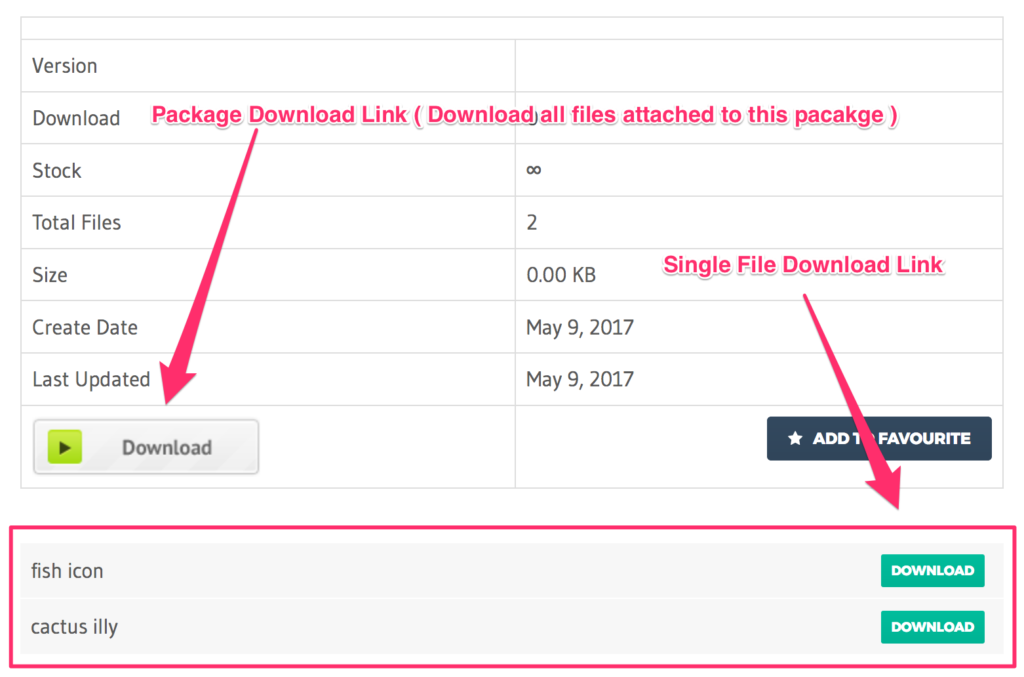
Please let me know if the problem persists.
Thanks
Hello, I have a problem that I can’t make the download open in a new window or tab. I’m using wpdm_all_packages shortcode.
Also, I’m using bootstrap 4 and tried to add code metioned from other forum topic thread which is similar to mine. I added into downloads/tpls/wpdm-all-downloads.php this line: $data['download_link'] = "<a target='_blank' class='btn btn-primary' href='".get_permalink($data['ID'])."'>"."Download"."</a>"; but nothing happens.
Hi guys – just putting together a “Digital Asset Library” using your plugin for a client. I’m a bit lost as to which add-on I need to enable multiple packages to be downloaded at once?.
I’m using a file link template on the pages as the customer doesn’t want a “full information pages” for the items – and so I want to add in a “add to cart/collection” button to the link template to enable the user to select a number of items before “downloading” in one go.
Is this possible, and in which case what add-ons do I need to make this happen?
Many thx
Hello @seblito,
You are using the free version of WPDM. That is the reason there is no link template option.
If you use the premium version of wpdm, you would see like this:

There is available edit and clone menu for your templates in PRO, however, you can also edit the templates PHP file from plugins > download-manager > tpls folder and follow this doc too, https://www.wpdownloadmanager.com/doc/template-files/
However, you can check the difference between free and paid wpdm here.
Thanks
I’m trying to set up Download Manager for the first time but the docs don’t measure up to the real deal.
In “Add new File” there are according to the documents a field named Link Template, however I don’t see that. I only have Page Template.
Also, no matter what page template I choose the item page always look the same.
Why is that?
Hello @bpw1133,
I am sorry that Frontend author does not have the ability to create tag option yet. Author have to select the admin created tags and categories in the frontend.
However if you need this feature, You can contact our customization team through the email address which is given below.
customize@wpdownloadmanager.com or through this link.
With Best Regards
As an example using your demo pages:
I am looking to link from the category blocks(https://demo.wpdownloadmanager.com/wpdmpro/category-blocks/) when you click “EXPLORE” button in the Videos category, it brings up, the advanced search page(https://demo.wpdownloadmanager.com/wpdmpro/advanced-search-left/) with the video category a selected and showing results.
If this is not possible can you tell me how I can set a default result in the advance search. IE: I want the videos to be selected when the results show. I can easily build out my own categories into a grid format, I just need a way to define the results when i link to the next page.



