
Forum Replies Created

It may need to change WPDM core files. But if a minor text needs to change you can also pick the selector and change it by Javascript or Jquery. I hope you have understood. please check and let me know, if you have any queries.
Thank you and regards
Hello panos akris,
Hope you are well. Thanks for writing to us. Can you please let me know Which Chat Bot you want to Active ChatGPT or Dialogflow? please check and let me know.
Thank you and regards
If the credentials are ok, it will not happen, because the system once works when the username/email and password ok. If it does not work once it will not work anytime. The system checks from the database if this identity has the same credentials, it can happen from your side due to spacing or unwanted characters. If the system for login has a bug it will happen every time, please check now too, if it is ok or not. please check and let me know.
Thank you and regards
If you want to login and go to your purchase page, please put your correct credentials. And as you have redirected from forgot password page, it also refreshes the page multiple times it didn’t keep the session for the purchase page. And for your thank you note, do you want to show it on your invoice page or any custom page? please check and let me know.
Thank you and regards
Please check now. I have adjusted setting for guest downloads and orders.

please check and let me know, if you have any queries.
Thank you and regards
You can also try this,
add_action( 'wp_loaded', 'wpdm_change_labels', 20 );

function wpdm_change_labels()
{
    $p_object = get_post_type_object( 'wpdmpro' );

    if ( ! $p_object )
        return FALSE;

    // see get_post_type_labels()
    $p_object->labels->name               = 'Documents';
    $p_object->labels->singular_name      = 'Document';
    $p_object->labels->add_new            = 'Add document';
    $p_object->labels->add_new_item       = 'Add new document';
    $p_object->labels->all_items          = 'All documents';
    $p_object->labels->edit_item          = 'Edit document';
    $p_object->labels->name_admin_bar     = 'Document';
    $p_object->labels->menu_name          = 'Document';
    $p_object->labels->new_item           = 'New document';
    $p_object->labels->not_found          = 'No documents found';
    $p_object->labels->not_found_in_trash = 'No documents found in trash';
    $p_object->labels->search_items       = 'Search documents';
    $p_object->labels->view_item          = 'View document';

    return TRUE;
}
please check and let me know, if it works for you.
Thank you and regards
Glad to hear that. However, if you need further help with anything else, then please don’t hesitate to open a new topic. If you get some free moments, can you please give us a 5* here https://wordpress.org/support/plugin/download-manager/reviews/?rate=5#new-post, It will inspire us a lot. Thanks in advance 🙂
Thank you again and regards
For your shortcode use category parameter, if you use category parameter, on initial load, it only will fetch the packages from the mentioned category, if you want to include packages from sub-categories too, you have to use include_children=1 parameter.
[wpdm_archive_flat category="YOUR_CATEGORY_SLUG" orderby="title" order="ASC"]
For more details you can check the doc here, https://www.wpdownloadmanager.com/download/wpdm-directory-add-on/
Please check and let me know
Thank you and regards
Please share which shortcode you are using.
Thank you and regards
please let me know, if you have any queries or issues.
Thank you again and regards
Your login interface is under other services. Can you please let me know which issue I need to check. please check and let me know.
Thank you and regards
I can’t check if your setup is not ready. please check and let me know, if you have any queries.
Thank you and regards
Hello Christy Kiltz,
Hope you are well. And thanks for writing to us. If you are searching archive page shortcode, you can check the shortcodes and demos here,
https://www.wpdownloadmanager.com/doc/short-codes/
this too
please check and let me know, if it helps you.
Thank you and regards
Hello Gerald,
Hope you are well. And sorry for the inconvenience. Please share the related URL, if possible a screenshot and your temporary wp-admin login details in a private reply to check the issue.
Thank you and regards
I think the interface you have shared is login interface. But you maybe set this login feature for your site as I image attached,

please check and let me know.
Thank you and regards
Hello Ryan Stueve,
Can you please setup this for me for checking the issue further as I image attached ? You can also replace the error log file here. You will find this wp-admin > Dashboard page

please check and let me know.
Thank you and regards
You can take the screenshot. And upload and share with me from here, https://imgbb.com/. Please check and let me know.
Thank you and regards
Hello again,
I can’t able to see the statement “prove your humanity” which is small to watch. Also, can you please let me know does it related to WPDM? please check and let me know.
Thank you and kind regards
Hello fiddla,
Please, give your temporary wp-admin login details in a private reply to adjust the issue.
Thank you and regards
I can’t able to access download button, if i add my role still I can’t access. Is there any additional restriction added those packages? please check and let me know.
Thank you and regards
Hello fiddla,
Hope you are well. Thanks for writing to us. Can you please share a screenshot too for getting the issue more clear? please check and let me know.
Thank you and regards
Hello carin otten,
Your most packages showing like this as I image attached,

Can you please share such package with issue and has access for me? please check and let me know.
Thank you and regards
For now, Single domain license will work for one site. Please check and let me know, if you have any queries.
Thank you again and kind regards
The linked site should work for license. If you are trying with other site you have to buy a another license or remove the old site that has been linked. I hope you have understood. please check and let me know.
Thank you and regards
Please check which site has been added for license key, you can also remove the site as I image attached,
https://dai323vbo0kfx.cloudfront.net/wp-content/uploads/2014/01/Remove-Linked-Site.png
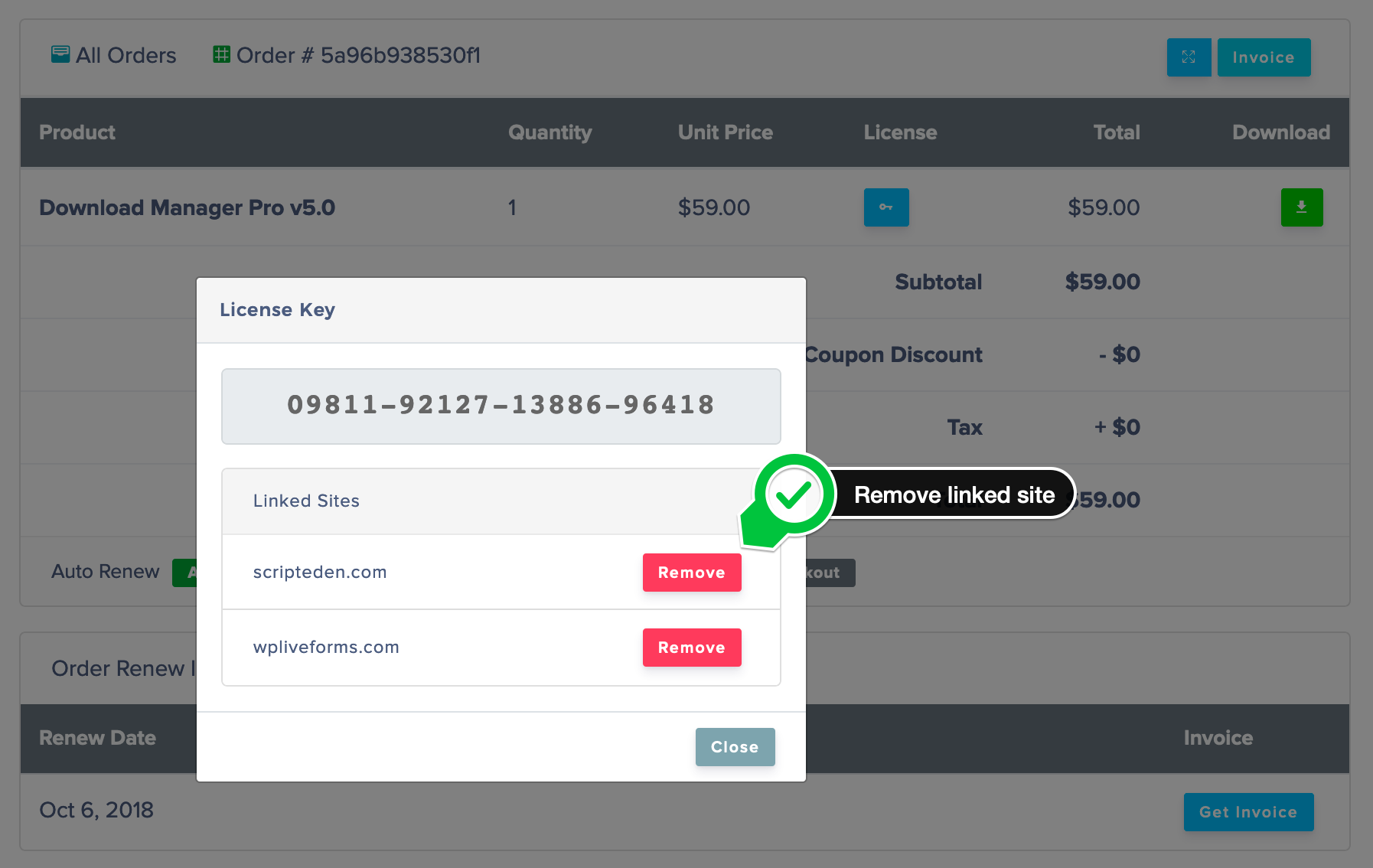
please check and let me know.
Thank you and kind regards