
Forum Replies Created

Hello,
After expiration, it will be eligible for renewal. And for your expired order, you are able to renew now. Please kindly check and let me know, if you have any more queries.
Thank you and kind regards
We generally don’t have the old PRO version plugin download directory. But I think if it is working with other sites, it might have a conflict somewhere. Please kindly check.
Thank you and kind regards
Now successfully logged in. please kindly again attach the photo screenshot, the link you have shared earlier is expired. Please kindly check.
Thank you and kind regards
Ok, really sorry for such this patience. You are confirming that reset the limit again the issue appears, Please kindly let me know. I shall again try to check the issue step by step for all plugin where it is conflicting. Please kindly let me know.
Thank you
Here you can give your admin access in a private reply. Please kindly check.
Thank you and regards
While login this message is appearing from your end as I image attached,
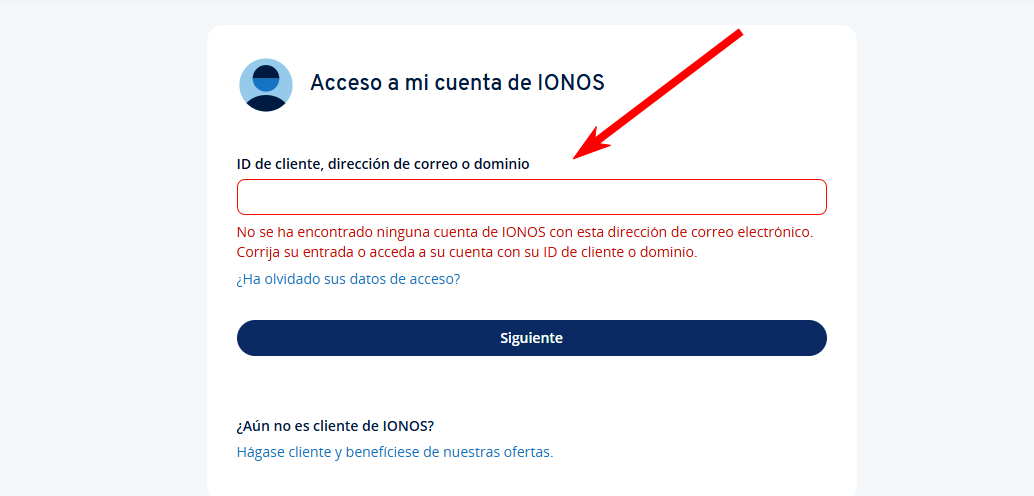
And also can you please again attach the photo screenshot, because you it is a very old topic you have replied and the link you have shared is expired. Please kindly check.
Thank you and kind regards
I think you are trying to take consent from your user for sending them newsletter. Please kindly check and let me know.
Thank you and kind regards
For hiding the favorite button for non-logged users, you can use the bellow code wrapping the favorite button in your php template,
if (is_user_logged_in()) {
        //contents
    }
You can follow this doc for backup and modifying the templates, https://www.wpdownloadmanager.com/doc/template-files/. Please kindly check and let me know.
Thank you and kind regards
I think the design is messed up for the active theme or plugin scripts. Please switch the theme or enable/disable other plugin for checking if there any conflict remained. Please kindly check.
Thank you and kind regards
The issue is not appearing from our testing site and from other users end too. If you keep some plugins active and reset the limit again and the issue doesn’t appear, there might be conflict somewhere. Sorry for your patience. Please kindly check.
Thank you and kind regards
The issue is not appearing from our test site and other users site. I think, It can be in conflict with Wp Engine any settings. You can also adjust enable/disable settings of WP Engine, thus the issue may get resolved. Please kindly check.
Thank you and kind regards
For HTMl structure, it might not well formatted or closed div properly. Please kindly check.
For showing different places favorite items, you may have to order custom service request or you can also keep a feature request here, https://www.wpdownloadmanager.com/support/forum/download-manager-pro-feature-request/
And fav. button will work for logged users only not guest user for now.
Please kindly check and let me know.
Thank you and kind regards
It should appear Downloads menu as I image attached,
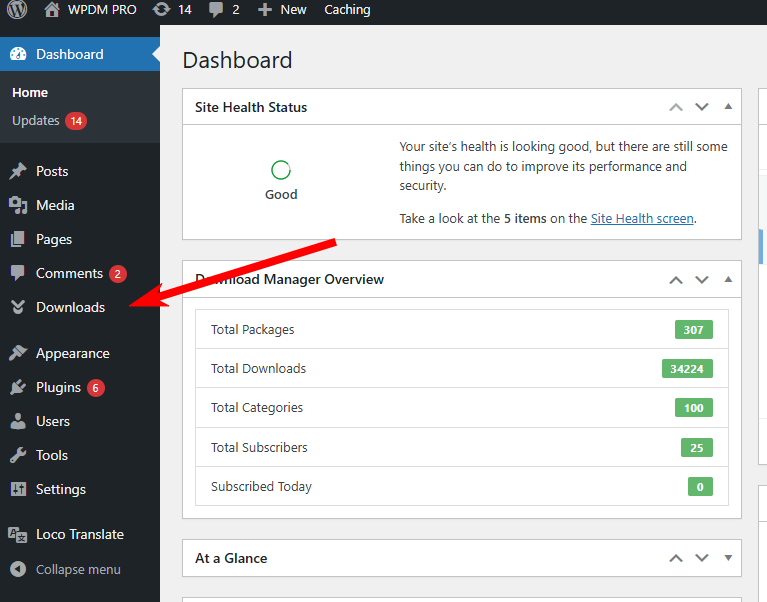
Please kindly check and let me know.
Thank you and kind regards
Can you please kindly check through WordPress default theme and plugin disabled, the features are working from our testing site and also other users are not claiming this issue. Please kindly test and let me know.
Thank you and kind regards
If any error appears while activating the plugin, there should come errors in the error logs too. Please kindly check the error logs details too, if there is any error. Please kindly check and let me know.
Thank you and kind regards
For your Information, 2fa will only work with download manager default login page, you can use WPDM login page replacing WP native login page. Please kindly check.
Thank you and kind regards
I have back information from our team developer that [doc_preview] depends entirely on Google doc preview; the download manager has no role in this. If the Google Doc previewer has difficulty reading a document, it will display a ‘No Preview Available’ message. To resolve this issue, You can use the WPDM PDF Previewer add-on. Please kindly check.
Thank you and kind regards
Hello Sherry,
Hope you are well. And sorry for the inconvenience. if possible, can you please, give your temporary wp-admin login details in a private reply to check the issue?
Thank you and regards
If you need further help with anything else, then please don’t hesitate to open a new topic.
Thank you and regards
Glad to hear that. However, if you need further help with anything else, then please don’t hesitate to open a new topic. If you get some free moments, can you please give us a 5* here https://wordpress.org/support/plugin/download-manager/reviews/?rate=5#new-post, It will inspire us a lot. Thanks in advance 🙂
Thank you again and regards
You can try Sull\’esclusione to Sull\\’esclusione and Ensure your CSV file is saved with UTF-8 encoding, as it supports a wide range of characters. Please kindly check and let me know.
Thank you and kind regards
We generally do not provide custom code here. However, the feature is working properly from our end, and other no user is also not claiming this issue. I think it might have a conflict somewhere. Please kindly check.
Thank you and kind regards
Sorry for the inconvenience. We are checking the issue. I have already forwarded it to our related team authority. Please kindly check and let me know if you have any queries.
Thank you and kind regards
I think WPEngine maybe creating the issue, Can you please kindly disable it and check the issue if it persists. Please kindly check.
Thank you and regards
Please keep same Redirect URI as in Downloads > Settings > Cloud Storage in your Dropbox API, thus I hope it should work for you.
Thank you and kind regards