
Forum Replies Created

The user will not get access to the order. But if you want to keep the current order active, in that case, you can’t use the expiration period and you just have to create a new product for every new version.
okay, got it, adjusting it with the next update.
Hi,
You can set order expiration time from premium package settings:

May you please explain your issue a little more with an example URL.
Hi,
That code was to save the custom data from the signup form, to save data from the edit profile page, you need to use the action hook wpdm_update_profile:
add_action("wpdm_update_profile", function ( ) {
  if(!is_user_logged_in()) return;
  update_user_meta(get_current_user_id(), 'fb_id', wpdm_query_var('profile/fb_id'));
  // ^^^ repeat it for all other fields

});
However, if you still facing a problem, please send me temporary wp-admin login info, I shall check and adjust it for you :).
Hi,
I didn’t get the password, also I couldn’t reset it for the following issue on your site:

You may the private reply here, private replies are only visible to you and me. Or mail to support@wpdownloadmanager.com with forum post URL
Now use the following code to save those custom data from signup form to the user meta table:
add_action("wpdm_user_signup", function ( $userid, $data ) {

  update_user_meta($userid, 'fb_id', wpdm_query_var('fb_id'));
  // ^^^ repeat it for all other fields

}, 10, 2);
Hi,
Please check now, you should be able to download :).
We shall adjust the date filter with the next update. However, the category is functional, please send me temporary wp-admin login info to check the category filter on your installation.
Hi,
WPDM free uses post_tags for tags, but wpdm pro uses custom taxonomy. However, we are releasing a new update of the directory add-on with post_tag compatibility.
@michele-tugnoli,
WP post meta shouldn’t be a reason here if you are using the latest version of wpdm.
The issue was not with wpdm pro, it is with your server’s memory cap, you tried to load 999 packages in a single page, and your server failed to allocate enough memory:

It is working fine after I changed it to 20.
@stekmedia, may I try disabling other plugins temporarily?
@michele-tugnoli, please give me temporary wp-admin login info in a private reply.
Hi, Anyone still having this issue, please send me temporary wp-admin login info in a private reply.
Sorry, my bad, please update the plugin again, no need to edit the template tag in the email template for now.
Please check at the bottom of wpdm basic settings page:
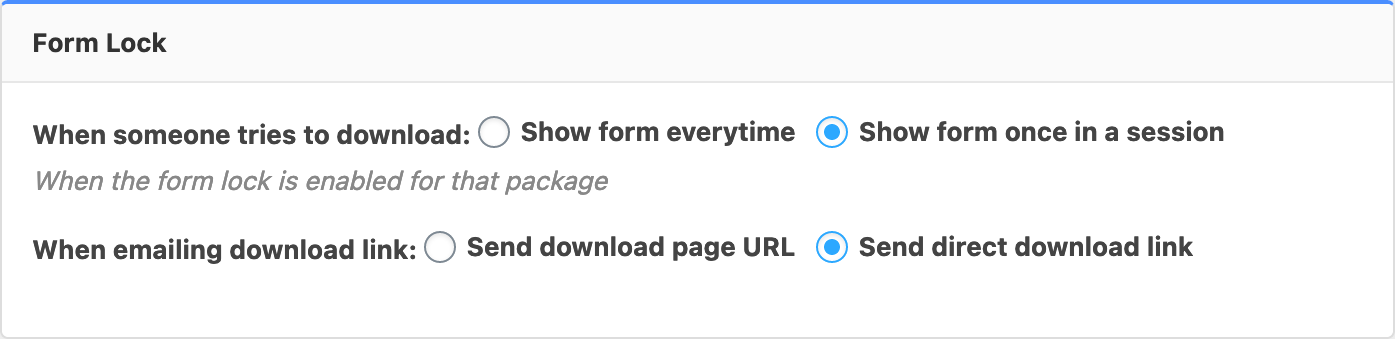
You need to select “Send direct download link” and save settings.
Hi,
Please update the amazon s3 add-on ( https://www.wpdownloadmanager.com/download/wordpress-amazon-s3-storage-plugin/ ), the latest version of the s3 add-on will track the downloads.