
Forum Replies Created

In that case, don’t need FTP. Everything should be okay now :).
We have found the issue, it will be adjusted with the next update ( tomorrow ). However, instead of top downloads widgets, you may use “Packages” widget, order desc by download count to show top downloads:
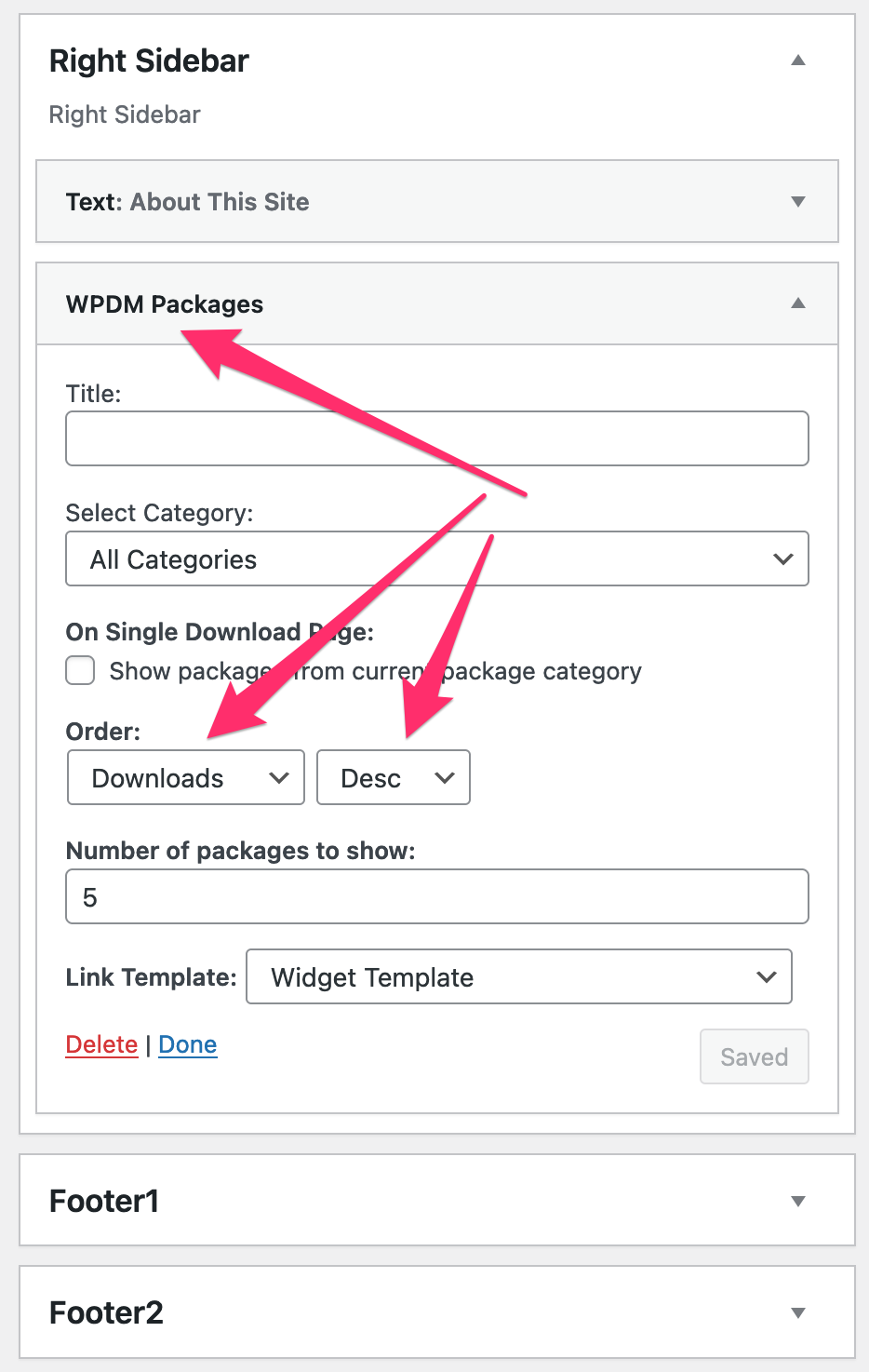
I’ve tested here and it worked fine for me:

Please allow network admin access to check all wpdm features for once on your site to test everything working well there.
Hi,
Sorry for some delays, It is ready, but we are releasing wpdm v6 and we need to release the membership add-on after that.
Yes, we have fixed it and an update is coming within the next week :).
Hi,
WPDM doesn’t change any file permission for uploaded file, they are set as your server/hosting rules. If any uploaded file doesn’t get proper permission, that is due to your server rules.
Hi,
You can get category url base slug using get_option('__wpdm_curl_base'); and package url base slug using get_option('__wpdm_purl_base');
But, save settings issue ( 403 ) is related to your server/hosting rules. Please try removing all html data used in any setting option and replace them with plain text, then save settings page, that should work fine, otherwise you may need to contact hosting support.
However, Please send me temporary wp-amdin login info again, I shall check it again in detail.
Hi,
Auto-renewal is disabled for your order and you will not be billed anymore. Hope you will be back soon. Also, please let us know if you have any suggestions for us or missing any feature you need, or any reason to cancel the subscription.
We have implemented the feature update will be released within the next week with wpdm pro v6.
The issue is happening as your home page http://websupport.cdbsolutions.com.br/ is redirecting to login url http://websupport.cdbsolutions.com.br/login/ even when user is already logged in.
@ines_scaini, please give me temporary wp-admin login info in a private reply to check your issue.
This cookie is required, otherwise wpdm may not work properly.
set-cookie header will only send on the first request, if it fails to set the cookie or cookie is disabled on the browser it will send on every request. Please send me your URL to check your situation. Also, for static files, wpdm even can’t send set cookie with the response. Please give me your URL and temporary wp-admin login info to check it in detail.
@candidenovellic-com, please create a separate topic for your query. However, please check this view https://demo.wpdownloadmanager.com/wpdmpro/advanced-search-left/
Everything is okay now. The issue was due to wrong settings values, I’ve saved settings data from Admin Menu ► Downloads ► Settings ► Cloud Storage, and it is working fine.
Hi,
Please send me temporary wp-admin login info in a private reply to check your issue in detail.
Thanks
Sorry, that is not possible with the email lock option.
That’s not possible ( category block ► archive page filter ) as it is now.
You can add category parameter like [wpdm_archive_filter items_per_page="12" category="cat-slug" link_template="app_card" cols=3 colspad=2 colsphone=1]. It will limit the shortcode result within the mentioned category.
Okay, got it, we shall adjust it with the next update.
Hi,
Sorry for your inconvenience, your order is active now.
Hi,
The file cart is working fine now, the issue was with the session file write permission. However, I’ve changed it to the database from wpdm privacy settings and it is working as it should be.
Shortcodes can’t be linked, but may you please explain a little more about your idea, in case it is implementable, we may add it to our to-do list.
Hi,
Sorry for the delayed reply. Created wpdm Gutenberg table here
https://khandishnetwork.com/demo-table/
All 6484 items are showing with search and category filter options.
Please check.