Forum Replies Created

No, it just depends on which tag you used there, there are 3 different tags [download_link], [download_link_extended] and [download_link_popup], more details: http://www.wpdownloadmanager.com/doc/templates/template-tags/
Actually there are thousands of other plugins and it is not possible to check compatibility with each of them, but we certainly are here to help you to find the conflicting plugin and resolve the issue, you may post info in “private reply” only you and me will be able to see this.
give me temporary wp-admin login info in a private reply.
Please give me the url and temporary wp-admin login info in a private reply to check your issue.
This is not a generic issue, but it is happening in your installation because of conflict with other plugins css, however please give me temporary wp-admin login info in a private reply to check it in details. However it will not cause any functional issue there.
Please give me your license key in a private reply to unlock it.
please give me the url and temporary wp-admin login info in a private reply to check.
You need to upgrade server’s php version to 5.3 or upper, now using very old version there.
Need to remove the line totally, however, we shall add the option and release an update soon.
It is working fine for me
https://www.evernote.com/l/AV3xoVkgUW5DfKeVX5HRVfn7HMPV3TXNdeEB/image.png

Please try again.
Then, please try disabling other plugins or changing theme temporarily.
Please give me example url to check. You can change image size from template tag, Doc: http://www.wpdownloadmanager.com/doc/templates/
Okay, it is changed to 5 in your installation.
Ok, I shall adjust it with the next update of the add-on
Please give me and url where you seeing the issue and temporary wp-admin login info.
There I used [download_link_popup] tag, Doc: http://www.wpdownloadmanager.com/doc/templates/
Clone the current page template your are using, remove [download_link] tag from there and save, now you the template page template. Doc: http://www.wpdownloadmanager.com/doc/templates/
Or give me temporary wp-admin login info in a private reply, I shall adjust it for you.
Yes, please use [file_list_extended] tag in your page template
Also, looks like you are using very very old version of wpdm pro, you should update your wpdm pro to latest version.
Changlelog: http://www.wpdownloadmanager.com/wordpress-download-manager-change-log/
Post type name should be wpdmpro in your query.
This only happen when another file with same name is already exists, but you can choose overwrite option from wpdm settings page. Please use pro forum http://www.wpdownloadmanager.com/support/forum/download-manager-pro/ for faster response.
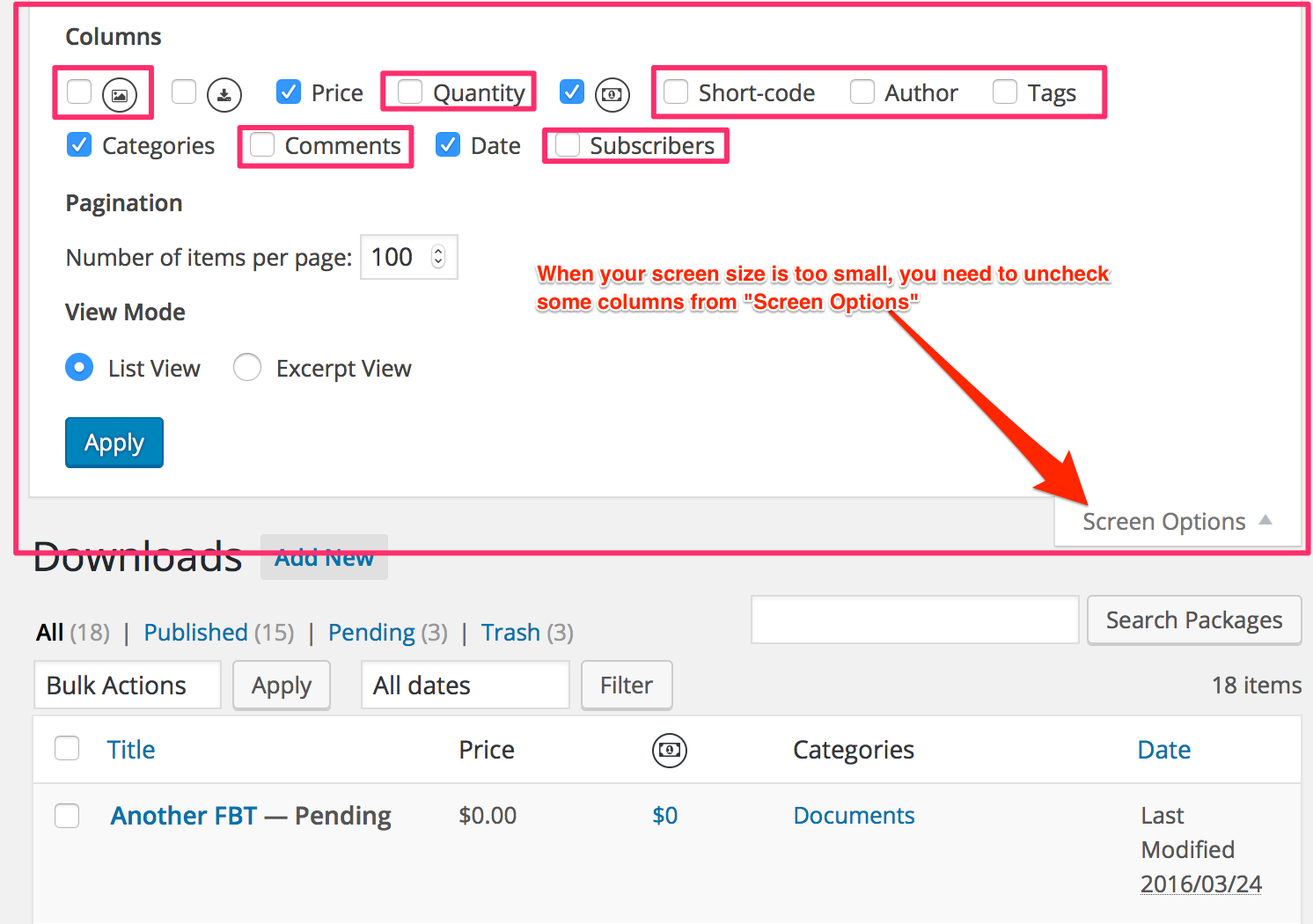
Actually it is just because of your screen size, hide some column from screen option on right top corner, then it will look better.
https://www.evernote.com/l/AV2bIUieOhxCC7m57_qAlrCPTAJQU4q5LoAB/image.png