
Forum Replies Created

Please give me temporary wp-admin login info in a private reply.
in the same browser session, wpdm counts multiple clicks on the same link as one. If every user uses different browser or close browser after use, then it will count every download. However, we shall add an option in the wpdm settings page to skip the situation on need.
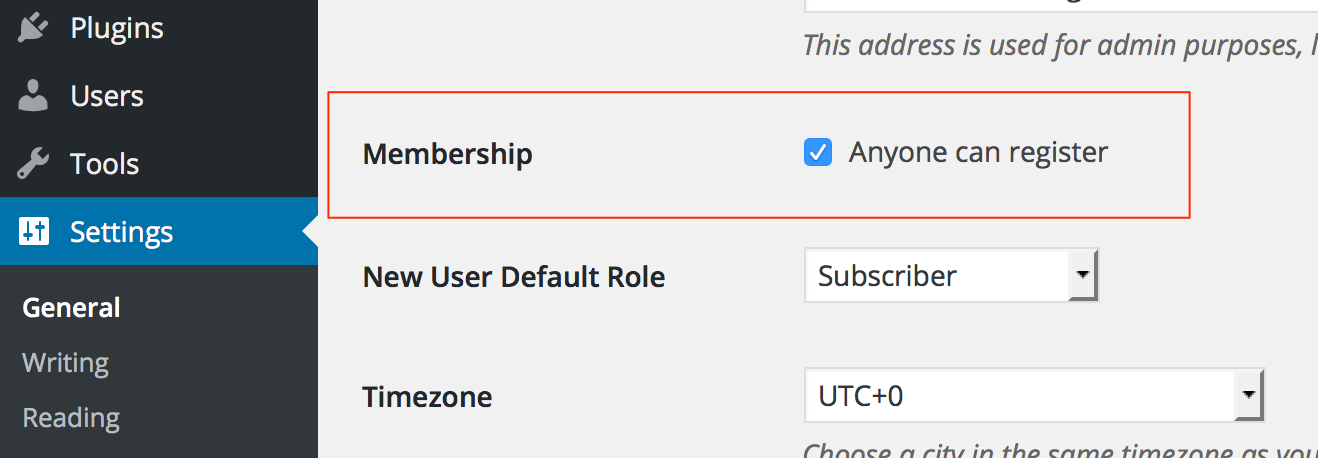
You need to enable user signup from wp settings page:
https://www.evernote.com/l/AV1eZaey2tNHcbKI1nNsALwXdaUbDmlSrGgB/image.png
There are actually many plugins at wordpress.org to bulk import users. Ex:
Now it is using Bootstrap’s color scheme, if you want to change color, you can generate CSS easily from here:
https://scripteden.com/tools/get-a-button/
And copy/paste the generated CSS at the end of your theme’s CSS file or add as custom CSS from customizer.
Sorry for the trouble, it was due to server file permission issue and standalone plugin update routine. However, removal of plugin files will not harm any of you data. Please download the latest version from premium download area https://www.wpdownloadmanager.com/user-dashboard/purchases/ and update your copy. In this latest update, we have integrated WordPress native update routine for wpdm pro, so, from next update you will be able to update the plugin like others with one click from plugins list in WordPress admin side.
Thanks.
You will get the name and email only if the user is registered and logged-in or if you are using email lock option.
Please give me ftp info in a private reply.
Also please increase upload_max_filesize limit.
FTP account skillste_staging@skillstest.web.za returning incorrect login info. FTP account skillpro logged in, but /public_html/wp-content/plugins is totally different location and not matching with http://skillstest.web.za/wp-admin/network/plugins.php. I tried to update plugin from http://skillstest.web.za/wp-admin/network/plugin-install.php but failing due to max upload size limit in your server ( The uploaded file exceeds the upload_max_filesize directive in php.ini. ). So, please give me the FTP info from where I’ll be able to reach the plugins here http://skillstest.web.za/wp-admin/network/plugins.php
Actually, you don’t need to change any code for redirecting after login, simple use a parameter redirect="refirect-url" with short-code, for example:
[wpdm_login_form redirect="http://www.webcrawldesigns.com/" logo="http://www.webcrawldesigns.com/wp-content/uploads/2015/08/cropped-wcd_logo_new.png"]
Dos:
https://www.wpdownloadmanager.com/doc/short-codes/wpdm_login_form-user-login-form-short-code/
Please give me temporary wp-admin login info in a private reply to check your issue.
Instead of uploading view on your server, you may upload to youtube, then attach youtube video URL with wpdm package, and finally, use [youtube_player] tag in the page template to play video. But only possible in pro version. However, we shall add the video upload and play support for free version soon.
If you don’t select any parent category for the packages, they will not show there.
Yes, but you need to add some rule for no-cache, for example, any page with ?wpdmdl= can’t be cached. Cart page can’t be cached.
Please network deactivate wpdm and all wpdm addons, then activate those from subsites separately. And please give me temporary ftp info, I can’t edit any file from wp-admin to check the issue.
Sorry, not clear, but you can remove table from aps-content-cat.php, it is used to show the items from a category when you click on it. May you please explain little more.
Paypal was not configured properly, return and cancel URL was missing, I’ve configured it now. Also please check it IPN is enabled.
If IPN is active now, everything will work properly, however it is, please let me know after you check your PayPal account.
dot with bucket name and folder, both are working fine for us.
https://www.evernote.com/l/AV2n4e_7H0FMP6HXhydKI25d6U0gOsHxS5cB/image.png

Please give me your wp login info and aws login info in a private reply to check.
You are seeing those errors because wpdm review add-on is not installed or active.