Download Notifications

Get an email, SMS, or Facebook Messenger alert whenever someone downloads a file from your WordPress site, plus new subscriber and package expiry emails. An add-on for WordPress Download Manager.

Version: 2.0.2 4.6 MB Updated Sep 14, 2026

Download Notifications tells you the moment someone downloads a file from your WordPress site. Get an instant email, SMS, or Facebook Messenger alert with the package name, the downloader's IP address, and their email address when it is known, so you always know who is downloading your files. It is an add-on for WordPress Download Manager, and it can also email you about new email lock subscribers and packages that are about to expire.

Key Features

  • Email download notifications — get an email every time a file is downloaded, with the package link, the downloader's IP address, and their email address when they are logged in or unlocked the download with their email
  • SMS alerts with Twilio — receive a text message for each download, with your own message that can include {{package_name}} and {{user_email}}
  • Facebook Messenger notifications — connect your Facebook page and get every download alert in Messenger
  • New subscriber alerts — when a visitor unlocks a download with the email lock, get their email address and any custom form fields they filled in
  • Package expiry reminders — get an email a set number of days before packages expire, with links to edit them
  • Per-package control — follow the global setting, or turn email notifications on or off for individual packages
  • Editable email templates — customize the download notification and package expiry emails in the WordPress Download Manager email template editor

How to Use

  1. Download the add-on from the premium download area, then install and activate it like any other WordPress plugin
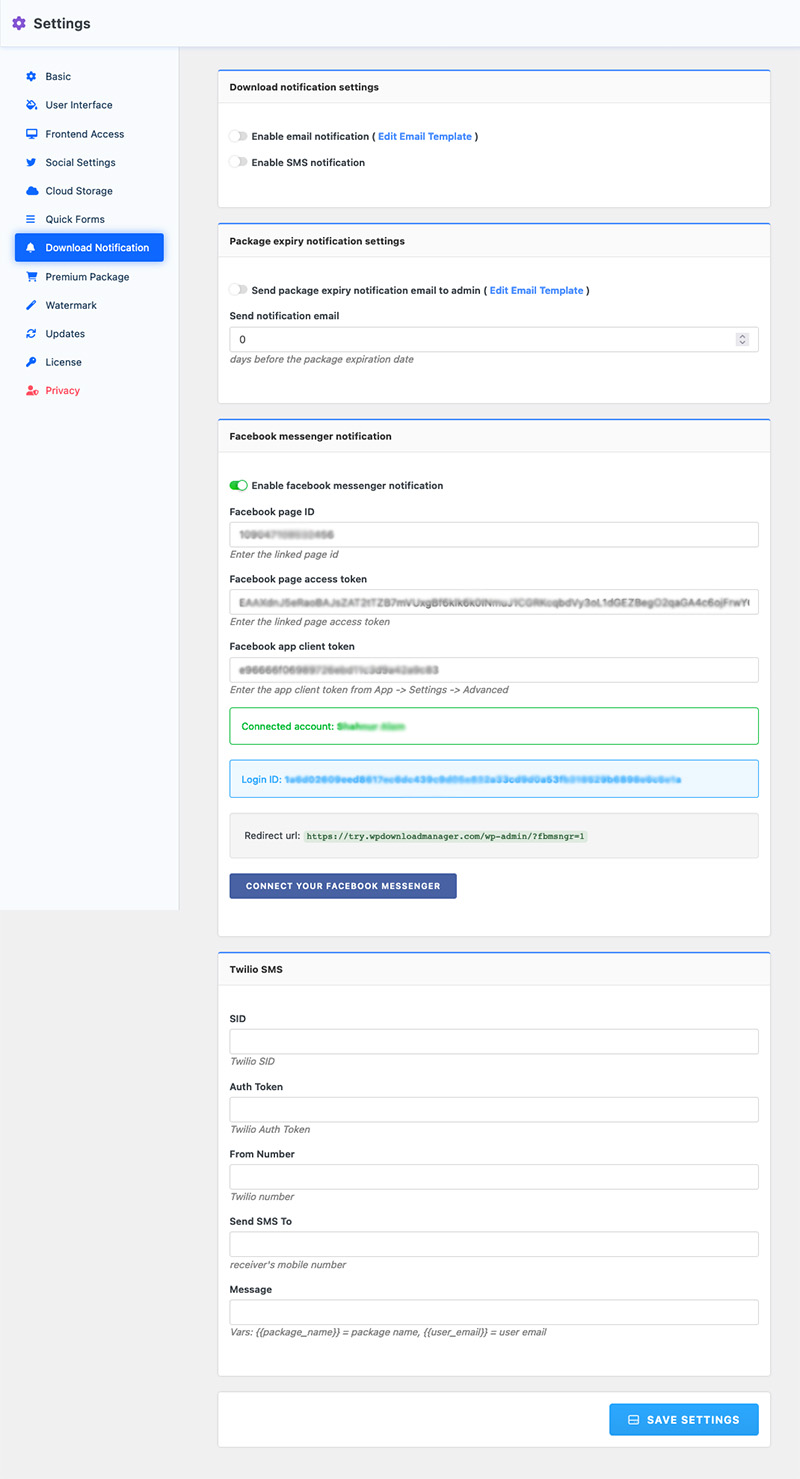
  2. Go to Downloads → Settings → Download Notification
  3. Tick Enable email notification to get an email for every download. Use Edit Email Template to change the email
  4. For text messages, tick Enable SMS notification and enter your Twilio SID, auth token, Twilio number, the number to send to, and your message
  5. For Messenger alerts, tick Enable facebook messenger notification, enter your Facebook page ID, page access token, and app client token, then click Connect your Facebook messenger. The Facebook app ID and secret come from Social Settings
  6. For expiry reminders, tick Send package expiry notification email to admin and set how many days before expiry to send it
  7. To change the email setting for one package, open its Download Notification tab and choose Use Global Settings, Send Notification, or Don't Send Notification

Download notification settings in WordPress Download Manager: email, package expiry, Facebook Messenger and Twilio SMS

Included in the Full Access Pack
Download Notifications is part of the Full Access Pack, which gives you every current and upcoming add-on on this site.
v2.0.2 Latest2026-09-14
  • Security fix: hardened the Facebook Messenger webhook verification response
  • Fixed new subscriber notifications showing the IP address instead of the logged-in user's email
  • Fixed email notifications not being sent on PHP 8 for packages whose notification setting was never saved
  • Enhanced System Optimization and Compatibility Assurance Update
  • Improved default selection option with the package settings
  • Improved package expiry notification function
  • Improved SMS notification function
  • Fixed an issue with the package expiry notification
  • Fixed an issue with the plugin auto-update routine
  • Added a new option for Facebook Messenger notifications
  • Added email notification for package expiration
  • Fixed an issue with the email template function
  • Compatibility update for WordPress Download Manager Pro v6
  • Added support for SMS notification using Twilio API
  • Added email template support
  • Fixed an issue with multiple recipient support
  • Added a new filter wpdm_send_new_subscriber_notification to enable/disable subscriber notification
  • Fixed an issue with subscribers email detection when email lock is enabled.
  • Added support for the email lock option; notifications now include the email and other custom field data
  • Added multiple email support for package specific notification
  • Compatibility update for WordPress Download Manager Pro v5
  • Improved client IP detection behind proxies
  • Added Global Option for enabling email notification
  • Fixed issue with notification message
  • Added email notification with the user's name and email when a user submits the email lock form
  • Initial Release

Write a comment...

17 Comments

  1. Jorge rojas

    Hello, I am interested in this plugin, but I would like to know if there is a way to filter emails from certain domains, for example gmail, hotmail or similar so that they are not sent as notifications. Thank you very much!

    1. Shahjada

      The option is not available yet, but noted for implementation.

      1. Jorge rojas

        Oh, thank you, I was thinking and while you do this implementation I’m going to buy this plugin and use an email to filter messages before send them to the sales team. Thank you very much.

  2. Chris Martin

    I’m having trouble entering two email addresses. I separate using a coma and it tells me “Please enter an email address”.

    1. Shahriar

      Maybe the restriction is coming from somewhere else. Please create a ticket here and send temporary wp-admin login info in private reply.

  3. Katie Bruhl Zraik

    Hello. Will this allow me to have a notification sent to the AUTHOR (not user role) that created the package? I have a site with many different authors and they want information sent to them when someone downloads their packages. They do not want notifications about other author’s download stats. Is this possible?

    1. Shahriar

      It is not possible at the moment. But noted for implementation.

  4. Francesco Aprile

    Hi. Is possible configure mail notification on upload or update document to user(s) belong to role(s) assigned or mail notification to specific user(s) assign thanks to access control addon?
    Thanks
    Best regards

    1. Shafayet

      Hi,
      This add-on will send a notification to the site admin when someone downloads an item. But. using advanced access control add-on ( https://www.wpdownloadmanager.com/download/advanced-access-control/ ), you will be able to send notifications to assigned users for new uploads and update on old uploads.

  5. wpdm

    Will you be able to see the email address to those who downloaded our packages ? ? We want to add tryout versions of our software and we need to do follow ups and send key number/unlock key.

    Thank you.

    1. Shahjada

      Hi,
      If you use email lock option, you will be able to see the emails of downloaders from Admin Menu >> Downloads >> Subscribers.

  6. Gestiamo Casa

    Is it possible to send a notification email also to the user who has downloaded the file?

    1. Shahjada

      Yes, that is only possible if a user’s email is known as the user is logged in when they are downloading. But, this plugin doesn’t have the option, however, you may follow https://www.wpdownloadmanager.com/doc/action-reference/wpdm_onstart_download/

  7. Ian Tavener

    Is this able to show IP address of download in the email?

    1. Shahjada

      Yes, it does.

  8. delacroix

    Does this addon work with the free version of Download Manager? Also, does it work with all browsers. Also does it send notification email with what file was downloaded by whom( email address and username for registered users)?

    Thanks

    1. Shaon

      Yes, this add-on works with free version, it is browser independent and send user info for logged in users.

$49.00 — $99.00
Select License
Yearly recurring pricing
Cancel anytime
Priority support
Secure checkout

Have questions?

Contact Support

Get notified when this plugin is updated

Enter your email to receive updates about this plugin.