Search Results for 'download link'

Viewing 25 results - 3,751 through 3,775 (of 11,368 total)
  • Author
    Search Results
  • #144929

    Thandi Viljoen
    Participant
    This reply has been marked as private.

    Nayeem Riddhi
    Moderator

    Hi,

    you can use [download_link_extended] template tag in your page template for extended form display, for more template tag, you can see the doc here, https://www.wpdownloadmanager.com/doc/templates/template-tags/

    thanks


    François Sass
    Participant
    This reply has been marked as private.

    Antony Liaw
    Member

    Hi, my download page has the error message:

    Notice: Trying to get property ‘ID’ of non-object in /public_html/wp-content/plugins/download-manager/libs/class.Apply.php on line 1339

    And when the visitors on my website download Email Lock files, they will all become “- invalid download links -“


    SHIRLEY SIMAUCHII
    Participant

    Why does the free download link for to Junk folder? I tested it out and the link goes straight to my junk folder. Is there something I need to click to make sure the link emailed to them does not go to junk?

    #144863

    James Ormerod
    Participant

    okay sorry, lets try again

    i want to replace the icons with a preview of the file

    here is my codde

    ———-

    <div class=”card mb-3 p-3″>
    [thumb_600x0]
    </div>
    <div class=”wpdm-button-area mb-3 p-3 card”>
    <p style=”text-align: center;”><span data-text-color=”primary”>Click below to Download all files within [title]:</span></p>
    [download_link]
    </div>

    <div class=”wpdm-page-template single-col-flat”>

    <h3 style=”text-align: center;”><span data-text-color=”primary”>Download only the files you want…</span></h3>
    [description]
    <br/>
    [image_gallery_400x400x4]
    <br/>

    </div>

    —————-

    #144861

    Isabel Jowett
    Participant

    Hi

    Many thanks for the link.

    Does the free version of Download Manager require a licence key? And is the licence key required to run an update?

    Many thanks

    #144845

    Arthur Schlenger
    Participant

    Thank you for your response. Yes, every package on the site needs to work like this. We need the mp3 for preview / listening and a link to the wav for a high resolution download on a large number of songs.

    #144844

    Nayeem Riddhi
    Moderator

    By default, you are using, link-template-default, for more template you can visit Downloads > Templates, let me know if you have other queries

    thanks

    #144843

    In reply to: Disable Details Page


    Nayeem Riddhi
    Moderator

    Yes, you can customize the link template. for more you can see this doc, https://www.wpdownloadmanager.com/building-a-wordpress-download-manager-link-template-from-scratch/ and also for the template tags, https://www.wpdownloadmanager.com/doc/templates/template-tags/

    thanks

    #144830

    James Ormerod
    Participant

    Hi All

    I have a custom page template but the images are being previewed. i don’t want to upload a featured image for everything.

    Heres the code

    <div class=”row”>
    <div class=”col-md-5″>
    <div class=”card mb-3 p-3″>
    [thumb_url_600x300]
    </div>
    <div class=”wpdm-button-area mb-3 p-3 card”>
    [download_link]
    </div>
    <ul class=”list-group ml-0 mb-2″>
    <li class=”list-group-item d-flex justify-content-between align-items-center [hide_empty:version]”>
    [txt=Last Updated]
    <span class=”badge”>[version]</span>

    <li class=”list-group-item d-flex justify-content-between align-items-center [hide_empty:file_size]”>
    [txt=File Size]
    <span class=”badge”>[file_size]</span>

    </div>

    <div class=”col-md-7″>
    <h1 class=”mt-0″>[title]</h1>
    [description]
    <h3>Attached Files</h3>
    [file_list]

    <ul class=”list-group ml-0 mb-2″>
    <li class=”list-group-item d-flex justify-content-between align-items-center [hide_empty:version]”>
    [txt=Last Updated]
    <span class=”badge”>[version]</span>

    <li class=”list-group-item d-flex justify-content-between align-items-center [hide_empty:file_size]”>
    [txt=File Size]
    <span class=”badge”>[file_size]</span>

    </div>

    </div>

    this is the link to the page https://thealfrescochef.co.uk/download/ember-manual/

    Many thanks in advance

    • This topic was modified 5 years, 9 months ago by James Ormerod. Reason: wrong code
    #144819

    WPDM user
    Participant

    Hi,
    1.is it possible to disable the link to the package details page? Is there a specific code for the functions.php page?
    I want the user just do download the package, by klicking the download button. There is no need to see details.

    #144803

    Christian Leuenberg
    Participant

    Ah, ok!
    Sorry to bother you again, but somehow nothing changes. I checked that new settings option and still got the same link in the email pointing to the page with the button instead of direct download. Using [#download_url#] as placeholder in the mail template is correct?

    #144778

    Shahjada
    Keymaster

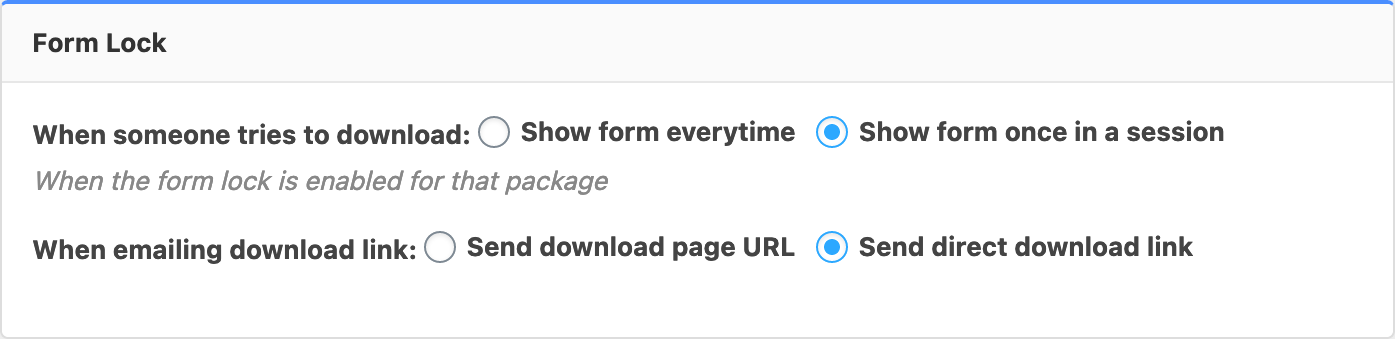
    Please check at the bottom of wpdm basic settings page:
    form lock

    You need to select “Send direct download link” and save settings.


    Arthur Schlenger
    Participant

    Hello, I have 2 audio files in a package. One is mp3 and the other is wav, I need to use the mp3 in the audio player and have the download link set to the wav. Is there an easy way to do this? Thank you for any help.

    #144763

    Christian Leuenberg
    Participant

    Thanks! Just wondering how I need to use it. Do I need to change the mail template? Currently it uses placeholder [#download_url#] for creating the link in the mail, but this still points to that page with the button. Is there any other placeholder I can use to directly start the download?

    #144695

    Paul O’Connell
    Participant

    I have the pro version of Download Manager and have also the email download plugin. When someone wishes to request a free download link the email they receive offers a button that when you click on it, opens a browser window for a couple of seconds but does not send the file?

    Can you offer a solution to this?


    Ann
    Member
    This reply has been marked as private.
    #144598

    Christian Leuenberg
    Participant
    This reply has been marked as private.
    #144594

    Christian Leuenberg
    Participant

    Great!

    Another question regarding WPDM: Is it possible, that the emailed download link directly points to the file download instead of showing a page with the download button? I saw this on your demo site but cannot recreate this …

    #144555

    In reply to: Issues with v2.8.7


    WAFWA Admin
    Participant

    That’s the issue. The shortcode is suppose to allow multiple categories provided they are seperated by a comma – that’s what is no longer working since I compelted the last update. So, if this update doens’t allow that. I would like the link to download the version 2.8.6.

    #144547

    Christian Leuenberg
    Participant
    This reply has been marked as private.
    #144508

    Christian Leuenberg
    Participant

    A follow-up to my question: I created a custom link template, which only includes the shortcode [download_link_extended], and selected this link template within the download package settings. I believe, this would be the right way to directly output the Live Form in the frontend. But in the frontend, it only shows a message saying “LiveForms plugin is not active!” which confuses me, because Live Forms IS active (I already deactivated and activated it again).

    Please help – thanks!


    Christian Leuenberg
    Participant

    Hi there,

    we just purchased WPDM Pro and the Form Lock Add-On. I am not sure if I really got it right, so hoping for your quick support on this.

    We have a landing page which should have a simple form (created with Live Forms) directly embedded which the user needs to fill out in order to get an email with the download link.

    Like in your docs, I created the download package, checked “Enable Form Lock”, chose our form and checked the “Email Download Link” option. Now on the landing page (built with Beaver Builder) I inserted the Live Forms shortcode. The form shows up correctly, but sending just reloads the page (with no success or error message), no mail gets out and no entry gets saved. Maybe it’s wrong to use the Live Form code and instead I need to use the WPDM shortcode? If yes, is it possible to directly show the form without having to click on a button that opens this lightbox/modal for unlocking?

    Hope you can give me some support!

    Best regards,
    Chris

    #144502

    Online with Ely
    Participant
    This reply has been marked as private.
Viewing 25 results - 3,751 through 3,775 (of 11,368 total)