Why do you write in other support threads, that i need PRO to open links in a new tab?
I could have done that with the free version too. I bought pro so I do not have to deal with php. I am not an software engineer! And also I do not want to have to change the php-files
e.g. here it sounds like i just need to add sth to the shortcode:
Open in a new tab/window
I use public downloads and a custom link template
-
This reply was modified 5 years, 9 months ago by
 Judith Koch.
Hi, for the Advanced access control shortcode this format is not working for me:
[wpdm_my_downloads login=1 template=”link-template-calltoaction3″ cols=”4″]
I wanted to use the call to action template “link-template-calltoaction3” but it’s not showing at all, am I formatting this incorrectly?
Thank you for your help
by default, you are using link-template-default.php for link template and page-template-default.php for the page template. As documentation, you have to copy the file in the theme directory naming a folder called download-manager, then paste it in tpls>page-templates for page template or tpls>link-templates for link template. And you have to replace [download_link] with <a href="[download_url]" class="btn btn-primary" target="_blank">[link_label]</a> in related PHP file. and for the back up the file, you may follow the link below documentation, https://www.wpdownloadmanager.com/doc/template-files/
Thanks.
Hi.
I need the downloads to open in a new tab. I purchased the PRO version therefor.
But I cant’t get it to work anyways. I cloned an existing Page template and tried to add link_target=_blank in various ways and positions.
Please tell me exactly where and how i need to add it in the code below to make it work!
<li class=”list-group-item d-flex justify-content-between align-items-center”>
[download_link_extended]
It is highly unprofessional in web standards to open downloads in the same window. So I really do not understand why it is so complicated! I get you want people to buy PRO, fine but then make it easily accesible for those at least!
This reply has been marked as private.
Hi,
you can use [download_link_extended] template tag in your page template for extended form display, for more template tag, you can see the doc here, https://www.wpdownloadmanager.com/doc/templates/template-tags/
thanks
This reply has been marked as private.
Hi, my download page has the error message:
Notice: Trying to get property ‘ID’ of non-object in /public_html/wp-content/plugins/download-manager/libs/class.Apply.php on line 1339
And when the visitors on my website download Email Lock files, they will all become “- invalid download links -“
Why does the free download link for to Junk folder? I tested it out and the link goes straight to my junk folder. Is there something I need to click to make sure the link emailed to them does not go to junk?
okay sorry, lets try again
i want to replace the icons with a preview of the file
here is my codde
———-
<div class=”card mb-3 p-3″>
[thumb_600x0]
</div>
<div class=”wpdm-button-area mb-3 p-3 card”>
<p style=”text-align: center;”><span data-text-color=”primary”>Click below to Download all files within [title]:</span></p>
[download_link]
</div>
<div class=”wpdm-page-template single-col-flat”>
<h3 style=”text-align: center;”><span data-text-color=”primary”>Download only the files you want…</span></h3>
[description]
<br/>
[image_gallery_400x400x4]
<br/>
</div>
—————-
Hi
Many thanks for the link.
Does the free version of Download Manager require a licence key? And is the licence key required to run an update?
Many thanks
Thank you for your response. Yes, every package on the site needs to work like this. We need the mp3 for preview / listening and a link to the wav for a high resolution download on a large number of songs.
By default, you are using, link-template-default, for more template you can visit Downloads > Templates, let me know if you have other queries
thanks
Hi All
I have a custom page template but the images are being previewed. i don’t want to upload a featured image for everything.
Heres the code
<div class=”row”>
<div class=”col-md-5″>
<div class=”card mb-3 p-3″>
[thumb_url_600x300]
</div>
<div class=”wpdm-button-area mb-3 p-3 card”>
[download_link]
</div>
<ul class=”list-group ml-0 mb-2″>
<li class=”list-group-item d-flex justify-content-between align-items-center [hide_empty:version]”>
[txt=Last Updated]
<span class=”badge”>[version]</span>
<li class=”list-group-item d-flex justify-content-between align-items-center [hide_empty:file_size]”>
[txt=File Size]
<span class=”badge”>[file_size]</span>
</div>
<div class=”col-md-7″>
<h1 class=”mt-0″>[title]</h1>
[description]
<h3>Attached Files</h3>
[file_list]
<ul class=”list-group ml-0 mb-2″>
<li class=”list-group-item d-flex justify-content-between align-items-center [hide_empty:version]”>
[txt=Last Updated]
<span class=”badge”>[version]</span>
<li class=”list-group-item d-flex justify-content-between align-items-center [hide_empty:file_size]”>
[txt=File Size]
<span class=”badge”>[file_size]</span>
</div>
</div>
this is the link to the page https://thealfrescochef.co.uk/download/ember-manual/
Many thanks in advance
-
This topic was modified 5 years, 9 months ago by
 James Ormerod. Reason: wrong code
Hi,
1.is it possible to disable the link to the package details page? Is there a specific code for the functions.php page?
I want the user just do download the package, by klicking the download button. There is no need to see details.
Ah, ok!
Sorry to bother you again, but somehow nothing changes. I checked that new settings option and still got the same link in the email pointing to the page with the button instead of direct download. Using [#download_url#] as placeholder in the mail template is correct?
Please check at the bottom of wpdm basic settings page:
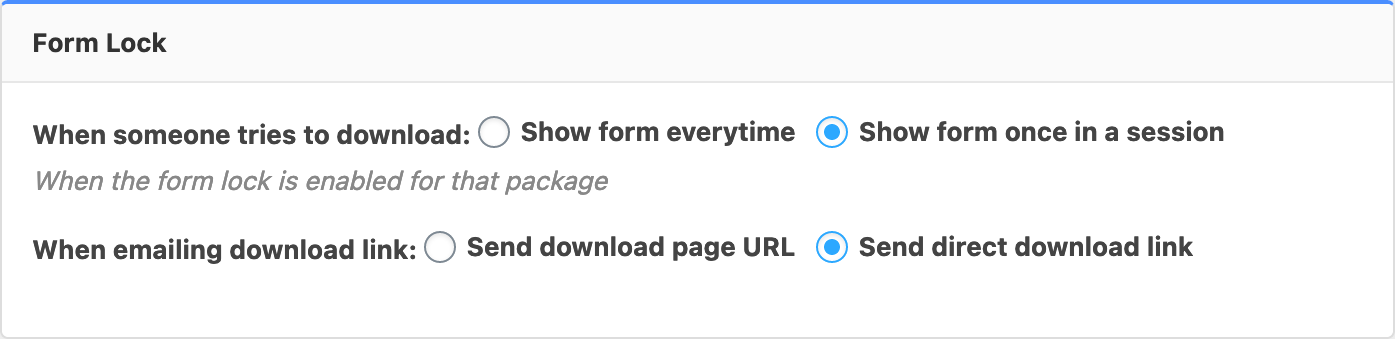
You need to select “Send direct download link” and save settings.
Hello, I have 2 audio files in a package. One is mp3 and the other is wav, I need to use the mp3 in the audio player and have the download link set to the wav. Is there an easy way to do this? Thank you for any help.
Thanks! Just wondering how I need to use it. Do I need to change the mail template? Currently it uses placeholder [#download_url#] for creating the link in the mail, but this still points to that page with the button. Is there any other placeholder I can use to directly start the download?
I have the pro version of Download Manager and have also the email download plugin. When someone wishes to request a free download link the email they receive offers a button that when you click on it, opens a browser window for a couple of seconds but does not send the file?
Can you offer a solution to this?
This reply has been marked as private.
This reply has been marked as private.
Great!
Another question regarding WPDM: Is it possible, that the emailed download link directly points to the file download instead of showing a page with the download button? I saw this on your demo site but cannot recreate this …
That’s the issue. The shortcode is suppose to allow multiple categories provided they are seperated by a comma – that’s what is no longer working since I compelted the last update. So, if this update doens’t allow that. I would like the link to download the version 2.8.6.



