
-
Search Results
-
I’m listing all downloads in tabular format on a page – see https://www.sacb.co.za/industry-statistics-legislation/#legislation. How can I edit the titles using CSS to align them all to the left and not centre them?
Topic: “No downloads found”
Hi,
I have the issue that all shortcodes ar not working after upgrading to Download Manager Pro.
The following error gets displayed: https://postimg.cc/bdRphC2H
If I’m downgrading the plugin to the free version it works again so I’m wondering, what’s the issue. Also all other shortcodes are not working.
Hello, Currently i am using following shortcode to display Table view of all Packages.
[wpdm_all_packages thumb=1 items_per_page="50" jstable=1 order_by="publish_date" order="DESC" cols="title,file_count,download_count|publish_date|download_link" colheads="Title|Date|Download::155px"]
Now i want to modify this shortcode to make following changes.
1) How to show each package descriptions below its Title in Table view as currently only the Title is visible with its Meta info like number of files, count of downloads, etc. I want to display description of the package below every title of the package. How to do that ?
2) I have two categories of the Packages as “Publications” and “Case Studies”. In Table view I want to only show “Publications” category packages and hide the others related to “Case Studies”. How to filter this using shortcode ?I am having trouble allowing my users to download files that I have posted on my Download Manager. Unfortunately, I don’t know when the downloads stopped working, but the site has been up and running since 2017. I am running WordPress 6.8.1 on a Linux host (self-hosted) and using Download Manager Pro 6.7.7. The problem I am now seeing is that when a user clicks on the download button for an ISO file, there is a long 30 or 40 second delay, then a file save dialog window appears. When the user clicks the save button, it appears that the download worked except the downloaded file has a size of 0 bytes. I have re-uploaded the files, but they still fail to download. I have debug enabled, but nothing is showing up in the debug.log
Topic: Addon “WPDM – Archive Page”
Hello everyone,
We use the addon “WPDM – Archive Page” to display the downloads in the frontend.
As you can see in the screenshot, all categories are displayed in the “Category – Select Category” and not only those that the customer is allowed to download (by his authorizations).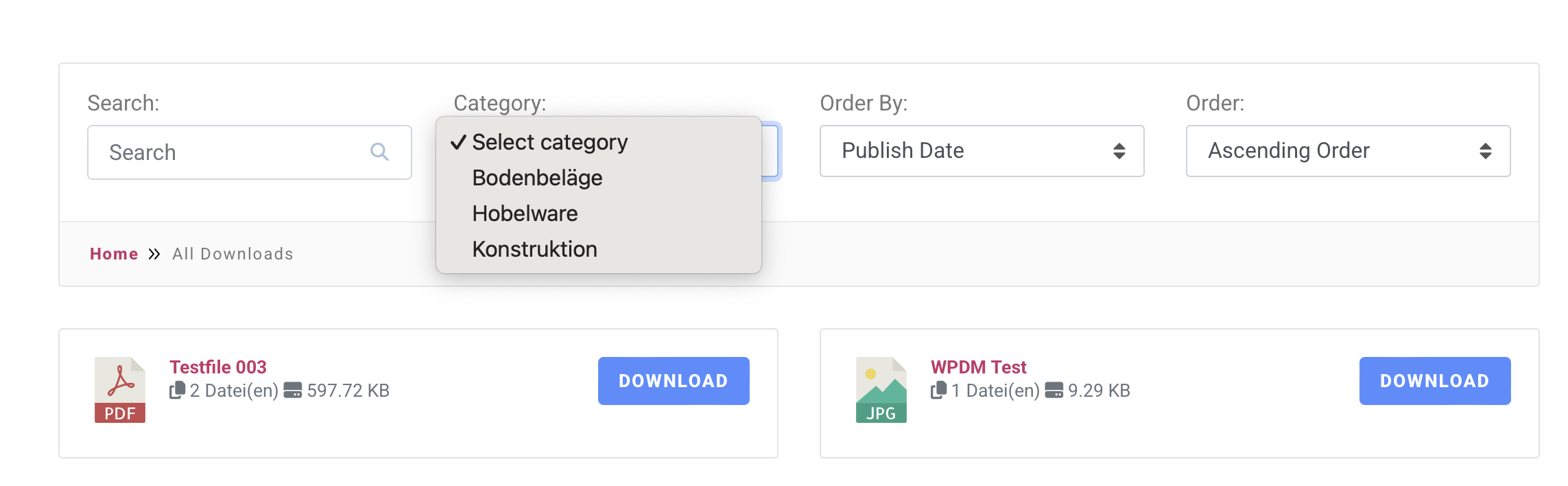
Many thanks for your efforts.
File downloads are interrupted for large files (e.g. 1.7 GB) if the network connection is below 10 MB/s. Files download normally at 20 MB/s (download lasts about a minute).
Is there a setting in Download Manager Pro to work around this problem?
Topic: Links working differently
I am using the plugin on a simple site with only 5 documents. 3 of the 5 links work correctly where they preview the document in the browser window. The other two prompt for the document to be downloaded before viewing. I want all the links to work the exact same way, preview in the browser. How can this be adjusted?
https://bomepharma.com/ is the website. Resources is where the downloads are.Hey,
I have a question regarding the shortcodes used to display files from a package directly in the “Downloads” tab of a product.
How does the following scenario work:
We’re exporting products from Shop A and importing them into Shop B.
However, Download Manager is only installed in Shop A – it’s not installed in Shop B.Since the shortcodes are transferred during export, I’m wondering:
Will the linked files still load and display correctly in the new shop (Shop B)?
Or will the shortcodes be ineffective because the files are no longer available or properly linked in the new environment?Thanks in advance for your feedback!
good morning, I am a novice, I have installed the free version on a site created in elementor. I should create access to file downloads divided into categories for users. How can I choose and assign only certain categories visible to users? (e.g. I would like to upload a piece of sheet music with the category ‘guitar’ and make it visible to registered users to whom I assign the category “guitar” while if I upload a piece of piano sheet music I would like to make it visible and downloadable only to users to whom I assign the category ‘piano’)


