Search Results for 'all+downloads'

Viewing 25 results - 1,376 through 1,400 (of 5,449 total)
  • Author
    Search Results
  • #163494

    Tanvir
    Spectator

    Hello,
    Hope you are well.
    1. The name is wpdm-pdf-viewer You can also find all the downloads here
    2. Different format has different file formats. You can use this link template link-template-default-icon for that. You can also set thumbnail image for packages and use [thumb_WidthxHeight] template tag on link templates to show.
    3. Next update will come in this month I hope. It is on development. Changelog here
    Thanks


    Thomas Sator
    Participant

    Hello,

    for all new downloads I will set the standard Link and Page Template.

    Is there a solution to set them?
    Is there a possibility to set the setting afterwards?

    Best regards
    Thomas

    • This topic was modified 4 years, 11 months ago by Thomas Sator.

    Tanvir
    Spectator

    Hello,
    Sorry for this inconvenience.
    THe addon is named as wpdm-daily-download
    You can get all downloads from here.
    Let me know please if the issue still persists.
    Thanks

    We have the Membership Pro plugin setup, and we are having an issues with subscribers not saving to subscription plans – sometimes, but not all the time. And we can’t work out why this is only intermittent either.

    This is whate we do:

    1. Add a subscriber user in WordPress
    2. Click on Manage Subscriptions next to the users name in the Users list
    3. Check the boxes for the Subscription Plans that we want them to be subscribed to, and click on the Save Changes button
    4. Go to the list of Subscription Plans under Membership, click on a plan, and the user/subscriber has not been added to the subscriber count, and if we login is that user/subscriber, they do not have access to the downloads that they should be able to access.
    5. If we then go back into the Manage Subscriptions option in the Users list, uncheck the Subscription Plans to cancel them, and save changes, then go back in and add them to the same Subscription plans again and save changes, then the changes “stick” and we can see the the Subscription Plan subscriber count increases correctly, and logging in as that user/subscriber will show that they have access to the intended downloads allocated to the Subscription Plan.

    This doesn’t happen every time we add a subscriber and allocate them to a subscription plan or plans… just sometimes, which is very frustrating, as we never know when it’s worked or not, and have to keep checking each one.

    Can you please investigate and see how we can resolve this issues?
    Thanks

    #163276

    In reply to: access denied to hide


    Tanvir
    Spectator

    Hello,
    If you want, you can create a special page using shortcode [wpdm_my_downloads login=1 template="template-id" cols="1 or 2 or 3 or 4"] or [wpdm_my_downloads login=1] to list all packages assigned to a specific user – this shortcode is useful when you want to create a user-specific download area or members area. This shortcode will hide package names too for specific users.

    For that you need this addon:

    Advanced Access Control


    Thanks


    hansi moier
    Participant

    Hallo,
    since the last update, no downloads seem to be possible. When i add a new file (or go to the download page of old files) and click on “Download” a new tab opens with the page saying Secure Connection Failed. I already tried and deleted the cache of the plugin and changed the setting of Temporary Storage Managment to “Store in Database” (this setting seems not to be possible to save, it always switches back to “File”)
    What else could be the problem?
    Thanks for any help!

    #163258

    Nayeem Riddhi
    Moderator

    Hello @thomas-sator,

    Hope you are well. you can create a new link-template and use this template tag, [pdf_thumb_WxH] in your link-template, it will show Image thumbnail from the attached PDF file with specified Width ( W ) and Height (H). If you are trying from Downloads > Categories, you can use Use Link Template from edit category option. And for showing certain categories with a shortcode on a page, you can use this shortcode, https://www.wpdownloadmanager.com/doc/short-codes/wpdm_packages-wp_query-in-a-shortcode-for-download-manager-packages/. Here has a category parameter called categories. you can also use this shortcode too, https://www.wpdownloadmanager.com/doc/short-codes/wpdm_category-query-all-downloads-from-one-or-more-categories/. please check, I hope those may help you

    Thank you and regards

    #163217

    Kyle Elliott
    Participant

    Hi,
    We are using a directory to display our wpdm downloads for certain categories on this page:https://gspairport.com/rfps/

    The issue is, when the page is updated, it loses the categories setting on WPDM.

    Secondly, we can only add categories if there is an active published download assigned to that category. This seems to be a new bug as it was working just fine previously.

    Since we have bid documents that are published only for a certain time period, we unpublish them after they close. If there is no wpdm download post assigned to a category, its removing it from our directory categories. This means each time we want to put a new wpdm download up, we need to go to our RFP page listed above after the post is published and add the category to the wpdm directory. This is using the elementor add-on.

    To resolve this, we need to be able to add empty categories and allow them to stay saved.

    #163214

    Tim Guella
    Participant

    Hello,

    I have two questions:

    Can I sort a list of downloads (currently using the shortcode for tags) by custom fields? I have used your plugin to to add OS values (Windows, iOS, etc) to downloads and I would like for users to be able to select their OS and be presented with a filtered list.

    Also, when I use reCAPTCHA it works well but the download begins right after they solve the reCAPTCHA. Instead, we would like them to click the download or at least leave a note “if your download does not automatically start please click the download button.”

    Thank you,

    Tim

    #163210

    Tanvir
    Spectator

    Hello,

    Sorry to hear about the issues.

      1. You can install pdf viewer from Downloads > settings > Updates option from your WordPress dashboard. If you can’t update it directry from WordPress dashboard, Please update from here.
      Here is the url of the addon

      WordPress PDF Viewer


      2. To set preview image for each download you have to set featured image for package and then [thumb_widthxheight] in link template or page template to show preview image in the list.
      To set preview image for category, you have to set image for each category from Downloads>Categories option.
      Then you have to use this shortcode with title=1 parameter and id='' parameter
      https://www.wpdownloadmanager.com/doc/short-codes/wpdm_category-query-all-downloads-from-one-or-more-categories/
      3. I have just tested this issue and I think it is a bug. I will forward the issue to the developer team. In the meantime you can add template parameter in shortcode to use template.

    Please let me know if you have any quries or if you have got all the answers.

    Thanks

    #163169

    nvision
    Participant

    Hi there,

    We have a website that has over 75GB of downloads in the /uploads/download-manager-files/ directory. Is there are a way to clear our the old/outdates files?

    We tried removing all of the files from this folder (except for .htaccess) and the functionality stopped working (customers were navigating to wp-admin instead of their front-end pages).

    Any help with this is appreciated.

    Thanks,
    Marek

    #163152

    Nayeem Riddhi
    Moderator

    Hello @juan_ateb,

    please check from Downloads > Categories > Column ID section. You shall get your required categry ID

    cat-id

    I hope this may help you

    Thank you and regards

    #163151

    Juan Gordo
    Participant

    Thanks Nayeem

    I have tried that with the category but struggling to set up the shortcode to get it to display only the current category’s packages. This is what i have so far but not sure what ID to give it to call the relevant category

    [wpdm_category id="" cols="3" toolbar=1 orderby="title" order="asc" items_per_page="20" template="card_vertical_download3"]

    I havent looked at the breadcrumbs properly yet but thanks for that. I will let you know how that works. The main problem i see is the removal of the Downloads page that is not relevant. I’ll see how it goes

    Thanks


    pap1723
    Participant

    Hello,
    I recently updated and all of my downloads that require an email address entry to unlock never proceed to the download.

    #163132

    Juan Gordo
    Participant

    Apologies if I have missed something really obvious but I am tearing my hair out trying to do this.

    Ok, so I played around with the categories and link templates and couldn’t find a way to add the category title or anything else on the category page (example). Link templates are literally just for the download links and these pages don’t seem to be affected by the Archive page settings. So I created individual pages for the categories and embedded the category shortcodes (example). Works beautifully, or it did until I got asked to put a breadcrumb on the package files to improve navigation.

    The breadcrumb think is a mystery in itself. Ended up going for a plugin that lets me put it on the sidebar widget. Looks awful but I can’t figure out any other way to do it (PLEASE let me know if there’s a better way, the ones on the WPDM site are perfect)

    The second issue is that the breadcrumb picks up the category rather than the category pages I created individually and I can’t see a way to change that. And also the mid level /downloads page that doesn’t mean anything.

    So, 2 questions

    – How do I format the category page?

    – What is the best way to do breadcrumbs with this plugin?

    Thanks very much in advance

    #163131

    Webmaster Af-ccc
    Participant

    Hi,
    I got some issue with wpdm_category short code : downloads set as ‘private” are not listed, even if the user is allowed to access them.
    However, they all are displayed by https://sitename/download-category/slug/ .
    Any ‘hidden’ parameter ?

    Thanks for any help
    René

    #163105

    Humayon
    Spectator

    Hi,
    The stats table can be big based on your site traffic and downloads.
    Deleting stats data shall clear the stats table, but still, package download count will be available.
    Enabling the auto-clean option will keep your session table clean.
    Keep selected the Save in Database option because the Save in file option is for the low traffic sites.
    However, we are checking the Temporary Storage Management issue which will be adjusted with the upcoming update.
    Thanks

    #163053

    Stephen Currah
    Participant
    This reply has been marked as private.
    #163044

    mfirwana
    Member

    hi

    this is not solution to delete all stats data i want keep the totals downloads no and the total download file

    Thanks


    Ikram Dirujii
    Participant

    Dear WPDM team. I am using the Download limit addon. but the problem is that the reset feature is not working automatically for guests. although it is working manually. please solve this Problem Sir

    • This topic was modified 4 years, 12 months ago by Ikram Dirujii.
    #163004

    Daniel Martin
    Participant

    I am using wpdm_get_package() to display a package details, but individual files in a package are downloading as “permission-denied.txt” when using <?php echo WPDM()->package->fileList->table($ID); ?>.

    All packages are set to use global settings and they are set to allow single file downloads.

    Any ideas?

    #162972

    Tanvir
    Spectator

    Hello,
    Sorry for this inconvenience. I just tested it with the latest versions and it is working fine. Downloads are only accessed by selected users even if allow access field is empty.

    Make sure that WPDM and all add-ons you are using of WPDM are in the latest version. If you can’t update it directry from WordPress dashboard, Please update from here.
    Please update wpdm to the latest version 6.0.8
    and advanced access control to the latest version 3.2.1

    I hope it will fix the issue. If still the issue persists, it will be very cooperative if you record me reproducing your issue using a tool like this and provide me the admin access of your website in a private reply.

    Thanks

    #162909

    Nayeem Riddhi
    Moderator

    Hello @jrpajr,

    Hope you are well. The code sample is here, the response code for any API should be like this,

    The JSON response will look like the following example:

    {
          "id": 6488,
          "title": "The Alchemist",
          "slug": "the-alchemist",
          "description": "The Alchemist follows the journey of an Andalusian shepherd boy named Santiago.",
          "excerpt": "The Alchemist is a novel by Brazilian author Paulo Coelho.",
          "author": 1,
          "status": "publish",
          "parent": 0,
          "tags": [
              "novel",
              "paulo-coelho"
          ],
          "categories": [
              16
          ],
          "thumbnail": "https://example.com/wp-content/uploads/2019/01/the-alchemist.jpg",
          "additional_previews": [
              "https://example.com/wp-content/uploads/2019/03/the-alchemist-cover.jpg",
              "https://example.com/wp-content/uploads/2019/03/the-alchemist-map.jpg"
          ],
          "version": "3.0.0",
          "link_label": "Download",
          "quota": 0,
          "download_limit_per_user": "100",
          "view_count": 80,
          "download_count": 14,
          "package_size": "811.84 KB",
          "access": [
              "guest",
              "subscriber",
              "administrator"
          ],
          "user_access": [
              "admin"
          ],
          "individual_file_download": "1",
          "cache_zip": "-1",
          "template": "link-template-calltoaction1",
          "page_template": "page-template-1col-flat",
          "files": {
              "1": "The Alchemist.pdf"
          },
          "fileinfo": {
              "1": {
                  "title": "The Alchemist",
                  "password": "",
                  "license_price": {
                      "statdard": "",
                      "extended": "",
                      "unlimited": ""
                  },
                  "price": ""
              }
          },
          "package_dir": "",
          "publish_date": "2019-04-01 12:00 am",
          "expire_date": "2019-08-31 12:00 am",
          "terms_lock": "1",
          "terms_title": "Agree to terms",
          "terms_conditions": "You can't redistribute without prior authorization.",
          "terms_check_label": "Checkbox Label",
          "password_lock": "1",
          "password": "[123][456]",
          "password_usage_limit": "2",
          "linkedin_lock": "1",
          "linkedin_message": "LinkedIn Share Lock message",
          "linkedin_url": "https://www.wpdownloadmanager.com/",
          "tweet_lock": "1",
          "tweet_message": "Custom tweet message",
          "twitterfollow_lock": "1",
          "twitter_handle": "Shahriar",
          "facebooklike_lock": "1",
          "facebook_like": "",
          "email_lock": "1",
          "email_lock_title": "Subscribe To Download",
          "email_lock_msg": "",
          "email_lock_idl": "0",
          "icon": "https://example.com/wp-content/plugins/download-manager/assets/file-type-icons/arrow.png",
    
          "base_price": "12.00",
          "sales_price": "10.00",
          "sales_price_expire": "2019-08-31 12:00 am",
          "pay_as_you_want": "0",
          "license": {
              "statdard": {
                  "active": "1"
              },
              "extended": {
                  "price": "22",
                  "active": "1"
              },
              "unlimited": {
                  "price": "32",
                  "active": "1"
              }
          },
          "discount": {
              "subscriber": "10",
              "contributor": "20",
              "author": "30",
              "editor": "40",
              "administrator": "50"
          },
          "enable_license": "1",
          "enable_license_key": "1",
          "free_downloads": [
                  "/Applications/XAMPP/wpdm/wp-content/uploads/2019/04/The-Alchemist-free-sample.pdf"
              ],
          "meta_input":{
            "meta_key" : "Hello"
          }    
      }

    here file attach should be like this,

    "files": {
              "1": "The Alchemist.pdf"
          }

    And for this default format, the file should be residing in wp-content/uploads/download-manager-files, thus the package should create with fa file. Please let me know if you have other queries

    Thank you and regards

    #162881

    Daniel Martin
    Participant

    I have now managed to do what I need using wpdm_get_package(), the only remaining issue, individual files in a package are downloading as permission-denied.txt when using <?php echo WPDM()->package->fileList->table($ID); ?>.

    All packages are set to use global settings and they are set to allow single file downloads.

    Any ideas?

    #162840

    Nayeem Riddhi
    Moderator

    Hi,

    For Invalid File Type updating ( 3.1.17 or 5.3.7 ),

    Here is the reason and solution:

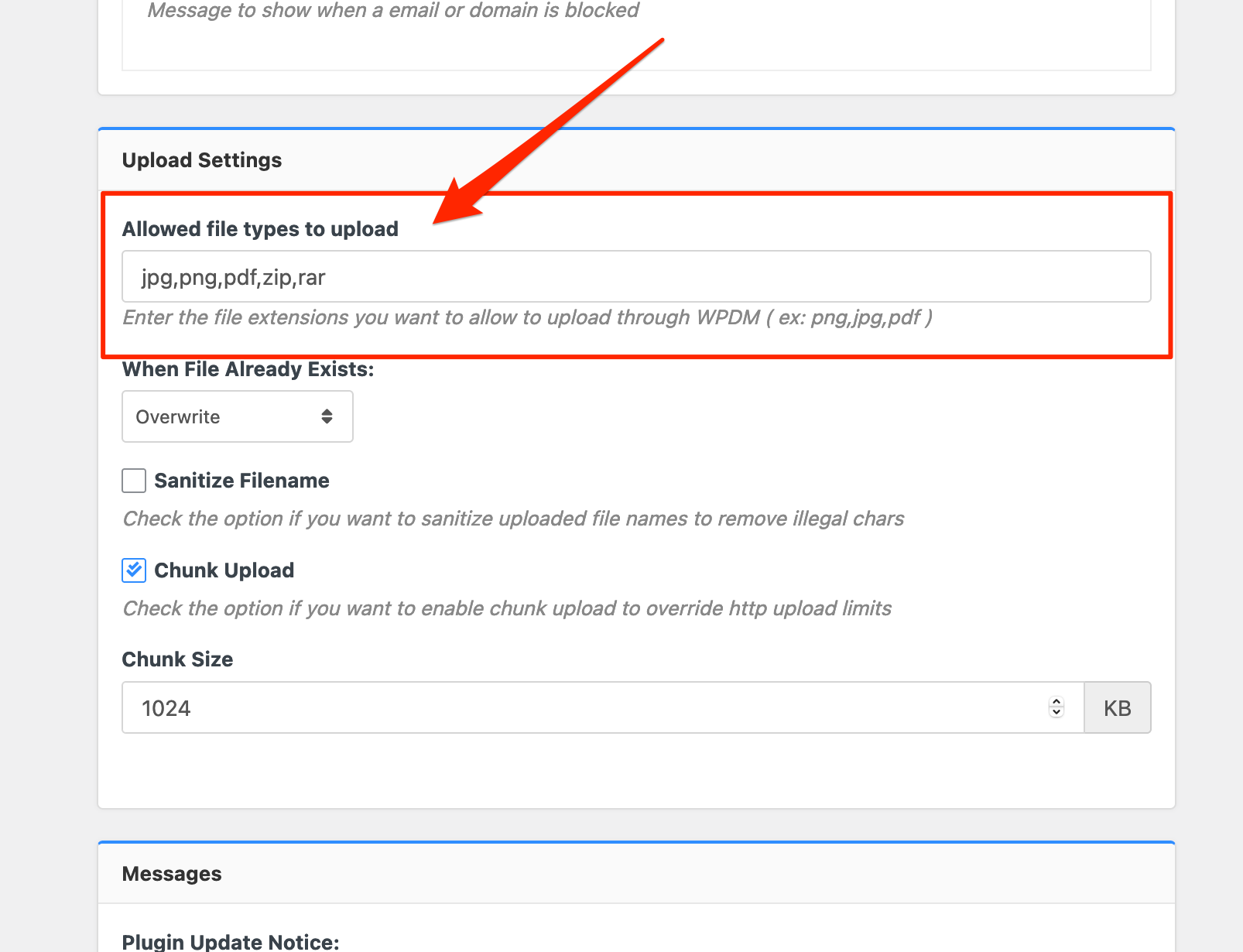
    From WPDM Free and WPDM Pro, we have changed the file type validation process during file upload and download. Now, you have to give file types to allow them to upload or download. You will find the option at Admin Menu ► Downloads ► Settings ► Basic Settings Tab ► Upload Settings section.
    Settings%20%E2%80%B9%20Download%20Manager%20%E2%80%B9%20WordPress%20Download%20Manager%20Pro%20%E2%80%94%20WordPress

    Please add file types ( texts, multiple texts separated by a comma ) as shown on the marked image. And then save settings. The shall resolve the issue.

    or, Just Keep it Empty for WordPress default use , thus it may resolve the issue

    thank you and regards

Viewing 25 results - 1,376 through 1,400 (of 5,449 total)