Seamlessly connect WordPress Download Manager with Amazon S3 and other S3-compatible cloud storage providers. Store, manage, and deliver files directly from the cloud with a modern, full-featured admin interface — no FTP or manual uploads needed. * PHP version requirement >= 8.1
What's New in Version 5.0.0
- Dedicated Settings Tab — S3 settings now have their own tab under Downloads > Settings for a cleaner, focused configuration experience
- Multi-Provider Support — Connect to Amazon S3, DigitalOcean Spaces, Wasabi, Backblaze B2, Google Cloud Storage, Filebase, or any S3-compatible service with a custom endpoint
- Config-Defined Credentials — Optionally define credentials in
wp-config.php for enhanced security and easier deployment across environments
Key Features
Modern S3 File Explorer
- Full-featured file manager built into your WordPress admin
- Browse, upload, create folders, and delete files across all your buckets
- Toggle between list and grid views
- Breadcrumb navigation for easy folder traversal
- Drag-and-drop file uploads with real-time progress tracking
- Multipart upload support for large files
S3 File Picker for Packages
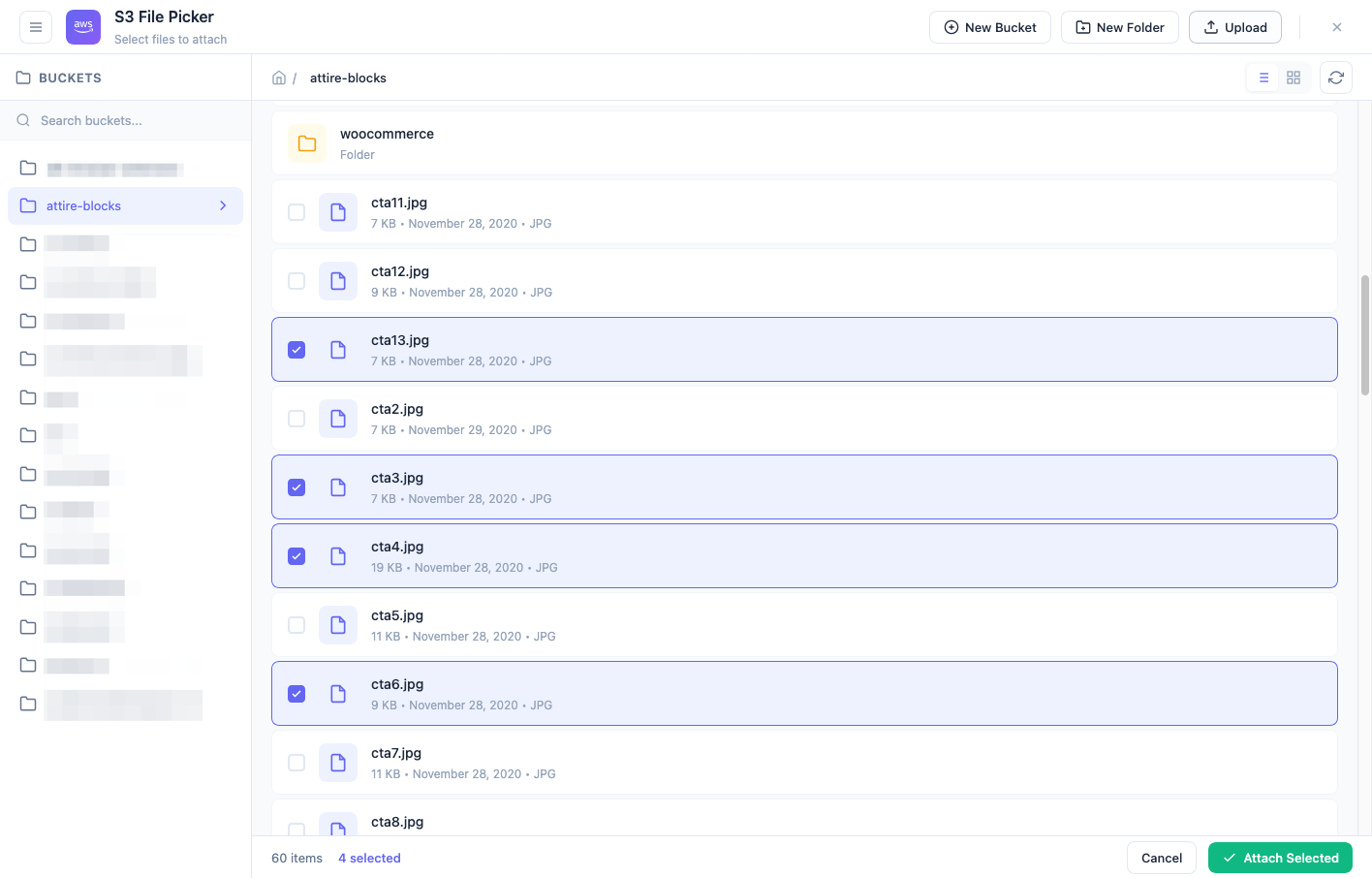
- Attach files directly from S3 to any download package
- Multi-file selection with checkboxes
- Dedicated file picker modal accessible from the package editor
Auto-Sync Engine
- Automatically sync existing package files to your S3 bucket
- Processes one package per cron cycle to prevent server timeouts
- Real-time sync progress dashboard with status metrics
- Run Now, Refresh, and Reset controls for full manual control
- External cron URL support for sites with
DISABLE_WP_CRON
- Email notification when sync completes
Direct S3 Upload
- Upload files directly to S3 when adding them to packages
- Configurable destination bucket and folder
- Optional package-specific subfolder organization using package IDs
Secure Downloads
- Generate time-limited presigned download URLs with automatic expiration
- Downloads are tracked in WPDM's statistics and download history
- Force-download support for media files (images, audio, video)
Role-Based Access Control
- Assign specific buckets to different WordPress user roles
- Read-only mode per role to prevent accidental modifications
Document Preview
- In-browser PDF preview for S3-hosted files via Google Docs Viewer
- Microsoft Office document preview (Word, Excel, PowerPoint)
S3-Compatible Providers
- Amazon S3 (all regions)
- DigitalOcean Spaces (7 regions)
- Wasabi Cloud Storage
- Backblaze B2 (US East, EU Central)
- Google Cloud Storage
- Filebase (decentralized storage)
- Any S3-compatible service via custom endpoint URL
Setup
Go to Admin Menu >> Downloads >> Settings >> Amazon S3 Tab to configure your storage provider and credentials:
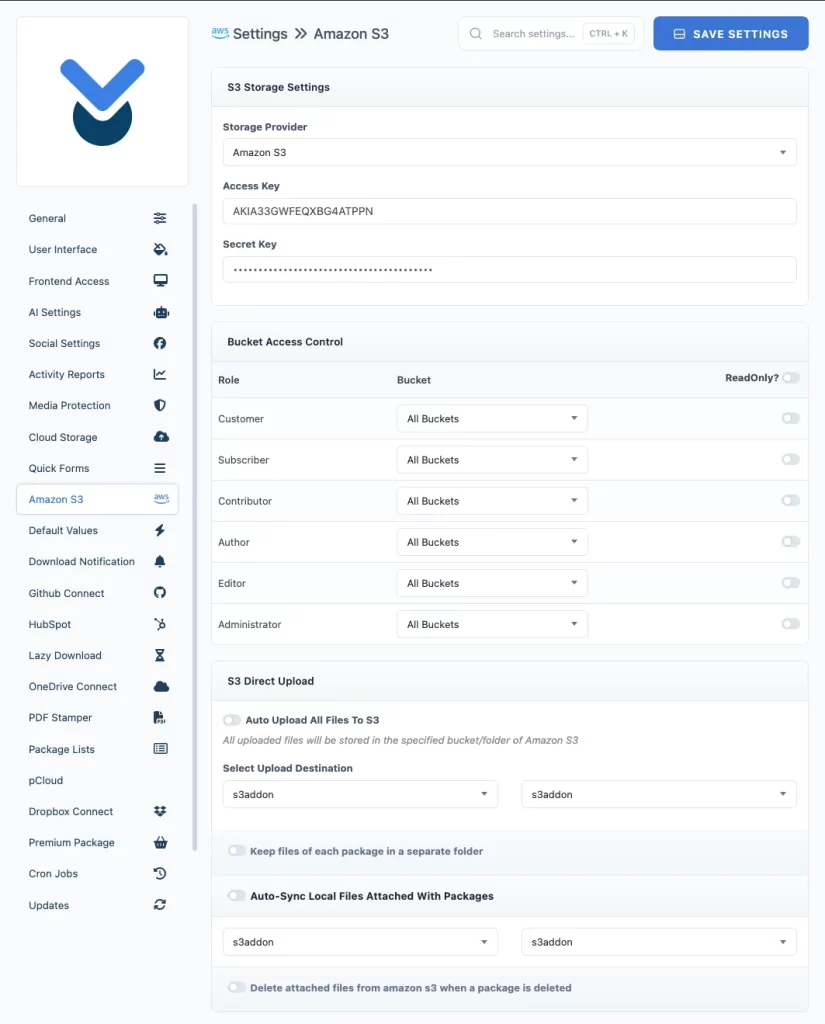
Enter your Access Key and Secret Key (or define them in wp-config.php), select your storage provider, and Save Settings.
Full-Featured WordPress Amazon S3 File Manager
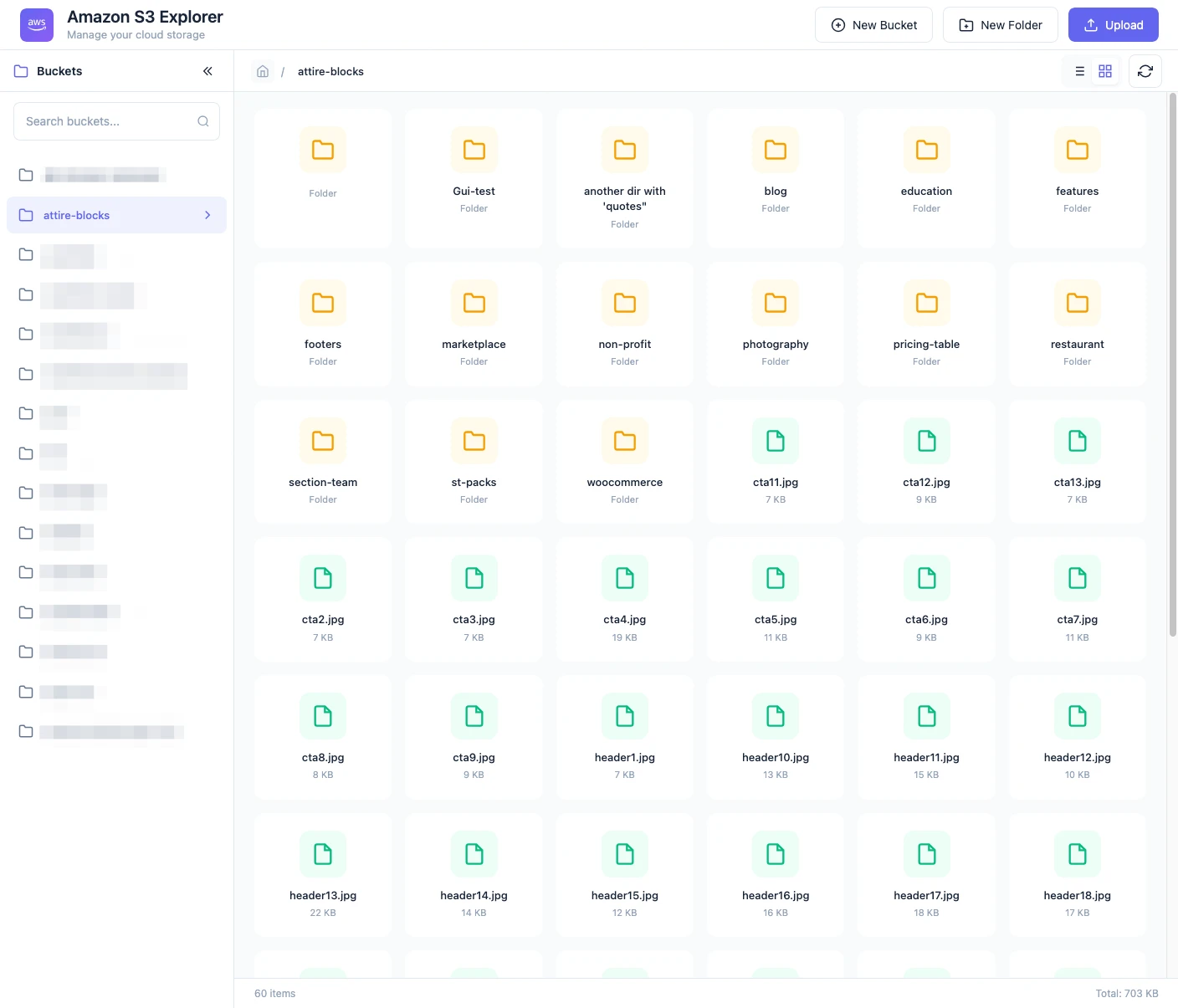
Explore & Attach Files
In the add/edit package window, click the "Select From Amazon S3" button to open the file picker. Browse your buckets, select one or more files, and click "Attach Selected" to link them to your package:
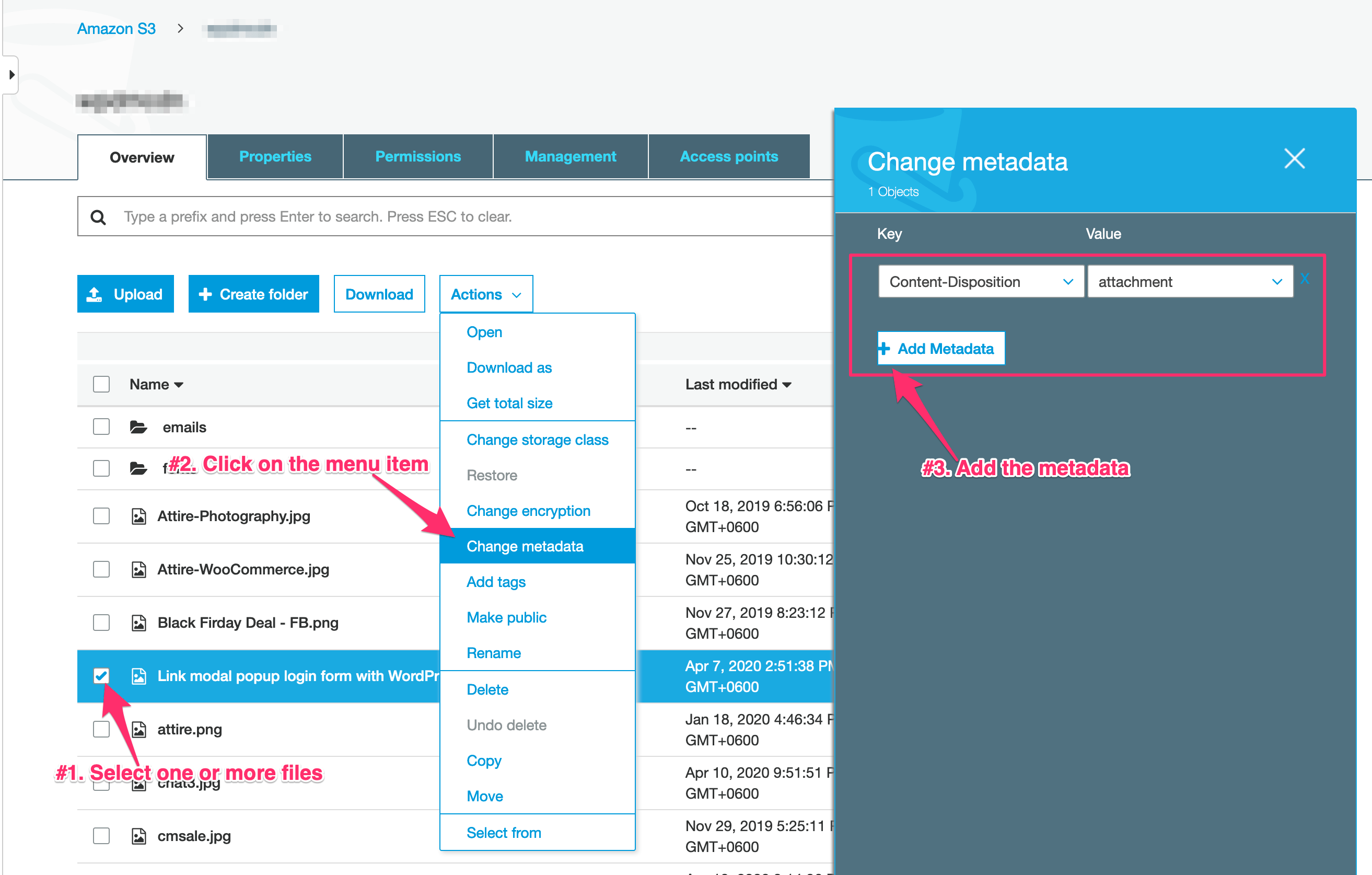
Force Download Amazon S3 Files
Sometimes image, video, or audio files may open in the browser instead of downloading. You can force download behavior for S3 files by following the steps shown below:
Available With Discounted Packs
This add-on is available with
the Special Pack and
the eCommerce Pack. If you already have any of those packs or the all addons pack, you can download it for FREE






55 Comments
When you are saying: “Auto-sync old package files to S3” tou mean that I can migrate my server hosted files to Amazon S3 easily?
yes, but only the files which are attached with wpdm.
Hello, In my plugin, the buttons for create dir, create bucket and upload file are not displaying.
PLease check the link below
https://www.dropbox.com/s/7t17mhvp3lxp207/amazon%20s3.png?dl=0
Please post in forum:
https://www.wpdownloadmanager.com/support/forum/download-manager-pro/
I am making a membership site to download various ebooks so that anytime the user can download the files. Kindly explain what does temporary link means? In order to provide permanent secure link for download in the membership area, is there different settings to be done?
Is there money back for Amazon S3 addon?
Also whether we can purchase Amazon S3 while using free WPDM?
Thanks.
Download links are stable, permanent and secure, here temporary download link means, when someone clicks on download button, it send a request to server and generates a temporary download limit from amazon s3, and use that URL to download the item from S3.
Please check https://www.wpdownloadmanager.com/terms-and-conditions/
Amazon S3 is usable with both free and pro.
Would front-end users be able to upload files to Amazon S3? For example a photographer with 100+ photos. Is there any kind of approval process?
Yes, you can, front-end users can upload files directly to amazon S3, you can also specify use role specific bucket access too. Also, when someone creates a packages from front-end admin can keep them pending from wpdm settings.
It seems the Download size does not appear, and the filecart plugin does not work with this plugin. Is there a way to make these two items work?
For remote files, you need to enter size manually. Also, multi-file download will not work for remote files, as files need to be in the same server to create zip, that’s why files cart will not work for s3 files.
Hi, thanks for the reply, how would I add the file size during a batch upload? would it be stored with the serialised data in __wpdm_fileinfo alongside titles?
The column heading for package size is
package_size.Is it possible to create a WPDM package that is linked to an S3 directory rather than individual S3 files?
We shall add the option with the next update.
I would like this too
I’m looking to migrate from the Wordpres plugin ‘S3 Bucket Browser’, because I’ve had issues with users having timeout problems when downloading S3 content. If I use your product, am I likely to alleviate those timeout issues? (e.g. client downloading many Gb files using slow connections)
Thanks
That should not be a problem with the our plugin. WPDM Amazon s3, simply create a temporary s3 link for each download request and aws handles the download, so there will not be any timeout issue.
I am looking to use this but I’m not seeing much information on the requirements for the Amazon S3 Bucket. I want my bucket to be secure and only accessible to my site, and users through the plugin. Is that an option? My IT Manager is telling me he can set up the bucket but needs to know what the requirements are for the plugin to connect to it, while having it be secure.
You need to set it up with aws access key and secret key. The access is totally secure, Only site manager who is authorized to create download package can access the bucket and attach files from bucket with a package. At front-end, when someone tries to download it, it will create a temporary download URL with a expiration period.
Could you say more about the expiration period? I’ve had trouble in the past with users not being able to download large files within the expiry period. How long is it? Is it configurable?
In case of S3 download link, there will not be any such issue with large file even it is in GBs.
we are planning to move the whole content of download manager to S3 (about 20 Gb)
does this plugin allow us to migrate the existing data?
the dream would be… buy plugin, set it up to work with s3, launch it and see documents moving. after this, click on the link in the front end and find the document (stored in s3)
is this a dream or this is what this plugin can do?
thnx
That is not possible yet, but it is in our to do list.
Did you ever get an answer to this? I am wondering the same thing.
Hi Shaon,
It is possible to force the generation of “https” link to S3 bucket instead “http”?
Example: https://{bucket}.s3.amazonaws.com/{directory}/{file}?AWSAccessKeyId={key}&Expires={expire}&Signature={signature}
Can I make the necessary modifications in wpdm-amazon-s3.php file?
Thanks and regards,
Done in v2.7.0
Is there a way to specify just one bucket as opposed to seeing a list of all buckets that I am seeing in the “WordPress Amazon S3 Storage Plugin Usage” screenshots under “Explore Buckets”? For instance, I am using a shared amazon account, and currently it would display all buckets, however in other S3 plugins I have used, I can generally focus on just one bucket. I wasn’t sure if that was possible with this add-on.
Also is there a way to specify the access or secret key in code as opposed to in a setting? I tend to prefer to not put these types of settings in the admin but rather through environment variables.
Sorry, that is not possible for now, but seems like a good idea and noted for implementation.
Thanks.
Hi – I note this question from a few years ago.
Was this ever implemented? I would like to grant access to a single bucket but that doesn’t appear to be available
I cant figure out where to go after I install the plugin? There are no instructions in the downloaded file.
Please check the “WordPress Amazon S3 Storage Plugin Usage:” section in the product description above.
Oh, LOL!!!! Never mind. I just figured out I had to have “Downloads Manager Pro” plugin installed as well.
Where is the “Admin Menu” in the WordPress Dashboard??
ok, is it possible to see the generated link for a file to download, so I could use it with woocommerce for example?
I want to have a temporary link that people who order my product will receive to download their product at the end of the selling process.
That is only possible for public download, protected download URL generates dynamically with expiration count. But if you are selling digital products, you will not need woocommerce, we have the best solution for that for free, here it is:
http://www.wpdownloadmanager.com/download/premium-package-wordpress-digital-store-solution/
HI,
I have download the plugin, and I can access to my bucket and its content.
I want to deliver mp3 amd mp4 files stored on Amazon S3. How can I create temporary link using the plugin? I don’t see any documentation …
The usage is explained the product description.
I am having trouble with downloads over 150kb in Google Chrome. When a user tries to download a simple PDF, there is an error, “Failed to load PDF document”. The file downloads fine in I.E. and Firefox. Please help me fix this ASAP. Thanks.
I take it back, there wasn’t a file size that I identified. I was able to download a PDF file that was 505KB. There is some kind of restriction somewhere that is preventing me from downloading a file. I am able to download some PDFs, but not others.
Does the PDF stamper play well with this add-on? If so, where are the files stamped. Presumably, they pass from Amazon to my server and then on to the customer?
To stamp a PDF file, it needs to be stored on the same server, and stamping will not work for remote files from cloud storage.
Please use forum ( http://www.wpdownloadmanager.com/support/forum/download-manager-pro/ ) to post support questions
Where are the release notes for your add-ons so we can see what was changed/fixed/improved?
Hi, I am using this add-on now.
I attached 2 files which are added from Amazon S3 file source.
When clicking download, I only got a 0 byte file.
Individual download worked properly.
Any suggestion?
If you add multiple files from amazon s3, full package download will skip s3 files, as for multi-file package download, need to create a zip files from attached file and that required all files to be stored in same server, so it simply skips any remote file.
So the solution there, is to enable single file download so that use can download each file separately.
@Shaon I hate to resurrect a comment but does this still hold true for S3? I have multiple files up in S3 and I’d like the option to download all and single.
Download all as a single zip is not possible when you are using remote file source like amazon s3, S3 also doesn’t have any such API method.
@Kyosuke Kodama, Yes, you can. You simply need to remove
[download_link]from your page template.Please follow the doc:
https://www.wpdownloadmanager.com/doc/templates/creating-a-new-template/
https://www.wpdownloadmanager.com/doc/templates/page-templates/
https://www.wpdownloadmanager.com/doc/templates/template-tags/
can I remove download all button? It is misleading users who download files
Noted. Thank you.
To use the Amazon S3, do you need to activate Amazon Cloudfront – thus using it as a CDN? WPEngine provides CDN hookup for any cloud service we’d like. If I did use the WP Engine version would I be able to upload my WPDM files there? What about for use with multisite (and the whole duplicate ID issue)?
This add-on has separate settings and functions for browsing aws files, creating dir, uploading file and attaching file from aws with your package. but I’m not sure exactly how WP Engine version works.
When you are saying: “Auto-sync old package files to S3” tou mean that I can migrate my server hosted files to Amazon S3 easily?
Does the add-on supports expiring or signed URLs ?
Yes, It does support expiring URL, actually it creates a temporary URL for attached file when someone tries to download.