

Shafayet
Forum Replies Created

Hi,
I’ve adjusted the relevant CSS and JS. Those issues should be fixed now.
Let me know if I can help you with anything else.
Thanks
Hi,
Sorry to hear that you are having problems with your website.
By the looks of it, the first issue is caused by some additional CSS somehow being forced into PM plugin.
The second issue is caused by multiple bootstrap js file inclusion, removing one should fix it.
If it’s okay with you please create a temporary admin login and send me a private reply with the login credentials, I’ll try to fix both issues.
Thanks
For customization service, please contact here https://www.wpdownloadmanager.com/user-dashboard/?udb_page=upgrade for a quote.
That will require code customization, no other such ready to use solution is not available as your custom requirement. You may use our customization team:
For now, we don’t have a plan to add a new form. However, we appeal to you to try our awesome form plugin here https://wpliveforms.com/.
Hi,
Instamojo is not compatible yet, however, I searched but didn’t find any recurring payment API with Instamojo, so why we implemented Rajorpay for our users who would like to accept recurring payment in INR. You may use Razorpay with Pro Membership as well as Premium package.
I’ve installed Razorpay on your site now. You can configure it using your Razorpay account in the same way as Instamojo.
Tested here https://www.portkeys.com/dev-test/, Gutenberg add-on is working fine and also showing footer properly.
Hello @arunveeranki,
I’ve tested again, the issue is with your Paypal account, as the credential you are using there returning error This currency cannot be accepted for this recipient’s account.. Please recheck your credentials or contact paypal support.
Hello @satyasaval,
I’ve tested the premium package with individual purchases, PayPal was working fine. Then checked the membership plugin, found the Paypal credential was wrong, so I copied the correct ones from your premium package settings and used them with the membership plugin and it is working fine now, please check here:
https://freetemplatestore.in/plans/?wppm_task=checkout&plan_id=1560
You can delete old post tags which are not associated with any posts from Admin Menu ► Posts ► Tags menu
Hi,
With INR, I’m seeing the following error on your site:

“This currency cannot be accepted for this recipient’s account.”
You need to add INR support for your Paypal account.
Doc:
https://support.webinterpret.com/hc/en-us/articles/203728826-How-to-set-up-your-PayPal-to-accept-International-currencies-PayPal-interface-
Please don’t use define('WPDM_USE_POST_TAGS', true); anymore, and move to wpdmtag. The old post tag feature may not work anymore, we kept it active initially so that users can get enough time to migrate.
Hi,
I’ve updated the plugin on your website. The issue should be fixed now.
Hi,
Those data are stored in the options field, I think WPML has a feature to translate option fields data. However, it is not related to WPDM. Probably, you can do that from here https://metalquartz.com/wp-admin/admin.php?page=wpml-string-translation%2Fmenu%2Fstring-translation.php
Your translation file location configuration was incorrect for Private Message. in case you face something like this in the future this is how you configure it
-
This reply was modified 5 years, 5 months ago by
Shafayet.
In that case, you may use service like the following:
https://cron-job.org/en/
https://www.easycron.com/user/register
However, from cpanel it should work fine. But, you may not get an email immediately, but you will get it as soon as corn executes.
You may send me temporary wp-admin login info in a private reply to check your setup.
There is a typo in the documentation
use [pm_to_author label="PM to Author" title="Contact Author" color="primary"] to pm to author.
For visitors(not users) to be able to send messages to the admin use Private Chat.
-
This reply was modified 5 years, 6 months ago by
I can see that you’ve already sent some messages to the administrator. To view those messages you’ll have to log in with the administrator account. Which is admin@likeblue.com or admin(username) in your case.
Hi,
From the error message you shared, it looks like the issue with due to invalid file format, may you please send me your CSV file to check.
After login I see like this:
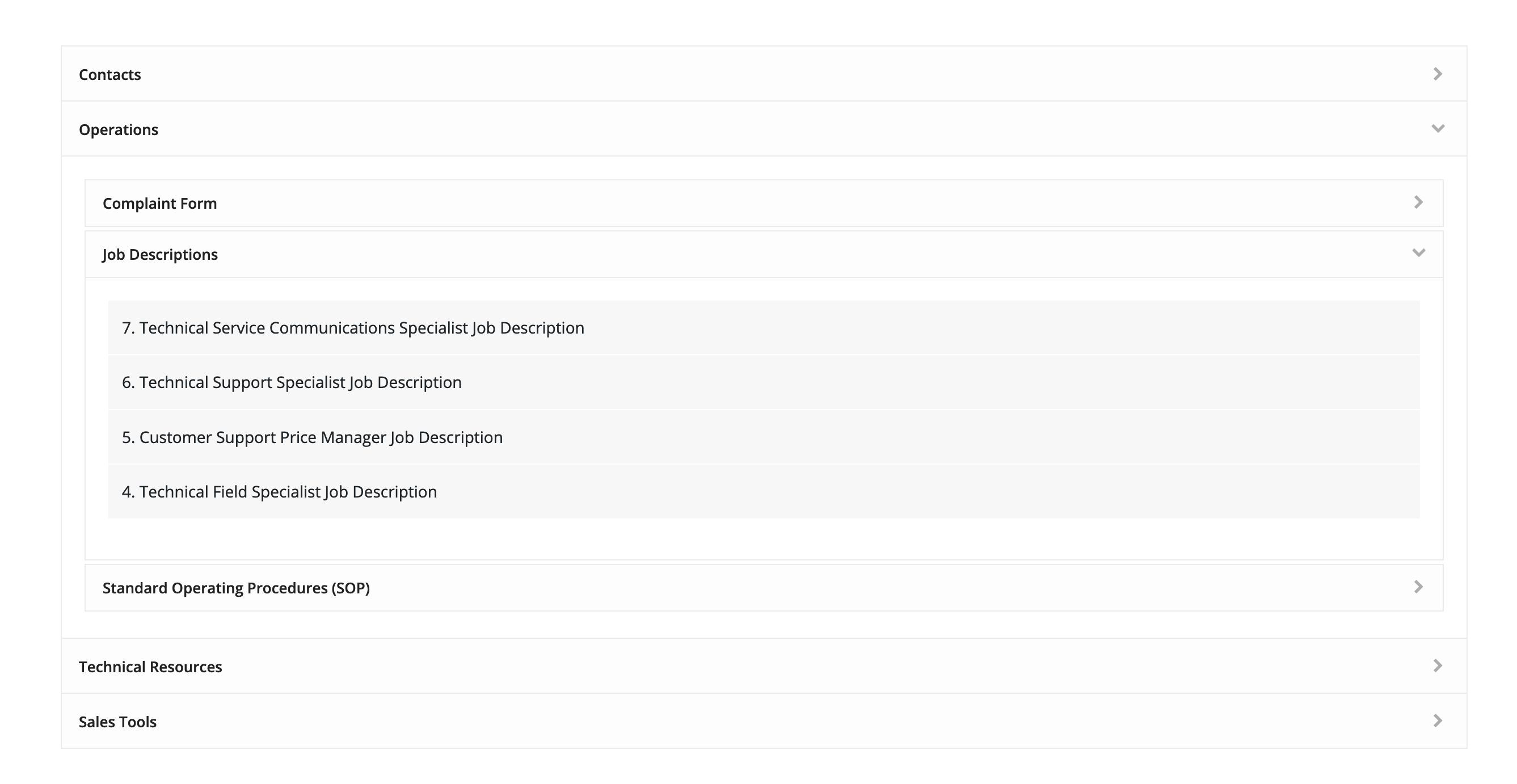
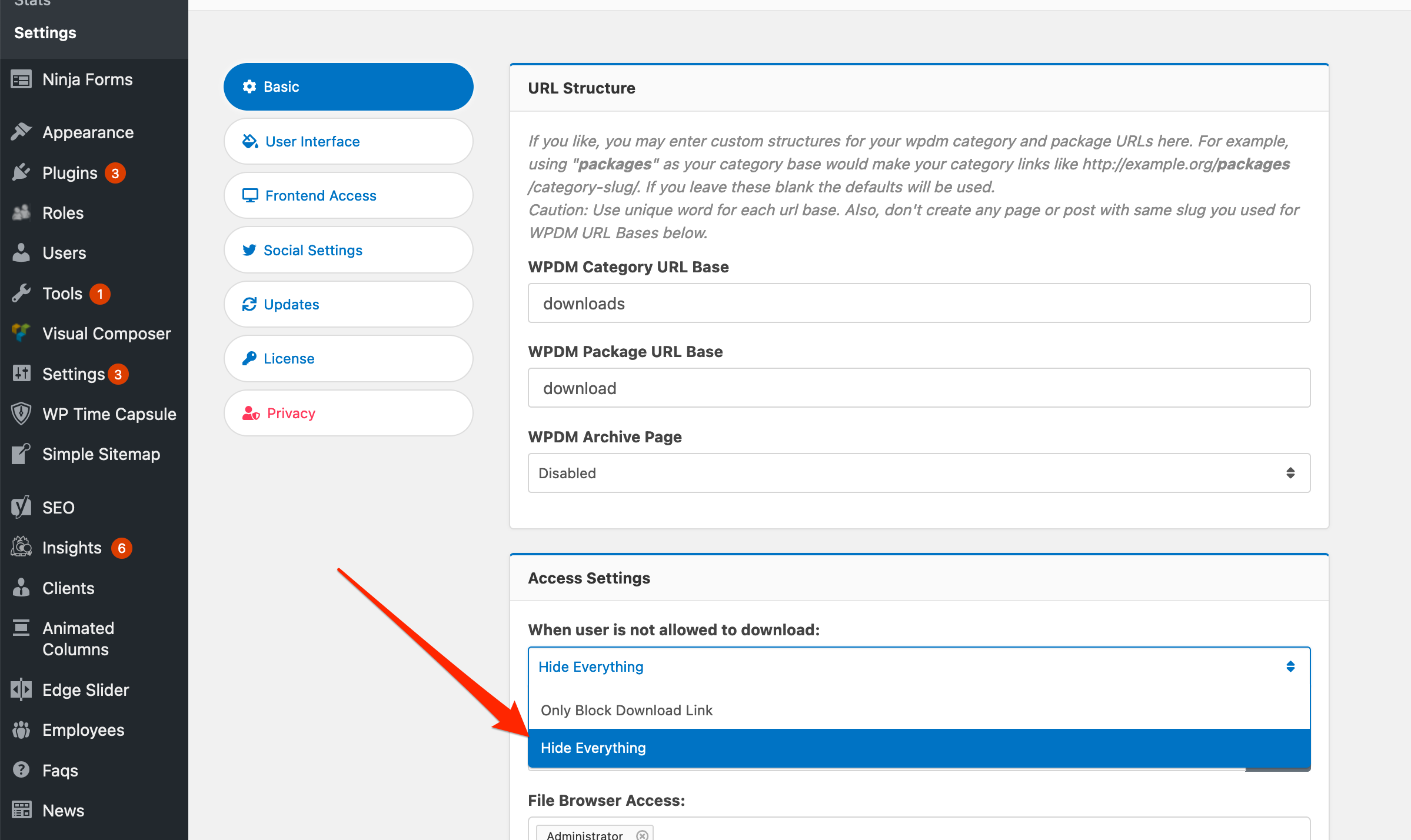
They are not downloadable. However, you even want to hide the file list, you need to select “Hide Everything” here:
Hi,
You can change sender info from here:
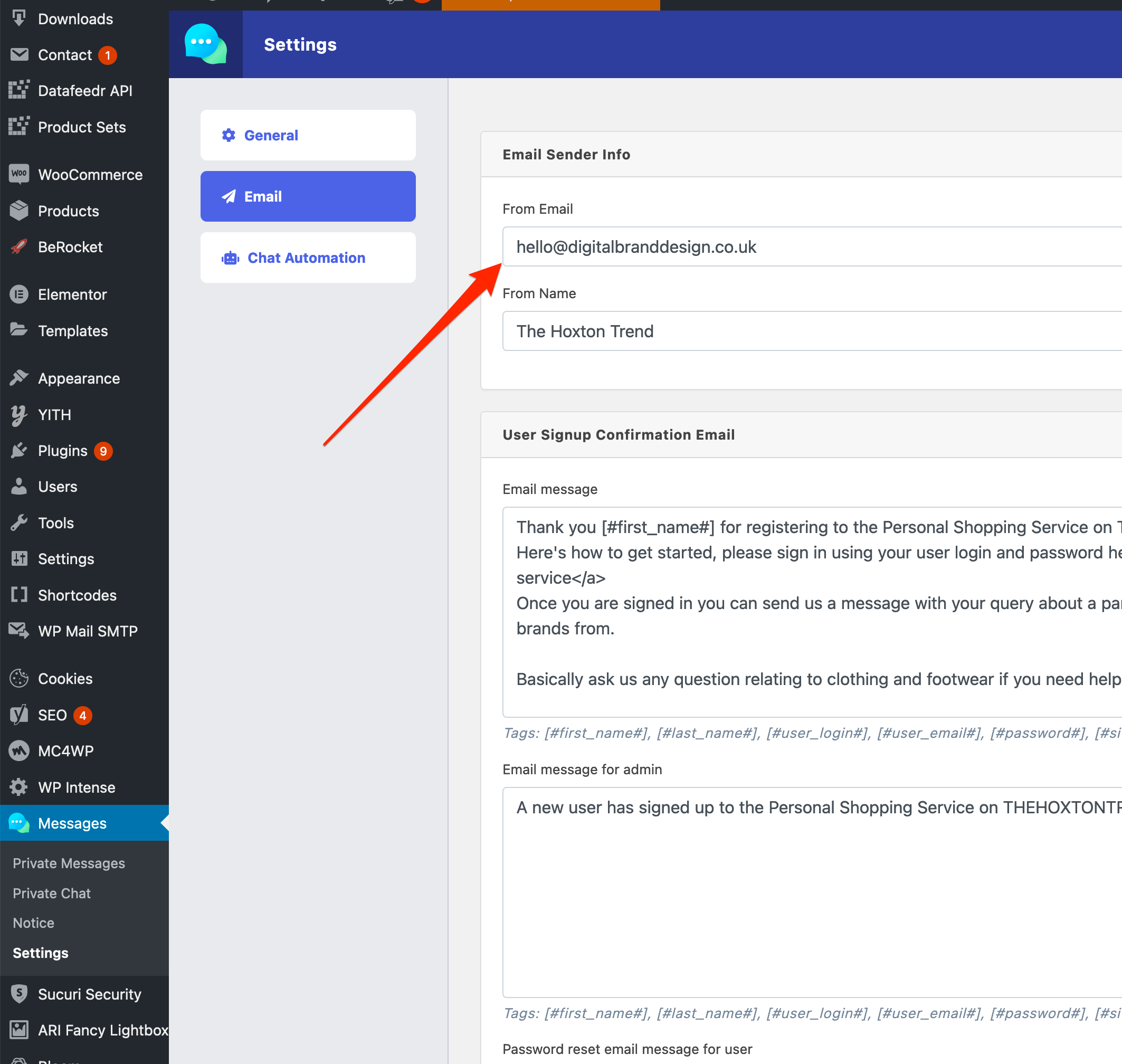
I changed it manually on your site while I was checking why you were not receiving a reply email. However, with the next update, it will automatically reset to noreply@your-domain-name.com
Hi,
Sorry for the delay. Here are the answers to your questions:
#1. Please give me temporary wp-admin login info in a private reply to check it in detail.
#2. Yes.
#3. No
#4. Explained here https://www.wpdownloadmanager.com/download/wordpress-private-message/
#5. Use shortcode [pm_to_athor label="PM to Author" title="Contact Author" color="primary"]
#6. Usage are explained here https://www.wpdownloadmanager.com/download/wordpress-private-message/
1. Feature will be available with the next update ( coming within the next week ).
2. We have tested and email notification is working for pm reply.
3. That should work with the option I mentioned in the previous reply