
Forum Replies Created

Some data are stored in the options field, I think WPML has a feature to translate option fields data. However, it is not related to WPDM. you may also contact the WPML support team too, please let me know if the problem resolves on your side
thanks
If it is working now, I have checked with my own credentials, you may also check with your own credentials
thanks
I have checked that, shortcode,
[wpdm_archive button_style="default" template="link-template-default" cols=1 items_per_page="10" orderby="title" order="ASC" login=1]
is working fine here, https://mpcdev2.wpengine.com/wpdm-test, can you please elaborate on this?
thanks
It is working fine from our side, can you please enable/disable other plugins for checking, you may also switch theme to another for checking, please let me know then
thanks
For auto-renewal issues, please mail support@wpdownloadmanager.com with your Order Id details. I hope you should get the help
Thanks
Hi,
I think individually tags and categories are working fine from your side, for working simultaneously tags and categories we shall look over this and try to adjust within the next updates
thanks
I think your problem has been resolved now, Glad to hear this your problem has been resolved
thanks
Please, give your temporary wp-admin login details in a private reply for checking the issue.
Thanks
Are you searching for a changelog option for the WPDM PRO plugin, please check here, https://www.wpdownloadmanager.com/wordpress-download-manager-change-log/, I hope it may help you
thanks
Has the problem occurring only single package, I have checked that other packages are ok, can you please create the same package with the same files, I hope it should work fine too, please also adjust the package settings too, I hope it will be okay then
thanks
Sorry for the inconvenience. The updated WPDM PRO version has been released on your side. and the issue has been also fixed too
thanks
-
This reply was modified 5 years, 6 months ago by
Nayeem Riddhi.
please check my video,
I think it is working fine from my side
thanks
please share your related packages URL, if possible, please, give your temporary wp-admin login details in a private reply for checking the issue
Thanks
For auto-renewal issues, please mail support@wpdownloadmanager.com with your Order Id details. I hope you should get the help
Thanks
Sorry for the inconvenience, please mail support@wpdownloadmanager.com for the payment-related issue. I hope you should get the help
Thanks
-
This reply was modified 5 years, 6 months ago by
Has the problem been resolved on your side? please let me know
thanks
I have checked that, everything is working fine, please check my attached video,
can you please elaborate more on your issue, please
thanks
For PDF previews, you may check this page template Single Column With Doc Preview as I image attached,

please let me know if you have other queries
thanks
Please, give your temporary wp-admin login details in a private reply for checking the issue
Thanks
Hi,
For Invalid File Type updating ( 3.1.17 or 5.3.7 ), you may face the following 2 issues:
- Upload is not working
- Showing “Invalid File Type” error when trying to download
Here is the reason and solution:
<hr/>
From WPDM Free 3.1.20 and WPDM Pro 5.3.7, we have changed the file type validation process during file upload and download. Now, you have to white file types to allow them to upload or download. You will find the option at Admin Menu ► Downloads ► Settings ► Basic Settings Tab ► Upload Settings section.
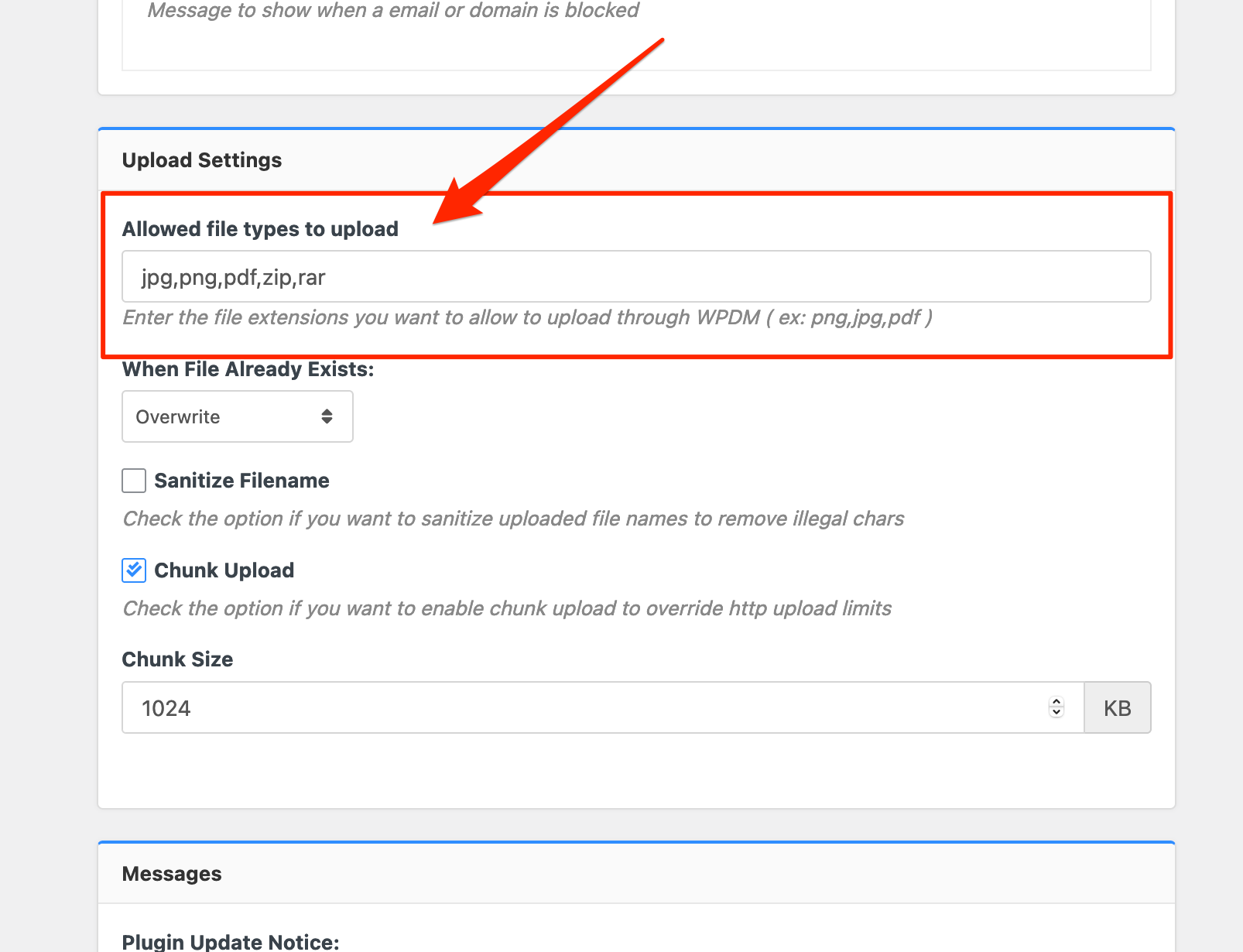
Please add file types ( texts, multiple texts separated by a comma ) as shown on the marked image. And then save settings. The shall resolve the issue.
or, Just Keep it Empty for WordPress default use as I image attached

thus it may resolve the issue
thanks
Glad to hear this, your problem has been resolved. However, for the export file, you may use the WordPress default export feature, thus you may also can import the file
thanks
Hi,
If you are trying package link over download text for this shortcode wpdm_all_packages, I have made a custom file that will render you download text for package link, please copy this Pastebin URL code,
then try to paste download-manager > tpls/tpls3 > wpdm-all-downloads.php file, if you are using bootstrap4 then tpls, bootstrap3 then tpls3, for making backup the file, please follow this doc, https://www.wpdownloadmanager.com/doc/template-files/
please let me know, if it works from your side
thanks
The WPDM PRO 5.3.8 has been released, please update your copy, I hope your problem will be resolved now
thanks
Can you please switch to another caching plugin, for a better performance cache plugin, you may check this doc too, https://www.wpdownloadmanager.com/best-wordpress-caching-plugins-for-better-performance/ or please, give your temporary wp-admin login details in a private reply for checking the issue.
Thanks
Can you please switch to another caching plugin, for a better performance cache plugin, you may check this doc too, https://www.wpdownloadmanager.com/best-wordpress-caching-plugins-for-better-performance/
thanks